1. Киришүү
The TechniSat DIGITRADIO 21 is a compact DAB+ and FM radio designed for under-cabinet installation, ideal for kitchens or other spaces where a space-saving audio solution is desired. It features digital radio reception (DAB+), traditional FM radio, Bluetooth audio streaming, and a clear color display. This manual provides essential information for the safe and efficient use of your device.
2. Коопсуздук маалыматы
- Аппаратты иштетүүдөн мурун бардык нускамаларды кылдат окуп чыгыңыз.
- Keep the device away from water, moisture, and direct heat sources.
- Ашыкча ысып кетүүнүн алдын алуу үчүн аппараттын айланасында туура желдетүүнү камсыз кылыңыз.
- Берилген кубат адаптерин гана колдонуңуз.
- Аппаратты өзүңүз ачууга же оңдоого аракет кылбаңыз. Бардык тейлөөлөрдү квалификациялуу кызматкерлерге тапшырыңыз.
- Аппаратты жумшак, кургак чүпүрөк менен тазалаңыз. Суюк тазалоочу каражаттарды колдонбоңуз.
3. Пакеттин мазмуну
Пакетте бардык буюмдар бар экенин текшериңиз:
- TechniSat DIGITRADIO 21 Unit
- Кубаттуу адаптер
- Mounting Material (screws, mounting plate)
- Колдонуучунун Колдонмосу (бул документ)
4. Продукт бүтүп калдыview
4.1 Алдыңкы панелди башкаруу жана дисплей
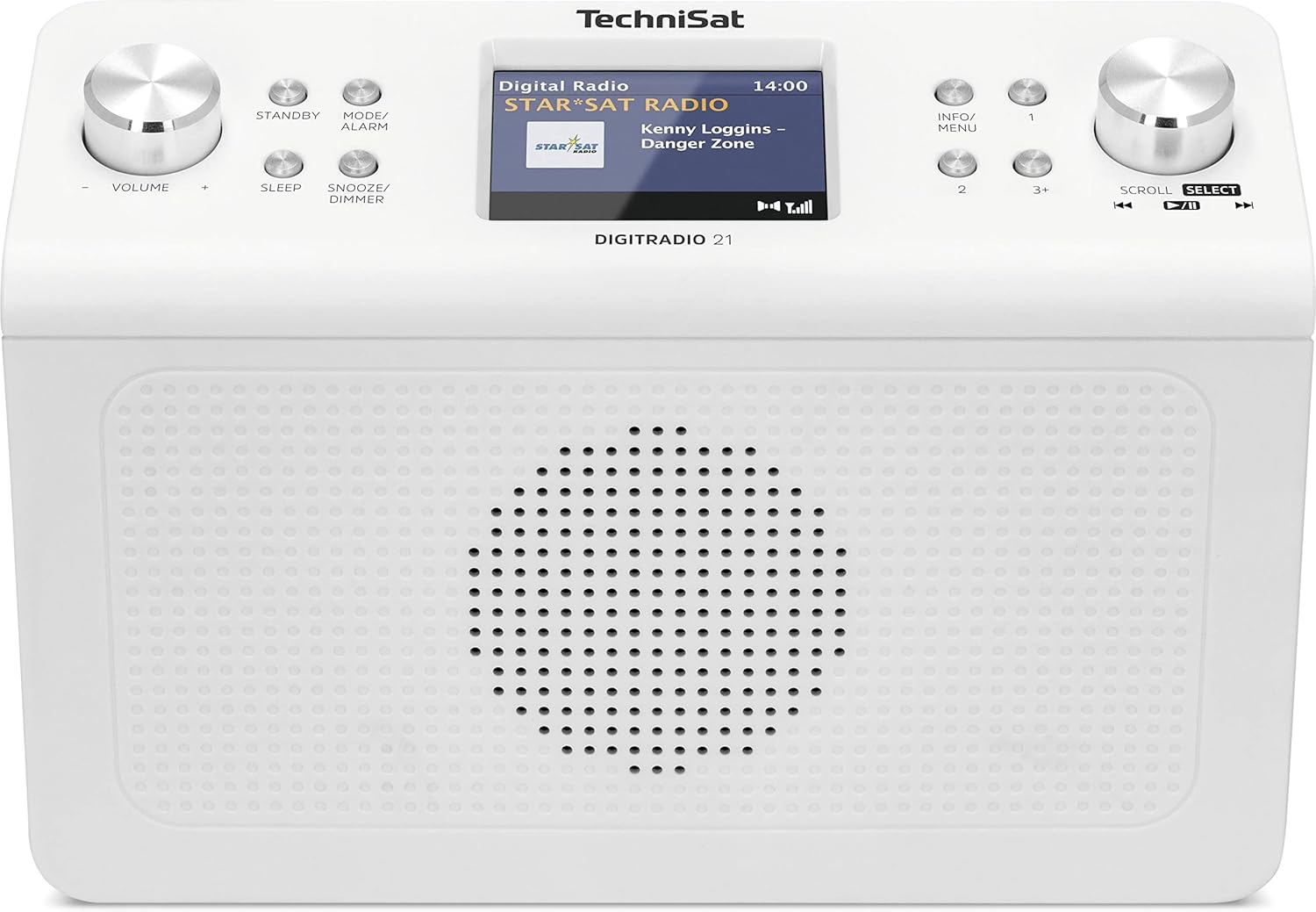
Сүрөт 4.1: Фронт view of the TechniSat DIGITRADIO 21. This image displays the central 2.8-inch color TFT display, the large volume knob on the left, and the scroll/select knob on the right. Surrounding buttons include Standby, Mode/Alarm, Sleep, Snooze/Dimmer, Info/Menu, and preset buttons 1, 2, 3+.
- Дисплей: 2.8-inch TFT color display for showing station information, time, and menu options.
- Үн баскычы: Үнүн жөндөө үчүн бураңыз.
- Күтүү баскычы: Аппаратты күйгүзөт же өчүрөт.
- Mode/Alarm Button: Switches between radio modes (DAB+, FM, Bluetooth) and accesses alarm settings.
- Уйку баскычы: Уйку таймер функциясын иштетет.
- Тындыргыч/Күнкүртүүчү баскычы: Ойготкучту кийинкиге калтырат же дисплей жарыктыгын тууралайт.
- Маалымат/Меню баскычы: Displays additional information or accesses the main menu.
- Алдын ала коюлган баскычтар (1, 2, 3+): Quickly access stored favorite stations.
- Scroll/Select Knob: Rotate to navigate menus or tune stations, press to confirm selection.
4.2 Арткы панелдин туташуулары

Сүрөт 4.2: Арткы view of the TechniSat DIGITRADIO 21. This image highlights the power input port (DC IN) and the 3.5mm headphone jack located on the back of the unit.
- DC IN: Кубаттуу адаптердин туташуу порту.
- Наушник уячасы (3.5 мм): Купуя угуу үчүн кулакчындарды туташтыруу үчүн.
5. Орнотуу
5.1 Радиону орнотуу
The DIGITRADIO 21 is designed for under-cabinet mounting. The included mounting plate and screws facilitate installation.
- Select a suitable location under a cabinet or shelf, ensuring sufficient space for the unit and access to controls.
- Position the mounting plate and mark the screw holes.
- Зарыл болсо, пилоттук тешиктерди бургула.
- Secure the mounting plate to the underside of the cabinet/shelf using the provided screws.
- Slide the DIGITRADIO 21 onto the mounted plate until it clicks securely into place.
Alternatively, the radio can be used as a standalone unit on a flat surface.
5.2 Кубат туташтыруу
- Connect the power adapter cable to the "DC IN" port on the rear of the DIGITRADIO 21.
- Кубат адаптерин ылайыктуу розеткага сайыңыз.
- The unit will power on or enter standby mode.
6. Иштөө нускамалары
6.1 Күйгүзүү/өчүрүү
- басыңыз Жанымда бол радиону күйгүзүү же өчүрүү үчүн баскыч.
6.2 Режимди тандоо
- басыңыз Mode/Alarm button repeatedly to cycle through available modes: DAB+, FM, Bluetooth.
6.3 DAB+ Радио операциясы
- колдонуп, DAB+ режимин тандаңыз Mode/Alarm баскычы.
- The radio will automatically scan for available DAB+ stations upon first use or if no stations are found.
- айлантыңыз Жылдыруу/Тандоо knob to browse the list of available stations.
- басыңыз Жылдыруу/Тандоо knob to select and listen to a station.
- To store a favorite station: While listening, press and hold one of the Preset buttons (1, 2, 3+) until "Preset Saved" appears on the display.
- To recall a favorite station: Briefly press the corresponding Алдын ала коюлган баскыч.
6.4 FM радиосунун иштеши
- аркылуу FM режимин тандаңыз Mode/Alarm баскычы.
- айлантыңыз Жылдыруу/Тандоо жыштыкты кол менен жөндөө үчүн баскычты басыңыз.
- Кийинки жеткиликтүү станцияны авто-скандоо үчүн басып, кармап туруңуз Жылдыруу/Тандоо баскыч.
- To store a favorite station: While listening, press and hold one of the Preset buttons (1, 2, 3+) until "Preset Saved" appears on the display.
- To recall a favorite station: Briefly press the corresponding Алдын ала коюлган баскыч.
6.5 Bluetooth аудио агымы
- колдонуп, Bluetooth режимин тандаңыз Mode/Alarm button. The display will show "Bluetooth Pairing".
- Bluetooth иштетилген түзмөгүңүздө (мисалы, смартфон, планшет) Bluetooth'ду иштетиңиз жана жеткиликтүү түзмөктөрдү издеңиз.
- Select "DIGITRADIO 21" from the list of devices to pair.
- Once paired, you can stream audio from your device to the radio.
6.6 Alarm, Sleep Timer, and Snooze
- Ойготкуч: басып, кармап туруңуз Mode/Alarm button to enter alarm settings. Use the Жылдыруу/Тандоо knob to set time, source, and volume.
- Уйку таймери: басыңыз Уйку button repeatedly to set a sleep timer (e.g., 15, 30, 60 minutes) after which the radio will automatically turn off.
- Чырым: Ойготкуч басылганда, басыңыз Тындыруу/Диммер баскычын басыңыз.
6.7 Дисплей орнотуулары
- басыңыз Тындыруу/Диммер button (when not snoozing an alarm) to adjust the display brightness.
- басыңыз Маалымат/Меню button to cycle through different display information (e.g., program type, frequency, date/time).
7. Техникалык тейлөө
- Тазалоо: Wipe the radio with a soft, dry, lint-free cloth. Do not use abrasive cleaners, waxes, or solvents.
- Сактагыч: Агрегатты узак убакытка сактасаңыз, аны кубаттан ажыратып, салкын, кургак жерде сактаңыз.
8. Кыйынчылыктарды
| Көйгөй | Мүмкүн себеп | Чечим |
|---|---|---|
| Күч жок | Кубат адаптери туташкан эмес же туура эмес розетка. | Кубат адаптери бекем туташтырылганын жана розетка иштеп турганын текшериңиз. |
| Poor DAB+ / FM reception | Weak signal, antenna position. | Adjust the position of the wire antenna for better reception. Perform a full scan for stations. |
| Bluetooth жупташуу көйгөйлөрү | Device not in pairing mode, radio not discoverable. | Ensure the radio is in Bluetooth pairing mode. Check your device's Bluetooth settings and try re-pairing. |
| Үн жок | Volume too low, headphones connected. | Increase volume. Disconnect headphones if external sound is desired. |
9. Техникалык шарттар
- Модел: DIGITRADIO 21
- Бренд: TechniSat
- Модель номери: 0001/3964
- Радио топтору: DAB+, FM (with RDS and PLL)
- Bluetooth версиясы: 4.2
- Баяндамачы: 2 Вт (RMS) моно динамик
- Дисплей: 2.8 дюймдук TFT түстүү дисплей
- Favorite Station Memory: DAB+ үчүн 10, FM үчүн 10
- Байланыштары: 3.5mm Headphone Jack, DC IN
- Өзгөчөлүктөр: Clock, Alarm, Sleep Timer, Snooze Function, Display Dimmer, Bluetooth Audio Streaming
- Электр камсыздоо: External Power Adapter (DC 5.9 V / 1000 mA)
- Өлчөмдөрү (W x Y x D): 22.5 x 7.2 x 15.1 см (болжол менен 8.86 x 2.83 x 5.94 дюйм)
- Түсү: Ак (нейтралдуу)
10. Кепилдик жана колдоо
Specific warranty details are not provided in the product information. For warranty claims or technical support, please refer to the official TechniSat website or contact your retailer. Keep your proof of purchase for any warranty-related inquiries.
Кошумча жардам алуу үчүн, баш багыңыз TechniSat official webсайт.


