This manual provides comprehensive instructions for setting up and operating your ALFAJR CW-15 Automatic Islamic Azan Prayer Clock. Designed for both wall mounting and table placement, this digital clock automatically calculates and plays the Azan five times a day based on your set location. Please read this manual carefully to ensure proper use and to fully utilize all features of your new clock.
Automatic Azan time adjustment after initial city/time setup.
Gregorian and Hijri calendar display.
Температураны Цельсий же Фаренгейт боюнча көрсөтүү.
Daylight Saving Time (DST) option.
English and Arabic display languages.
Wall-mountable or table-standing design.
Dimensions: Approximately 9 inches (width) x 8.5 inches (height).
Powered by 4 AA batteries (included) or USB-C (cable not included).
Орнотуу колдонмосу
1. Батареяны орнотуу
The ALFAJR CW-15 clock operates on 4 AA batteries. These are included in your package.
Сааттын артындагы батарея отсегин табыңыз.
Батарея уясынын капкагын ачыңыз.
Insert the 4 AA batteries, ensuring correct polarity (+ and -).
Батарея уясынын капкагын бекем жабыңыз.
Alternatively, the clock can be powered via a USB-C cable (not included) connected to a compatible power adapter.
2. Initial Power On and Display Overview
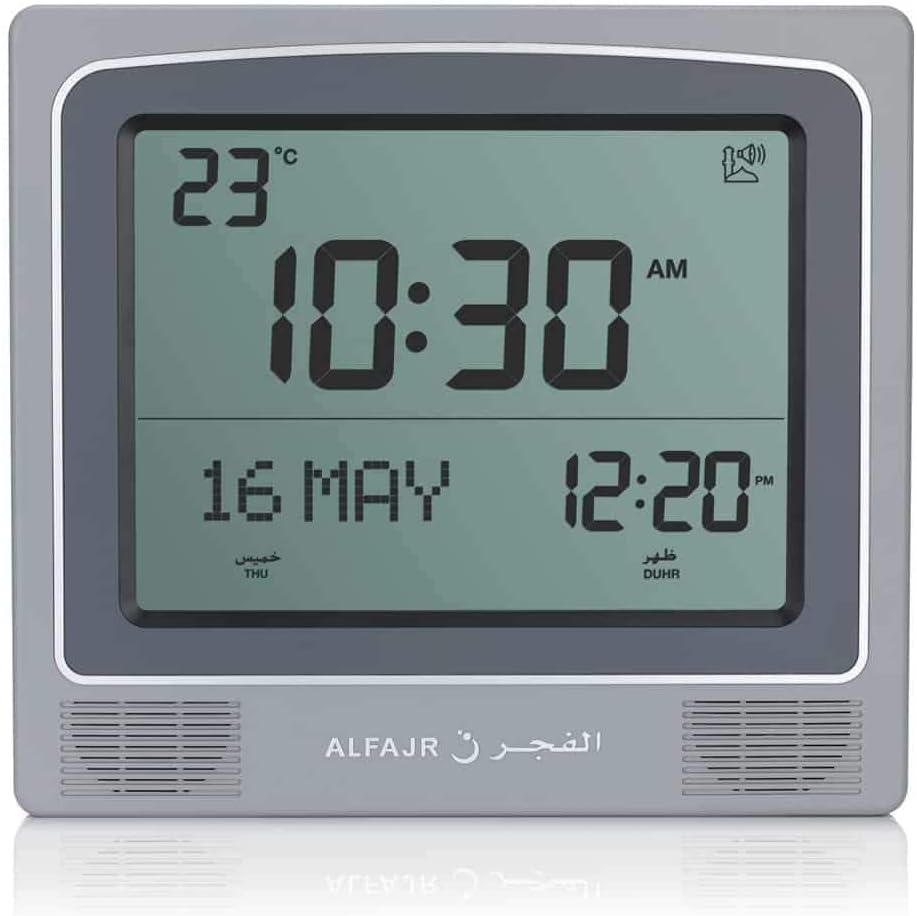
Upon inserting batteries or connecting USB-C power, the clock will power on. The display will show the current time, date, and temperature. Familiarize yourself with the buttons on the side/back of the clock: UP, SET, жана ылдый.
Сүрөт 1: Алдыңкы view of the ALFAJR CW-15 clock, showing the digital display with time, date, and temperature. The speaker grilles are visible at the bottom.
Сүрөт 2: Алдыңкы view of the ALFAJR CW-15 clock, similar to Figure 1, but with the ALFAJR brand logo visible at the bottom center.
3. Убакыт жана дата орнотуу
басып, кармап туруңуз SET убакыт дисплейи күйүп-өчө баштаганга чейин баскычын болжол менен 3 секунд басып туруңуз.
колдонуу UP жана ылдый саатты тууралоо үчүн баскычтар. Басыңыз SET ырастоо жана мүнөттөргө жылдыруу үчүн.
Мүнөттөрдү колдонуп тууралаңыз UP жана ылдый, андан кийин басыңыз SET.
Continue this process to set the year, month, and day.
Датаны койгондон кийин басыңыз SET to exit the time/date setting mode.
4. Setting Location (City or Coordinates)
Accurate Azan times depend on correct location settings. You can select a pre-programmed city or enter latitude/longitude.
басыңыз SET button once (short press) to enter the main menu.
Колдонуу UP or ылдый to navigate to the "CITY" or "LOCATION" setting.
Басыңыз SET to enter the location setting.
Option A: Select Pre-programmed City: Колдонуу UP or ылдый to scroll through the list of cities. Once your city is displayed, press SET ырастоо үчүн.
Option B: Enter Latitude/Longitude: If your city is not listed, select the option to enter coordinates. Use UP жана ылдый to adjust the values for latitude, longitude, and time zone offset (GMT). Press SET ар бир мааниден кийин.
After confirming your location, the clock will automatically calculate the Azan times.
5. Azan Calculation Method
The clock supports various Azan calculation methods. Consult local Islamic authorities for the recommended method in your region.
From the main menu (short press SET), navigate to "CALC. METHOD".
Басыңыз SET кирүү.
Колдонуу UP or ылдый to select the desired calculation method (e.g., Muslim World League, Umm Al-Qura, Egyptian General Authority of Survey, etc.).
Басыңыз SET ырастоо үчүн.
6. Жайкы убакыт (DST)
If your region observes Daylight Saving Time, enable this feature.
From the main menu, navigate to "DST".
Басыңыз SET.
Колдонуу UP or ылдый to toggle between "ON" and "OFF".
Басыңыз SET ырастоо үчүн.
7. Температура бирдиги
You can choose to display temperature in Celsius or Fahrenheit.
From the main menu, navigate to "TEMP UNIT".
Басыңыз SET.
Колдонуу UP or ылдый to select "C" (Celsius) or "F" (Fahrenheit).
Басыңыз SET ырастоо үчүн.
8. Calendar Display
The clock can display either the Gregorian or Hijri calendar.
From the main menu, navigate to "CALENDAR".
Басыңыз SET.
Колдонуу UP or ылдый to select "GREGORIAN" or "HIJRI".
Басыңыз SET ырастоо үчүн.
Иштөө нускамалары
1. Adjusting Azan Volume
The clock features adjustable Azan volume. The volume buttons are typically located on the side or back of the unit.
During an Azan, press the UP or ылдый buttons to increase or decrease the volume.
Alternatively, some models may have a dedicated volume switch or buttons on the back. Refer to the physical clock for exact button placement.
2. Changing Azan Reciter
You can select from five different Azan reciters.
From the main menu (short press SET), navigate to "AZAN VOICE" or "RECITER".
Басыңыз SET кирүү.
Колдонуу UP or ылдый to cycle through the available reciters (Makkah, Madina, Egypt, AlQuds, Riyadh).
Басыңыз SET тандооңузду ырастоо үчүн.
3. Daily Alarms
The clock includes daily alarm functions in addition to the Azan. These can be set for specific times.
From the main menu, navigate to "DAILY ALARM".
Басыңыз SET.
Колдонуу UP or ылдый to set the desired alarm time (hour and minute).
Басыңыз SET to confirm and enable the alarm.
To disable, navigate back to "DAILY ALARM" and set the time to "OFF" or a similar option.
4. Дисплей режимдери
The clock typically cycles through different display information or allows manual switching.
The default display shows time, date, and temperature.
Кыска басуу UP or ылдый buttons outside of menu mode may cycle through additional information like next prayer time or Qibla direction (if available on this model).
Монтаждоо параметрлери
The ALFAJR CW-15 clock is designed for versatile placement, either on a wall or a flat surface.
1. Дубалга орнотуу
To mount the clock on a wall:
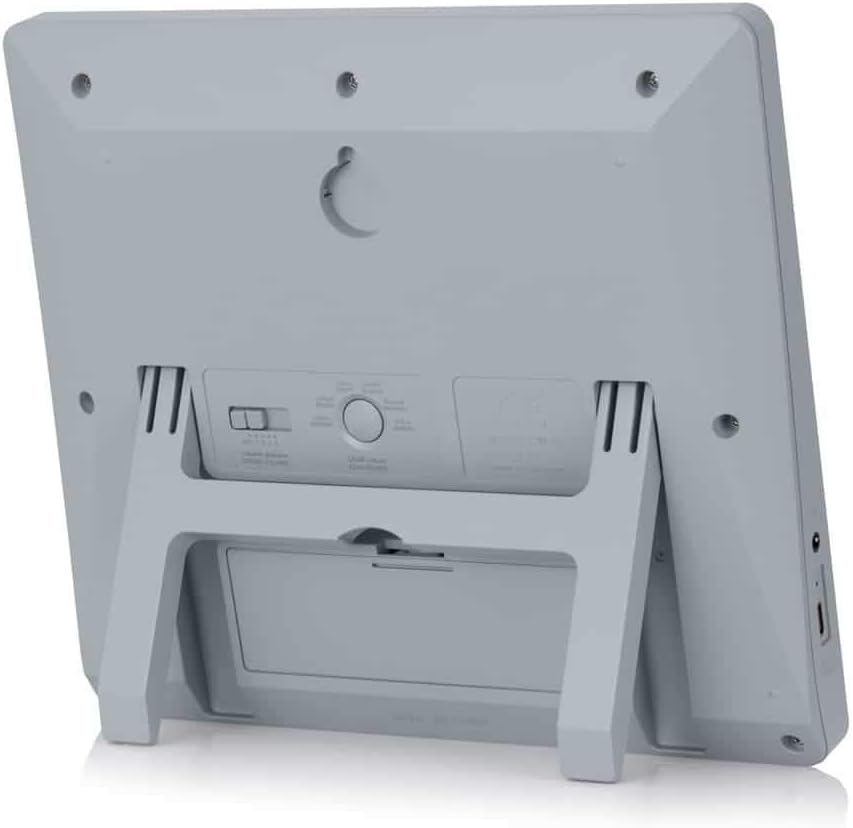
Locate the keyhole slot on the back of the clock.
Choose a suitable location on a wall.
Install a screw (not included) into the wall, leaving a small portion protruding. Ensure the screw head fits into the keyhole slot.
Carefully hang the clock onto the screw, ensuring it is securely seated.
3-сүрөт: Арткы view of the ALFAJR CW-15 clock, highlighting the keyhole for wall mounting and the battery compartment.
2. Table Placement
For table or desk placement:
Locate the integrated stand on the back of the clock.
Pull out the stand until it locks into position.
Саатты тегиз, туруктуу бетке коюңуз.
4-сүрөт: Каптал view of the ALFAJR CW-15 clock, showing the integrated kickstand extended for stable table placement.
Техникалык тейлөө
1. Тазалоо
To maintain the appearance and functionality of your clock:
Сааттын бетин жумшак, кургак чүпүрөк менен сүртүңүз.
Do not use abrasive cleaners, solvents, or chemical sprays, as these can damage the display or casing.
Avoid getting moisture into the clock's openings.
2. Батареяны алмаштыруу
When the display dims or the clock functions become erratic, it's time to replace the batteries.
Сааттын артындагы батарея отсегин ачыңыз.
Эски АА батарейкаларын алып салыңыз.
Insert four new AA batteries, observing correct polarity.
Батарея отсегин жабыңыз.
You may need to re-enter the time and location settings after battery replacement.
Проблемаларды чечүү
Көйгөй
Мүмкүн себеп
Чечим
Саат күйбөй жатат.
Batteries are dead or incorrectly inserted. No USB-C power.
Check battery polarity. Replace with new batteries. Ensure USB-C cable (if used) is connected and power source is active.
Verify city, latitude, longitude, and GMT offset. Select the correct Azan calculation method for your region. Check DST setting.
Azan sound is too low or too high.
Үндүн көлөмүн тууралоо керек.
Adjust the volume using the dedicated buttons or through the menu.
Дисплей күңүрт же бүлбүлдөп турат.
Батареянын кубаттуулугу төмөн.
Бардык 4 AA батарейкасын жаңылары менен алмаштырыңыз.
Clock resets unexpectedly.
Intermittent power loss or very low batteries.
Ensure batteries are fresh and securely seated. If using USB-C, check the connection and power source stability.
Техникалык шарттар
Модел: CW-15
Бренд: ALFAJR
Дисплей түрү: Санарип
Түсү: Боз
Материал: Пластик
Продукциянын өлчөмдөрү: 8.5 дюйм (W) x 9 дюйм (H)
Элемент Салмагы: 3 унция
Кубат булагы: 4 AA batteries (included) or USB-C (cable not included)
Монтаж түрү: Wall Mount / Table Stand
Өзгөчөлүктөр: Automatic Azan, Multiple Azan Reciters, Gregorian/Hijri Calendar, Temperature Display, Daylight Saving Time
Тилдер: Англис, араб
Кепилдик жана колдоо
Чектелген Кепилдик
The ALFAJR CW-15 Azan Clock comes with a limited warranty. Please refer to the warranty card included in your original packaging for specific terms, conditions, and duration. This warranty typically covers manufacturing defects under normal use.
Кардарларды колдоо
For technical assistance, troubleshooting not covered in this manual, or warranty claims, please contact ALFAJR customer support through their official website or the retailer from whom you purchased the product. Please have your model number (CW-15) and purchase date available when contacting support.
Тектеш документтер - CW-15
S&A CW-5000/5200 Industrial Chiller User Manual GUANGZHOU TEYU ELECTROMECHANICAL CO., LTD. тарабынан S&A CW-5000 жана CW-5200 сериясындагы өнөр жай муздаткычтары үчүн колдонуучу колдонмосу орнотуу, иштетүү, спецификацияларды жана көйгөйлөрдү оңдоону камтыйт.
CW-5200 сериясы өнөр жай муздаткыч муздаткыч Колдонуучунун колдонмосу CW-5200 Series Industrial Refrigeration Chiller үчүн колдонуучу колдонмосу, коопсуздук маалыматын, орнотууну, иштетүүнү, жөндөөлөрдү, сигнализацияларды, бузулууларды аныктоону жана спецификацияларды камтыйт.
CW-5202 сериясы өнөр жай муздаткыч муздаткыч Колдонуучунун колдонмосу Бул колдонуучу колдонмосу CW-5202 сериясындагы өнөр жай муздаткыч муздаткычы үчүн толук нускамаларды камтыйт, анда орнотуу, иштетүү, коопсуздук чаралары, бузулууларды жоюу жана оптималдуу иштеши үчүн техникалык мүнөздөмөлөр камтылган.
Thermafiber туюк системасы: Curtain Wall Perimeter Өрттү сактоо Оуэнс Корнинг тарабынан патенттелген көшөгө дубалдын периметри боюнча өрткө каршы чечим болгон Thermafiber Impasse системасын табыңыз. Бул система орнотууну жеңилдетет, отко туруктуулукту жогорулатат жана жогорку акустикалык аткарууну сунуш кылат.
Epson CW-C4000 Сериялар Колдонуучунун колдонмосу Epson CW-C4000 Сериялар принтери үчүн комплекстүү колдонуучу колдонмосу, орнотууну, иштетүүнү, тейлөөнү, бузулууларды аныктоону жана спецификацияларды камтыйт. Epson принтериңизди кантип максималдуу түрдө пайдаланууну үйрөнүңүз.