1. Киришүү
Сатып алганыңыз үчүн рахматasing the Blackstar ID:Core Stereo 10 Sugar Skull V2 Limited Edition amplifier. This 10-watt (2x5W) stereo combo amplifier is designed to provide a versatile and high-quality sound experience for electric guitarists. It features Blackstar's patented ISF (Infinite Shape Feature) control, a range of voices, and built-in effects, making it ideal for practice, recording, and small performances. This manual provides essential information for safe and effective use of your ampөмүрлүү.
2. Маанилүү коопсуздук нускамалары
- Көрсөтмөлөрдү окуу: Бул продуктуну колдонуудан мурун бардык коопсуздук жана иштетүү нускамаларын окуп чыгыңыз.
- Көрсөтмөлөрдү сактоо: Бул нускамаларды келечектеги маалымат үчүн сактаңыз.
- Эскертүүлөргө кулак сал: Буюмдагы жана колдонуу нускамасындагы бардык эскертүүлөрдү аткарыңыз.
- Суу жана ным: Бул аппаратты суунун жанында колдонбоңуз.
- Тазалоо: Кургак чүпүрөк менен гана тазалаңыз.
- Вентиляция: Эч кандай желдетүүчү тешиктерди жаап албаңыз. Өндүрүүчүнүн көрсөтмөлөрүнө ылайык орнотуу.
- Жылуулук: Радиаторлор, жылуулук регистрлери, мештер же башка аппараттар (анын ичинде) сыяктуу жылуулук булактарынын жанына орнотпоңуз ampкөтөргүчтөр) жылуулукту пайда кылуучу.
- Электр кабелин коргоо: Электр шнурунун басылып кетүүсүнөн же кысып калуудан сактаңыз, өзгөчө сайгычтарда, розеткаларда жана алар аппараттан чыга турган жеринде.
- Бороон учурунда электр розеткасын өчүрүңүз: Бул аппаратты чагылгандуу бороондордо же узак убакыт бою колдонбогондо электр розеткасынан ажыратыңыз.
- Тейлөө: Бардык тейлөөлөрдү квалификациялуу тейлөө кызматкерлерине тапшырыңыз. Аппарат кандайдыр бир зыянга учураганда, мисалы, кубат берүүчү шнур же сайгыч бузулганда, суюктук төгүлгөндө же аппараттын ичине нерселер түшкөндө, аппарат жамгырга же нымдуулукка дуушар болгондо, нормалдуу иштебей калганда тейлөө талап кылынат. , же түшүрүлгөн.
3. Пакеттин мазмуну
Сураныч, төмөнкү нерселер үчүн кутучаны белгилеңиз:
- Blackstar ID:Core Stereo 10 Sugar Skull V2 Limited Edition Ampөмүрлүү
- Электр менен жабдуу бирдиги
- USB кабели
- Колдонуучунун Колдонмосу (бул документ)
4. Башкаруу элементтери жана өзгөчөлүктөрү
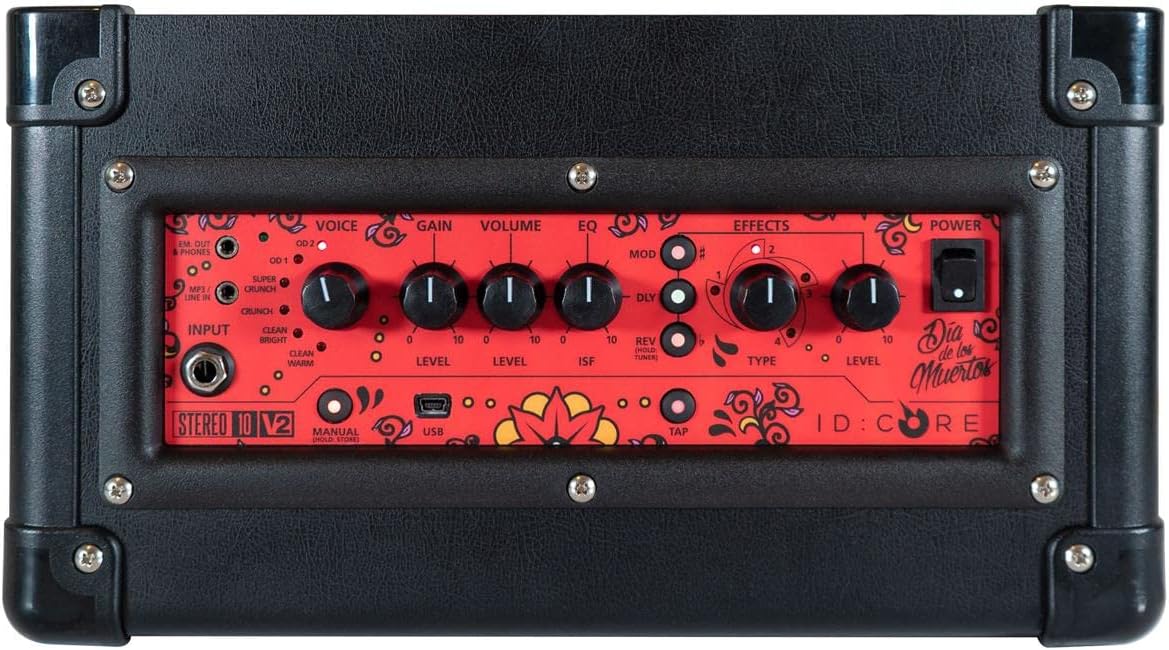
Сүрөт: Жогорку view -ныкы amplifier's control panel, showing all knobs, buttons, and input/output jacks.
Алдыңкы панелдин башкаруу элементтери:
- Киргизүү: 6.35mm (1/4") jack for connecting your guitar.
- Үн: Rotary switch to select one of six Blackstar voices: Clean Warm, Clean Bright, Crunch, Super Crunch, OD 1, OD 2.
- Пайда: Ашыкча же бурмалоонун көлөмүн көзөмөлдөйт.
- Көлөмү: Жалпы чыгаруу деңгээлин тууралайт ampөмүрлүү.
- EQ: Тон башкаруу.
- ISF (Чексиз форма өзгөчөлүгү): Patented control that shifts the tone stack response between a USA-style (counter-clockwise) and a UK-style (clockwise) ampөмүрлүү.
- Модуляция (модуляция): Rotary switch to select and adjust the level of modulation effects (Chorus, Flanger, Phaser, Tremolo).
- Dly (Delay): Rotary switch to select and adjust the level of delay effects (Linear, Analogue, Tape, Multi).
- Rev (Reverb): Rotary switch to select and adjust the level of reverb effects (Room, Hall, Spring, Plate).
- Түрү: Selects the specific effect type within the Mod, Dly, or Rev categories.
- Деңгээл: Тандалган эффекттин жалпы деңгээлин тууралайт.
- таптаңыз: Button to set the tempo for time-based effects (Delay, Tremolo).
- Күч: үчүн күйгүзүү/өчүрүү ampөмүрлүү.
- USB: USB-B port for connecting to a computer for recording and using Blackstar's Architect software.
- Em. Out / Phones: 6.35mm (1/4") jack for headphones or direct recording output with speaker emulation.
- MP3 / Line In: 3.5mm (1/8") stereo jack for connecting external audio devices like MP3 players or phones.

Сүрөт: алдыңкы view of the Blackstar ID:Core Stereo 10 ampкөтөргүч, көрсөтүүчүasing the unique Sugar Skull V2 design on the speaker grille.
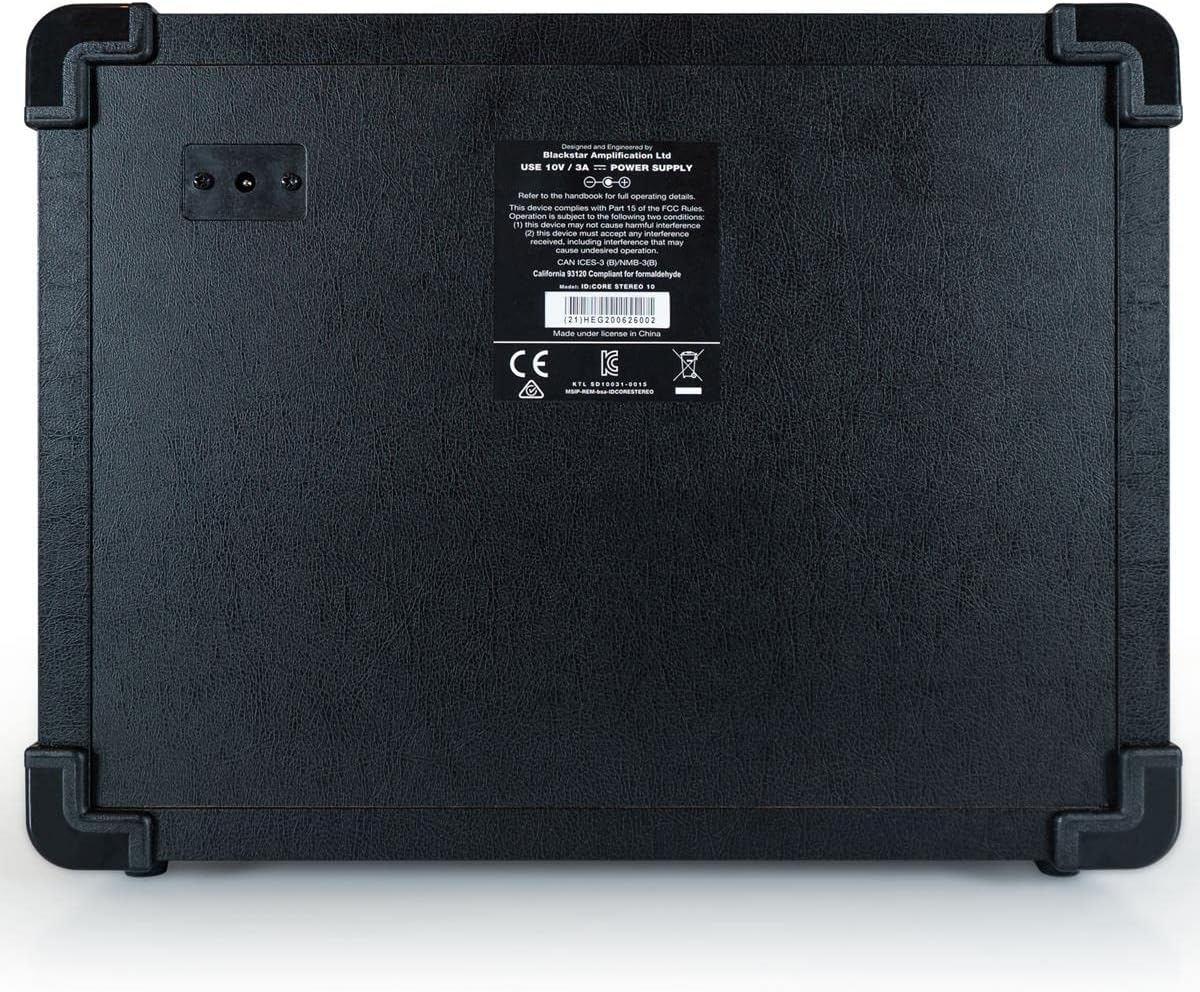
Сүрөт: Арткы view of the Blackstar ID:Core Stereo 10 amplifier, displaying the product information label and power input.
5. Орнотуу
- Пакеттен чыгаруу: Кылдаттык менен алып салуу ampкөтөргүчтү жана таңгактагы бардык аксессуарларды сактаңыз. Келечекте ташуу же сактоо үчүн таңгакты сактап коюңуз.
- Жайгашкан жери: кой amplifier on a stable, flat surface. Ensure adequate ventilation around the unit. Avoid placing it near heat sources or in direct sunlight.
- Кубат туташуу: Connect the supplied power supply unit to the DC input jack on the rear of the amplifier. Plug the power supply into a suitable mains outlet. Ensure the ampТуташтыруудан мурун, көтөргүчтүн кубат которгучу ӨЧҮРҮЛГӨН абалда болушу керек.
- Гитара туташуу: Электр гитараңызды туташтырыңыз Киргизүү jack on the front panel using a standard 6.35mm (1/4") instrument cable.
- Тышкы аудио (кошумча): To play along with music, connect an MP3 player, phone, or other audio source to the MP3 / Line In 3.5 мм стерео кабелин колдонуу менен уяча.
- USB туташуу (кошумча): For recording or using the Blackstar Architect software, connect the amplifier to your computer using the supplied USB cable.
6. Иштөө нускамалары
- Күйгүзүү: Ensure all connections are secure, then switch the Күч button to the ON position. The power indicator light will illuminate.
- Үнүн коюу: менен баштоо Көлөм knob at a low setting to avoid sudden loud sounds.
- Үн тандоо: айлантыңыз Үн switch to choose your desired amplifier type (e.g., Clean Warm, Crunch, OD 1).
- Пайданы тууралоо: колдонуу Пайда knob to control the amount of drive. Lower settings provide cleaner tones, while higher settings introduce more distortion.
- Shape Tone with EQ and ISF: тууралаңыз EQ knob for general tone shaping. Experiment with the ISF control to blend between American (tight low-end, aggressive mids) and British (woodier, less aggressive) ampкөтөргүчтүн мүнөздөмөлөрү.
- Эффекттерди колдонуу:
- Select a modulation, delay, or reverb effect using the Мод, Dly, же Аян rotary switches.
- колдонуу Type knob to select a specific effect within that category (e.g., Chorus, Flanger for Mod).
- Adjust the effect's intensity with the Деңгээл баскыч.
- For time-based effects (Delay, Tremolo), press the таптаңыз button repeatedly at your desired tempo to synchronize the effect.
- Headphone/Recording Output: наушниктерди туташтырыңыз Em. Out / Phones jack for silent practice. This output also provides a speaker-emulated signal for direct recording.
- USB аудио: When connected to a computer via USB, the amplifier acts as an audio interface, allowing you to record your guitar directly into a DAW or use the Blackstar Architect software for deeper editing and patch management.
- Өчүрүү: When finished, turn the Көлөм down, then switch the Күч баскычын OFF абалына басыңыз.
7. Техникалык тейлөө
- Тазалоо: тазалаңыз amplifier's exterior with a soft, dry cloth. Do not use abrasive cleaners, solvents, or waxes.
- Сактагыч: Узак мөөнөткө колдонулбаганда, сактаңыз amplifier in a dry, cool place, away from direct sunlight and extreme temperatures.
- Вентиляция: Ensure that the ventilation openings are always clear to prevent overheating.
- Кабельге кам көрүү: Always handle power and instrument cables carefully. Avoid bending or kinking them sharply.
8. Кыйынчылыктарды
| Көйгөй | Мүмкүн себеп | Чечим |
|---|---|---|
| Үн жок ampөмүрлүү |
|
|
| Poor sound quality / Buzzing noise |
|
|
| Эффекттер иштебейт |
|
|
9. Техникалык шарттар
- Модел: IDCORE10 V3
- Чыгуу Wattage: 10 Watts (2 x 5W Stereo)
- Баяндамачылар: 2 x 3" Blackstar Speakers
- Үндөр: 6 (Таза Жылуу, Таза Жаркыраган, Кырсык, Супер Кынч, OD 1, OD 2)
- Эффекттери: Modulation (Chorus, Flanger, Phaser, Tremolo), Delay (Linear, Analogue, Tape, Multi), Reverb (Room, Hall, Spring, Plate)
- Башкаруу каражаттары: Voice, Gain, Volume, EQ, ISF, Mod, Dly, Rev, Type, Level, Tap, Power
- Киргизүүлөр: Guitar Input (6.35mm jack), MP3/Line In (3.5mm stereo jack), USB-B
- Чыгуулары: Emulated Out/Headphones (6.35mm jack)
- Кубат булагы: Электр зымдары
- Шайкеш түзмөктөр: Электр гитара
- Элемент Салмагы: 10 фунт (4.54 кг)
- Продукциянын өлчөмдөрү: 16 x 18 x 14 дюйм (40.6 x 45.7 x 35.6 см)
- ASIN: B08Z88WN8T
10. Кепилдик жана колдоо
Blackstar Amplification products are designed and manufactured to the highest standards. For detailed warranty information specific to your region and product, please refer to the warranty card included with your purchase or visit the official Blackstar Ampжашоо website. For technical support or service inquiries, please contact your authorized Blackstar dealer or Blackstar customer support directly.
Онлайн ресурстар:
- Blackstar Ampофициалдуу Webсайт: www.blackstaramps.com
- Blackstar Architect Software: www.blackstaramps.com/architect


