Introduction
This manual provides detailed instructions for the setup, operation, maintenance, and troubleshooting of your Perixx PERIDUO-606 Wireless Mini Ergonomic Keyboard and Vertical Mouse combo. Please read this manual thoroughly before use to ensure optimal performance and longevity of your devices.
Пакеттин мазмуну
- 1 x Perixx PERIDUO-606 Wireless Mini Ergonomic Keyboard
- 1 x Perixx Wireless Vertical Mouse
- 1 x Adjustable Palm Rest Stand
- 1 x Movable Magnet (for height adjustment)
- 1 x Nano USB Receiver (located in the keyboard's battery compartment)
- 1 x User Manual

Продукт бүттүview
The Perixx PERIDUO-606 is a compact wireless ergonomic keyboard and vertical mouse combination designed for comfort and efficiency. It features a split-key design and a vertical mouse to promote natural wrist and hand positions.
Баскычтоптун өзгөчөлүктөрү:
- Split-Key Design: Separates keys into two groups to reduce wrist deviation.
- Компакт өлчөмү: Measures approximately 13.82 x 8.94 x 2.56 inches, suitable for smaller workspaces.
- Adjustable Palm Rest: Integrated palm rest with an adjustable stand for varied wrist positions.
- Membrane Low Profile Ачкычтар: Ыңгайлуу терүү тажрыйбасын камсыз кылат.
- 4-Way Scroll Navigation: Integrated scroll wheel for enhanced navigation.


Чычкан өзгөчөлүктөрү:
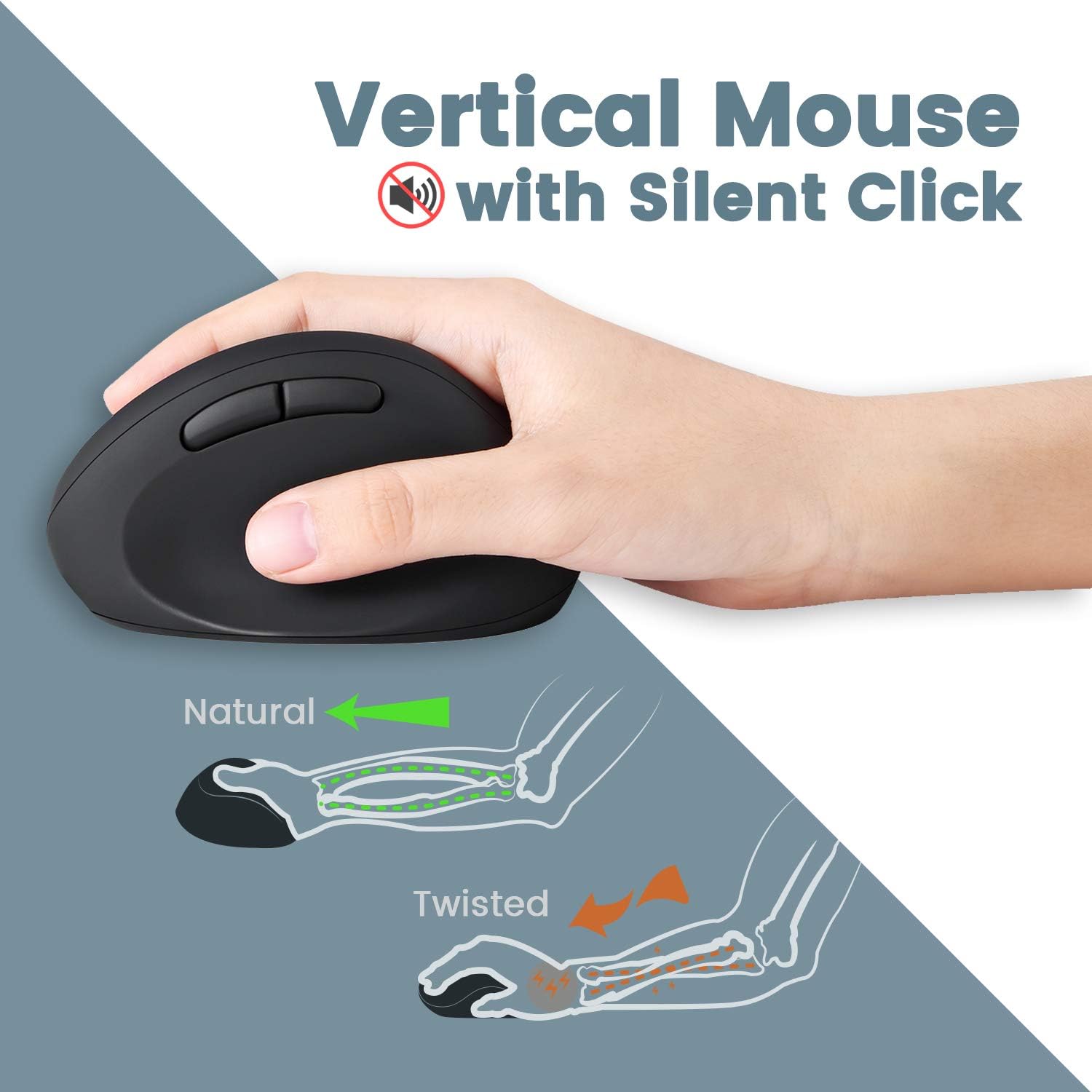
- Vertical Ergonomic Design: Positions the hand in a natural handshake posture to reduce wrist strain.
- Унчукпай чыкылдатуу: Операциялык ызы-чууну азайтат.
- Жөнгө салынуучу DPI: Offers 800 / 1200 / 1600 DPI settings for customizable cursor speed.
- 5 баскычтуу дизайн: Standard left/right click, scroll wheel, and two thumb buttons.
Зымсыз туташуу:
- 2.4 GHz Wireless Technology: Provides a stable connection up to 33 feet (10 meters).
- Single Nano USB Receiver: One receiver connects both the keyboard and mouse.
Орнотуу нускамалары
- Батареяны орнотуу:
- For the keyboard: Open the battery compartment on the underside of the keyboard and insert two AAA batteries (not included).
- For the mouse: Open the battery compartment on the underside of the mouse and insert one AA battery (not included).
- USB кабылдагычты табыңыз: The Nano USB receiver is stored in a dedicated compartment on the backside of the keyboard. Carefully remove it.
- Алуучуну туташтыруу: Nano USB кабыл алгычын компьютериңиздеги жеткиликтүү USB портуна сайыңыз.
- Күйгүзүү: Ensure both the keyboard and mouse are powered on (check for an ON/OFF switch, usually on the underside). The devices should connect automatically via Plug and Play.
- Attach Palm Rest (Optional): The adjustable palm rest stand attaches magnetically to the front of the keyboard. Use the movable magnet for height adjustment as desired.

Иштөө нускамалары
Баскычтопту колдонуу:
- Терүү: Position your hands naturally over the split-key layout. The design is intended to reduce wrist bending.
- Функция баскычтары: Use the F1-F12 keys for standard functions. Some keys may have secondary functions accessible via the 'Fn' key (refer to keycap legends).
- Жылдыруу дөңгөлөгү: Utilize the central scroll wheel for vertical and horizontal scrolling in compatible applications.
Чычканды колдонуу:
- Кармап: Hold the mouse in a natural handshake position.
- DPI жөндөө: Press the DPI button (usually located near the scroll wheel or on the top) to cycle through 800, 1200, and 1600 DPI settings. Select the sensitivity that best suits your preference.
- Унчукпай чыкылдатуулар: The main left and right click buttons are designed for quiet operation.
Техникалык тейлөө
- Тазалоо: Баскычтоптун жана чычкандын беттерин тазалоо үчүн жумшак, кургак чүпүрөктү колдонуңуз. өжөр кир үчүн, бир аз гamp жумшак самын менен кездеме колдонсо болот, бул аппараттарга суюктук кирбесин.
- Батареяны алмаштыруу: Иштин майнаптуулугу начарлаганда же түзмөктөр жооп бербей калганда батарейкаларды алмаштырыңыз. Жаңы батарейкаларды салууда туура полярдуулукту текшериңиз.
- Сактагыч: When not in use for extended periods, turn off the devices to conserve battery life. Store the USB receiver in the keyboard's compartment to prevent loss.
Проблемаларды чечүү
| Көйгөй | Чечим |
|---|---|
| Баскычтоп/чычкан жооп бербей жатат |
|
| Keys are sticky or not registering consistently |
|
| Mouse cursor freezes or moves erratically |
|
| Зымсыз байланыш тез-тез үзүлүп калат |
|
Техникалык шарттар
| Өзгөчөлүк | Деталь |
|---|---|
| Модель номери | 11660 |
| Байланыш | 2.4 GHz Wireless (Nano USB Receiver) |
| Операциялык аралык | 33 фут (10 метр) чейин |
| Баскычтоптун өлчөмдөрү (LxWxH) | 13.82 x 8.94 x 2.56 дюйм |
| Чычкандын өлчөмдөрү (LxWxH) | 4.5 x 2.64 x 2.28 дюйм |
| Баскычтоптун салмагы | Болжол менен 1.6 фунт |
| Чычкандын DPI жөндөөлөрү | 800 / 1200 / 1600 |
| Баскычтоптун батареясы | 2 x AAA (киргизилген эмес) |
| Чычкан батареясы | 1 x AA (киргизилген эмес) |
| Шайкеш операциялык системалар | Windows 7, 8, 10, 11 |
Кепилдик жана колдоо
Your Perixx PERIDUO-606 comes with a 12 айлык чектелген кепилдик сатып алынган күндөн тартып. Бул кепилдик өндүрүштүк кемчиликтерди камтыйт жана буюмдун нормалдуу колдонууда белгиленгендей иштешин камсыздайт.
Техникалык колдоо, кепилдик боюнча дооматтар же андан аркы жардам алуу үчүн, расмий Perixx сайтына кириңиз. website or contact their customer service department. Contact information can typically be found on the Perixx brand store page or included documentation.
Онлайн ресурстар: Perixx Brand Store on Amazon


