Introduction
This manual provides comprehensive instructions for the installation, operation, and maintenance of your AeroCool Miragebk ATX PC Case. The Miragebk features an ARGB LED strip on the front panel, a hinged tempered glass side panel, and a 12 cm ARGB fan, designed for optimal component visibility and cooling performance.
Пакеттин мазмуну
- AeroCool Miragebk ATX PC Case
- Кошумча жабдуулар топтому (бурамалар, бекиткичтер, кабелдик байлагычтар)
- Колдонуучунун Колдонмосу (бул документ)
Коопсуздук маалыматы
Бул продуктуну орнотуудан же иштетүүдөн мурун бардык коопсуздук көрсөтмөлөрүн окуп чыгып, түшүнүп алыңыз. Муну аткарбоо жаракат алууга же продуктунун бузулушуна алып келиши мүмкүн.
- Орнотуу же техникалык тейлөө иштерин жүргүзүүдөн мурун ар дайым кубат булагын розеткадан сууруп коюңуз.
- Кутучаны күн нуру түз тийген жерге же жылуулук булактарынын жанына койбоңуз.
- Keep the case away from water and excessive humidity.
- Handle the tempered glass panel with care to prevent breakage.
- Электрдик коркунучтарды алдын алуу үчүн туура жерге туташтырууну камсыз кылыңыз.
Орнотуу жана орнотуу
Follow these steps to set up your AeroCool Miragebk PC case and install components.
1. Ишти даярдоо
- Корпусту туруктуу, тегиз бетке коюңуз.
- Carefully open the hinged tempered glass side panel. This panel provides full access to the interior.
- Remove any protective films from the glass and other surfaces.

Сүрөт 1: Алдыңкы view of the AeroCool Miragebk PC case, showcasing the ARGB LED strip and tempered glass panel.
2. Motherboard орнотуу
- Киргизүү/чыгаруу калканчын корпустун арткы тешигине орнотуңуз.
- Align your ATX, Micro ATX, or Mini ITX motherboard with the standoffs inside the case.
- Берилген бурамалар менен энелик тактаны бекитиңиз.
3. Электр энергиясы менен жабдууну орнотуу
- Install the power supply unit (PSU) into the dedicated compartment at the bottom of the case.
- PSUну корпустун артындагы бурамалар менен бекитиңиз.
4. Storage Drive Installation (HDDs/SSDs)
The case supports up to 7 HDDs and SSDs.
- Locate the drive bays or mounting points.
- Mount your 2.5" SSDs or 3.5" HDDs using the appropriate screws.
5. Графикалык картаны (GPU) орнотуу
Иш 356 мм узундуктагы графикалык карталарды колдойт.
- Корпустун арткы жагындагы керектүү кеңейтүү уячасынын капкактарын алып салыңыз.
- Insert your graphics card into the PCIe slot on the motherboard.
- Графикалык картаны бурамалар менен бекитиңиз.
6. Cooling System Installation (Fans/Liquid Cooling)
The case supports up to 8 fans and liquid cooling on the front, top, and rear.
- Install additional fans as needed for optimal airflow.
- For liquid cooling, mount radiators to the designated areas (front, top, or rear).
- The case includes one 12 cm ARGB fan.
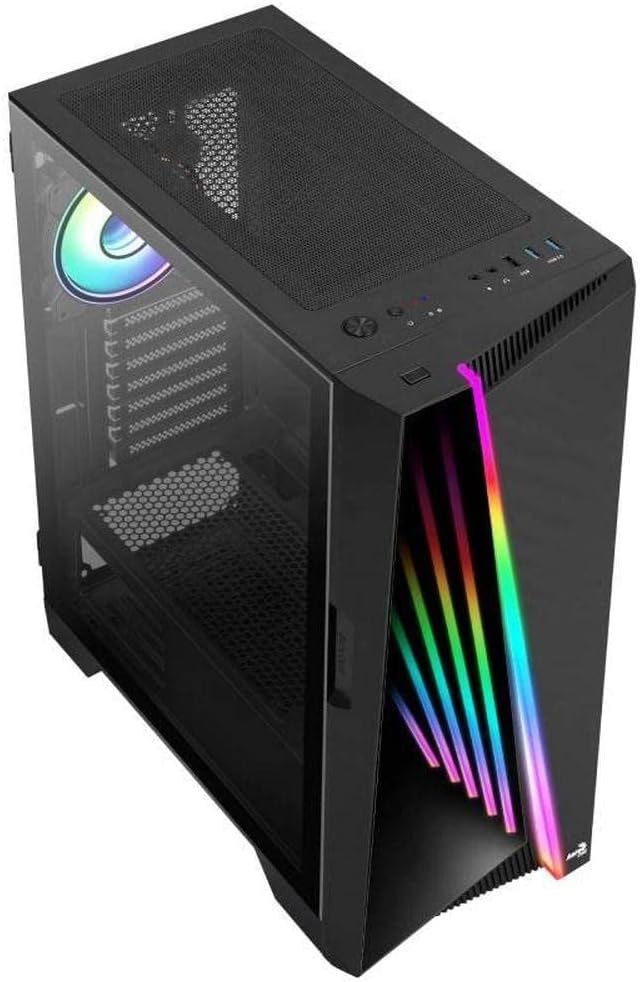
2-сүрөт: Бурчтуу view of the AeroCool Miragebk PC case, highlighting the top mesh for ventilation and the front panel design.
7. Кабелдик башкаруу
Utilize the cable routing cutouts and tie-down points behind the motherboard tray to manage cables for improved airflow and aesthetics.
8. Ишти жабуу
Once all components are installed and cables are managed, close the tempered glass side panel and secure it.
Иштөө нускамалары
Front Panel I / O
The top panel of the AeroCool Miragebk provides convenient access to essential ports and controls:
- Кубат баскычы: Turns the PC on/off.
- Калыбына келтирүү баскычы: Restarts the PC.
- LED башкаруу баскычы: Cycles through ARGB lighting modes or syncs with the motherboard.
- USB 3.0 порттору (x2): жогорку ылдамдыктагы маалыматтарды берүү үчүн.
- USB 2.0 порту (x1): Стандарттык USB түзмөктөр үчүн.
- HD Audio & Microphone Jacks: Аудио киргизүү жана чыгаруу үчүн.
ARGB жарыкты башкаруу
The ARGB lighting on the front panel and included fan can be controlled in two ways:
- LED башкаруу баскычы: Press the dedicated LED button on the top panel to cycle through various pre-set ARGB lighting effects.
- Motherboard синхрондоштуруу: Connect the ARGB lighting to a compatible 3-pin +5V ARGB header on your motherboard. This allows software control of 16.8 million colors and synchronization with other ARGB components. The Mirage control hub supports up to 6 ARGB fans and 2 additional 3-pin ARGB accessories.
Техникалык тейлөө
Үзгүлтүксүз тейлөө сиздин PC корпусуңуздун оптималдуу иштешин жана узак иштөөсүн камсыз кылууга жардам берет.
- Чаң чыпкалары: Periodically remove and clean the dust filters (if present) to maintain good airflow and prevent dust buildup inside the case.
- Тышкы тазалоо: Сырткы беттерин жумшак менен сүртүңүз, гamp кездеме. Абразивдүү тазалагычтардан же эриткичтерден качыңыз.
- Ички тазалоо: Use compressed air to remove dust from internal components and fans. Ensure the PC is powered off and unplugged before cleaning.
- Жылууланган айнек: Чыңалган айнек панелди микрофибра чүпүрөк жана электроника үчүн иштелип чыккан айнек тазалагыч менен тазалаңыз.
Проблемаларды чечүү
If you encounter issues with your AeroCool Miragebk case, refer to the following common solutions:
- PC Not Powering On:
- Ensure the power supply is properly connected to the wall outlet and switched on.
- Verify all internal power cables (24-pin ATX, CPU, GPU) are securely connected.
- Check that the front panel power switch cable is correctly connected to the motherboard.
- ARGB жарыктандыруу иштебейт:
- Confirm the ARGB cables are correctly connected to the motherboard's 3-pin +5V ARGB header or the internal control hub.
- If using motherboard sync, ensure the motherboard's ARGB software is installed and configured correctly.
- Try pressing the LED control button on the top panel to see if pre-set modes function.
- Начар аба агымы/кысып кетүү:
- Check if all installed fans are spinning correctly.
- Чаң чыпкаларын жана ички компоненттерин тазалаңыз.
- Ensure proper fan orientation (intake/exhaust) for optimal airflow.
Техникалык шарттар
| Өзгөчөлүк | Деталь |
|---|---|
| Бренд | AeroCool |
| Модель аты | MIRAGEBK |
| Иштин түрү | Tower (Semitower) |
| Motherboard шайкештиги | ATX, Микро ATX, Мини ITX |
| Материал | Температуралуу айнек |
| Түс | Кара |
| Элемент Салмагы | 12.98 фунт |
| Продукциянын өлчөмдөрү (LxWxH) | 19.65 x 8.5 x 16.46 дюйм |
| USB 3.0 порттордун саны | 2 |
| USB 2.0 порттордун саны | 1 |
| Кубат менен камсыздоону орнотуу түрү | Төмөнкү тоо |
| Муздатуу ыкмасы | Аба |
| Вентилятордун өлчөмү (кошулган) | 12 Centimeters (ARGB) |
| CPU муздаткычтын максималдуу бийиктиги | 162мм |
| Максималдуу GPU узундугу | 356мм |
| Drive Bays | 7 (HDDs and SSDs) |
Кепилдик жана колдоо
For warranty information or technical support, please refer to the official AeroCool webсайтка же кардарларды тейлөө бөлүмүнө кайрылыңыз. Кепилдик дооматтар үчүн сатып алганыңыздын далилин сактаңыз.


