1. Киришүү
This manual provides comprehensive instructions for the installation, operation, and maintenance of your Comelit Quadra Mini Wi-Fi 2-Wire Video Intercom Kit. This system is designed to enhance home security and communication by allowing visitors to ring the doorbell and communicate with occupants, with the added convenience of hands-free operation and Wi-Fi connectivity.
Please read this manual thoroughly before installation and use to ensure proper functioning and to prevent damage to the device.
2. Коопсуздук маалыматы
Жарааттарды жана буюмга зыян келтирбөө үчүн төмөнкү коопсуздук чараларын сактаңыз:
- Орнотуу жергиликтүү электр эрежелерине жана эрежелерине ылайык квалификациялуу кызматкерлер тарабынан аткарылышы керек.
- Disconnect power before performing any installation, wiring, or maintenance procedures.
- Сырткы блокту түздөн-түз суу агымдарынын астында калтырбаңыз же сууга чөмтүрбөңүз.
- Аппаратты ачпаңыз casings unless instructed to do so by this manual or Comelit technical support.
- Use only original Comelit accessories and spare parts.
- Таңгактоочу материалдарды балдар жетпеген жерде сактаңыз.
3. Пакеттин мазмуну
The Comelit Quadra Mini Wi-Fi 2-Wire Video Intercom Kit includes the following components:
- 1x Quadra Outdoor Unit (Doorbell Panel)
- 1x Mini Hands-Free Wi-Fi Monitor (Indoor Unit)
- 1x энергия менен жабдуу бирдиги
- 1x Line Termination Board
- Монтаждык аксессуарлар (бурамалар, дубал сайгычтар)
- Көрсөтмө (бул документ)
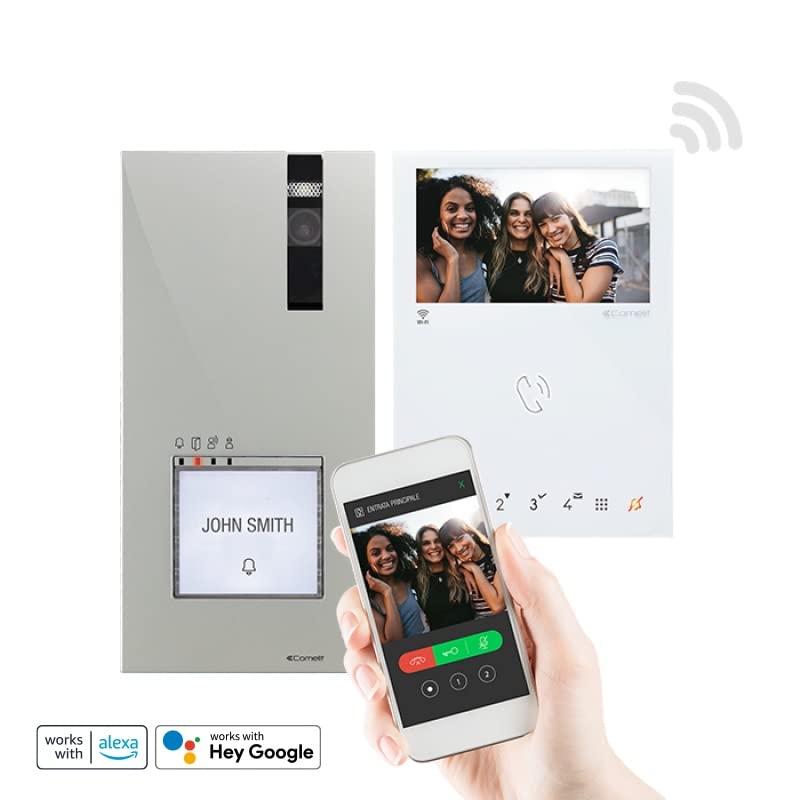
Figure 1: ашыкview of the Comelit Quadra Mini Wi-Fi 2-Wire Video Intercom Kit components.
4. Продукт бүтүп калдыview
4.1. Quadra Outdoor Unit
The Quadra outdoor unit features an HD color wide-angle camera for clear visitor identification. It can be configured with 1 to 4 call buttons, allowing for multiple apartment or user calls. Four signaling LEDs indicate the status: call sent, door open activated, audio activated, and line busy. It incorporates a 1/4" CMOS detector and is powered via the bus line. Its robust design (IP54-IK08 rated) ensures durability against environmental factors. Dimensions: 95x195x28 mm.
4.2. Mini Hands-Free Wi-Fi Monitor
The indoor Mini monitor is a hands-free color unit with a 4.3-inch (16:9) LCD screen, offering a resolution of 480x272 pixels. It features 8 sensitive keys and 4 programmable buttons for various functions. Users can adjust brightness, audio volume, and ringtone volume directly from the monitor. Its Wi-Fi capability allows for remote interaction via a compatible smartphone application.
4.3. Электр менен жабдуу бирдиги
The power supply unit is designed to power the outdoor unit, the electric strike (door lock release), and the indoor monitor. It accepts an input voltage of 110-240 V AC and provides a 33 V DC output. This unit occupies 6 DIN modules in an electrical panel.
5. Орнотуу жана орнотуу
The Comelit Quadra Mini Wi-Fi kit is pre-programmed and ready for use, simplifying the installation process. This system uses a 2-wire bus connection for communication and power.
5.1. Электр схемасы
Refer to the detailed wiring diagram provided in the separate installation guide for specific connections. Ensure all connections are secure and correctly polarized. The 2-wire bus connects the outdoor unit, indoor monitor, and power supply.
5.2. Mounting the Outdoor Unit
- Choose a suitable mounting location at eye level, protected from direct heavy rain if possible, though the unit is IP54-IK08 rated.
- Mark drilling points using the mounting template (if provided).
- Тешиктерди бургула жана дубал тыгындарын салгыла.
- Connect the 2-wire bus cable and any electric strike wiring to the outdoor unit terminals.
- Сырткы блокту берилген бурамалар менен дубалга бекитиңиз.
5.3. Үйдүн ичиндеги мониторду орнотуу
- Select an indoor location for the monitor, typically near the main entrance or in a central area.
- Монитордун кронштейнин дубалга орнотуңуз.
- Connect the 2-wire bus cable to the monitor terminals.
- Attach the monitor to its bracket.
5.4. Электр энергиясы менен жабдууну орнотуу
Install the power supply unit in your electrical panel (6 DIN modules). Connect the 110-240 V AC input and the 33 V DC output to the 2-wire bus system as per the wiring diagram.
5.5. Баштапкы күйгүзүү жана конфигурация
- Once all components are wired and mounted, apply power to the system.
- The system is pre-programmed for basic operation. Test the call function from the outdoor unit to the indoor monitor.
- For Wi-Fi connectivity, download the Comelit app on your smartphone and follow the in-app instructions to pair your monitor.
- Configure call buttons on the outdoor unit if more than one is used, referring to the detailed programming guide.
6. Иштөө нускамалары
6.1. Чалууга жооп берүү
- Конок сырткы блоктогу чакыруу баскычын басканда, ички монитор шыңгырап, коноктун сүрөтүн көрсөтөт.
- басыңыз Жооп button (typically a phone icon) on the monitor to establish two-way hands-free communication.
- Чакырууну аяктоо үчүн басыңыз Чакырууну аяктоо баскычы (адатта кызыл телефон сүрөтчөсү).
6.2. Эшикти ачуу
- Чалуу учурунда же качан viewing the outdoor unit camera, press the Door Reliz button (typically a key icon) to activate the electric strike and open the door/gate.
- The door open activated LED on the outdoor unit will illuminate.
6.3. Монитор орнотуулары
Use the sensitive keys and programmable buttons on the Mini monitor to access and adjust settings:
- Жарыктык: Оптималдуу үчүн экран жарыктыгын тууралаңыз viewing.
- Аудионун үнү: Control the volume of the two-way communication.
- Коңгуроонун үн деңгээли: Set the desired volume for incoming calls.
- Программалануучу баскычтар: Refer to the advanced settings guide for customizing the 4 programmable buttons (e.g., for additional camera views, intercommunication, or auxiliary functions).
6.4. Wi-Fi байланышы жана смартфон тиркемеси
- Ensure your Mini monitor is connected to your home Wi-Fi network as per the setup instructions.
- Смартфонуңуздун колдонмолор дүкөнүнөн расмий Comelit тиркемесин жүктөп алыңыз.
- Follow the app's instructions to pair your monitor. This typically involves scanning a QR code displayed on the monitor or entering a pairing code.
- Once paired, you can receive calls, view the outdoor unit camera, and open the door remotely from your smartphone.
7. Техникалык тейлөө
Regular maintenance ensures the longevity and optimal performance of your video intercom system:
- Тазалоо: жумшак колдонуу, damp cloth to clean the outdoor unit camera lens and the indoor monitor screen. Do not use abrasive cleaners or solvents.
- Байланыштары: Periodically check all wiring connections for tightness and signs of corrosion. Ensure the 2-wire bus connections are secure.
- Программалык камсыздоо жаңыртуулары: Check the Comelit app or website for any available firmware updates for your monitor to ensure you have the latest features and security enhancements.
- Курчап турган чөйрөнү коргоо: While the outdoor unit is robust, ensure it is not subjected to extreme physical impact or prolonged exposure to harsh chemicals.
8. Кыйынчылыктарды
If you encounter issues with your Comelit video intercom kit, refer to the table below for common problems and solutions:
| Көйгөй | Мүмкүн себеп | Чечим |
|---|---|---|
| Ички монитордо сүрөт жок | No power to the system; Loose wiring connection; Faulty outdoor unit camera. | Check power supply and circuit breaker. Verify 2-wire bus connections. Contact technical support if problem persists. |
| Чалуу учурунда аудио жок | Audio volume too low; Loose wiring; Faulty microphone/speaker. | Adjust audio volume on the monitor. Check 2-wire bus connections. |
| Эшик иштебей жатат | Incorrect wiring to electric strike; Faulty electric strike; Insufficient power from power supply. | Verify electric strike wiring. Test electric strike independently. Ensure power supply is functioning correctly. |
| Wi-Fi connection unstable or not connecting | Wi-Fi сигналы начар; Туура эмес Wi-Fi сырсөзү; Маршрутизатор маселелери. | Ensure monitor is within Wi-Fi range. Re-enter Wi-Fi password. Restart your home router. |
If the problem persists after attempting these solutions, please contact Comelit technical support.
9. Техникалык шарттар
| Өзгөчөлүк | Деталь |
|---|---|
| Өндүрүүчү | Comelit Immotec |
| Үлгү шилтемеси | 8451V/BM |
| Бренд | Comelit |
| Байланыш технологиясы | Зымсыз (Wi-Fi) |
| Шайкеш түзмөктөр | Смартфон |
| Power Source | Electric Cable (110-240 V AC input, 33 V DC output) |
| Монтаж түрү | Дубалга орнотуу |
| Видео жаздыруу чечими | 720p (HD) |
| Тышкы блоктун өлчөмдөрү | 95x195x28 мм |
| Outdoor Unit IP Rating | IP54-IK08 |
| Ички монитордун экраны | 4.3 inch / 16:9 LCD (480x272 pixels) |
| Сунушталган Колдонуулар | Көзөмөл |
| Салмагы | 1 килограмм |
| Буюмдардын саны | 1 |
| Запастык бөлүктөрдүн болушу | Запастык бөлүктөр боюнча маалымат жок |
10. Кепилдик жана колдоо
Comelit өнүмдөрү жогорку сапаттагы стандарттарга ылайык өндүрүлөт. Кепилдиктин конкреттүү шарттары жана эрежелери үчүн, өнүмүңүзгө тиркелген кепилдик картасын караңыз же расмий Comelit дүкөнүнө баш багыңыз. webсайт. Кепилдик дооматтар үчүн сатып алганыңыздын далилин сактаңыз.
For technical assistance, troubleshooting beyond this manual, or spare parts inquiries, please contact Comelit customer support through their official webсайт же продукт документациясында көрсөтүлгөн байланыш маалыматы.