1. Киришүү
Thank you for choosing the LB-Link BL-WN150AH Long-Range USB Adapter. This device is designed to provide your desktop computer with high-speed wireless connectivity, extending your Wi-Fi range and improving signal stability. This manual will guide you through the installation, operation, and maintenance of your new adapter.
2. Пакеттин мазмуну
Бардык буюмдардын бар экенин текшерүү үчүн таңгакты кылдаттык менен текшериңиз. Эгерде кандайдыр бир буюм жок болсо же бузулуп калса, сатуучуга кайрылыңыз.
- LB-Link BL-WN150AH Long-Range USB Adapter
- Detachable High-Gain Antenna (5dBi)
- Resource CD (Drivers and User Manual)
- Ыкчам орнотуу колдонмосу
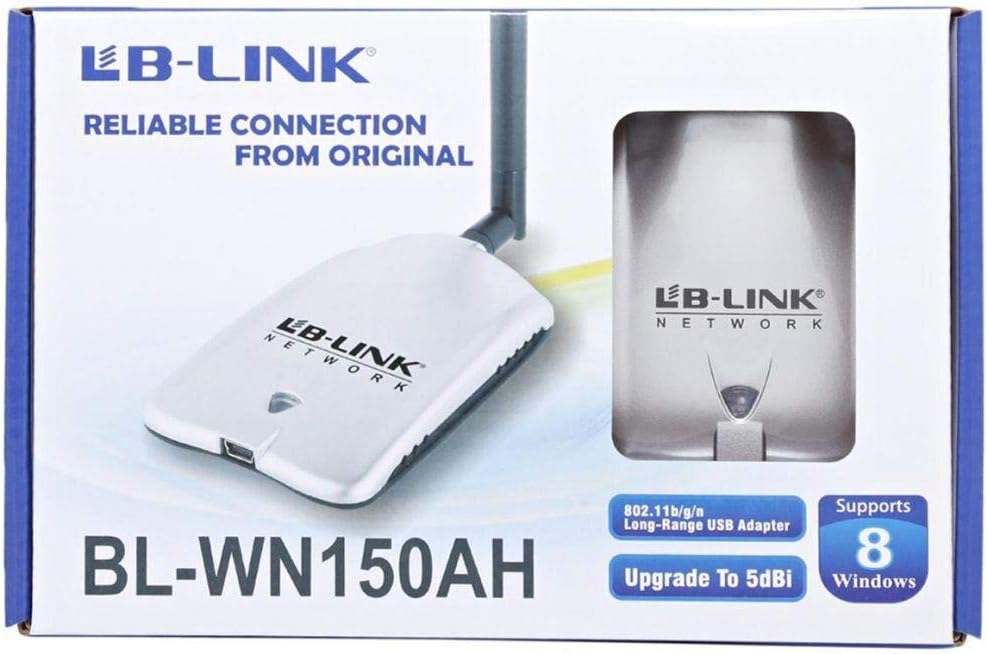
Figure 2.1: Product packaging showing the adapter and its features.
3. Продукт бүтүп калдыview
The BL-WN150AH is a compact USB adapter with an external antenna for enhanced signal reception. Familiarize yourself with its components:
- USB туташтыргычы: Used to connect the adapter to your computer's USB port.
- Антенна туташтыргычы: For attaching the detachable high-gain antenna.
- LED көрсөткүчү: Lights up when the adapter is powered on and blinks during data transmission.
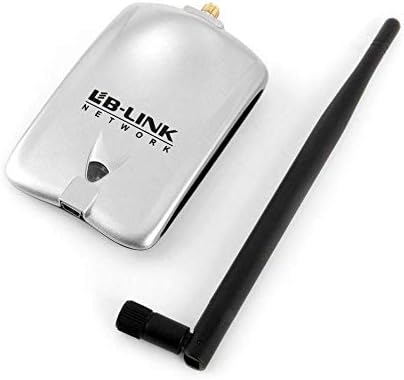
Figure 3.1: The BL-WN150AH adapter and its detachable antenna.
4. Орнотуу
4.1 Драйверди орнотуу
Before connecting the adapter, install the necessary drivers from the provided Resource CD or download the latest drivers from the official LB-Link webсайт.
- Ресурстук CDди компьютериңиздин CD/DVD дискине салыңыз.
- Follow the on-screen instructions to run the setup wizard.
- Select the appropriate driver for your operating system (Windows XP/Vista/7/8, Mac OSX, Linux).
- Complete the installation process. You may be prompted to restart your computer.

Figure 4.1: Supported operating systems including Windows XP, Vista, 7, 8, Mac OSX, and Linux.
4.2 Аппараттык туташуу
- Attach the detachable antenna to the antenna connector on the adapter by screwing it clockwise until secure.
- Plug the LB-Link BL-WN150AH USB Adapter into an available USB port on your desktop computer.
- The LED indicator on the adapter should light up, indicating it is powered on.
4.3 Wi-Fi тармагына туташуу
- Once the drivers are installed and the adapter is connected, your computer should detect the new wireless adapter.
- Open your computer's wireless network settings (e.g., Wi-Fi icon in the system tray for Windows).
- Жеткиликтүү тармактардын тизмесинен каалаган Wi-Fi тармагын тандаңыз.
- Суралган болсо, тармактын коопсуздук ачкычын (сырсөз) киргизиңиз.
- Click 'Connect'. The adapter's LED will blink rapidly during data transmission.
5. Иштөө нускамалары
After successful connection, the adapter will automatically maintain the wireless link. You can monitor the connection status through your operating system's network utility.
- Сигнал күчү: The network utility will display the current signal strength, which is influenced by distance from the router and obstacles.
- Тармак ылдамдыгы: The adapter supports up to 150Mbps wireless N speeds. Actual speeds may vary based on network conditions.
6. Техникалык тейлөө
To ensure optimal performance and longevity of your LB-Link BL-WN150AH USB Adapter, follow these maintenance guidelines:
- Тазалоо: Use a soft, dry cloth to clean the adapter. Do not use liquid or aerosol cleaners.
- Сактагыч: Адаптерди салкын, кургак жерде күндүн тике тийген нурунан жана экстремалдык температурадан алыс сактаңыз.
- Колдонуу: Адаптерди кулап же катуу таасирлерге дуушар кылуудан качыңыз.
- Антеннага кам көрүү: Ensure the antenna is securely attached but do not overtighten. Avoid bending or forcing the antenna.
7. Кыйынчылыктарды
If you encounter issues with your LB-Link BL-WN150AH USB Adapter, refer to the following common problems and solutions:
- Wi-Fi тармактары табылган жок:
Чечим: Ensure the adapter is properly plugged into a USB port. Verify that the drivers are correctly installed. Check if your router is powered on and broadcasting a Wi-Fi signal. - Cannot Connect to a Network:
Чечим: Double-check the Wi-Fi password. Ensure your router's security settings (WPA/WPA2) are compatible. Try restarting your computer and router. - Жай туташуу ылдамдыгы:
Чечим: Move closer to your wireless router. Ensure there are no major obstructions (e.g., thick walls, metal objects) between the adapter and the router. Update the adapter's drivers to the latest version. - Adapter Not Recognized by Computer:
Чечим: Try plugging the adapter into a different USB port. Reinstall the drivers. Check Device Manager (Windows) to see if the adapter is listed without errors.
8. Техникалык шарттар
Detailed technical specifications for the LB-Link BL-WN150AH Long-Range USB Adapter:
| Өзгөчөлүк | Description |
|---|---|
| Модел | BL-WN150AH |
| Бренд | LB-Link |
| Аппараттык интерфейс | USB |
| Зымсыз стандарттар | IEEE 802.11b/g/n |
| Маалымат ылдамдыгы | 150 Мбит/сек чейин (802.11n) |
| Антенна түрү | Detachable 5dBi Omni-directional Antenna |
| Шайкеш түзмөктөр | Рабочий компьютер |
| Колдоого алынган операциялык системалар | Windows XP, Windows Vista, Windows 7, Windows 8, Mac OSX, Linux |
| Өндүрүүчү | LB-Link |

Figure 8.1: Product specifications listed on the side of the packaging.
9. Кепилдик жана колдоо
LB-Link products are designed for reliability and performance. This product comes with a standard manufacturer's warranty. Please refer to the warranty card included in your package for specific terms and conditions.
For technical support, driver updates, or further assistance, please visit the official LB-Link webсайтка же кардарларды тейлөөгө кайрылыңыз. Кепилдик дооматтар үчүн сатып алуу дүмүрчөгүңүздү сактаңыз.
UPC: 7966241501344