1. Киришүү
Welcome to your JBL J777 Wireless In-Ear Headphones. This manual provides detailed instructions to help you get the most out of your device, ensuring proper setup, operation, and maintenance. Please read this manual thoroughly before using your headphones.
2. Продукт бүтүп калдыview
The JBL J777 headphones are designed for wireless audio playback and hands-free calling, offering convenience and quality sound.
2.1 Компоненттер
- In-ear earbuds with silicone tips
- Flexible neckband cable
- Inline remote control with integrated microphone
- USB charging port (typically located on the remote)
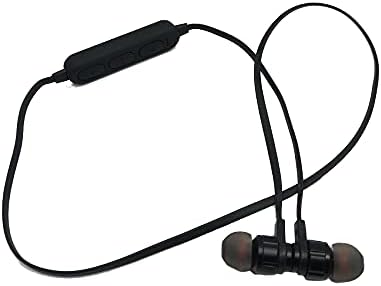
This image displays the complete JBL J777 wireless in-ear headphones. It features two black earbuds connected by a flexible cable, with an inline remote control positioned on the cable. The design is intended for comfortable wear around the neck.
2.2 Башкаруу
The inline remote control provides easy access to various functions:
- Күйгүзүү/Көп функциялуу баскыч: Used for powering on/off, play/pause music, and answering/ending calls.
- Үнүн жогорулатуу баскычы: Increases volume, also used for skipping to the next track.
- Үнүн төмөндөтүү баскычы: Decreases volume, also used for skipping to the previous track.

А деталдуу view of the inline remote control for the JBL J777 headphones. It shows three distinct buttons for power/multi-function, volume up, and volume down, along with a small microphone opening for hands-free calls.
3. Орнотуу
3.1 Наушниктерди заряддоо
- Connect the micro-USB charging cable to the charging port on the inline remote control.
- Кабелдин экинчи учун USB кубат булагына туташтырыңыз (мисалы, компьютердин USB порту, USB дубал адаптери).
- Адатта, LED индикатору кубаттоо учурунда кызыл түстө күйүп, толук кубатталганда өчөт же көк түстө күйөт.
- The integrated 90mAh lithium battery provides wireless operation.
3.2 Bluetooth жупташтыруу
To connect your JBL J777 headphones to a Bluetooth-enabled device:
- Наушниктердин өчүрүлгөнүн текшериңиз.
- басып, кармап туруңуз Power/Multi-function button for approximately 5-7 seconds until the LED indicator flashes red and blue alternately. This indicates the headphones are in pairing mode.
- Уюлдук телефонуңузда же Bluetooth иштетилген түзмөгүңүздө Bluetooth жөндөөлөрүнө өтүп, Bluetooth'ту иштетиңиз.
- Издөө available devices and select "JBL J777" from the list.
- Once paired, the LED indicator will typically flash blue slowly or remain solid blue.
- The headphones have an operation distance of up to 10 meters (33 feet) in an open environment.
4. Иштөө нускамалары
4.1 Күйгүзүү/өчүрүү
- Күйгүзүү үчүн: басып, кармап туруңуз Power/Multi-function button for 3 seconds. The LED will flash blue.
- Өчүрүү үчүн: басып, кармап туруңуз Power/Multi-function button for 3 seconds. The LED will flash red and then turn off.
4.2 Музыканы ойнотуу
- Ойнотуу/тындыруу: басыңыз Power/Multi-function баскычын бир жолу.
- Кийинки трек: басып, кармап туруңуз Үндү көтөрүү баскычы.
- Мурунку трек: басып, кармап туруңуз Үндү төмөндөтүү баскычы.
- Көлөмү: басыңыз Үндү көтөрүү баскычын кыскача.
- Үнүн азайтуу: басыңыз Үндү төмөндөтүү баскычын кыскача.
4.3 Чалууларды башкаруу
- Чалууга жооп берүү/аяктоо: басыңыз Power/Multi-function баскычын бир жолу.
- Чакырууну четке кагуу: басып, кармап туруңуз Power/Multi-function баскычын 2 секунда басыңыз.
- Акыркы номерди кайра терүү: эки жолу басыңыз Power/Multi-function баскычы.
4.4 Активдүү ызы-чууну жокко чыгаруу
The JBL J777 headphones feature active noise cancellation to reduce ambient noise for a more immersive listening experience. This feature operates automatically or is controlled via the multi-function button, depending on the specific model variant.
5. Техникалык тейлөө
Proper care ensures the longevity and optimal performance of your headphones.
- Тазалоо: Gently wipe the earbuds and cable with a soft, dry cloth. Do not use harsh chemicals or abrasive materials.
- Сактагыч: Store the headphones in a cool, dry place away from direct sunlight and extreme temperatures. Avoid tangling the cable.
- Батареяга кам көрүү: Батареянын иштөө мөөнөтүн узартуу үчүн, бат-баттан батарейканы толук зарядсыздандырбаңыз. Узак убакыт колдонулбаса да, гарнитураны үзгүлтүксүз заряддаңыз.
6. Кыйынчылыктарды
If you encounter any issues with your JBL J777 headphones, refer to the following common problems and solutions:
- Кулакчындар күйбөй жатат: Батарея заряддалганын текшериңиз. Кубат булагына туташып, кайра аракет кылыңыз.
- Түзмөк менен жупташтыруу мүмкүн эмес:
- Кулакчындар жупташтыруу режиминде экенин текшериңиз (кызыл жана көк түстөр менен күйүп-өчүп турат).
- Түзмөгүңүздө Bluetooth иштетилгенин текшериңиз.
- Наушниктерди түзмөгүңүзгө жакыныраак жылдырыңыз.
- Turn off and on both the headphones and your device, then try pairing again.
- Үн жок:
- Наушниктердин жана туташкан түзмөгүңүздүн үнүнүн деңгээлин текшериңиз.
- Наушниктердин туура жупташтырылганын жана туташтырылганын текшериңиз.
- Башка колдонмодон же булактан аудио ойнотуп көрүңүз.
- Үн сапатынын начардыгы же үзгүлтүктүү байланыш:
- Кулакчындар менен түзмөгүңүздүн ортосунда эч кандай тоскоолдуктар жок экенин текшериңиз.
- Move away from other wireless devices that may cause interference.
- Наушниктерди түзмөгүңүз менен кайра жупташтырыңыз.
7. Техникалык шарттар
Detailed technical specifications for the JBL J777 Wireless In-Ear Headphones:
| Бренд | JBL |
| Модель номери | J777 |
| Type | Кулактагы зымсыз гарнитуралар |
| Байланыш | Зымсыз (Bluetooth 4.2) |
| Bluetooth Profiles | HFP, A2DP, AVCTP, AVDTP, AVRCP |
| Операция аралык | 10 метрге чейин (33 фут) |
| Өткөрүүчү күч | 2-класс |
| Жыштык диапазону | 2.402 - 2.480 ГГц |
| Диаметри | Ø15мм |
| Импеданс | 32Ω |
| Микрофон | Интеграцияланган |
| Noise Control | Активдүү ызы-чууну жокко чыгаруу |
| Батарея | Rechargeable Lithium, 90mAh |
| менен шайкеш келет | Мобилдик телефондор |
| TF картасын колдоо | 128MB - 32GB |
| Камтылган компоненттер | Кулак жаздыкчалары |

This image shows the rear side of the JBL J777 product packaging. It clearly lists technical specifications such as Bluetooth version, supported profiles, operation distance, transmitting power, frequency range, speaker size, impedance, and battery capacity. It also indicates TF card support.
8. Кепилдик жана колдоо
For warranty information regarding your JBL J777 Wireless In-Ear Headphones, please refer to the documentation provided at the time of purchase. This information is typically included in the product packaging or available on the official JBL webсайт.
For further assistance, technical support, or to inquire about service, please visit the official JBL support page or contact their customer service department directly. Keep your proof of purchase handy for any warranty claims.


