1. Киришүү
This manual provides detailed instructions for the installation, operation, and maintenance of your Avidsen THOMSON Rheita 100 Full HD Wireless WiFi Outdoor Camera Lamp. Please read this manual thoroughly before using the product to ensure proper function and safety.

Image 1.1: The Avidsen THOMSON Rheita 100 outdoor camera lamp, mounted on a wall.
2. Коопсуздук маалыматы
Буюмга зыян келтирбөө же өзүңүзгө жана башкаларга зыян келтирбөө үчүн төмөнкү коопсуздук чараларын сактаңыз:
- Ensure the power supply matches the product's requirements.
- Аппаратты ажыратууга же өзгөртүүгө аракет кылбаңыз. Бардык тейлөөлөрдү квалификациялуу кызматкерлерге тапшырыңыз.
- Аппаратты суудан, нымдан жана экстремалдык температурадан алыс кармаңыз.
- Камераны кулап кетпеши үчүн бекем орнотуңуз.
- Ensure all wiring is correctly connected and insulated to avoid electrical hazards.
3. Пакеттин мазмуну
Пакетте бардык буюмдар бар экенин текшериңиз:
- Avidsen THOMSON Rheita 100 IP video surveillance camera with lighting
- Монтаждык аксессуарлар (бурамалар, дубал сайгычтар)
- Колдонуучунун Колдонмосу (бул документ)
4. Орнотуу
4.1 Физикалык орнотуу
- Choose a suitable outdoor location for mounting, ensuring a clear view and access to power. The camera is designed for flush wall mounting.
- Монтаждык кронштейнди калып катары колдонуп, дубалга бургулоо жерлерин белгилеңиз.
- Тешиктерди бургула жана зарыл болсо, дубал тыгындарын салгыла.
- Орнотуу кронштейнин дубалга бурама менен бекитиңиз.
- Attach the camera lamp unit to the mounted bracket.

Сүрөт 4.1: Каптал view of the camera, illustrating its wall-mounted design.
4.2 Кубат туташтыруу
Connect the camera to a suitable power source. The device operates on 3 Watts and requires a wall-mounted electrical plug type.
4.3 Колдонмону жүктөп алуу жана жупташтыруу
- жүктөп алыңыз atHome Security смартфонуңуздун колдонмолор дүкөнүнөн тиркеме (iOS жана Android үчүн жеткиликтүү).
- Каттоо эсебин түзүңүз же сизде мурунтан эле бар болсо кириңиз.
- Follow the in-app instructions to add a new device. This typically involves scanning a QR code on the camera or manually selecting the model.
4.4 Wi-Fi туташуусу
During the app pairing process, you will be prompted to connect the camera to your home Wi-Fi network. Ensure your Wi-Fi network is 2.4GHz for optimal compatibility.

Image 4.2: The camera shown alongside a smartphone displaying the 'atHome Security' app interface, demonstrating remote control capabilities.
5. Иштөө нускамалары
5.1 Live View жана Жаздыруу
Once connected, open the atHome Security app to access the live video feed. You can initiate manual recordings or configure automatic recording settings.
5.2 Кыймылды аныктоо жана эскертүүлөр
The camera features motion detection and silhouette recognition. Configure alert settings within the app to receive notifications on your smartphone when activity is detected. The alert type is primarily motion-only.
5.3 Motorized Control (Pan/Tilt)
The Rheita 100 features a motorized camera for adjustable viewing angles. Use the controls within the atHome Security app to pan (left/right) the camera. This also enables auto-tracking of human silhouettes.

Image 5.1: A visual representation of the camera's motorized pan function, indicated by red arrows.
5.4 Night Vision and Lighting
The camera is equipped with infrared night vision, providing clear visibility up to 25 meters in low-light conditions. The integrated lamp can be controlled via the app, offering both comfort lighting and a deterrent when combined with the siren function.

Image 5.2: The camera lamp providing illumination in a dark outdoor setting.
5.5 Эки тараптуу аудио
The integrated microphone and speaker allow for two-way communication through the camera, enabling you to listen and speak to visitors or deter intruders.
5.6 Smart Home интеграциясы
The camera is compatible with Google Home and Amazon Alexa. Follow the instructions in your respective smart home app to link your atHome Security account and control basic camera functions via voice commands.
5.7 Сактоо
The camera supports local storage via a microSDXC card (not included), with a maximum capacity of 128 GB for recording video footage.
6. Техникалык тейлөө
- Тазалоо: Камера линзасын жана корпусун жумшак, кургак чүпүрөк менен акырын сүртүңүз. Катуу химиялык заттарды же абразивдүү тазалоочу каражаттарды колдонбоңуз.
- Программалык камсыздоо жаңыртуулары: Regularly check the atHome Security app for firmware updates to ensure optimal performance and security.
- Курчап турган чөйрөнү коргоо: The camera has an IP65 rating, indicating protection against dust and water jets. However, avoid direct high-pressure water exposure.
7. Кыйынчылыктарды
- Кубат жок: Электр кубатына туташуусун текшерип, розетка иштеп жатканын текшериңиз.
- Wi-Fi ажыратуу: Ensure the camera is within range of your Wi-Fi router. Restart the camera and your router if necessary. Verify your Wi-Fi network is 2.4GHz.
- Unable to Pair with App: Ensure your smartphone is connected to the same Wi-Fi network as the camera during initial setup. Reset the camera if pairing fails repeatedly.
- Видеонун сапаты начар: Check your Wi-Fi signal strength. Ensure the lens is clean and free from obstructions.
- Кыймылды аныктоо иштебей жатат: Verify motion detection settings are enabled in the app and sensitivity is adjusted correctly.
8. Техникалык шарттар
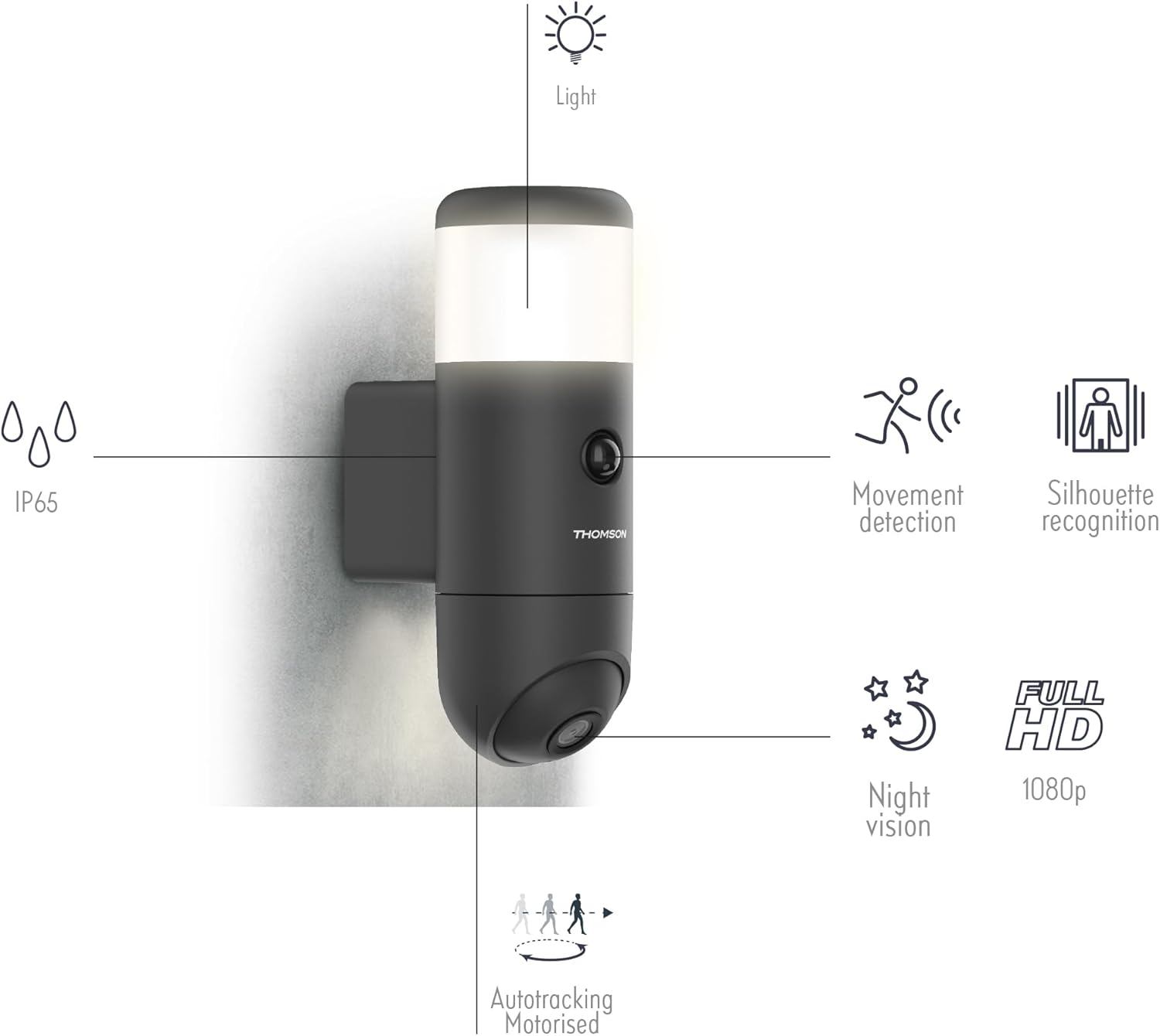
Сүрөт 8.1: An overview of the camera's features including IP65 rating, movement detection, silhouette recognition, night vision, Full HD 1080p resolution, and motorized auto-tracking.
- Модель номери: 512511
- Видеонун сапаты: 1080p толук HD
- Байланыш: Зымсыз (Wi-Fi)
- Түнкү көрүнүш: Infrared, up to 25m
- Багыты: Motorized (Pan)
- Жаздыруу: Ооба
- Аудио: Integrated Microphone and Speaker
- Сактагыч: Max 128 GB microSDXC (not supplied)
- Smart Home шайкештиги: Google Home, Amazon Alexa
- Колдонмо: atHome Security
- Күч: 3 Watts, Manual Operation (wall-mounted plug)
- Өлчөмдөрү (L x W x Y): 54.2 x 23 x 33 см
- Салмагы: 1100 грамм
- Түсү: Кара
- Орнотуу ыкмасы: Сүзүү монтаждоо
- Өзгөчөлүктөр: HD Resolution, Movement Detection, Silhouette Recognition, Auto-tracking
- IP рейтинги: IP65

Image 8.2: Diagram showing the dimensions of the camera lamp: 8 cm width and 23 cm height.
9. Кепилдик жана колдоо
For warranty information and technical support, please refer to the documentation provided with your purchase or visit the official Avidsen webсайт. Кепилдик дооматтар үчүн сатып алганыңыздын далилин сактаңыз.


