1. Коопсуздук боюнча маанилүү маалымат
Сураныч, чогултуу жана колдонуу алдында бардык нускамаларды кунт коюп окуп чыгыңыз. Бул колдонмону келечектеги маалымат үчүн сактаңыз.
- ЭСКЕРТҮҮ: Always assemble the desk according to the provided instructions to ensure stability.
- 177 lbs (80 кг) максималдуу салмак сыйымдуулугунан ашпаңыз.
- Be cautious when using the height adjustment feature to avoid injury from moving parts.
- Keep hands and fingers away from the moving parts during operation.
- Чогултуу же иштетүү учурунда электр шнурунун кысылып же бузулуп калбагандыгын текшериңиз.
- Бул продукт ички колдонуу үчүн гана арналган.
2. Продукт бүтүп калдыview
The FLEXISPOT E1L is a dual-motor, L-shaped electric standing desk designed for home and office use. It features adjustable height, a quiet operation, and a customizable control panel.

Image 2.1: The FLEXISPOT E1L desk frame demonstrating its adjustable height capabilities.

Image 2.2: The FLEXISPOT E1L desk in a typical office setup, showcasing its L-shape and functionality.
3. Орнотуу жана чогултуу
Assembly of the FLEXISPOT E1L desk is designed to be straightforward, typically taking less than 30 minutes. All necessary tools are included.
3.1 Пакеттен чыгаруу жана компоненттерди текшерүү
Carefully unpack all components and verify against the packing list. Ensure all parts are present and undamaged before proceeding.
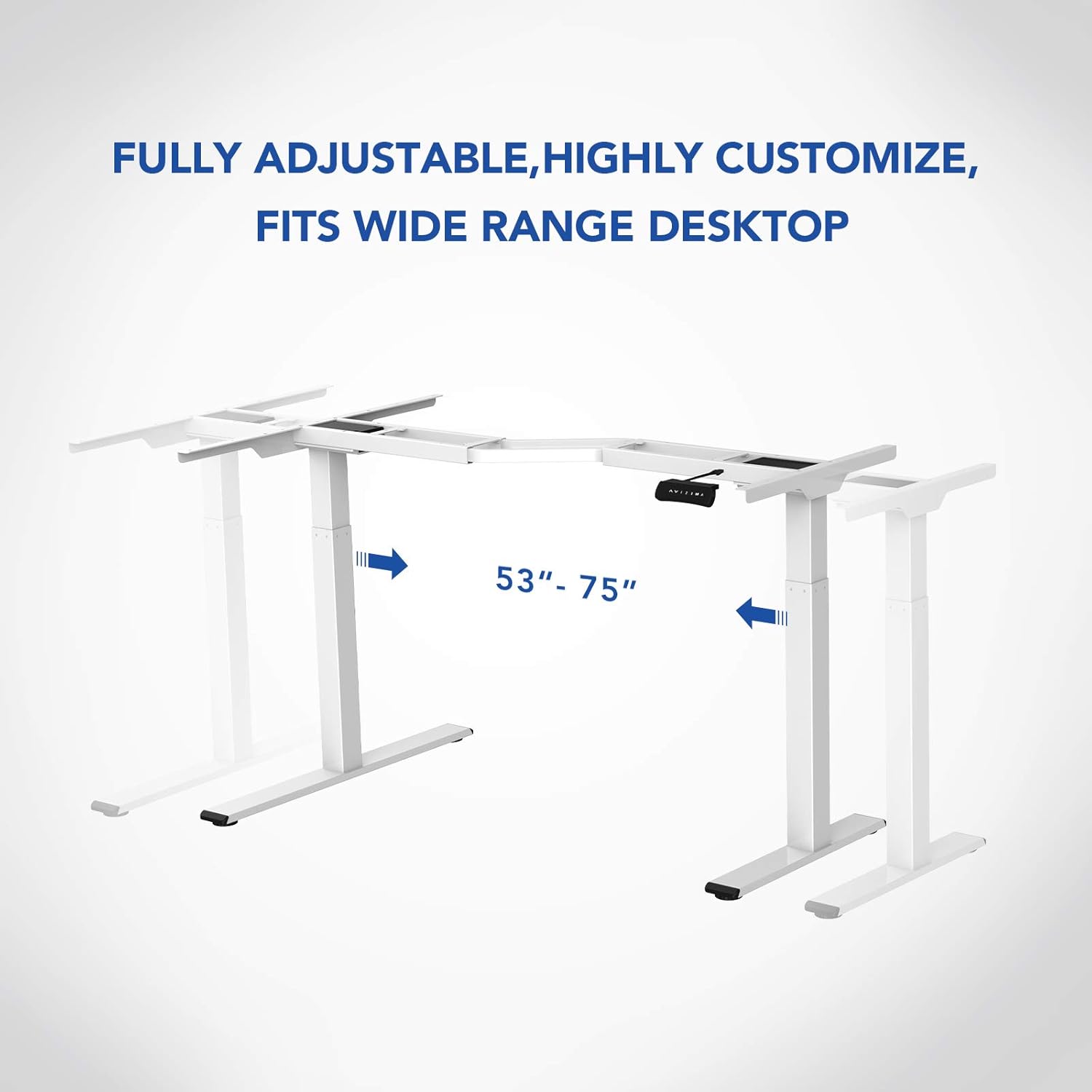
Сүрөт 3.1: Бүттүview of the FLEXISPOT E1L desk frame components prior to assembly.
3.2 Чогултуу кадамдары
- Attach the lifting columns to the desktop frame.
- Буттарды көтөрүүчү мамылардын түбүнө бекитиңиз.
- Connect the control box and motor cables as per the detailed diagram in the included assembly guide.
- Mount the control panel to the desired location on the desk.
- Place the desktop surface onto the assembled frame and secure it.
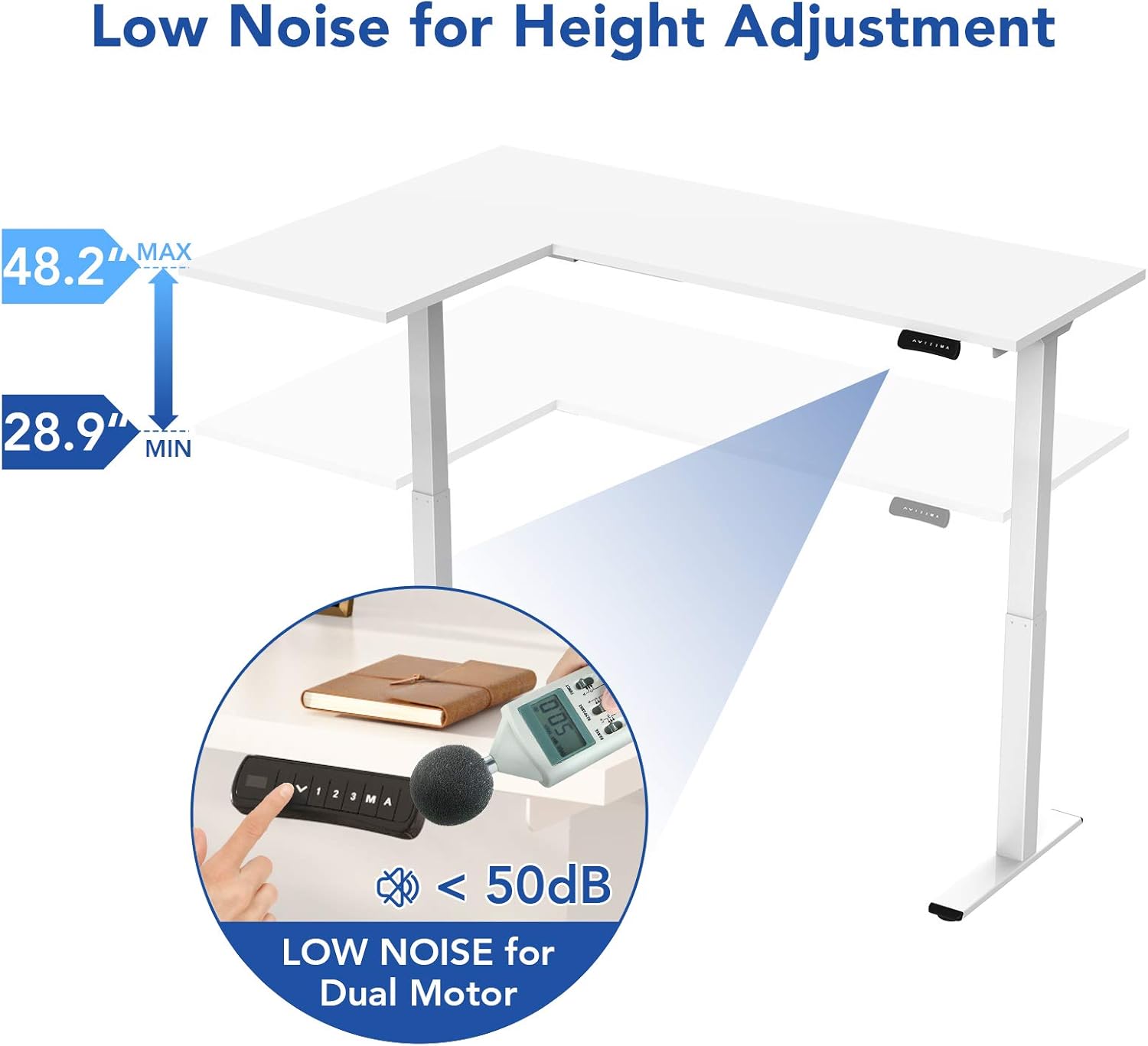
Image 3.2: An assembly step illustrating the connection of the L-shaped desk frame components.

Image 3.3: The desk frame nearing completion, with the control panel attached.
3.3 Reversible L-Shape Configuration
The L-shaped configuration of the desk is reversible, allowing you to set up the longer side on either the left or right, depending on your preference and workspace layout. This flexibility is determined during the assembly process.

Image 3.4: Visual representation of the desk's reversible L-shape, allowing for left or right-hand configurations.
4. Иштөө нускамалары
4.1 Бийиктигин тууралоо
The desk features a dual-motor lift mechanism for smooth and quiet height adjustments. The height can be adjusted from 27.9 inches (70.9 cm) to 47.2 inches (120 cm).
- колдонуу Up (▲) жана Төмөн (▼) buttons on the control panel to manually adjust the desk height.
- The desk operates at a speed of 1 inch per second and maintains a noise level under 50 dB during movement.

Image 4.1: Illustration highlighting the low noise operation (under 50 dB) of the desk's dual motor system.
4.2 Башкаруу панелинин функциялары
The built-in LED control panel allows for easy customization and programming of desk height settings.

Image 4.2: Close-up of the control panel, detailing its buttons and functions.
- Up/Down Buttons (▲, ▼): Столдун бийиктигин кол менен тууралаңыз.
- Эстутум алдын ала орнотуулары (1, 2, 3): Store and recall up to three preferred height settings. To save a height, adjust the desk to the desired position, then press the 'M' button followed by the desired number (1, 2, or 3).
- Эстутум баскычы (M): Used to save height presets.
- Sit-Stand Reminder (A): Activate a programmable timer to remind you to switch between sitting and standing postures. Refer to the full assembly guide for detailed programming instructions.
4.3 Кагылышууга каршы система
The desk is equipped with a built-in anti-collision system. If the desk encounters an obstruction during height adjustment, it will automatically stop and reverse slightly to prevent damage or injury.

Image 4.3: Visual explanation of the anti-collision system, showing the desk reversing upon contact with an obstacle.
5. Техникалык тейлөө
Regular maintenance ensures the longevity and optimal performance of your FLEXISPOT E1L desk.
- Тазалоо: Үстөлдүн үстүн жана алкагын жумшак, г менен сүртүңүзamp кездеме. Финишке зыян келтирүүчү абразивдүү тазалагычтардан же эриткичтерден качыңыз.
- Кабелдик башкаруу: Periodically check all cables to ensure they are securely connected and not pinched or frayed. Use the included cable management tray to keep wires organized.
- бекиткичтер: Маал-маалы менен бардык бурамалар менен болттордун бекемдигин текшерип туруңуз. Керек болсо кайра тартыңыз.
- Мотор инспекциясы: Listen for any unusual noises during operation. If you notice any, discontinue use and consult the troubleshooting section or contact customer support.
6. Кыйынчылыктарды
Эгерде сиз столуңузда көйгөйлөргө туш болсоңуз, төмөнкү жалпы көйгөйлөрдү чечүү кадамдарын караңыз:
| Көйгөй | Мүмкүн себеп | Чечим |
|---|---|---|
| Иш стол кыймылдабайт. | Power cable disconnected; control box error; overload. | Check power connections. Unplug and replug the power cord. Reduce weight on the desk. |
| Үстел бир калыпта эмес кыймылдайт. | Uneven load; motor synchronization issue. | Distribute weight evenly. Perform a reset (refer to the full manual for specific reset procedures). |
| Ката коду көрсөтүлдү. | Атайын система катасы. | Refer to the detailed error code list in the complete user manual or contact customer support. Often, a power cycle (unplugging for 10 seconds and replugging) can resolve temporary errors. |
| Anti-collision system triggers too easily. | Sensitivity setting too high. | Adjust the anti-collision sensitivity setting via the control panel (refer to the full manual for instructions). |
If these steps do not resolve the issue, please contact FLEXISPOT customer support.
7. Техникалык шарттар
| Өзгөчөлүк | Спецификация |
|---|---|
| Бренд | FLEXISPOT |
| Модель номери | E1L |
| Үстөлдүн дизайны | L формасындагы компьютердик столго |
| Frame Material | Industrial-grade Steel |
| Көтөрүү механизми | Dual Electric Motor |
| Бийиктигин тууралоо диапазону | 27.9 дюймдан 47.2 дюймга чейин (70.9 смден 120 смге чейин) |
| Көтөрүү ылдамдыгы | 1"/second |
| Ызы-чуу деңгээли | 50 дБ төмөн |
| Максималдуу Салмак сыйымдуулугу | 177 фунт (80 кг) |
| Башкаруу панели | LED with 3 Memory Presets & Sit-Stand Reminder |
| Өзгөчөлүктөр | Anti-Collision System, Corded Operation, Reversible L-Shape |
| Ассамблея талап кылынат | Ооба (бардык монтаждоо куралдарын камтыйт) |
| Ассамблеяга сунушталган адамдар | 1 |
8. Кепилдик жана колдоо
8.1 Кепилдик маалыматы
The FLEXISPOT E1L desk comes with a Limited Warranty. Please refer to the warranty card included with your product or visit the official FLEXISPOT website for detailed terms and conditions regarding parts and labor coverage.
8.2 Кардарларды колдоо
For technical assistance, warranty claims, or any questions regarding your FLEXISPOT E1L desk, please contact FLEXISPOT customer support through their official webсайт же продукт таңгагында көрсөтүлгөн байланыш маалыматы.
Сиз да зыярат кылсаңыз болот Amazonдагы FLEXISPOT дүкөнү кошумча продукт маалымат жана колдоо ресурстар үчүн.


