Introduction
This manual provides detailed instructions for the assembly, operation, and maintenance of your FLEXISPOT Pro Corner Electric Standing Desk. Please read this manual thoroughly before assembly and use to ensure safe and correct operation. Keep this manual for future reference.
Коопсуздук маалыматы
- Монтаждоодон мурун бардык компоненттер бар экенин жана бузулбаганын текшериңиз. Эгерде кандайдыр бир бөлүктөрү жок же сынган болсо, колдонбоңуз.
- Assembly requires at least two people due to the weight and size of the components.
- Иш учурунда балдарды жана үй жаныбарларын столдон алыс кармаңыз.
- Бийиктикти тууралоодо столдун жолунда эч кандай тоскоолдуктар жок экенин текшериңиз.
- Do not sit or stand on the desk. The maximum weight capacity is 220 lbs.
- Берилген кубат адаптерин гана колдонуңуз.
- Тазалоо же тейлөө алдында электр энергиясын өчүрүңүз.
Пакеттин мазмуну
Your FLEXISPOT Pro Corner Electric Standing Desk arrives in two separate packages. Please verify all parts are included before beginning assembly.
- L-shaped Desktop (Splice Board)
- Desk Frame (Dual Motor Lift System)
- Control Pad with USB Charger
- Куралдар
- Кубаттуу адаптер жана кабелдер
- Instruction Manual

Image: All components of the FLEXISPOT Pro Corner Electric Standing Desk laid out, including the L-shaped desktop, dual motor frame, and control panel.
Монтаждоо көрсөтмөлөрү
Follow these steps carefully for proper assembly. It is recommended to have two people for certain steps, especially when handling the desktop and flipping the assembled desk.
1-кадам: Бөлүктөрдү таңгактан чыгарып, аныктоо
Carefully unpack all contents from both boxes. Refer to the package contents list to ensure all parts are present. Lay out all components on a clean, soft surface to prevent scratches.

Image: Illustration showing the desk components arriving in two separate packages.
2-кадам: Үстөлдүн алкагын чогултуңуз
Connect the various parts of the steel frame according to the diagrams provided in the included paper manual. Ensure all screws are tightened securely. The dual motor system should be integrated into the frame structure.
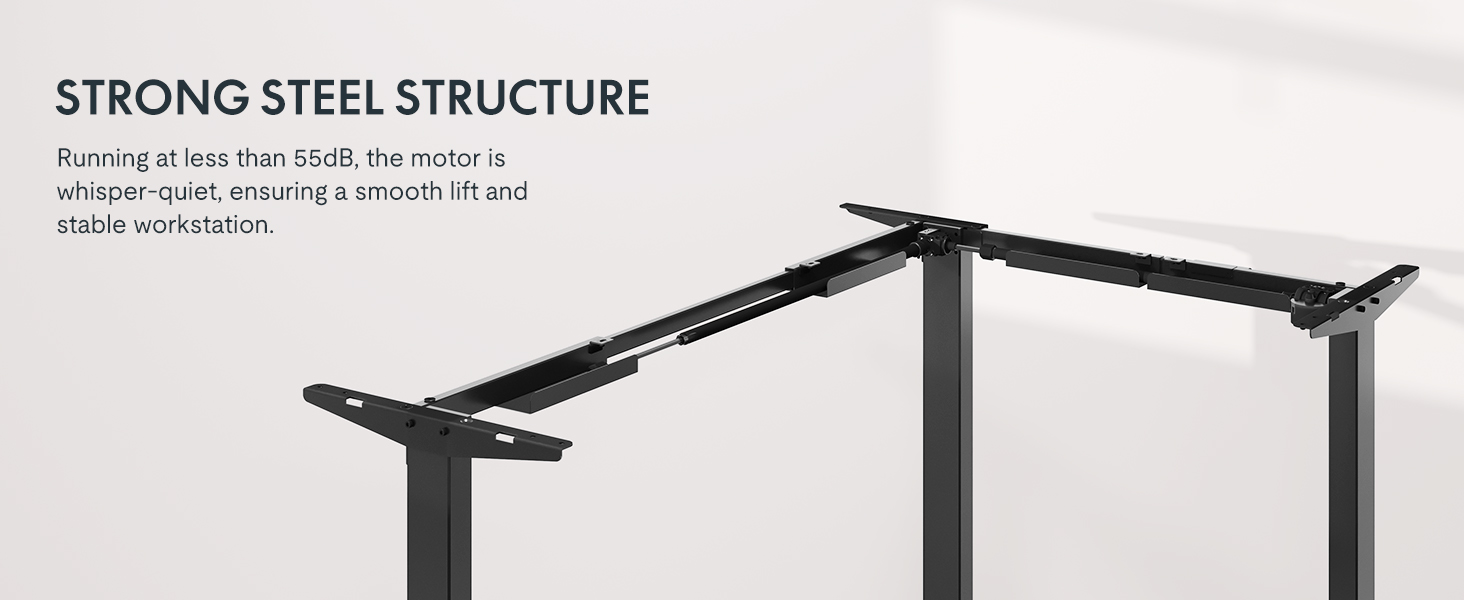
Image: Diagram illustrating the strong steel structure and dual motor system of the desk frame.
Step 3: Attach the Desktop
Place the L-shaped desktop upside down on a soft, protected surface. Position the assembled frame onto the desktop, aligning the pre-drilled holes. Secure the frame to the desktop using the provided screws. Note that the L-shape is reversible, allowing for left-hand or right-hand configuration. Choose your desired orientation before securing the desktop.

Image: The L-shaped desk shown with both left and right configurations, highlighting its reversible design.
4-кадам: Башкаруу панелин орнотуу
Mount the control panel to the underside of the desktop in a convenient location. Connect the control panel cable to the motor control box as indicated in the wiring diagram. Ensure all connections are secure.

Image: Close-up of the advanced LED control panel with up/down movement buttons, height memory presets, sit/stand reminder, and a USB charger port.
Step 5: Connect Power and Position the Desk
With assistance, carefully flip the assembled desk upright and move it to its desired location. Connect the power adapter to the control box and then plug it into a wall outlet. Ensure cables are managed to prevent snagging during height adjustments.
Иштөө нускамалары
Бийиктигин тууралоо
- колдонуу ▲ жана ▼ arrows on the control panel to adjust the desk height. The desk will move smoothly between 28.9 inches and 48.2 inches.
- Учурдагы бийиктик LED экранда көрсөтүлөт.

Image: The desk shown at its minimum (28 inches) and maximum (47.2 inches) adjustable heights, demonstrating its versatility for sitting and standing positions.
Memory Presets
- The control panel features three memory settings (1, 2, 3) to store your preferred sitting and standing heights.
- Бийиктикти сактоо үчүн: Үстөлдү каалаган бийиктикке тууралаңыз, андан кийин баскычын басыңыз 'М' button followed by the desired number button (1, 2, or 3). The display will show "S-" and then the number, indicating the height is saved.
- To recall a saved height: Press the corresponding number button (1, 2, or 3). The desk will automatically move to the saved position.
Отур/Тур эскертүү
- The control panel includes a sit/stand reminder function. Press the 'A' button to activate or deactivate this feature. Refer to the detailed instructions in the included paper manual for setting reminder intervals.
USB заряддоо порту
- A USB charging port is integrated into the control panel for convenient charging of small electronic devices.
Кагылышууга каршы өзгөчөлүк
- Үстөл кагылышууга каршы система менен жабдылган. Эгерде үстөл бийиктикти тууралоо учурунда тоскоолдукка туш болсо, ал автоматтык түрдө токтоп, бузулуунун алдын алуу үчүн бир аз артка бурулат.
Image: Illustration showing the anti-collision feature, where the desk stops and rebounds upon encountering an obstacle.
Техникалык тейлөө
- Regularly wipe the desktop and frame with a soft, damp кездеме. Абразивдүү тазалагычтардан же эриткичтерден качыңыз.
- Check all screws and connections periodically to ensure they remain tight.
- Keep the area around the desk legs clear of dust and debris to ensure smooth operation of the lifting mechanism.
- Do not attempt to lubricate the motor or internal components.
Проблемаларды чечүү
| Көйгөй | Мүмкүн себеп | Чечим |
|---|---|---|
| Иш стол кыймылдабайт. | Power cable disconnected, motor overload, or control panel error. | Check power connections. Unplug and replug the desk after 30 seconds. Reduce weight on the desk if overloaded. Consult the full manual for specific error codes. |
| Үстел бир калыпта эмес кыймылдайт же адаттан тыш үндөрдү чыгарат. | Loose connections, uneven weight distribution, or obstruction. | Ensure all screws are tight. Redistribute weight evenly on the desktop. Check for any obstructions under or around the desk. |
| Эстутум алдын ала орнотуулары иштебейт. | Туура эмес сактоо процедурасы. | Refer to the "Memory Presets" section in Operating Instructions to correctly save heights. |
Техникалык шарттар
| Өзгөчөлүк | Деталь |
|---|---|
| Модель номери | MAH0002191 |
| Продукциянын өлчөмдөрү | 63"D x 39.4"W x 28.9"H |
| Бийиктигин тууралоо диапазону | 28.9" to 48.2" (including 1" desktop thickness) |
| Максималдуу Салмак сыйымдуулугу | 220 фунт |
| Мотор түрү | Dual Motor |
| Ызы-чуу деңгээли | 50 дБ төмөн |
| Иш столунун материалы | Wood (Splice Board) |
| Frame Material | Өнөр жайлык класстагы болот |
| Башкаруу панелинин өзгөчөлүктөрү | LED display, 3 memory presets, Sit/Stand reminder, USB charging port |
| Ассамблея талап кылынат | Ооба (2 адам сунушталат) |
Кепилдик жана колдоо
FLEXISPOT provides the following warranty coverage for your product:
- 5 жылдык камтуу: Үстөлдүн рамкасы жана мотор.
- 2 жылдык камтуу: Башкаруу панели жана электроника.
For customer support, please contact FLEXISPOT directly or refer to the contact information provided with your purchase documentation. You can also visit the official FLEXISPOT store for more information and assistance.
Сатуучу: FlexiSpot


