1. Продукт бүтүп калдыview
The BESTTEN USOT-D-3A-L is a heavy-duty digital programmable timer designed for outdoor use. It features a 7-day programming cycle, a built-in clock, and three grounded outlets, allowing for automated control of outdoor lighting, decorations, and appliances. Its weatherproof construction ensures reliable operation in various outdoor conditions.
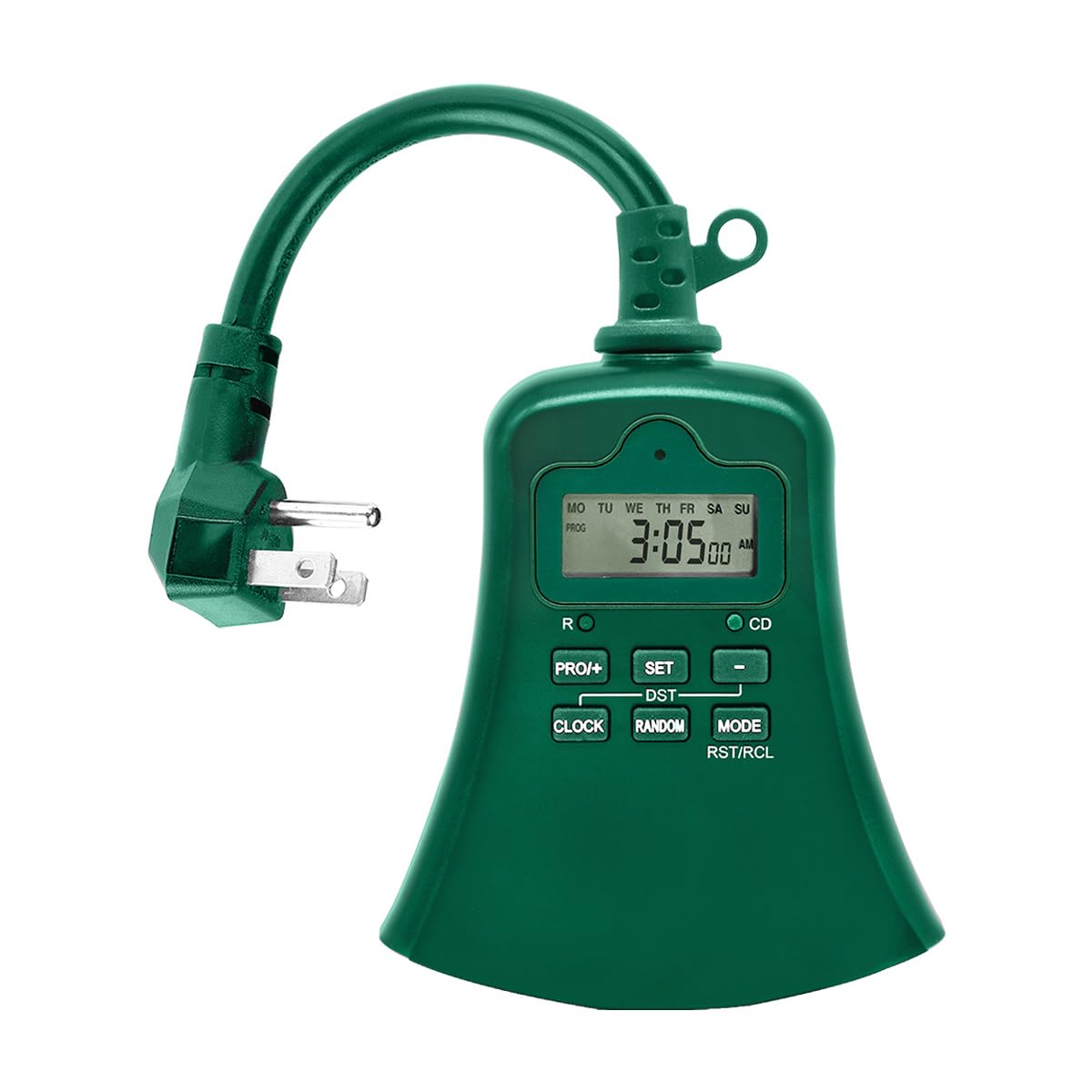
Сүрөт 1.1: Алдыңкы view of the BESTTEN USOT-D-3A-L Outdoor Digital Programmable Timer, showing the display, control buttons, and three grounded outlets.
2. Маанилүү коопсуздук нускамалары
Бул продуктуну колдонуудан мурун бардык коопсуздук көрсөтмөлөрүн окуп чыгып, түшүнүп алыңыз. Бул көрсөтмөлөрдү аткарбоо өрткө, электр тогуна урунууга же жаракат алууга алып келиши мүмкүн.
- Сыртта гана колдонуу: This timer is designed for outdoor use. Ensure it is installed in a location protected from direct water spray, though its weatherproof design offers protection against rain.
- Негиздөө: Always plug the timer into a grounded 3-prong outlet. Do not remove the grounding prong.
- Электрдик рейтинг: Do not exceed the electrical ratings of the timer. Refer to the specifications section for details.
- Сууга чөмүлүү: Таймерди сууга салбаңыз.
- Балдар: Балдар жетпеген жерде сактаңыз.
- Тейлөө: Do not attempt to open or repair the timer. Refer all servicing to qualified personnel.
- Узартуу шнурлары: If using an extension cord, ensure it is rated for outdoor use and can handle the total amperage of the connected devices.
3. Продукциянын өзгөчөлүктөрү
- 7 күндүк санариптик программалоо: Set up to 20 ON/OFF programs per day for individual days or groups of days.
- 3 жерге туташтырылган розеткалар: Control multiple devices simultaneously.
- Аба ырайына чыдамдуу дизайн: Сырткы чөйрөгө ылайыктуу бышык конструкция.
- Countdown Timer Function: Set a specific duration for devices to remain ON.
- Кол менен жокко чыгаруу: Easily switch between ON, OFF, and AUTO modes.
- Built-in Battery Backup: Retains programming during power outages.
- ETL тизмеленген: Коопсуздук жана сапат стандарттары боюнча тастыкталган.
4. Пакеттин мазмуну
Пакетти ачканда бардык буюмдардын бар экендигин текшериңиз:
- BESTTEN USOT-D-3A-L Outdoor Digital Programmable Timer
- Instruction Manual
5. Орнотуу
- Жайгашкан жерди тандаңыз: Select a suitable outdoor location for the timer. Ensure it is near a grounded 3-prong electrical outlet and where the connected devices will reach. While weatherproof, avoid locations where it might be submerged or exposed to direct, high-pressure water spray.
- Монтаждоо (кошумча): The timer can be hung using the integrated keyhole slot on the back. Use a screw (not included) appropriate for your mounting surface.
- Таймерди сайыңыз: Insert the timer's plug into a grounded 3-prong outdoor electrical outlet. The display should illuminate.
- Түзмөктөрдү туташтыруу: Plug your outdoor lights or appliances into the three grounded outlets on the bottom of the timer. Ensure the total load does not exceed the timer's maximum rating.
Image 5.1: Illustration of the timer plugged into an outdoor GFCI outlet, with three devices connected to its outlets.
6. Орнотуу жана программалоо
Before programming, familiarize yourself with the control buttons:
- СААТ: Учурдагы убакытты жана күндү коюу үчүн колдонулат.
- ПРОГ: Used to enter and exit programming mode for ON/OFF times.
- КҮЙГҮЗҮҮ/ӨЧҮРҮҮ/АВТО: Cycles through ON, OFF, and AUTO modes.
- КҮН: Adjusts the day of the week during time setting or program setting.
- HOUR: Adjusts the hour during time setting or program setting.
- МИН: Adjusts the minute during time setting or program setting.
- RST/RCL: Resets the timer or recalls program settings.
6.1. Баштапкы абалга келтирүү
It is recommended to perform a full reset before first use or after a prolonged period of inactivity.
- Кичинесин табыңыз RST/RCL баскычы.
- Using a pointed object (e.g., a pen tip), press the RST/RCL button. The display will clear, and the timer will reset to default settings.
6.2. Учурдагы убакытты жана күндү коюу
- басып, кармап туруңуз СААТ button. The display will show the current time.
- Кармап жатканда СААТ, басыңыз КҮН button repeatedly until the correct day of the week is displayed (MO, TU, WE, TH, FR, SA, SU).
- Кармап жатканда СААТ, басыңыз HOUR button repeatedly to set the correct hour (12-hour format with AM/PM).
- Кармап жатканда СААТ, басыңыз MIN Туура мүнөттү коюу үчүн баскычын кайра-кайра басыңыз.
- бошотуңуз СААТ button. The current time and day are now set.
6.3. КҮЙГҮЗҮҮ/ӨЧҮРҮҮ Убакыттарын программалоо
Таймер 20ге чейин КҮЙГҮЗҮҮ/ӨЧҮРҮҮ программаларына мүмкүндүк берет. Ар бир программа КҮЙГҮЗҮҮ убактысынан жана ӨЧҮРҮҮ убактысынан турат.
- басыңыз ПРОГ button once. The display will show "1 ON" and the time will flash. This is for the first ON program.
- Басыңыз КҮН repeatedly to select the desired day(s) for this program. Options include: specific day (MO, TU, etc.), all weekdays (MO TU WE TH FR), all weekend days (SA SU), all 7 days (MO TU WE TH FR SA SU), or various combinations.
- Басыңыз HOUR каалаган КҮЙГҮЗҮҮ саатын коюу үчүн.
- Басыңыз MIN каалаган КҮЙГҮЗҮҮ МҮНӨТҮН коюу үчүн.
- Басыңыз ПРОГ again. The display will show "1 OFF" and the time will flash. This is for the first OFF program.
- Repeat steps 2-4 to set the desired OFF time for the first program. The day selection will automatically match the ON program.
- Басыңыз ПРОГ again to move to the next program ("2 ON"). Repeat the process for up to 20 programs.
- Каалаган убакта программалоо режиминен чыгуу үчүн, баскычын басыңыз СААТ баскычы.
To clear a program: Ал эми viewing the specific ON or OFF program you wish to clear, press the RST/RCL button. The program will be replaced with "--:--".
6.4. Countdown Timer Function
The countdown function allows you to turn on or off a device for a specific duration.
- Таймердин күйүп турганын текшериңиз АВТО режими.
- басып, кармап туруңуз ON/OFF/AUTO button for approximately 3 seconds. The display will show "CD" (Countdown).
- колдонуу HOUR жана MIN каалаган саноонун узактыгын орнотуу үчүн баскычтарды басыңыз.
- Басыңыз ON/OFF/AUTO again to start the countdown. The connected device will turn ON (if currently OFF) or OFF (if currently ON) for the set duration.
- Артка саноону жокко чыгаруу үчүн, баскычын басыңыз ON/OFF/AUTO дагы бир жолу.
7. Иштөө режимдери
басыңыз ON/OFF/AUTO button repeatedly to cycle through the operating modes:
- АВТО: The timer operates according to the programmed ON/OFF times. This is the standard operating mode for automated control.
- КҮЙҮК: The connected devices will remain continuously ON, overriding any programmed settings. The display will show "ON".
- ӨЧҮК: The connected devices will remain continuously OFF, overriding any programmed settings. The display will show "OFF".
Таймердин дайыма иштеп турганын текшериңиз АВТО mode for programmed schedules to function.
8. Техникалык тейлөө
- Тазалоо: Тазалоодон мурун таймерди розеткадан сууруп алыңыз. Сыртын жумшак, d менен сүртүңүзamp кездеме. Катуу химиялык заттарды же абразивдүү тазалагычтарды колдонбоңуз.
- Сактагыч: Эгер таймерди көпкө сактап койсоңуз, аны электр тармагынан сууруп, салкын, кургак жерде сактаңыз.
- Батарея: Ички батарейка электр энергиясы өчүрүлгөн учурда жөндөөлөрдү сактоо үчүн иштелип чыкканtages. If the display is consistently blank or settings are lost frequently, the internal battery may need servicing by a qualified technician.
9. Кыйынчылыктарды
| Көйгөй | Мүмкүн себеп | Чечим |
|---|---|---|
| Таймердин дисплейи бош. | No power to the timer; internal battery depleted. | Ensure the timer is securely plugged into a live outlet. If the problem persists, the internal battery may need charging (leave plugged in for 24 hours) or replacement. |
| Devices are not turning ON/OFF at programmed times. | Timer is not in AUTO mode; incorrect program settings; devices not properly connected. | Басыңыз ON/OFF/AUTO until "AUTO" is displayed. Review your program settings (Section 6.3) for accuracy. Ensure devices are securely plugged into the timer. |
| Timer is ON/OFF continuously, ignoring programs. | Timer is in ON or OFF mode. | Басыңыз ON/OFF/AUTO until "AUTO" is displayed. |
| Программалоонун кыйынчылыгы. | Incorrect button sequence; unfamiliarity with controls. | Refer to Section 6.3 for detailed programming steps. Perform an initial reset (Section 6.1) and try again. |
10. Техникалык шарттар
| Модель номери | USOT-D-3A-L |
| Электрдик рейтинг | 125V AC, 60Hz, 15A Resistive, 1875W |
| Соода түйүндөрүнүн саны | 3 Негизделген розетка |
| Программалоо циклдери | 7 күндүк, 20ге чейин күйгүзүү/өчүрүү программалары |
| Материал | Поликарбонат |
| Элемент Салмагы | 8.5 унция (0.53 фунт) |
| Сертификаттар | ETL тизмеленген |
11. Кепилдик жана Кардарларды колдоо
BESTTEN products are designed and manufactured to the highest quality standards. For warranty information, technical support, or customer service inquiries, please contact BESTTEN directly through their official webпродукт сатылып алынган сайт же сатуучу.
Please have your model number (USOT-D-3A-L) and purchase information ready when contacting support.


