1. Киришүү
This manual provides essential information for setting up, operating, maintaining, and troubleshooting your HP EliteOne 800 G5 24-inch All-in-One Touchscreen PC. Please read this guide thoroughly before using your device to ensure proper functionality and longevity.

1-сүрөт: HP EliteOne 800 G5 All-in-One компьютери, анын ичинде клавиатура жана чычкан.
2. Пакеттин мазмуну
Пакетте бардык буюмдар бар экенин текшериңиз:
- HP EliteOne 800 G5 баары бир компьютер
- HP USB Keyboard
- HP USB Mouse
- Электр кабели
- Documentation (this manual, safety information)
3. Продукт бүтүп калдыview
3.1 Фронт View

Сүрөт 2: Алдыңкы view of the HP EliteOne 800 G5, showing the 24-inch touchscreen display and integrated speakers.
- 23.8-inch FHD IPS WLED-backlit Touchscreen Display: Main interactive display area.
- 2 MP FHD Pop-up Webкамера: Located at the top center, retracts when not in use.
- Интеграцияланган Dual Array Digital микрофон: For clear audio input during calls or recordings.
- Bang & Olufsen Speakers: Located below the screen for high-quality audio output.
3.2 тарап View (Оңдо)

3-сүрөт: Оң тарап view illustrating the optical disk drive and audio ports.
- Optical Disk Drive: For reading and writing CDs/DVDs.
- Disc drive eject button: To open the optical disk drive tray.
- Standard lock slot (10 mm): For security cables.
- Universal Audio Jack with CTIA headset support: For connecting headsets with a microphone.
- Наушник туташтыргычы: Наушниктерди туташтыруу үчүн.
3.3 Арткы View жана порттор
4-сүрөт: Арткы бөлүгүнүн деталдары view showing all available ports and connections.
- USB 3.1 Gen 2 Type-A port: High-speed USB connection.
- USB 3.1 Gen 2 Type-A port (charge support up to 5V/1.5A): High-speed USB with charging capability.
- Audio line-out connector: Тышкы динамиктерди же аудио системаларды туташтыруу үчүн.
- USB 3.1 Gen 1 Type-A ports (2): Standard USB connections.
- RJ-45 (network) jack: Зымдуу Ethernet туташуусу үчүн.
- Кубат туташтыргычы: Электр шнурын туташтыруу үчүн.
- USB 3.1 Gen 2 Type-A ports (2) wake capable: High-speed USB ports that can wake the system.
- Dual-Mode DisplayPort™ 1.2 (DP++): Тышкы дисплейлерди туташтыруу үчүн.
- HDMI 2.0a connector: Тышкы дисплейлерди туташтыруу үчүн.
- SD card reader 4.0 (NOT INCLUDED on all models): SD эстутум карталарын окуу үчүн.
- USB 3.1 Type-C™ Gen 2 port (charge support up to 5V/3A): Reversible USB-C port with charging capability.
- Dual-state power button: To power on/off or put the system to sleep.
- Албетте View Button (optional): Activates HP Sure View integrated privacy screen.

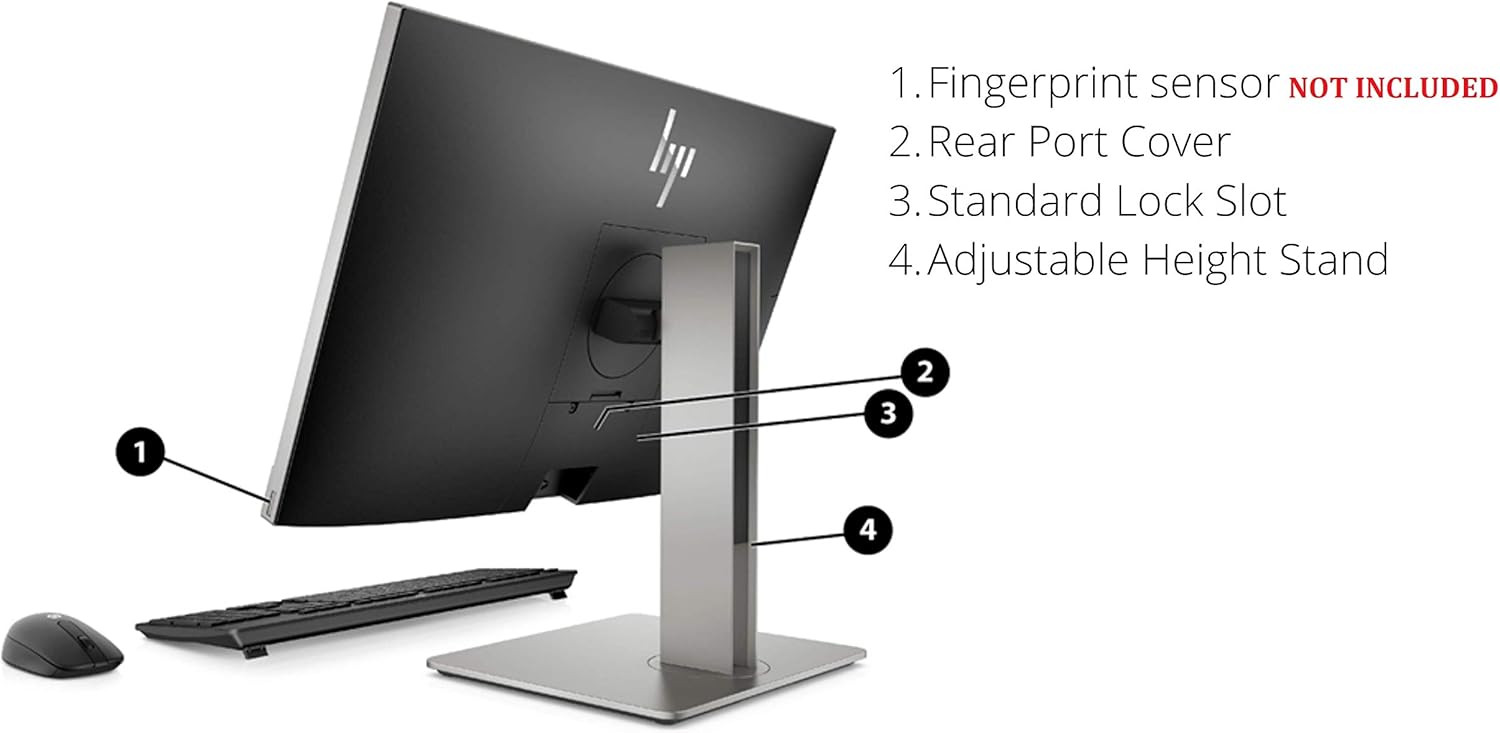
5-сүрөт: Арткы view highlighting the adjustable height stand and other features.
- Fingerprint sensor (NOT INCLUDED on all models): For biometric authentication.
- Rear Port Cover: Conceals and protects rear ports.
- Standard Lock Slot: For security cables.
- Жөндөлүүчү бийиктик: Allows for ergonomic positioning of the display.
4. Орнотуу
Follow these steps to set up your HP EliteOne 800 G5 PC:
- Компьютерди таңгактан чыгарыңыз: Бардык компоненттерди таңгактан кылдаттык менен алып салыңыз.
- Position the PC: Place the All-in-One PC on a stable, flat surface. Ensure adequate ventilation around the device.
- Баскычтоп менен чычканды туташтыруу: Plug the USB keyboard and mouse into any available USB Type-A ports on the rear of the PC.
- Туташуу кубаты: Connect the power cord to the power connector on the rear of the PC, then plug the other end into a grounded electrical outlet.
- Тармакка туташуу (милдеттүү эмес): For a wired internet connection, connect an Ethernet cable from your router or modem to the RJ-45 (network) jack on the rear of the PC.
- Күйгүзүү: Press the dual-state power button, located on the rear of the PC, to turn on the system.
- Баштапкы орнотуу: Follow the on-screen instructions to complete the Windows 10 Pro setup, including language, region, network connection (if not wired), and user account creation.
5. Иштөө нускамалары
5.1 Электр энергиясын башкаруу
- Күйгүзүү: Press the power button on the rear of the PC.
- Уйку режими: Briefly press the power button or select 'Sleep' from the Windows Start menu.
- Өчүрүү: Windows Start менюсунан "Өчүрүү" дегенди тандаңыз.
- Кайра баштоо: Windows "Старт" менюсунан "Кайра баштоо" дегенди тандаңыз.
5.2 Сенсордук экранды колдонуу
The 24-inch display supports multi-touch gestures. Common gestures include:
- таптаңыз: Чычкан чыкылдатууга барабар.
- Эки жолу таптаңыз: Эки жолу чыкылдатууга барабар.
- Басып кармап туруңуз: Оң чыкылдатууга барабар.
- Чымчып/Созуп: Чоңойтуу же кичирейтүү.
- Серпүү: Мазмунду карап чыгыңыз же багыт алыңыз.
5.3 Webкамера жана аудио
- Webкамера: The 2 MP FHD pop-up webcam automatically extends when an application requires it (e.g., video calls). Gently push it down to retract when not in use for privacy.
- Микрофон: The integrated dual array digital microphone is active when the webcam is in use or when voice input is required.
- Баяндамачылар: The Bang & Olufsen speakers provide audio output. Volume can be adjusted via Windows settings or keyboard shortcuts.
5.4 Optical Disk Drive
To use the DVD+/-RW SM DL 9.5mm slim tray:
- Press the eject button on the right side of the PC.
- Place a CD or DVD onto the tray, ensuring it is seated correctly.
- Gently push the tray back into the PC until it clicks shut.
6. Техникалык тейлөө
6.1 Тазалоо
- Экран: Бир аз жумшак, түксүз кездемени колдонуңуз dampсуу же экранды тазалоо эритмеси менен. Суюктукту экранга түз чачпаңыз.
- Шасси: Жумшак, кургак чүпүрөк менен сүртүңүз. Абразивдүү тазалоочу каражаттардан алыс болуңуз.
- Вентиляция: Ашыкча ысып кетүүнүн алдын алуу үчүн желдетүү тешиктери чаңдан жана тоскоолдуктардан тазаланганын текшериңиз.
6.2 Программалык камсыздоо жаңыртуулары
Оптималдуу аткарууну жана коопсуздукту камсыз кылуу үчүн операциялык системаңызды жана драйверлериңизди үзгүлтүксүз жаңыртыңыз:
- Windows жаңыртуулары: барыңыз Орнотуулар > Жаңыртуу жана Коопсуздук > Windows Жаңыртуу жаңыртууларды текшерүү жана орнотуу үчүн.
- HP колдоо жардамчысы: Use the pre-installed HP Support Assistant software to check for driver and firmware updates specific to your HP EliteOne PC.
7. Кыйынчылыктарды
| Көйгөй | Мүмкүн себеп | Чечим |
|---|---|---|
| PC күйбөйт | Электр кубаты жок, байланышы үзүлгөн | Check power cord connection to PC and outlet. Ensure outlet is functional. |
| Экранда дисплей жок | PC in sleep mode, display settings issue | Press any key or move mouse to wake. If connected to external display, check display input source. |
| Сенсордук экран жооп бербейт | Software glitch, dirty screen | Restart the PC. Clean the screen with a soft, lint-free cloth. |
| Динамиктерден аудио жок | Volume muted, incorrect audio output device | Check volume levels in Windows. Ensure 'Speakers (Bang & Olufsen)' is selected as the default playback device. |
| Webкамера иштебейт | Webcam retracted, privacy settings, driver issue | камсыз кылуу webcam is extended. Check Windows privacy settings for camera access. Update webcam drivers via HP Support Assistant. |
8. Техникалык шарттар
Key technical specifications for the HP EliteOne 800 G5 24-inch All-in-One PC:
| Өзгөчөлүк | Деталь |
|---|---|
| Модель номери | 2D9S5UW#ABA |
| Дисплей | 23.8" diagonal FHD IPS widescreen WLED-backlit touch screen (1920 x 1080) |
| Процессор | Intel Core i5-9500 (9M Cache, up to 4.40 GHz) |
| Графика | Intel UHD Graphics 630 (Интеграцияланган) |
| RAM | 8 ГБ DDR4-2666 SDRAM |
| Сактагыч | 256 GB M.2 2280 PCIe NVMe TLC SSD |
| Операция системасы | Windows 10 Pro |
| Webcam | 2 MP FHD pop-up webcam |
| Аудио | Bang & Olufsen Speakers, Integrated Dual Array Digital Microphone |
| Оптикалык диск | DVD+/-RW SM DL 9.5mm slim tray |
| Порттар (арткы) | USB 3.1 Gen 2 Type-A (x3), USB 3.1 Gen 1 Type-A (x2), USB 3.1 Type-C Gen 2 (x1), DisplayPort 1.2 (x1), HDMI 2.0a (x1), RJ-45 (x1), Audio line-out (x1), Power connector (x1) |
| Порттор (каптал) | Universal Audio Jack (x1), Headphone connector (x1) |
| Өлчөмдөрү (LxWxH) | 18.4 x 7.1 x 21.2 дюйм |
| Салмагы | 19.24 фунт |
9. Кепилдик жана колдоо
Your HP EliteOne 800 G5 PC comes with a standard manufacturer's warranty. Please refer to the warranty card included in your package for specific terms and conditions, including coverage duration and service options.
For technical support, driver downloads, and additional product information, please visit the official HP support webсайт:
When contacting support, have your product model number (2D9S5UW#ABA) and serial number ready.