Продукт бүттүview
The Enermax Liqmax III 240 White A-RGB AIO CPU Liquid Cooler is an all-in-one liquid cooling solution designed for both Intel and AMD CPU platforms. It features addressable RGB lighting that can synchronize with popular motherboard software such as ASUS Aura Sync, Gigabyte RGB FUSION, MSI Mystic Light Sync, ASRock Polychrome, and Razer Chroma, offering 16.8 million colors and dynamic lighting effects. Its dual-chamber water block design, combined with Central Coolant Inlet (CCI) structure and Shunt-Channel Technology (SCT), ensures efficient heat transfer by targeting the hottest spots and shortening the coolant path. The cooler is equipped with dual-convex blade fans engineered to generate high air pressure and volume for optimal cooling performance.
Пакеттин мазмуну
Орнотууну баштоодон мурун, пакетте бардык компоненттер бар экенин текшериңиз:
- 1x 240мм Радиатор
- 2x 120mm ARGB PWM Fans
- 1x CPU Water Block with Integrated Pump
- Mounting Hardware for Intel Sockets (LGA2066, LGA2011-v3, LGA2011, LGA1700, LGA1200, LGA1151, LGA1150, LGA1156, LGA1155)
- AMD розеткалары үчүн орнотуу жабдыктары (AM5, AM4, AM3+, AM3, AM2+, AM2, FM2+, FM2, FM1)
- Термикалык паста
- Колдонуучунун Колдонмосу (бул документ)
Орнотуу жана орнотуу
Орнотуу боюнча этап-этабы менен толук көрсөтмөлөрдү алуу үчүн, расмий веб-сайтка кайрылыңыз Орнотуу боюнча колдонмо (PDF) provided by Enermax. Below is a general overview and key considerations.
Алдын ала орнотуу
- Системаңыздын өчүрүлгөнүн жана розеткадан ажыратылганын текшериңиз.
- Identify your CPU socket type (Intel or AMD) to select the correct mounting hardware.
- Prepare your PC case for radiator mounting (top or front, depending on case compatibility).
AMD Installation Overview
For AMD platforms, the installation typically utilizes the existing AMD stock backplate that comes with your motherboard. Secure the appropriate AMD mounting brackets to the water block, then align and secure the cooler to the CPU socket using the provided standoffs and screws.

Figure 1: Diagram illustrating the AMD CPU cooler installation process, showing the water block, mounting brackets, and the use of the AMD stock backplate.
Intel Installation Overview
For Intel platforms, install the universal backplate behind the motherboard, then attach the correct Intel mounting brackets to the water block. Apply thermal paste to the CPU, then carefully place the water block onto the CPU and secure it with the provided screws.
Fan and Radiator Mounting
Mount the two 120mm ARGB PWM fans to the 240mm radiator using the long screws. Ensure the fans are oriented to push or pull air through the radiator in your desired airflow configuration. Then, mount the assembled radiator and fan unit to your PC case.

Figure 2: The Enermax Liqmax III 240 White A-RGB AIO CPU Liquid Cooler, showcasing the radiator, two ARGB fans, and the water block.
Кабелдик байланыштар
- Насостун кубат кабелин энелик платаңыздагы CPU_FAN же AIO_PUMP башына туташтырыңыз.
- Connect the fan PWM cables to the CPU_FAN or SYS_FAN headers on your motherboard.
- Connect the ARGB lighting cables from the fans and water block to a 3-pin 5V ARGB header on your motherboard. Ensure correct pin alignment (5V-D-G) to prevent damage.

Figure 3: Illustration of the 3-pin 5V ARGB header connection on a motherboard, essential for synchronizing the cooler's lighting effects.
Иштөө нускамалары
Fan Control and Performance
The included 120mm ARGB PWM fans operate within a speed range of 500 to 1600 RPM. This Pulse Width Modulation (PWM) control allows your motherboard to dynamically adjust fan speed based on CPU temperature, providing optimal cooling performance when needed and quieter operation at idle. The dual-convex blade design enhances both air pressure (max. 1.98mmH2O) and high-volume airflow (max. 72.1CFM).
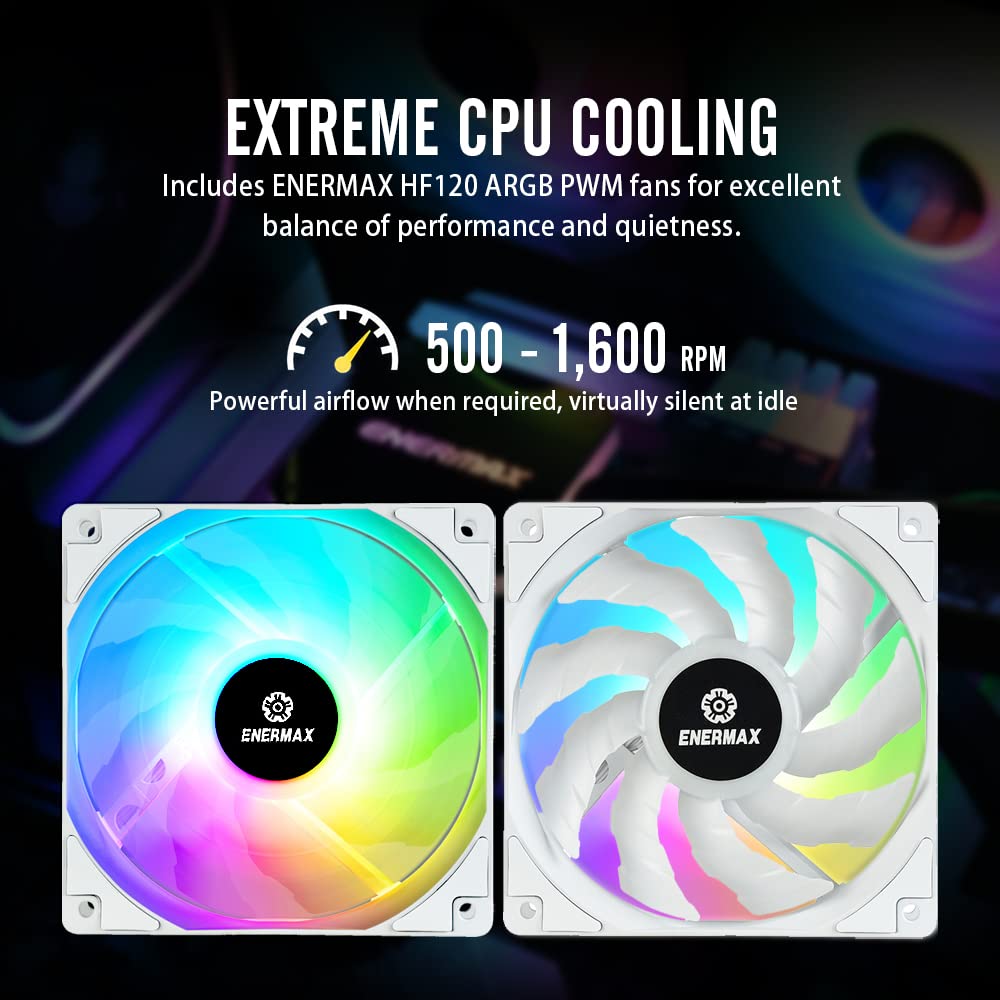
Сүрөт 4: Жакын пландан view of the Enermax HF120 ARGB PWM fans, highlighting their design for balanced performance and quietness.

Figure 5: Diagram illustrating the powerful airflow generated by the dual-convex blade design, showing air pressure and volume metrics.
ARGB жарыктандыруу синхрондоштуруу
Once connected to a compatible 3-pin 5V ARGB motherboard header, the cooler's lighting can be controlled and synchronized using your motherboard's RGB software (e.g., ASUS Aura Sync, Gigabyte RGB FUSION, MSI Mystic Light Sync, ASRock Polychrome). This allows for customization of colors and dynamic lighting effects across your system.
Техникалык тейлөө
Үзгүлтүксүз тейлөө сиздин суюк муздаткычыңыздын узак иштөөсүн жана оптималдуу иштешин камсыз кылууга жардам берет.
- Чаңды тазалоо: Periodically clean dust from the radiator fins and fan blades using compressed air. Accumulated dust can impede airflow and reduce cooling efficiency.
- Кабелдик башкаруу: Бардык кабелдердин тыкан жайгаштырылганын жана корпустун ичиндеги абанын айлануусуна тоскоол болбогонун текшериңиз.
- Системанын мониторинги: Use system monitoring software to regularly check CPU temperatures and pump/fan speeds to ensure they are operating within normal parameters.
- Муздаткычты текшерүү: As this is a closed-loop AIO system, no coolant refilling is typically required. However, be vigilant for any signs of leaks around the tubing or water block.
Проблемаларды чечүү
If you encounter issues with your Enermax Liqmax III 240 cooler, consider the following troubleshooting steps:
- Кубат жок/Желдеткичтер айланбай жатат:
- Check all power connections to the pump and fans. Ensure they are securely plugged into the correct motherboard headers.
- Verify that the CPU_FAN header is enabled in your motherboard's BIOS/UEFI settings.
- Жогорку CPU температурасы:
- Ensure the water block is making proper contact with the CPU. Re-seat if necessary, applying fresh thermal paste.
- Check fan orientation on the radiator for optimal airflow.
- Радиатордун сүзгүчтөрүндөгү чаңды тазалаңыз.
- Verify pump operation (listen for a faint hum or check RPM in monitoring software).
- ARGB жарыктандыруу иштебей жатат/туура эмес түстөр:
- Confirm the ARGB cable is connected to a 3-pin 5V ARGB header, not a 4-pin 12V RGB header. Connecting to a 12V header can damage the LEDs.
- Ensure the ARGB header is enabled in your motherboard's BIOS/UEFI.
- Use your motherboard's RGB software to control the lighting. Update the software if issues persist.
- Ашыкча ызы-чуу:
- Check fan speeds; higher RPMs will generate more noise. Adjust fan curves in BIOS/software if desired.
- Желдеткичтин калактарына эч кандай кабелдер тоскоол болбогонун текшериңиз.
- A gurgling sound might indicate air bubbles in the loop. Gently tilt your PC case to help move air bubbles to the pump.

Figure 6: Chart illustrating the low noise level of the cooler, optimized for quiet operation.
Техникалык шарттар
| Өзгөчөлүк | Спецификация |
|---|---|
| Модель номери | ELC-LMT240-W-ARGB |
| Радиатордун өлчөмү | 240мм |
| Fan Size | 120мм |
| Желдетүүчү түрү | ARGB PWM Fan |
| Fan Speed | 500 - 1600 RPM (Max. Rotational Speed) |
| Аба агымынын кубаттуулугу | 72.1 CFM (мүнөтүнө куб фут) |
| Аба басымы | 1.98 ммН2О |
| Ызы-чуу деңгээли | 14 дБ |
| Муздатуу ыкмасы | Суу |
| Материал | Алюминий |
| Тtage | 5 вольт |
| Кубат туташтыргычынын түрү | 4-Pin (Сеул) |
| Шайкеш түзмөктөр | Иш такта |
| Продукциянын өлчөмдөрү (L x W x Y) | 10.79 x 2.09 x 4.72 дюйм (27.4 x 5.3 x 12 см) |
| Салмагы | 3.97 фунт (1.8 кг) |
| Intel CPU Socket Support | LGA2066, LGA2011-v3, LGA2011, LGA1700, LGA1200, LGA1151, LGA1150, LGA1156, LGA1155 |
| AMD CPU Socket Support | AM5, AM4, AM3+, AM3, AM2+, AM2, FM2+, FM2, FM1 |
Кепилдик маалымат
The Enermax Liqmax III 240 White A-RGB AIO CPU Liquid Cooler comes with a 5 жылдык кепилдик. This warranty covers defects in materials and workmanship under normal use. For specific terms, conditions, and to initiate a warranty claim, please refer to the official Enermax website or contact Enermax customer support directly.
Колдоо жана Байланыш
For further assistance, technical support, or inquiries regarding your Enermax product, please visit the official Enermax webсайт же алардын Amazon бренд дүкөнү:
- Enermax Official Webсайт: www.enermaxusa.com (Эскертүү: URL мурдагы болуп саналатample, refer to product packaging or official sources for exact URL)
- Enermax Amazon Store: Visit Enermax Store on Amazon
Кошумча ресурстарды жана көп берилүүчү суроолорду алардын колдоо баракчаларынан таба аласыз.
Расмий продукт Videos
No official product videos with 'Seller' as creator type were found in the provided data to embed directly into this manual. Please refer to the Enermax official website or their YouTube channel for any available product videos.


