1. Киришүү
Сатып алганыңыз үчүн рахматasing the Technical Pro SPARK8GNEON Portable Bluetooth Speaker. This manual provides essential information for the safe and efficient operation of your device. Please read it thoroughly before use and retain it for future reference.
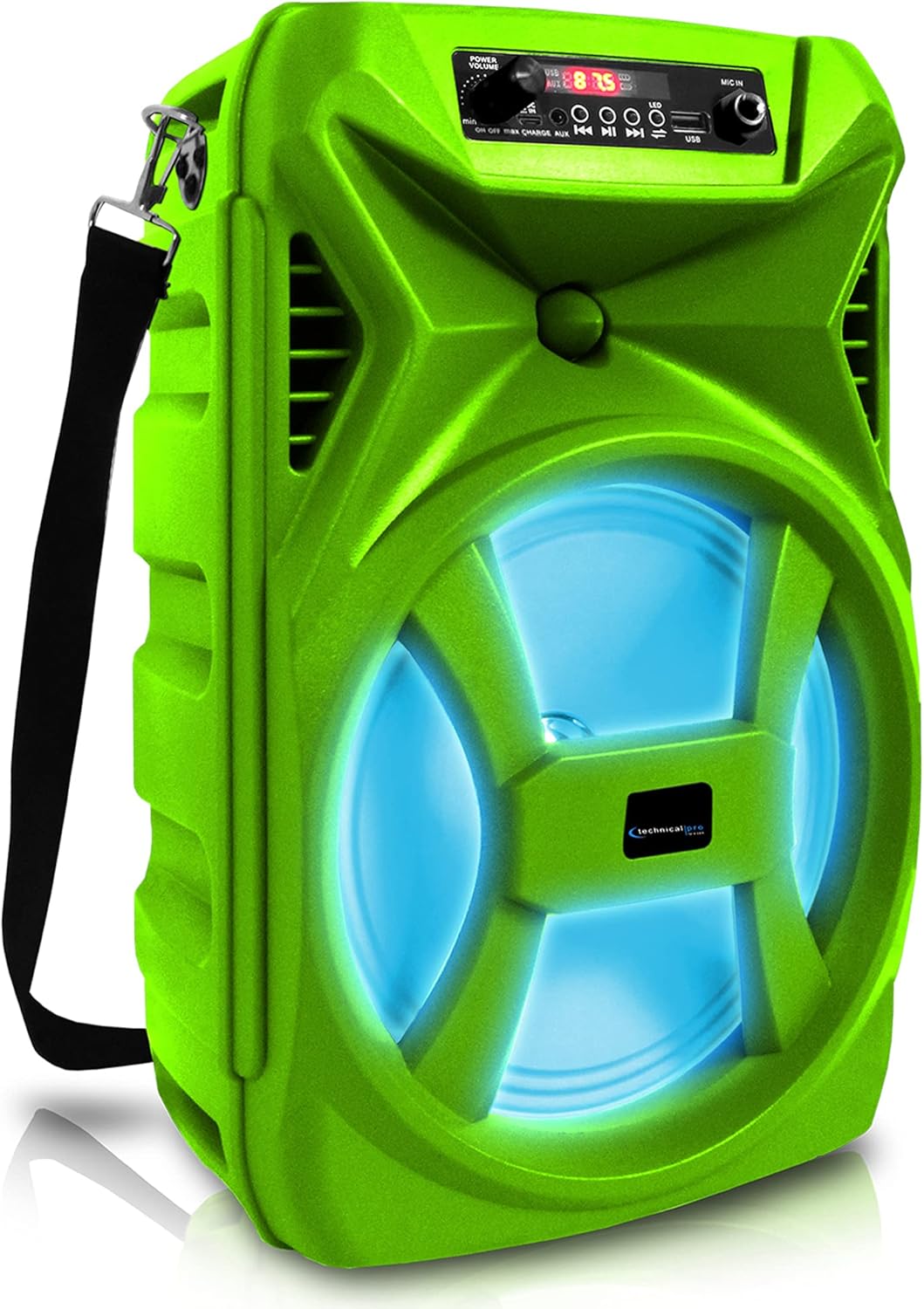
Фронт view of the Technical Pro SPARK8GNEON portable Bluetooth speaker, showcasing its vibrant green casing, illuminated woofer, and the top-mounted control panel.
2. Коопсуздук маалыматы
- Динамикти экстремалдык температурага, нымдуулукка же түз күн нуруна дуушар кылбаңыз.
- Спикерди түшүрүүдөн же катуу таасирлерге дуушар кылуудан качыңыз.
- Динамикти ажыратууга же өзгөртүүгө аракет кылбаңыз. Бул кепилдикти жокко чыгарат.
- Динамикти суудан жана башка суюктуктардан алыс кармаңыз.
- Берилген заряддоо кабелин же тастыкталган эквивалентти гана колдонуңуз.
- Динамикти иштетип жатканда туура желдетүүнү камсыз кылыңыз.
3. Пакеттин мазмуну
Пакетте бардык буюмдар бар экенин текшериңиз:
- Technical Pro SPARK8GNEON Portable Bluetooth Speaker
- USB заряддоо кабели
- Погон
- Колдонуучунун Колдонмосу (бул документ)
4. Продукт бүтүп калдыview
Спикердин компоненттери жана башкаруу элементтери менен таанышыңыз.

An infographic detailing the main features of the Technical Pro SPARK8GNEON speaker, such as its built-in rechargeable battery, True Wireless Stereo (TWS) capability, Bluetooth compatibility, USB and card inputs, durable ABS plastic construction, and support for A2DP & AVRCP stereo Bluetooth devices.
Башкаруу панели (үстүндө) View)
- Кубат баскычы: Динамикти күйгүзүү/өчүрүү үчүн басып кармап туруңуз.
- Режим баскычы: Short press to switch between Bluetooth, USB, TF Card, and AUX modes.
- Ойнотуу/тындыруу баскычы: Аудиону ойнотуу же тындыруу үчүн басыңыз.
- Мурунку/Үндү азайтуу баскычы: Мурунку трек үчүн кыска басыңыз, үндү азайтуу үчүн көпкө басыңыз.
- Кийинки/Үндү катуулатуу баскычы: Кийинки трек үчүн кыска басыңыз, үнүн катуулатуу үчүн көпкө басыңыз.
- LED жарык баскычы: LED жарык режимдерин алмаштыруу же аларды өчүрүү үчүн басыңыз.
- USB порт: USB флэш-дискти ойнотуу үчүн.
- TF карта уячасы: TF (MicroSD) картасын ойнотуу үчүн.
- AUX киргизүү: тышкы аудио түзмөктөр үчүн 3.5 мм уячасы.
- Заряддоо порту: USB заряддоо кабелин туташтыруу үчүн.
5. Орнотуу
5.1 Алгачкы заряддоо
- Before first use, fully charge the speaker for 8-10 hours.
- USB кубаттоочу кабелди динамиктин кубаттоочу портуна, ал эми экинчи учун USB кубаттоочу адаптерге (кошулмага кирбейт) же компьютердин USB портуна туташтырыңыз.
- Заряддоо индикатору кубаттоо учурунда күйөт жана толук заряддалганда өчөт.
5.2 Күйгүзүү/өчүрүү
- To power ON, press and hold the Power Button until the display illuminates.
- To power OFF, press and hold the Power Button again until the display turns off.
6. Иштөө нускамалары
6.1 Bluetooth жупташтыруу
- Динамикти күйгүзүңүз. Ал автоматтык түрдө Bluetooth жупташтыруу режимине өтөт, бул дисплейде Bluetooth сүрөтчөсүнүн жаркылдап күйүшү менен көрсөтүлөт.
- Мобилдик түзмөгүңүздө (смартфон, планшет ж.б.) Bluetooth иштетип, жеткиликтүү түзмөктөрдү издеңиз.
- Select "SPARK8GNEON" from the list of devices.
- Once paired, the speaker will emit a confirmation tone, and the Bluetooth icon will stop flashing.
- Эми сиз түзмөгүңүздөн аудиону динамик аркылуу ойной аласыз.
6.2 USB/TF картасын ойнотуу
- Insert a USB flash drive or TF (MicroSD) card into the respective port.
- The speaker will automatically switch to USB or TF Card mode and begin playing audio files. If not, press the Mode Button to select the correct mode.
- Ойнотууну башкаруу үчүн Ойнотуу/Тынытуу, Мурунку жана Кийинки баскычтарын колдонуңуз.
6.3 AUX киргизүү
- Connect one end of a 3.5mm audio cable (not included) to the speaker's AUX input port.
- Экинчи учун тышкы түзмөгүңүздүн (мисалы, MP3 ойноткуч, ноутбук) аудио чыгаруу уячасына туташтырыңыз.
- Press the Mode Button to select AUX mode.
- Тышкы түзмөгүңүздөн ойнотууну жана үнүн башкарыңыз.
6.4 Чыныгы зымсыз стерео (TWS) жупташтыруу
The TWS function allows you to connect two SPARK8GNEON speakers wirelessly for a stereo sound experience.

Illustration demonstrating the True Wireless Stereo (TWS) feature, showing two Technical Pro SPARK8GNEON speakers wirelessly connected to a single smartphone for synchronized audio playback.
- Ensure both SPARK8GNEON speakers are powered on and in Bluetooth mode, but not yet paired with any device.
- On one of the speakers (this will be the primary speaker), press and hold the TWS button (if available, or a specific button designated for TWS pairing, otherwise assume it's initiated by a long press of the Mode button or a dedicated TWS button not explicitly listed but implied by feature).
- The speakers will attempt to connect to each other. A confirmation tone will sound once connected.
- Эми мобилдик түзмөгүңүздү 6.1-бөлүмдө сүрөттөлгөндөй Bluetooth аркылуу негизги динамикке туташтырыңыз.
- Аудио эми эки динамикте тең стерео форматында ойнотулат.
6.5 LED жарыктары
Press the LED Light Button on the control panel to cycle through various light modes or to turn the LED lights off.
7. Техникалык тейлөө
- Тазалоо: Динамиктин сыртын тазалоо үчүн жумшак, кургак чүпүрөктү колдонуңуз. Абразивдүү тазалагычтарды же эриткичтерди колдонбоңуз.
- Сактагыч: When not in use for extended periods, store the speaker in a cool, dry place away from direct sunlight.
- Батареяга кам көрүү: To prolong battery life, fully charge the speaker before storing it for long periods and recharge it every 3-6 months.
8. Кыйынчылыктарды
| Көйгөй | Мүмкүн себеп | Чечим |
|---|---|---|
| Динамик күйбөйт. | Батарея түгөнүп калды. | Динамикти толук заряддаңыз. |
| Үн жок. | Үн өтө төмөн; туура эмес режим тандалган; түзмөк туташкан эмес. | Increase volume on speaker and connected device; press Mode button to select correct input; ensure Bluetooth/AUX connection is established. |
| Bluetooth түзмөгү жупташа албайт. | Динамик жупташтыруу режиминде эмес; аппарат өтө алыс; кийлигишүү. | Ensure speaker is in Bluetooth pairing mode (flashing icon); move device closer to speaker; turn off other Bluetooth devices nearby. |
| TWS жупташтыруу ишке ашпай калды. | Speakers are too far apart; one speaker already paired to a device. | Ensure speakers are within close proximity; disconnect any Bluetooth devices from both speakers before initiating TWS pairing. |
9. Техникалык шарттар
- Модел: SPARK8GNEON
- Чыгуу кубаттуулугу: 500 Ватт (чоку)
- Динамик өлчөмү: 8 Inch Woofer & Tweeter
- Байланыш: Bluetooth, USB, TF Card, AUX (3.5mm)
- Bluetooth версиясы: (Стандарттуу деп эсептесек, көрсөтүлгөн эмес)
- Батарея: 1 литий-иондук батарейка (кошулган)
- Батареянын иштөө мөөнөтү: (Not specified, varies with usage)
- Заряддоо убактысы: 8-10 hours (initial charge)
- Продукциянын өлчөмдөрү (L x W x Y): 8.86 x 7.48 x 14.17 дюйм
- Элемент Салмагы: 4 фунт
- Импеданс: 3 Ом
- UPC: 817802016296

Diagram illustrating the physical dimensions of the Technical Pro SPARK8GNEON speaker, measuring 14.17 inches in height, 8.86 inches in width, and 7.48 inches in depth.
10. Кепилдик жана колдоо
For warranty information or technical support, please refer to the warranty card included with your product or visit the official Technical Pro website. You may also contact Technical Pro customer service directly for assistance.
Webсайт: Technical Pro Store on Amazon


