Introduction
The FLEXISPOT Pro 3 Stages Dual Motor Electric Standing Desk is designed to enhance your workspace by allowing seamless transitions between sitting and standing positions. This desk promotes better blood circulation, alleviates back and leg pain, and helps maintain proper muscle alignment, contributing to a healthier and more productive work style.
Key features include a seamless whole-piece desktop, a robust 3-stage lift system, quiet dual motors, and an intuitive one-touch LED control panel for personalized height adjustments.

Figure 1: The FLEXISPOT Pro 3 Stages Dual Motor Electric Standing Desk, showcasing its spacious whole-piece desktop and sturdy white frame.
Коопсуздук маалыматы
Продукцияга зыян келтирбөө жана зыян келтирбөө үчүн чогултуу жана иштетүү алдында бардык коопсуздук нускамаларын кылдат окуп чыгыңыз.
- Салмак сыйымдуулугу: Ensure the desk is not overloaded. The maximum weight capacity for this desk is 287 фунт. Exceeding this limit can cause damage to the desk and potential injury.
- Ассамблея: When assembling the desk, handle heavy parts with care. It is highly recommended to have the assistance of another person for safe assembly.
- Электр коопсуздугу: Ensure the power cord is properly connected and not pinched or damaged. Do not operate the desk with a damaged cord or plug. Keep liquids away from electrical components.
- Чымчым пункттары: Keep hands and other objects clear of the moving parts of the desk frame during height adjustments to avoid pinching or crushing.
- Балдар жана үй жаныбарлары: Keep children and pets away from the desk during operation. Do not allow them to play on or under the desk.
- Жайгашкан жери: Place the desk on a level surface. Ensure there is sufficient clearance around the desk for safe movement and adjustment.
Пакеттин мазмуну
Монтаждоону баштоодон мурун, бардык компоненттердин бар экенин жана бузулбаганын текшериңиз. Эгерде кандайдыр бир бөлүктөрү жок же бузулуп калса, кардарларды колдоо менен байланышыңыз.
- Whole-Piece Desktop (Natural Desktop)
- Electric Desk Frame (White) with Dual Motors
- One-Touch LED Control Panel
- Адаптер жана шнур
- Монтаждоочу жабдык (буроолор, болттар ж.б.)
- Көрсөтмө (бул документ)
Орнотуу жана чогултуу
Assembly of the FLEXISPOT standing desk is designed to be straightforward, though it is recommended for two people. The desktop comes with pre-marked holes for easy alignment of the frame.
- Компоненттерди таңгактан чыгаруу: Таңгактан кылдаттык менен бардык бөлүктөрүн алып салыңыз жана чийилип калбаш үчүн таза, жумшак бетке жаткызыңыз.
- Буттарды иш тактасына бекитүү: Align the desk frame with the pre-drilled holes on the underside of the desktop. Secure the frame to the desktop using the provided screws. A drill may be helpful for this step.
- Башкаруу панелин орнотуу: Mount the one-touch LED control panel to the designated area on the underside of the desktop, typically on the front edge.
- Connect Motors and Control Panel: Мотор кабелдерин башкаруу кутучасына, андан кийин башкаруу панелинин кабелин башкаруу кутучасына туташтырыңыз. Бардык туташуулардын бекем экенин текшериңиз.
- Туташуу кубаты: Кубат адаптерин башкаруу кутусуна сайыңыз, андан кийин кубат шнурун розеткага сайыңыз.
- Кабелдик башкаруу: Use the included cable ties or management clips to neatly organize and secure all cables to prevent tangling or damage during desk movement.

Figure 2: The seamless whole-piece desktop provides a superior and more durable surface compared to multi-piece alternatives.
Иштөө нускамалары
The FLEXISPOT standing desk features an intuitive control panel for easy height adjustment and memory functions.
Башкаруу панелиview
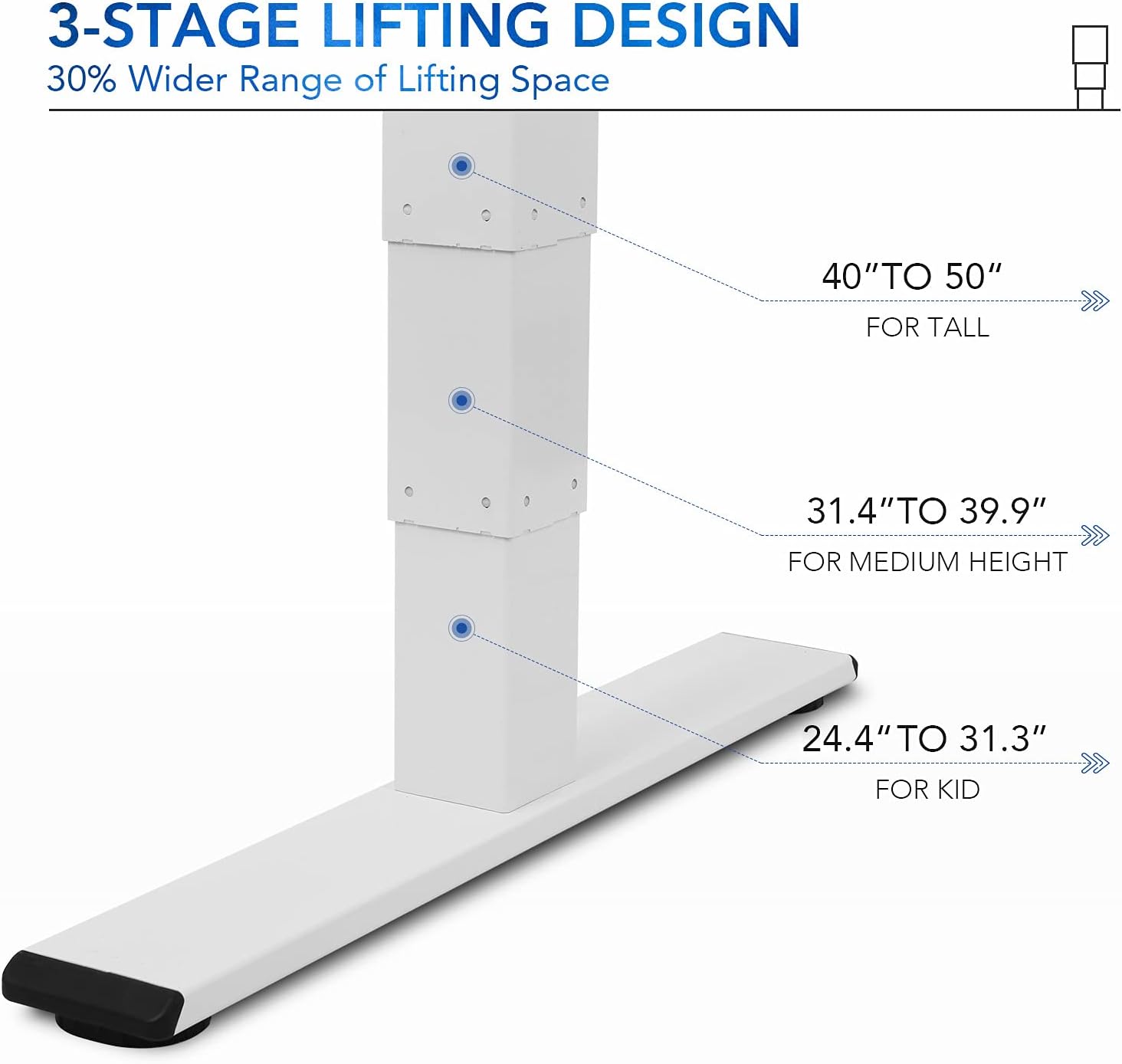
Figure 3: The one-touch LED control panel allows for precise height adjustments and memory programming.
- Өйдө/төмөн жебелер: Үстөлдүн бийиктигин кол менен тууралоо үчүн басып, кармап туруңуз. Токтотуу үчүн коё бериңиз.
- Memory Buttons (1, 2, 3): Program and recall your preferred sitting and standing heights.
- "M" Button: Эстутум алдын ала коюлган бийиктикти сактоо үчүн колдонулат.
- "A" Button: (If applicable) May be used for advanced settings or a sit/stand reminder.
Бийиктигин тууралоо
3-сtage lift system provides a wide height range from 24.4 inches (for children) to 50 inches (for tall adults), accommodating various user heights comfortably.

4-сүрөт: 3-сtage lifting design offers a 30% wider range of height adjustment compared to 2-stage системалары.
- Кол менен тууралоо: Use the up and down arrows to find your desired height.
- Эстутум алдын ала орнотууларын сактоо:
- Үстөлдү каалаган бийиктикке тууралаңыз.
- Press the "M" button. The display will flash.
- Press one of the numbered memory buttons (1, 2, or 3) before the display stops flashing. The height is now saved.
- Эстутум алдын ала орнотууларды кайра чакырып алуу: Simply press the corresponding numbered memory button (1, 2, or 3) to automatically move the desk to the saved height.
Quiet Dual Motors and Stability
The desk is equipped with whisper-quiet dual motors that generate less than 45 dB of sound during operation. These motors provide enhanced stability and can handle up to 287 lbs, ensuring smooth and reliable height adjustments even with heavy setups.
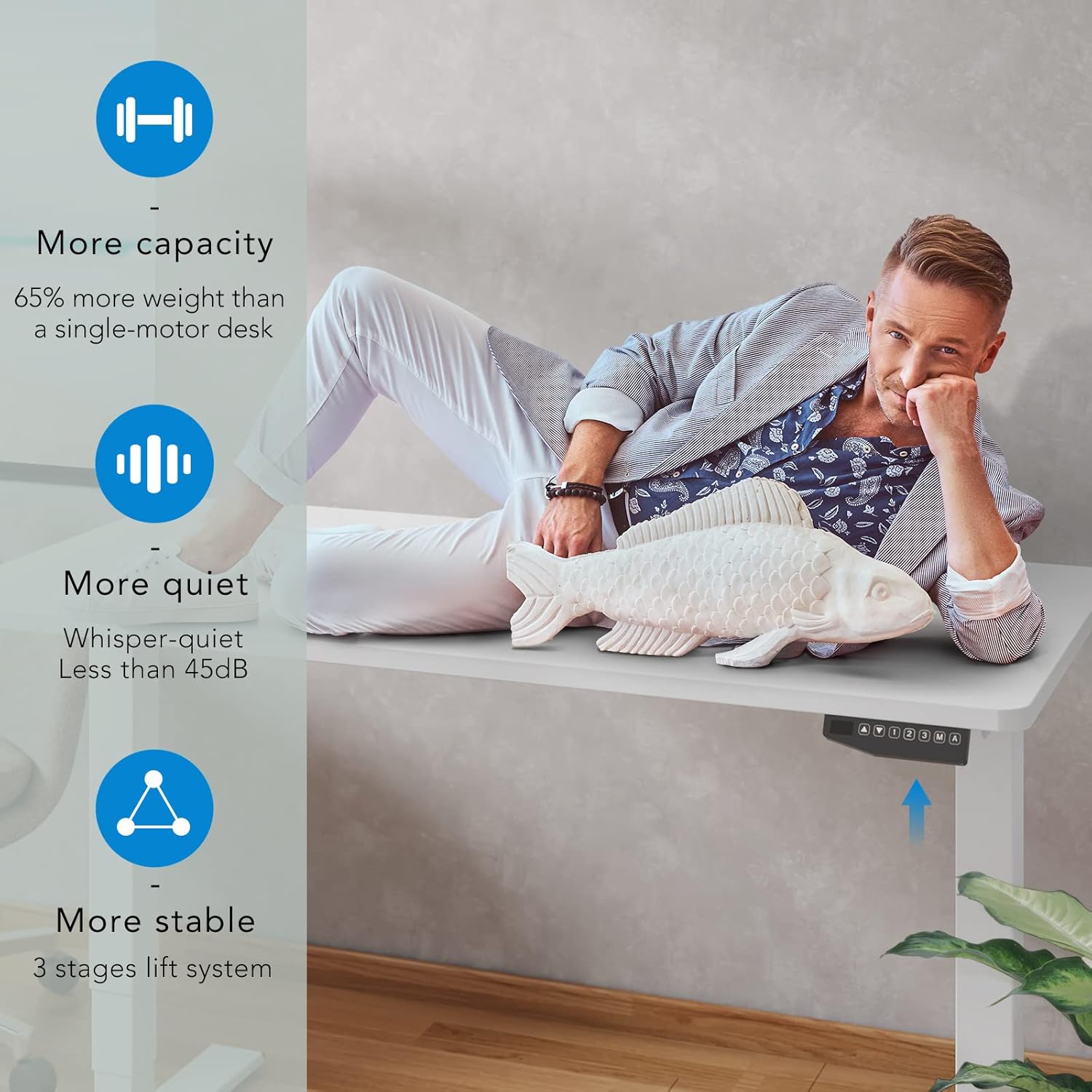
Figure 5: The dual motor system provides increased capacity, quiet operation, and superior stability.
Video 1: Demonstration of the FLEXISPOT Dual Motor Bamboo Standing Desk, highlighting its stability, quiet operation, and suitability for gaming setups. This video also shows the desk's ability to hold significant weight without instability.
Video 2: A home use version demonstration of the FLEXISPOT Dual Motor Bamboo Standing Desk, emphasizing its durability, ease of use with memory presets, and quiet operation for a productive home office environment.
Техникалык тейлөө
Үзгүлтүксүз техникалык тейлөө FLEXISPOT турган столуңуздун узак мөөнөттүү иштешин жана оптималдуу иштешин камсыз кылат.
- Тазалоо: Жумушчу столду жана алкакты кургак, жумшак чүпүрөк менен сүртүңүз. Өжөр тактар үчүн бир аз сүртүңүзamp кездемени колдонсо болот, андан кийин дароо кургак чүпүрөк менен сүртүңүз. Катуу химиялык заттардан же абразивдүү тазалоочу каражаттардан алыс болуңуз.
- Кабель текшерүү: Periodically inspect all cables for any signs of wear, fraying, or damage. Ensure they are securely fastened and not interfering with the desk's movement.
- Бурама тыгыздыгы: Over time, screws may loosen. Periodically check and tighten all assembly screws to maintain desk stability.
- Жүктүн бөлүштүрүлүшү: Distribute weight evenly across the desktop to prevent undue stress on any single point or motor.
Video 3: A durability test video for the desktop, demonstrating its resistance to scratches, weight, and ease of cleaning. This highlights the robust nature of the bamboo desktop material.
Проблемаларды чечүү
If you encounter any issues with your FLEXISPOT standing desk, refer to the following common solutions:
| Көйгөй | Мүмкүн себеп | Чечим |
|---|---|---|
| Иш стол кыймылдабайт же башкаруу элементтерине жооп бербейт. | Power disconnected, loose cables, motor overload. | Check power cord connection to outlet and control box. Ensure all motor cables are securely plugged in. Reduce weight on the desk if overloaded. |
| Үстел бир калыпта эмес кыймылдайт же адаттан тыш үндөрдү чыгарат. | Uneven load, loose assembly, obstruction. | Ensure weight is evenly distributed. Check and tighten all assembly screws. Inspect for any obstructions under or around the desk. |
| Эстутум алдын ала орнотуулары иштебейт. | Incorrect programming. | Re-program the memory presets following the "Saving Memory Presets" instructions in the Operating section. |
| Үстөл кыймылдын ортосунда токтойт. | Overheat protection, obstruction. | Allow the desk to cool down for 20 minutes if used continuously for an extended period. Check for obstructions. |
Эгер бул чечимдерди колдонгондон кийин көйгөй чечилбесе, кошумча жардам алуу үчүн FLEXISPOT кардарларды колдоо кызматына кайрылыңыз.
Техникалык шарттар
| Өзгөчөлүк | Деталь |
|---|---|
| Бренд | FLEXISPOT |
| Модель номери | EC5 |
| Продукциянын өлчөмдөрү (D x W x Y) | 55.1"D x 27.5"W x 23.6"H (Minimum height) |
| Бийиктик диапазону | 24.4-50" |
| Иш столунун материалы | Whole-Piece Wood (Natural Desktop) |
| Негизги материал | Металл (Ак алкак) |
| Мотор түрү | Dual Motor |
| Ызы-чуу деңгээли | 45 дБден аз |
| Салмак сыйымдуулугу | 287 фунт |
| Башкаруу панели | One-Touch LED with 3 Memory Presets |
| Ассамблея талап кылынат | Ооба (2 киши сунушталат) |
| UPC | 810072796073 |
Кепилдик жана колдоо
FLEXISPOT stands behind the quality of its products. Your FLEXISPOT Pro 3 Stages Dual Motor Electric Standing Desk comes with the following warranty coverage:
- 5 жылдык камтуу: Applies to the desk frame and motors.
- 2 жылдык коргоо: Башкаруу панелине жана электроникага тиешелүү.
For any assistance, warranty claims, or technical support, please contact FLEXISPOT customer service. Please have your model number (EC5) and proof of purchase ready when contacting support.
You can visit the official FLEXISPOT website for more information and contact details: www.flexispot.com


