1. Киришүү
The Phomemo M120 Label Maker is a lightweight, portable thermal label printer designed for various labeling needs, from home organization to small business use. It offers inkless printing, multi-size label compatibility, and powerful customization options through its companion application. This manual provides detailed instructions for setting up, operating, maintaining, and troubleshooting your M120 label maker.

Image: The Phomemo M120 Label Maker shown with a roll of labels and several printed labels, demonstrating its versatility for different applications like barcodes, QR codes, names, and addresses.
Негизги өзгөчөлүктөрү:
- Portable and Long-lasting: Weighing just 200g, the M120 is highly portable and can print up to 3,000 labels on a single charge. An auto-sleep mode conserves energy.
- Multi-Size Compatibility: Supports label sizes from 20-50mm with an adjustable paper slot, ideal for barcodes, QR codes, addresses, and more.
- Powerful APP & Customization: The "Print Master" app offers voice and image recognition, OCR for text editing, and extensive customization with over 1,500 symbols, 200 templates, 110 fonts, and 20 languages.
- Күчтүү шайкештик: Connects via Bluetooth to iOS and Android devices using the "Print Master" app, and via USB to PC (Windows, Mac, Chrome OS) using the "Labelife" software.
- Inkless Printing & Easy to Use: Utilizes thermal printing technology, requiring no ink. Simply load thermal labels for crisp, high-definition prints.
2. Эмнелер камтылган
Пакетте бардык буюмдар бар экенин текшериңиз:
- M120 Label Maker
- 1 Roll 1.18''X0.78'' (40X30mm) label paper (100pcs)
- 1 USB-C кабели
- 1 Колдонуучунун колдонмосу (бул документ)
3. Техникалык шарттар
| Өзгөчөлүк | Деталь |
|---|---|
| Продукциянын өлчөмдөрү | 4.37"D x 3.39"W x 2.32"H |
| Элемент Салмагы | 8.3 унция (235 грамм) |
| Байланыш технологиясы | Bluetooth, USB-Type-C |
| Басма технологиясы | Термикалык |
| Максималдуу медиа өлчөмү | 20-50мм |
| Максималдуу кара жана ак басып чыгаруу чечими | 203 Dots Per Inch (dpi) |
| Макс басып чыгаруу ылдамдыгы (монохромдуу) | 10 промилле |
| Шайкеш түзмөктөр | Android & iOS Phone/Tablet (Bluetooth via App), Chrome OS, Mac OS (10/11/12/14/15+), Windows (7/8/10/11+) (USB via PC) |
| Башкаруу ыкмасы | Колдонмо, тийүү, үн |
| Батарея | 1 Батарея талап кылынат (кошулган) |
| Эстутум сактоо сыйымдуулугу | 64 ГБ |
| Өзгөчөлүктөр | Lightweight, Portable, Voice recognition, Wireless |

Image: The Phomemo M120 Label Maker with callouts indicating a 1200mAh battery capacity and the ability to print 350 labels per 10 minutes, emphasizing its fast printing and powerful battery.

Image: The Phomemo M120 Label Maker being placed into a pocket, illustrating its lightweight and compact design for easy portability. Dimensions are also shown.
4. Орнотуу
4.1 Алгачкы заряддоо
Before first use, fully charge the Phomemo M120 label maker using the provided USB-C cable. Connect the cable to the printer's USB-C port and a compatible USB power adapter (not included). The indicator light will show charging status.
4.2 Этикетка кагазын жүктөө
- Этикетка бөлүмүнүн капкагын ачыңыз.
- Insert the label roll with the printing side facing up. Ensure the labels are aligned with the paper slot.
- Close the cover firmly. The printer will automatically detect the label size and calibrate.

Image: A close-up of the Phomemo M120 Label Maker's interior, highlighting the adjustable paper slot and demonstrating various label sizes (20-50mm) that can be used with the device.
4.3 App & Software Installation
The Phomemo M120 can be used with mobile devices (iOS/Android) via Bluetooth or with computers (Windows/Mac/Chrome OS) via USB.
For Mobile Devices (Phone/Tablet):
- жүктөп алыңыз "Басма мастери" App Store (iOS) же Google Play Дүкөнүнөн (Android) колдонмо.
- Мобилдик түзмөгүңүздө Bluetooth иштетилгенин текшериңиз.
- Open the "Print Master" app and search for your printer. Connect to the device (e.g., "Phomemo-M120"). Note: Do not pair via your phone's Bluetooth settings directly; connect within the app.
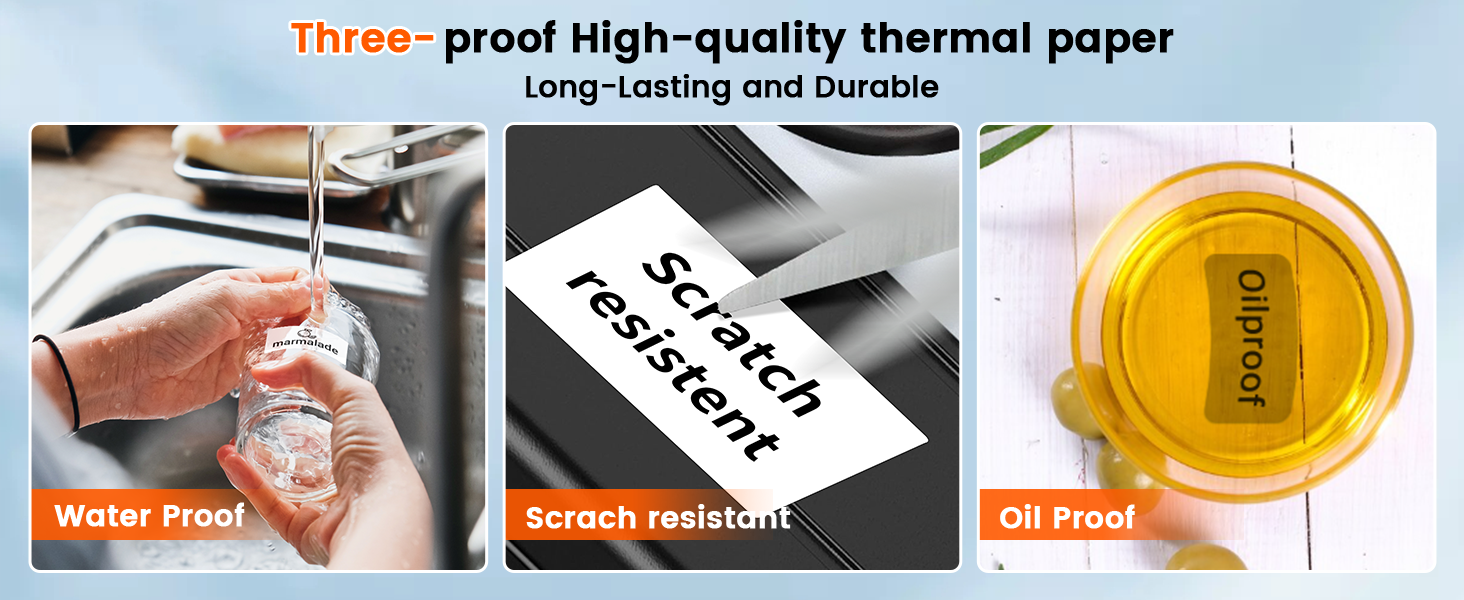
Image: A six-step visual guide demonstrating how to download the "Print Master" app, enable Bluetooth, install label paper, find and connect to the printer within the app, and begin editing and printing labels.
For Computers (PC/Laptop):
- Расмий Phomemo сайтына кириңиз website for drivers and software: https://ms.phomemo.com/?mo=M120
- Download and install the appropriate driver for your operating system (Windows, Mac, Chrome OS).
- жүктөп алып, орнотуңуз "Labelife" программалык камсыздоо.
- Connect the M120 label maker to your computer using the provided USB-C cable.
- Open the "Labelife" software to start using the printer.

Image: A six-step guide illustrating how to visit the Phomemo website, download the "Labelife" app and drivers, connect the printer via USB to a PC, and begin printing from the software.

Image: The Phomemo M120 Label Maker connected to a laptop via USB and wirelessly to a smartphone via Bluetooth, demonstrating its compatibility with various devices including iOS, Android, Mac OS, Windows, Chrome OS, and Linux.
5. Иштөө нускамалары
5.1 Basic Printing (via App)
- Ensure the printer is powered on and connected to your device via the "Print Master" app (for mobile) or "Labelife" software (for PC).
- Open the app/software and select a template or create a new label design.
- Customize your label with text, images, barcodes, QR codes, and other elements.
- Preview the label to ensure it appears as desired.
- Tap the print button to send the label to the M120 printer.

Image: The "Print Master" app interface displayed on a smartphone, showcasing its multi-functional capabilities including borders, icons, templates, and fonts for comprehensive label customization.
5.2 Printer Settings (On-Device)
The M120 features a simple screen and buttons for quick adjustments:
- Тил: Дисплей тилин өзгөртүңүз.
- Dormancy Time: Set the auto-sleep duration to conserve battery.
- ырааттуулугу: Adjust print density.
- Кагаз түрү: Select the type of label paper being used.
- Өзүн-өзү сыноо: Print a test page to check printer functionality.
- Заводдук орнотуулар: Reset the printer to its default settings.

Image: The Phomemo M120 Label Maker's display screen showing options for one-click screen settings, including Language, Dormancy Time, Consistency, Paper Type, Self-Test, and Factory Settings.
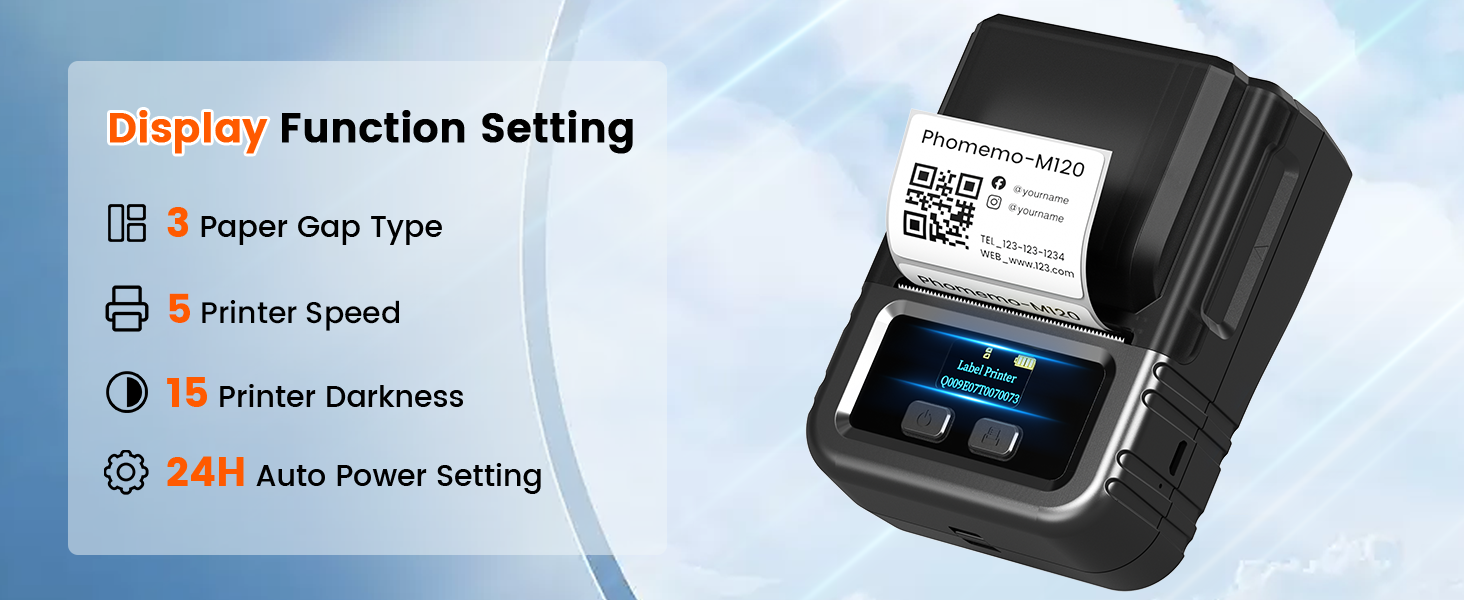
Image: A graphic illustrating the display function settings of the Phomemo M120, including options for 3 Paper Gap Types, 5 Printer Speeds, 15 Printer Darkness levels, and 24H Auto Power Setting.
5.3 Энбелгилердин түрлөрү жана колдонмолору
The M120 supports various label types and sizes (20-50mm) for diverse applications:
- White Labels: Жалпы колдонуу үчүн стандарттуу этикеткалар.
- Color Labels: For aesthetic or categorization purposes.
- Pattern Labels: Labels with pre-designed patterns.
- Transparent Labels: For a seamless look on various surfaces.
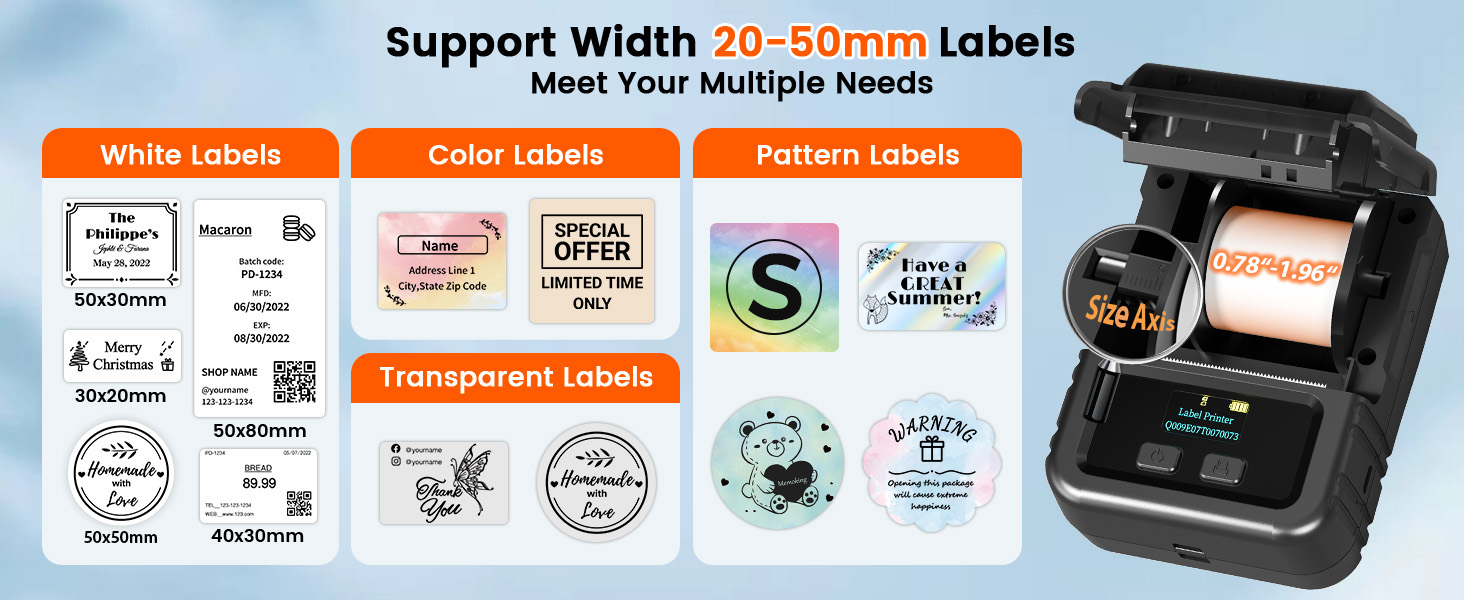
Image: A visual representation of the Phomemo M120's capability to support label widths from 20-50mm, showcasing мисamples of white, color, pattern, and transparent labels for multiple needs.
Common Usage Scenarios:
- Small Business & Shipping: Баасы tags, clothing labels, address labels, QR codes for inventory or product information.
- Home Use & Organization: Jars labels, file labels, stuff labels, storage labels.
- Holiday & Gift: Greetings labels, gift tags, envelope labels, Christmas labels, thank you cards.

Сүрөт: төрт мурункуamples of the Phomemo M120's use in small business and shipping: creating price tags for baked goods, clothing labels, address labels for packages, and QR codes for product information on bags.

Сүрөт: төрт мурункуamples of the Phomemo M120's use for home organization: labeling jars for pantry items, creating file labels for documents, labeling various personal items, and organizing storage bins.
6. Техникалык тейлөө
6.1 Басып чыгаруу башын тазалоо
Басып чыгаруунун оптималдуу сапатын камсыз кылуу үчүн, басып чыгаруучу башты үзгүлтүксүз тазалап туруңуз. Пахта таякчасын жеңил сүртүңүзampened with rubbing alcohol. Gently wipe the print head surface. Allow it to dry completely before closing the cover or printing.
6.2 Батареяга кам көрүү
- Батареяны бат-баттан толук кубаттап калуудан алыс болуңуз.
- Батареянын ден соолугун сактоо үчүн аппаратты тез-тез колдонбосо дагы, дайыма заряддаңыз.
- Store the printer in a cool, dry place away from extreme temperatures.
6.3 Этикеткаларды сактоо
Store thermal labels in a cool, dry place away from direct sunlight, heat, and moisture. This prevents premature fading or degradation of the thermal coating, ensuring your labels remain clear and durable.

Image: A visual representation of the three-proof features of high-quality thermal paper: water-proof, scratch-resistant, and oil-proof, highlighting the durability of labels printed with the Phomemo M120.
7. Кыйынчылыктарды
7.1 Жалпы маселелер жана чечимдер
| Көйгөй | Мүмкүн себеп | Чечим |
|---|---|---|
| Принтер күйбөй жатат | Батареянын аздыгы; Кубат баскычы туура басылган жок | Принтерди кубаттаңыз; Кубат баскычын бир нече секунд басып туруңуз. |
| No print/Blank labels | Label roll inserted incorrectly (upside down); No label paper; Print head dirty | Re-insert label roll with printing side up; Load new label paper; Clean the print head. |
| Басып чыгаруу сапаты начар (алсыз/сызыктар пайда болот) | Low battery; Dirty print head; Low print density setting; Using non-thermal paper | Charge the printer; Clean the print head; Adjust print density in app/software; Ensure you are using Phomemo thermal labels. |
| Bluetooth байланышы көйгөйлөрү | Not connected via app; Bluetooth off on device; Printer too far from device | Ensure connection is made within the "Print Master" app; Turn on Bluetooth; Move printer closer to device. |
| PC connection issues (USB) | Driver/software not installed; Loose USB cable | Install "Labelife" software and drivers from Phomemo website; Ensure USB cable is securely connected. |
| Энбелгилер туура эмес азыктандырылган | Paper not aligned; Paper compartment not closed properly | Re-align label paper in the slot; Ensure the cover is firmly closed. |
8. Кепилдик жана колдоо
8.1 Кепилдик маалыматы
The Phomemo M120 Label Maker comes with a standard manufacturer's warranty. For specific details regarding warranty coverage and duration, please refer to the warranty card included in your product packaging or contact Phomemo customer support.
8.2 Коргоо пландары
Extended protection plans may be available for purchase. These plans can offer additional coverage beyond the standard manufacturer's warranty. Examples камтыйт:
- 3 жылдык коргоо планы
- 4 жылдык коргоо планы
- Толук коргоо (жарамдуу сатып алууларды камтыган айлык план)
Please check with your retailer for availability and terms of these protection plans.
8.3 Кайтаруу саясаты
This product typically has a 30-day return policy for refunds or replacements. Please consult the retailer's specific return policy for detailed terms and conditions.
8.4 Кардарларды колдоо
For further assistance, technical support, or inquiries not covered in this manual, please utilize the following resources:
- Расмий колдонуучу колдонмо (PDF): For a downloadable version of the manual, please visit: Phomemo M120 User Manual PDF
- Phomemo Brand Store: Explore other products and find support information on the official brand store: Phomemo Amazon Store
- Өндүрүүчү Webсайт: For drivers, software, and general support, visit the Phomemo official webсайт.


