1. Киришүү
Thank you for choosing the TOOLCRAFT LSH-880 Digital Hot Air Station. This manual provides essential information for the safe and efficient operation, maintenance, and troubleshooting of your device. Please read this manual thoroughly before use and retain it for future reference.
2. Маанилүү коопсуздук нускамалары
Жарааттарды же аппаратты бузууну болтурбоо үчүн ар дайым төмөнкү коопсуздук чараларын сактаңыз:
- кубат менен камсыз кылуу Voltage түзмөктө көрсөтүлгөн.
- Operate the hot air station in a well-ventilated area to avoid inhaling fumes.
- The nozzle and heated air can reach very high temperatures. Avoid direct contact with skin or flammable materials.
- Always place the hot air gun in its stand when not in use. The automatic power-saving function will activate.
- Do not use the device near liquids or in damp шарттар.
- Балдарды жана уруксаты жок адамдарды операциялык аймактан алыс кармаңыз.
- Disconnect the power plug before cleaning or maintenance.
- Электр зымы же сайгычы бузулган болсо, аппаратты иштетпеңиз.
3. Пакеттин мазмуну
The package for your TOOLCRAFT LSH-880 Digital Hot Air Station should contain the following items:
- TOOLCRAFT LSH-880 Digital Hot Air Station Main Unit
- Hot Air Solder Gun with Stand
- 4 x Nozzles (various sizes)
- Электр кабели
- Колдонуучунун Колдонмосу (бул документ)
4. Продукт бүтүп калдыview
The TOOLCRAFT LSH-880 is a digital hot air station designed for various soldering and desoldering tasks. It features precise temperature and airflow control, a clear LCD display, and an automatic power-saving function.
Негизги блок жана компоненттер
Below are images illustrating the main components of the hot air station:

Figure 4.1: The complete TOOLCRAFT LSH-880 Digital Hot Air Station, including the main unit, hot air gun, and a set of four interchangeable nozzles.

Сүрөт 4.2: Жакыныраак view of the main unit's front panel, highlighting the digital LCD display, temperature and airflow adjustment controls, and the power switch.
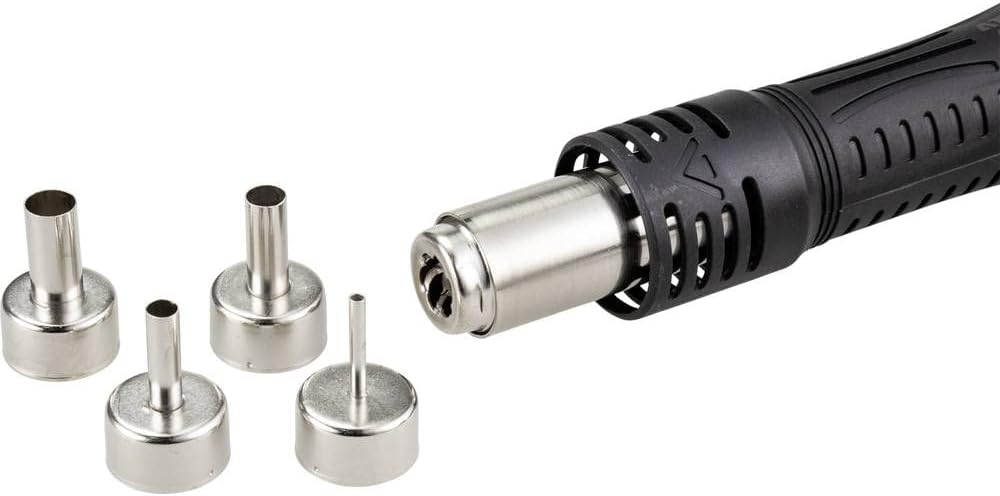
Figure 4.3: Detail of the hot air gun's nozzle attachment point and the four different sized nozzles included for various applications.
5. Орнотуу
Follow these steps for the initial setup of your hot air station:
- Аппаратты таңгактан чыгаруу: Бардык компоненттерди таңгактан кылдаттык менен алып салыңыз. Таңгакты келечекте ташуу же сактоо үчүн сактаңыз.
- Жайгашкан жери: Place the main unit on a stable, heat-resistant, and non-flammable surface. Ensure adequate clearance for ventilation around the unit.
- Connect the Hot Air Gun: Insert the hot air gun's connector securely into the designated port on the main unit.
- Насадканы тиркөө: Select the appropriate nozzle for your task and securely attach it to the hot air gun. Ensure it is firmly seated to prevent air leakage.
- Туташуу кубаты: Ensure the power switch on the main unit is in the OFF position. Connect the power cord to the main unit and then to a grounded electrical outlet.
6. Иштөө нускамалары
6.1 Күйгүзүү/өчүрүү
- To power on the device, flip the POWER switch on the front panel to the 'ON' position. The LCD display will illuminate.
- To power off, flip the POWER switch to the 'OFF' position. The hot air gun will enter a cooling cycle before completely shutting down.
6.2 Adjusting Temperature and Airflow
- Температураны жөндөө: Use the 'TEMP' up/down buttons to set the desired temperature. The digital display shows the current temperature, which can be adjusted from 100°C to 500°C.
- Аба агымын жөндөө: Rotate the 'AIR' knob to adjust the airflow rate. The display will show the airflow percentage.
- Preselection Buttons: The three numbered buttons (1, 2, 3) allow for quick recall of pre-set temperature and airflow configurations. To save a setting, adjust the temperature and airflow, then press and hold one of the numbered buttons until a confirmation sound or display change occurs.
6.3 Using the Hot Air Gun
- Once the desired temperature and airflow are set, remove the hot air gun from its stand. The heating element will activate.
- Direct the hot air stream carefully towards the workpiece.
- Автоматтык энергия үнөмдөө: When the hot air gun is placed back into its stand, the unit will automatically enter a power-saving mode, reducing the temperature and airflow to prolong the life of the heating element and handle.
- Automatic Air Volume Cooler: This feature automatically cools down the heating element when the gun is placed in its stand or when the unit is powered off, extending component lifespan.
- Independent Cold Air Function: This function allows for rapid cooling of components or the hot air gun itself. Refer to the device interface for activation (usually a dedicated button or a specific combination of controls).
7. Техникалык тейлөө
Regular maintenance ensures the longevity and optimal performance of your hot air station:
- Тазалоо: Ensure the device is unplugged and cooled down before cleaning. Wipe the main unit and hot air gun with a soft, dry cloth. Do not use abrasive cleaners or solvents.
- Соплолорго кам көрүү: Periodically inspect nozzles for blockages or damage. Clean any residue from the nozzles. Replace damaged nozzles to maintain optimal airflow.
- Вентиляция: Keep the ventilation openings on the main unit clear of dust and debris to prevent overheating.
- Сактагыч: When not in use, store the hot air station in a dry, dust-free environment, preferably in its original packaging.
8. Кыйынчылыктарды
Жалпы көйгөйлөр жана аларды чечүү жолдору үчүн төмөнкү таблицаны караңыз:
| Көйгөй | Мүмкүн себеп | Чечим |
|---|---|---|
| Түзмөк күйбөйт. | Электр менен камсыздоо жок; Кубат өчүргүч өчүрүлгөн; Электр шнуру бузулган. | Check power connection; Ensure power switch is ON; Inspect power cord for damage. |
| Hot air gun not heating. | Hot air gun not properly connected; Heating element failure; In stand (power-saving mode). | Ensure hot air gun is securely connected; Remove gun from stand; If issue persists, contact support. |
| Low or no airflow. | Airflow knob set too low; Nozzle blocked; Fan malfunction. | Adjust airflow knob; Clean or replace nozzle; If issue persists, contact support. |
| Температураны көрсөтүү туура эмес. | Sensor issue; Environmental factors. | Ensure proper ventilation; If issue persists, contact support. |
9. Техникалык шарттар
| Өзгөчөлүк | Спецификация |
|---|---|
| Өндүрүүчү | TOOLCRAFT |
| Модель номери | LSH-880 (Part No: TO-6904818) |
| Кубат булагынын түрү | Hand-operated (Electric) |
| Тtage | 230 вольт |
| Ватtage | 800 Ватт |
| Температура диапазону | 100 - 500 °C |
| Температуранын туруктуулугу | 100 °C |
| Дисплей түрү | LCD |
| Продукциянын өлчөмдөрү (L x W x Y) | 21 x 9 x 14 см |
| Элемент Салмагы | 1.46 килограмм |
| Камтылган компоненттер | Hot Air Station, Hot Air Gun, 4 Nozzles |
| Өзгөчөлүктөр | Automatic power saving when gun on stand, Automatic air volume cooler, Independent cold air function, Three temperature preselection quick buttons, Brushless swirl fan |
10. Кепилдик жана колдоо
Кепилдик маалыматы: The TOOLCRAFT LSH-880 Digital Hot Air Station comes with an EU Spare Part Availability Duration of 1 year from the date of purchase. Please retain your proof of purchase for warranty claims.
Кардарларды колдоо: For technical assistance, troubleshooting beyond this manual, or warranty inquiries, please contact your retailer or the TOOLCRAFT customer service department. Refer to the product packaging or the official TOOLCRAFT webбайланыш маалыматы үчүн сайт.


