Introduction
This manual provides essential information for the safe and efficient use of your Xiaomi Mi 11 Lite smartphone. Please read this manual carefully before using the device to ensure optimal performance and to prevent damage.
The Xiaomi Mi 11 Lite is designed to offer a premium mobile experience with its ultra-thin and ultra-light design, powerful Snapdragon 732G processor, long-lasting 4250 mAh battery with 33W fast charging, and a versatile 64MP triple camera system. Its AMOLED DotDisplay screen provides vibrant visuals, and the durable glass and metal frame ensure a superior look and feel.
Жайгашуу
1. Кутудан чыгаруу жана алгачкы текшерүү
Carefully remove all components from the packaging. Verify that all items are present and undamaged. The standard package typically includes the Xiaomi Mi 11 Lite smartphone, a power adapter, a USB Type-C cable, a SIM eject tool, and a protective case.

Сүрөт: алдыңкы view of the Xiaomi Mi 11 Lite smartphone in Bubblegum Blue color. The phone features a punch-hole camera on the top left of the screen and slim bezels.
2. SIM картаны жана microSD картасын салуу (кошумча)
- Аппараттын капталындагы SIM карта салгычын табыңыз.
- SIM картаны чыгаруу куралын ачуу үчүн аны лотоктогу кичинекей тешикке салыңыз.
- Place your Nano-SIM card(s) and/or microSD card (if applicable) into the tray with the gold contacts facing down, ensuring correct orientation as indicated on the tray.
- Аспапты акырын ордунан чыккыча кайра түртүңүз.

Сүрөт: каптал view of the Xiaomi Mi 11 Lite, highlighting the slim profile and the location of the SIM card tray on the left side of the device.
3. Батареяны заряддоо
Before first use, fully charge the device. Connect the USB Type-C cable to the phone's charging port and the other end to the power adapter. Plug the power adapter into a wall outlet. The charging indicator will appear on the screen.
The Xiaomi Mi 11 Lite supports 33W fast charging. Use the original charger and cable for optimal charging speed and safety.
4. Күйгүзүү жана баштапкы конфигурация
Press and hold the Power button (located on the right side of the device) until the Xiaomi logo appears. Follow the on-screen instructions to complete the initial setup, including language selection, Wi-Fi connection, Google account setup, and security settings.
Иштеп жатат
1. Негизги навигация
- Кубат баскычы: Экранды күйгүзүү/өчүрүү үчүн басыңыз. Күйгүзүү/өчүрүү же кайра баштоо үчүн басып кармап туруңуз.
- Үн баскычтары: Медиа үнүн, чалуунун үнүн же эскертме үнүн тууралаңыз.
- Сенсордук экран жаңсоолор:
- таптаңыз: Бир нерсени тандаңыз же колдонмону ачыңыз.
- Серпүү: Экрандарды же тизмелерди сыдырыңыз.
- Чымчуу: Сүрөттөрдү чоңойтуу же кичирейтүү же web барактар.
- Узак басуу: Контексттик менюларга кириңиз же сүрөтчөлөрдү жылдырыңыз.
2. Камераны колдонуу
The Mi 11 Lite features a 64MP triple camera system. To open the camera app, tap the camera icon on the home screen or lock screen. Select different modes such as Photo, Portrait, Video, or Pro mode. Tap the shutter button to capture an image or start/stop video recording.
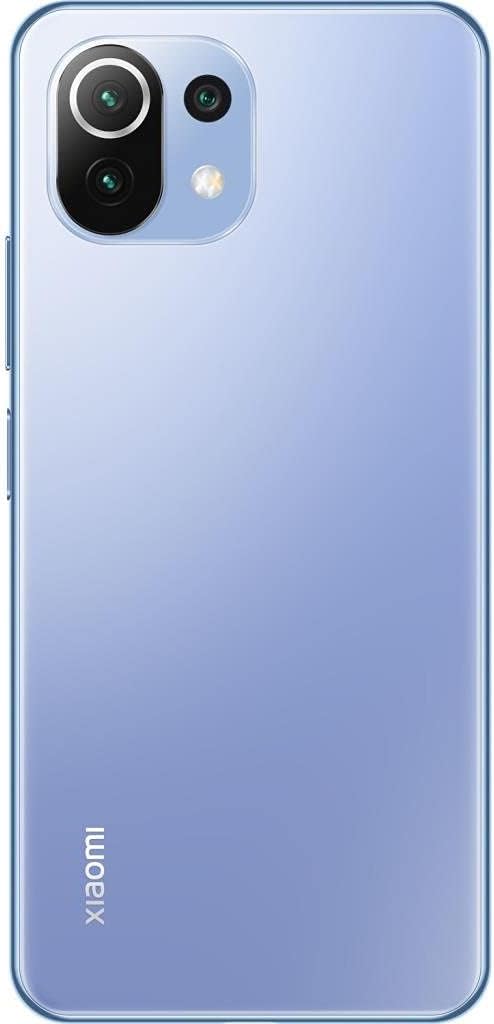
Сүрөт: Артка view of the Xiaomi Mi 11 Lite in Bubblegum Blue, showcasing the triple camera module located on the top left corner. The Xiaomi logo is vertically aligned on the bottom left.
3. Байланыш
- Wi-Fi: Жеткиликтүү тармактарга туташуу үчүн Орнотуулар > Wi-Fi бөлүмүнө өтүңүз.
- Bluetooth: Наушник же динамиктер сыяктуу башка Bluetooth түзмөктөрү менен жупташтыруу үчүн Орнотуулар > Bluetooth бөлүмүнө өтүңүз.
- Мобилдик маалыматтар: Жөндөөлөр > SIM карталар жана мобилдик тармактарда SIM картаңыз активдүү жана мобилдик дайындар иштетилгенин текшериңиз.
Техникалык тейлөө
1. Аспапты тазалоо
Use a soft, lint-free cloth to clean the screen and body of the phone. Avoid using harsh chemicals, abrasive cleaners, or aerosol sprays, as these can damage the device's finish or internal components. The phone features a fingerprint-resistant coating on the back.
2. Батареяга кам көрүү
- Аппаратты экстремалдык температурага (0°C төмөн же 45°C жогору) тийгизүүдөн сактаңыз.
- Do not fully discharge the battery regularly. It is recommended to keep the battery level between 20% and 80% for optimal longevity.
- Түпнуска же тастыкталган заряддагычтарды жана кабелдерди гана колдонуңуз.
3. Программалык камсыздоону жаңыртуу
Түзмөгүңүздө эң акыркы функциялар, коопсуздук жаңыртуулары жана иштин натыйжалуулугун жакшыртуулар бар экенине ынануу үчүн программалык камсыздоонун жаңыртууларын үзгүлтүксүз текшерип жана орнотуп туруңуз. Жаңыртууларды текшерүү үчүн Орнотуулар > Телефон жөнүндө > MIUI версиясына өтүңүз.
Проблемаларды чечүү
- Түзмөк күйбөй жатат: Батарея заряддалганын текшериңиз. Заряддагычты туташтырыңыз жана кайра күйгүзүү аракетинен мурун бир нече мүнөт күтүңүз.
- Колдонмолор бузулуп же катып жатат: Close the problematic app and reopen it. If the issue persists, restart the device. Clear the app's cache or data in Settings > Apps.
- Батареянын иштөө мөөнөтү начар: Check for background apps consuming power. Reduce screen brightness, disable unnecessary features like GPS or Bluetooth when not in use, and ensure the device is running the latest software update.
- Тармакка туташуу көйгөйлөрү: Toggle Airplane mode on and off. Restart the device. Check if your SIM card is properly inserted. Contact your mobile carrier if the issue persists.
- Экран жооп бербейт: Force restart the device by holding the Power button for about 10-15 seconds.
Техникалык шарттар
| Өзгөчөлүк | Деталь |
|---|---|
| Бренд | XIAOMI |
| Модель аты | Mi 11 Lite |
| Бөлүмдүн номери | M2101K9AG |
| RAM өлчөмү | 6 ГБ |
| Ички сактагыч | 128 ГБ |
| Процессор | Snapdragon 732G |
| Дисплей түрү | AMOLED |
| Screen Size | 6.55 дюйм |
| Display Resolution | 2400 x 1080 |
| Батарея сыйымдуулугу | 4250 мАч (литий-ион) |
| Уюлдук технология | 4G |
| Өлчөмдөр | 16 x 4 x 2 см; 470 г |
Кепилдик жана колдоо
Кепилдик маалымат
This product comes with a 3-month warranty provided by the seller, Telmov. Please retain your proof of purchase for any warranty claims. The warranty covers manufacturing defects under normal use conditions.
Кардарларды колдоо
For technical assistance, troubleshooting, or warranty inquiries, please contact your point of purchase or refer to the official Xiaomi support channels. You can find more information on the official Xiaomi webсайт: www.mi.com/global/service/support/


