Introduction
This manual provides detailed instructions for the setup, operation, maintenance, and troubleshooting of your Logilink UA0384 Full HD USB Webcam. Please read this manual thoroughly before using the device to ensure proper functionality and to maximize your user experience.
Продукт өзгөчөлүктөрү
- Full HD 1080p resolution at 30 frames per second.
- 76° wide-angle lens for broader coverage.
- Integrated ring light with 3 adjustable brightness levels for optimal illumination.
- Automatic autofocus for clear image quality.
- Dual microphone with noise cancellation for clear audio.
- Automatic Low Light Correction, Exposure (AE), and White Balance (AWB).
- Plug and Play functionality, no driver installation required.
- Versatile mounting options: LCD screens, laptops, tabletops, or tripod.
- Compatible with Windows, Mac OS, Linux, Chrome OS, Xbox One, and Android.
Пакеттин мазмуну
- Logilink UA0384 Full HD USB Webcam
Жайгашуу
1. Пакеттен чыгаруу жана жайгаштыруу
Кылдаттык менен алып салуу webcam from its packaging. The webcam can be placed on a flat surface, clipped onto an LCD monitor or laptop screen, or mounted on a tripod using the integrated thread.
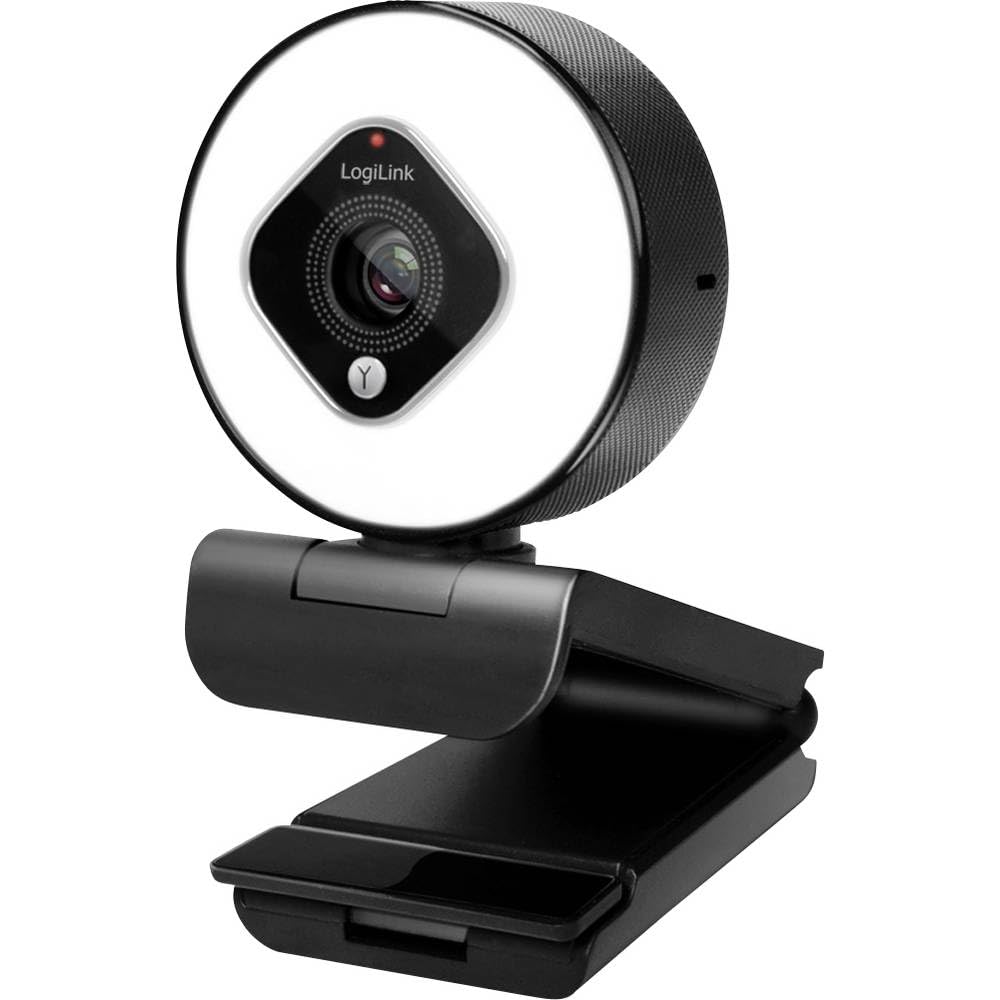
Image showing the Logilink UA0384 webcam, highlighting its compact design, integrated ring light, and flexible mounting options.
2. Туташуу Webcam
- Компьютериңизде же түзмөгүңүздө жеткиликтүү USB портун табыңыз.
- Plug the USB cable of the Logilink UA0384 webкамераны USB портуна салыңыз.
- The webcam is plug-and-play, meaning no additional drivers are typically required. Your operating system should automatically detect and install the necessary software.
- Wait for your system to confirm that the device is ready for use. This may be indicated by a notification or a light on the webкамера
Иштөө нускамалары
1. Негизги колдонуу
кошулгандан кийин, webcam is ready for use with video conferencing applications (e.g., Skype, Zoom, Google Meet, FaceTime) or streaming software (e.g., OBS, XSplit, Twitch). Select the Logilink UA0384 as your preferred camera and microphone device within your application's settings.
2. Шакекче жарыгын иштетүү
The integrated ring light provides additional illumination. To activate or adjust the brightness:
- Locate the touch-sensitive control on the webcam, typically around the ring light itself.
- Tap the control to cycle through the 3 brightness levels or to turn the light off.
3. Autofocus and Automatic Adjustments
The UA0384 features automatic autofocus, ensuring your image remains sharp even if you move. It also includes automatic low light correction, auto exposure, and auto white balance to adapt to various lighting conditions without manual intervention.
4. Кош микрофон
The built-in dual microphones with noise cancellation are designed to capture clear audio. Ensure the webcam is selected as the audio input device in your application settings for optimal sound quality.
Техникалык тейлөө
Линзаны жана денени тазалоо
- камсыз кылуу webТазалоодон мурун камера компьютериңизден ажыратылган болушу керек.
- Use a soft, lint-free cloth to gently wipe the lens. For stubborn smudges, a small amount of lens cleaning solution can be applied to the cloth (not directly to the lens).
- Денесин сүртүңүз webкургак же бир аз d менен камераamp soft cloth. Avoid using harsh chemicals or abrasive materials.
Сактагыч
Колдонулбаган учурда, дүкөндү сактаңыз webкамераны таза, кургак жерде, өтө жогорку температурадан жана түз күн нурунан алыс сактаңыз.
Проблемаларды чечүү
1. WebКамера аныкталган жок
- USB туташуусун текшерүү: USB кабелинин экөөнө тең бекем сайылганын текшериңиз webcam and the computer. Try a different USB port.
- Компьютерди кайра иштетүү: Кээде жөнөкөй өчүрүп-күйгүзүү аныктоо көйгөйлөрүн чече алат.
- Башка түзмөктө сыноо: If possible, try connecting the webcam to another computer to determine if the issue is with the webcam or your primary device.
2. Видео жок же видеонун сапаты начар
- Колдонмо орнотуулары: Verify that the Logilink UA0384 is selected as the camera device in your video conferencing or streaming application.
- Жарыктандыруу шарттары: Ensure adequate lighting. Use the integrated ring light if necessary.
- Линзанын тазалыгы: тазалаңыз webкамера линзасын "Техникалык тейлөө" бөлүмүндө сүрөттөлгөндөй колдонуңуз.
- Системалык ресурстар: Системалык ресурстарды керектеп жаткан башка талаптуу тиркемелерди жабыңыз.
3. Аудио жок же аудио сапаты начар
- Колдонмо орнотуулары: Confirm that the Logilink UA0384 is selected as the microphone device in your application settings.
- Системанын көлөмү: Check your computer's microphone input volume settings.
- Тоскоолдуктар: Микрофондордун жабылып же тосулуп калбагандыгын текшериңиз.
Техникалык шарттар
| Өзгөчөлүк | Спецификация |
|---|---|
| Модель номери | UA0384 |
| Бренд | Logilink |
| Видео тартуунун резолюциясы | 1080p толук HD |
| Кадрлар секундасына | 30 кадр/сек |
| талаасы View | 76° |
| Микрофон түрү | Dual Microphone with Noise Cancellation |
| Линзанын түрү | 6 tempered glass and plastic elements |
| Диафрагма | f/2.1 |
| Фокустун узундугу | 7 см |
| Өзгөчөлүктөр | Autofocus, Ring Light (3 levels), Low Light Correction |
| Байланыш | USB |
| Кабелдин узундугу | 1.6 м |
| Продукциянын өлчөмдөрү | 2.44 x 1.81 x 2.91 дюйм |
| Элемент Салмагы | 5 унция |
Кепилдик жана колдоо
For warranty information and technical support, please refer to the documentation provided with your purchase or visit the official Logilink webсайт. Кепилдиктин конкреттүү шарттары аймакка жана сатуучуга жараша өзгөрүшү мүмкүн.


