Introduction
This manual provides detailed instructions for the Pyle PKBRD8100 Portable Foldable 88-Key Digital Piano Keyboard. Please read this manual thoroughly before using the product to ensure proper operation and to maximize your musical experience. Keep this manual for future reference.
Кутуда эмне бар
Таңгактан чыгаргандан кийин, төмөндө көрсөтүлгөн нерселердин бардыгы бар экенин жана жакшы абалда экендигин текшериңиз:
- Портативдик жана бүктөлүүчү пианино баскычтобу
- USB кубаттагыч кабели
- USB адаптер
- Колдонуучунун Колдонмосу (бул документ)
- Piano Bag for Easy Storage & Travel
- Sustain Pedal

Image: All components included in the Pyle PKBRD8100 package, neatly arranged. This includes the foldable keyboard, a sustain pedal, a USB charger, a USB cable, and a black carrying bag.
Продукт өзгөчөлүктөрү
The Pyle PKBRD8100 Digital Piano Keyboard offers a range of features designed for versatility and ease of use:
- 88 Толук өлчөмдөгү ачкычтар: Provides a comprehensive range for musical expression.
- Бүктөлүүчү Дизайн: Allows for compact storage and portability.
- Bluetooth байланышы: Enables connection to smart devices for MIDI and audio streaming.
- 129 Selectable Tones: A wide variety of instrument sounds.
- 128 Rhythm Styles: Accompaniment options for practice and performance.
- Built-in Full Range Stereo Speakers: For clear audio output.
- Record & Playback Mode: Capture and review your performances.
- Педаль киргизүү: For expressive playing.
- Aux (3.5mm) Input Jack / Mic Input: For connecting external audio sources or a microphone.
- Наушник уячасы (3.5 мм): Жеке практика үчүн.
- Digital LCD Display & LED Indicators: For easy navigation and status updates.
- Камтылган кайра заряддалуучу батарея: For portable use.
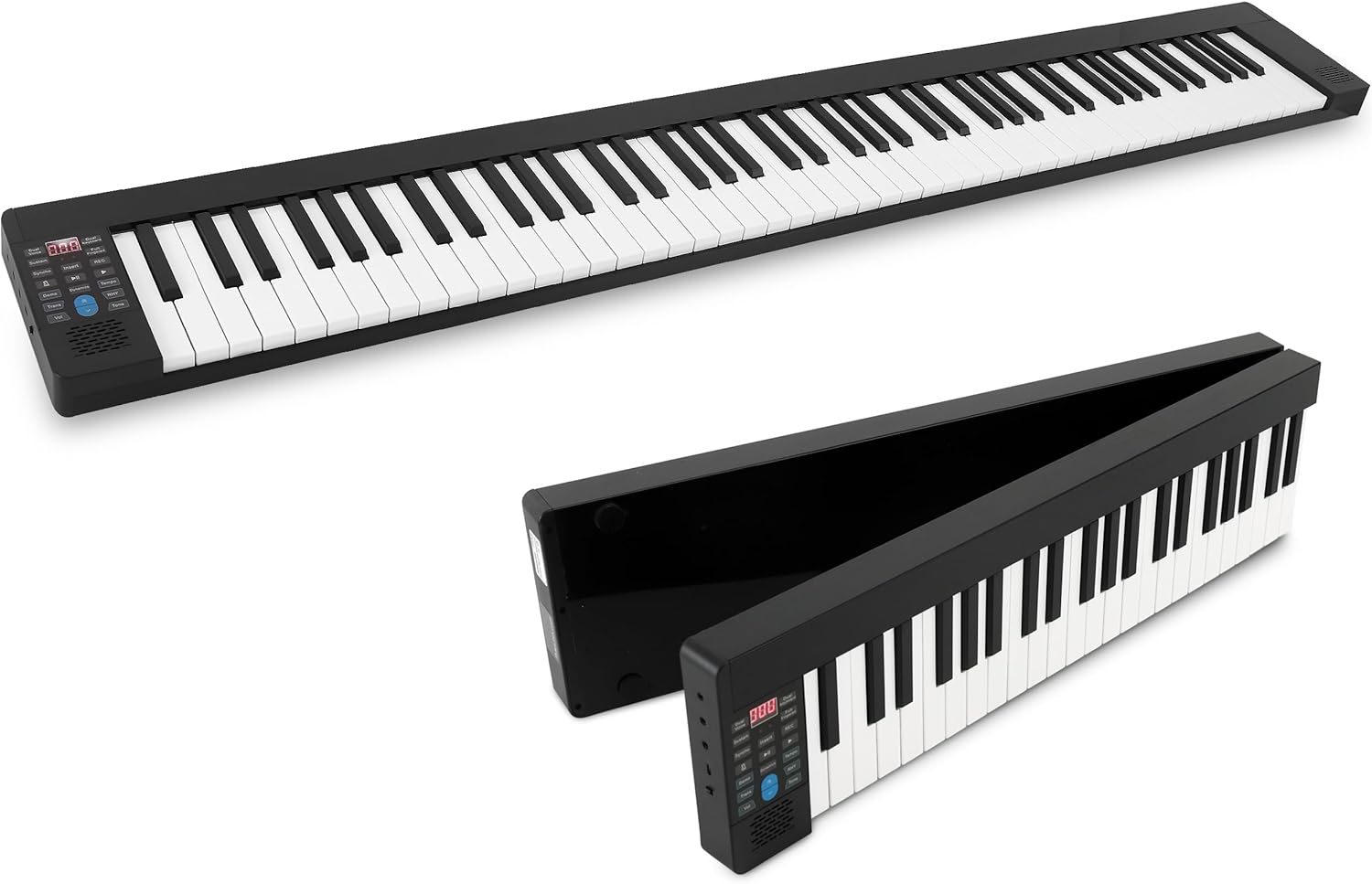
Image: The Pyle PKBRD8100 digital piano keyboard fully extended, showcasing its 88 keys and compact design.

Image: The Pyle PKBRD8100 keyboard in the process of folding, highlighting its 180-degree foldable design and a user carrying it in the included travel bag.
Жайгашуу
- Баскычтопту таңгактан чыгаруу: Бардык компоненттерди таңгактан кылдаттык менен алып салыңыз.
- Клавиатураны жайыңыз: Gently unfold the keyboard until it lies flat and locks into position. Ensure it is placed on a stable, flat surface.
- Кубат туташуу:
- Заряддоо: Connect the USB charger cable to the keyboard's USB port and the USB adapter to a power outlet. The built-in battery will begin charging.
- Түз кубат: The keyboard can also be operated directly from the power adapter while charging.
- Педаль туташуу: Insert the sustain pedal cable into the designated sustain pedal interface on the keyboard.
- Headphones/External Speakers (Optional): For private practice, connect headphones to the 3.5mm headphone jack. To connect to external speakers, use the Aux (3.5mm) Input Jack.
- Bluetooth жупташтыруу (кошумча): To connect via Bluetooth, ensure Bluetooth is enabled on your smart device. The keyboard will appear as an available device for pairing.

Сүрөт: деталдуу view of the input/output ports on the Pyle PKBRD8100, including the headphone jack, USB port for power/data, and the sustain pedal connection point.
Иштөө нускамалары
Башкаруу панелиview

Image: A detailed diagram illustrating the various buttons and their functions on the Pyle PKBRD8100 control panel, including LED display, volume, tone, rhythm, and function buttons.
- Күйгүзүү/өчүрүү: Locate the power button on the side or control panel to turn the keyboard on or off.
- Үндү көзөмөлдөө: Use the 'Vol' buttons (Decrease/Increase) to adjust the master volume.
- Тон тандоо: Press the 'Tone' button, then use the arrow buttons to cycle through the 129 available tones. The selected tone number will appear on the LED display.
- Ритм тандоо: Press the 'RHY' (Rhythm) button, then use the arrow buttons to select from the 128 rhythm styles. Press the 'START/STOP' button to begin or end the rhythm.
- Демо ырлар: Press the 'Demo' button to play a demonstration song. Press it again to stop.
- Жаздыруу жана ойнотуу:
- Press 'REC' to start recording your performance.
- Press 'PLAY' to listen to your recorded performance.
- Колдоо функциясы: Press the 'Sustain' button to activate or deactivate the sustain effect. The connected sustain pedal will also control this function.
- Кош үн: Press the 'Dual Voice' button to layer two different instrument sounds simultaneously.
- Метроном: Press the 'Metronome' button to activate the metronome function for timing practice.
- Bluetooth MIDI/Audio:
- Bluetooth MIDI: Connect to music apps on your smart device for learning or composition.
- Bluetooth Audio: Stream audio from your device through the keyboard's speakers.

Сүрөт: An overview of the Bluetooth and MIDI capabilities, demonstrating how the keyboard connects to computers and mobile devices for editing, creating music, and using learning applications.
Техникалык тейлөө
- Тазалоо: Use a soft, dry cloth to wipe the surface of the keyboard. Do not use liquid cleaners, waxes, or solvents, as they may damage the finish.
- Сактагыч: When not in use, fold the keyboard and store it in the provided piano bag to protect it from dust and damage. Store in a cool, dry place away from direct sunlight and extreme temperatures.
- Батареяга кам көрүү: To prolong battery life, avoid fully discharging the battery frequently. Charge the keyboard regularly, even if not in constant use.
- Колдонуу: Баскычтопту түшүрүүдөн же катуу соккулардан сактаныңыз. Анын үстүнө оор нерселерди коюуга болбойт.
Проблемаларды чечүү
| Көйгөй | Мүмкүн себеп | Чечим |
|---|---|---|
| Баскычтоп күйбөйт. | Батарея түгөндү же кубат адаптери туура эмес туташтырылган. | Connect the USB charger cable and adapter to a power outlet. Ensure the power button is pressed. |
| Динамиктерден үн жок. | Volume is too low, headphones are connected, or external speakers are not properly connected. | Increase the volume. Disconnect headphones if not needed. Check connections to external speakers. |
| Bluetooth байланышы ишке ашпай калды. | Bluetooth is not enabled on the device, keyboard is not in pairing mode, or interference. | Ensure Bluetooth is active on your device. Restart both the keyboard and your device. Move closer to the keyboard. |
| Туруктуу педаль иштебей жатат. | Pedal not fully inserted or sustain function is off. | Ensure the sustain pedal cable is securely connected. Press the 'Sustain' button on the control panel to activate the function. |
Техникалык шарттар
- Баскычтоп баскычтары: 88 Толук өлчөмдөгү ачкычтар
- Preset Selectable Tones: 129 Tones
- Preset Selectable Rhythms: 128 Ритмдер
- Аудио интерфейси: Aux (3.5 мм) киргизүү уячасы / микрофон киргизүү
- Максималдуу үн деңгээли: 110 дБ чейин
- USB/кубат кабелинин узундугу: 3.9 фут (1.2 метр)
- Курулуш материалдары: Engineered ABS, PC, PVC
- Камтылган кайра заряддалуучу батарея: 3.7V Li-ion, 1100mAh
- Электр камсыздоо: 120/240V, USB 5V/1A
- Piano Dimensions (Unfolded): 28.7'' x 9.0'' x 2.6'' inches (72.9 cm x 22.9 cm x 6.6 cm)
- Элемент Салмагы: Болжол менен 12.27 фунт (5.57 кг)
- Байланыш технологиясы: Bluetooth
- Колдоого алынган программалык камсыздоо: Pop piano, GarageBand, Perfect Piano (via Bluetooth MIDI)
- Операциялык системанын шайкештиги: iOS, Android, Windows, macOS (via Bluetooth MIDI)
Кепилдик жана колдоо
Кепилдик маалыматы жана техникалык колдоо үчүн расмий Pyle кайрылыңыз website or contact their customer service directly. Details are typically provided with your purchase documentation or on the manufacturer's webсайт.
Pyle Official Webсайт: www.pyleusa.com


