Introduction
This user manual provides comprehensive instructions for the installation, operation, maintenance, and troubleshooting of the Walfront SVP-916 Adjustable Over and Under Voltage Protector. This device is designed to protect electrical appliances from damage caused by voltage fluctuations, including overvoltage жана undervoltage conditions. Please read this manual thoroughly before using the product to ensure safe and efficient operation.
Негизги өзгөчөлүктөрү
- Overvoltagд коргоо
- Undervoltagд коргоо
- Тtage дисплей (томtagд өлчөө)
- Жөнгө салынуучу ашыкчаtage коргоо мааниси
- Жөнгө салынуучу ашыкчаtage калыбына келтирүү мааниси
- Жөнгө салынуучу ашыкчаtage коргоо иш-аракет убактысы
- Жөнгө салынуучу фонtage коргоо мааниси
- Жөнгө салынуучу фонtage калыбына келтирүү мааниси
- Жөнгө салынуучу фонtage коргоо иш-аракет убактысы
- Adjustable delay time for fault recovery
- Adjustable power-on delay on time
- Reset method selection
- Проблемаларды чечүү
- Заводдук орнотууларды калыбына келтириңиз
Продукт бүттүview

1-сүрөт: Фронт view of the Walfront SVP-916 Adjustable Voltage Protector, showing the digital display and control buttons.

2-сүрөт: Side view of the Walfront SVP-916, highlighting its compact design and qualification sticker.
3-сүрөт: Detailed dimensions of the Walfront SVP-916, showing measurements in millimeters and inches for installation planning.
Орнотуу жана орнотуу
Before installation, ensure the main power supply is turned off to prevent electric shock. This device is designed for DIN rail mounting.
Зымдар диаграммасы

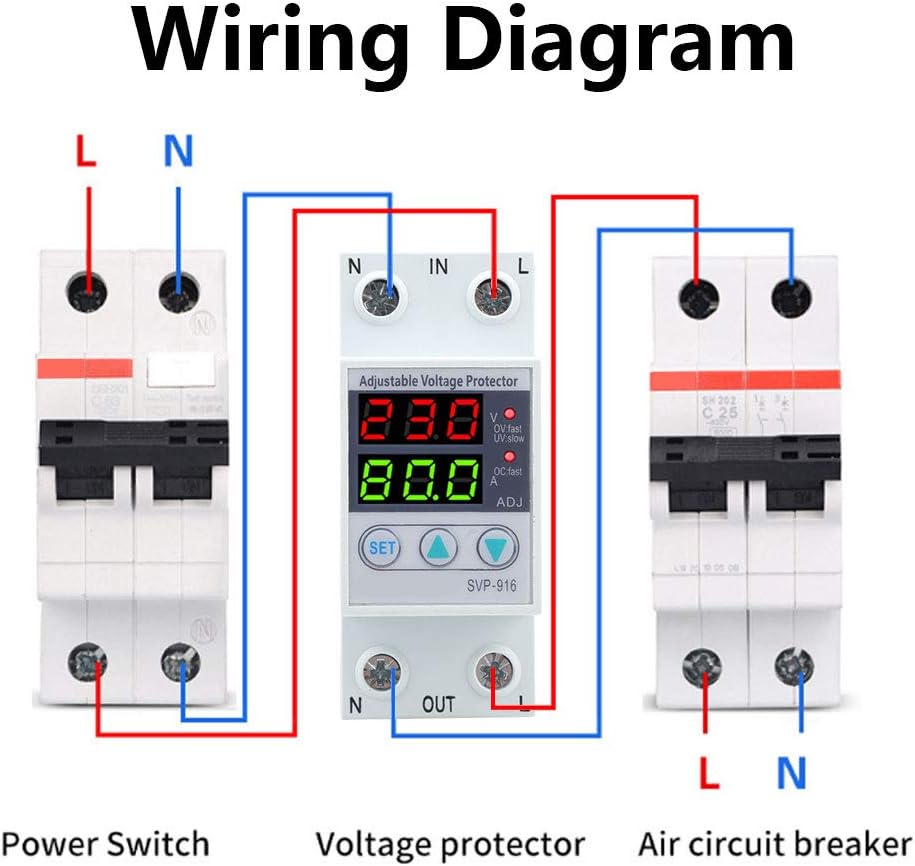
4-сүрөт: Көлөмдүн туташуусун көрсөткөн зым схемасыtage protector between a power switch and an air circuit breaker. Ensure correct L (Live) and N (Neutral) connections for both input and output terminals.
- Mount the SVP-916 protector onto a standard DIN rail in your electrical panel.
- Connect the incoming Live (L) and Neutral (N) wires from your power source to the "IN" terminals of the protector.
- Connect the outgoing Live (L) and Neutral (N) wires from the "OUT" terminals of the protector to your load (e.g., air circuit breaker, appliances).
- Бардык байланыштар коопсуз жана туура изоляцияланганын текшериңиз.
- Once wiring is complete, restore power to the circuit. The device display will light up.
Иштөө нускамалары
The SVP-916 features a digital display for real-time voltage and current monitoring, along with buttons for setting protection parameters.
Параметрди тууралоо
Томду тууралоо үчүнtage and current coefficients, follow these steps:
- басыңыз SET button 10 times. The display will show "PF1" and a numerical value (default 524). This value represents the voltage coefficient.
- колдонуу Up (▲) жана Төмөн (▼) buttons to adjust this value. For example, to increase the displayed voltage, increase this coefficient.
- басыңыз SET button again. The display will show "PF2" and a numerical value (default 129). This value represents the current coefficient.
- колдонуу Up (▲) жана Төмөн (▼) buttons to adjust this value if needed.
- басыңыз SET button twice more to save the settings and return to normal operation.
Видео 1: Demonstration of adjusting the voltage and current coefficients on the Walfront SVP-916. This video shows how to access the PF1 and PF2 settings and modify their values to calibrate the device's readings.
Коргоо орнотуулары
The device allows for adjustment of various protection parameters:
- Overvoltage коргоо мааниси: Adjustable from OFF-80V-100V (Default: 90V).
- Overvoltage Recovery Value: Көлөмдү коётtage at which the device restores power after an overvoltagэ окуя.
- Overvoltage Action Time: Configures the delay before the device trips on overvoltage.
- Undervoltage коргоо мааниси: Sets the minimum voltage босого.
- Undervoltage Recovery Value: Көлөмдү коётtage at which the device restores power after an undervoltagэ окуя.
- Undervoltage Action Time: Configures the delay before the device trips on undervoltage.
- Fault Recovery Delay Time: Delay before power is restored after any protection trip.
- Power-on Delay Time: Delay before power is supplied to the load upon initial power-up.
Техникалык тейлөө
The Walfront SVP-916 is designed for low maintenance. Regular checks can ensure its longevity and proper function:
- Визуалдык текшерүү: Түзмөктү мезгил-мезгили менен физикалык бузулуулардын, байланыштардын бошоп калышынын же түсүнүн өзгөрүшүнүн белгилерин текшерип туруңуз.
- Тазалоо: Keep the device clean and free from dust. Use a dry, soft cloth for cleaning. Do not use liquid cleaners or solvents.
- Туташуу текшерүү: Бардык зымдардын туташууларынын бекем жана ишенимдүү экенин текшериңиз. Бошоң туташуулар ысып кетүүгө же үзгүлтүккө учуроого алып келиши мүмкүн.
- Функционалдык тест: If possible, periodically test the protection functions by simulating overvoltage же undervoltage conditions (e.g., using a variable power supply) to ensure the device trips as expected.
In case of any malfunction, refer to the troubleshooting section or contact customer support. Do not attempt to open or repair the device yourself, as this may void the warranty and pose a safety risk.
Проблемаларды чечүү
This section provides solutions to common issues you might encounter with your SVP-916 Voltage Protector.
| Көйгөй | Мүмкүн себеп | Чечим |
|---|---|---|
| Түзмөк күйбөйт. | No power supply; incorrect wiring; internal fault. | Check main power supply. Verify wiring connections according to the diagram. If problem persists, contact support. |
| Түзмөк тез-тез бузулуп калат. | Тtage fluctuations; protection settings too sensitive. | Монитор томtage stability. Adjust overvoltage/undervoltage protection values or action times to be less sensitive if appropriate for your application. |
| Туура эмес томtagэлектрондук/учурдагы дисплей. | Calibration issue (PF1/PF2 settings). | Refer to "Parameter Adjustment" in Operating Instructions to recalibrate PF1 (voltage) and PF2 (current) values. |
| Device does not reset after trip. | Fault condition still present; manual reset required; internal fault. | Voltage/current has returned to normal range. Check reset method selection. If manual reset is enabled, press the reset button. If problem persists, contact support. |
Заводдук орнотууларды калыбына келтирүү
To restore the device to its factory default settings, you must manually adjust the PF1 and PF2 values back to their default (PF1: 524, PF2: 129) as described in the "Parameter Adjustment" section. There is no single button for factory reset.
Техникалык шарттар
| Параметр | Нарк |
|---|---|
| Бренд | Walfront |
| Модел | SVP-916 (40A) |
| Rated Voltage | 100-130VAC |
| Жыштык | 50/60 Гц |
| Элемент Салмагы | 6.5 унция |
| Продукциянын өлчөмдөрү | 0.39 x 0.39 x 0.39 inches (approx. 10x10x10 mm) |
| Келип чыккан өлкө | Кытай |
| Материал | Пластик |
| Орнотуу ыкмасы | DIN темир жол |
Кепилдик маалымат
Сураныч, продуктунун таңгагына же сатуучунун көрсөтмөсүнө кайрылыңыз website for specific warranty terms and conditions. Typically, Walfront products come with a standard manufacturer's warranty covering defects in materials and workmanship.
Кардарларды колдоо
For technical assistance, troubleshooting beyond this manual, or warranty claims, please contact Walfront customer support through their official website or the retailer from whom you purchased the product. Have your product model (SVP-916) and purchase details ready when contacting support.
You can visit the Walfront Store for more information: Walfront Official Store


