Introduction
Сатып алганыңыз үчүн рахматasing the ieGeek K302 Bluetooth Car Radio. This manual provides detailed instructions for installation, operation, and maintenance of your new car audio system. Please read this manual thoroughly before using the product to ensure proper functionality and safety.
Коопсуздук маалыматы
- Always ensure the vehicle is parked safely before operating the car radio controls.
- Агрегатты ажыратууга же өзгөртүүгө аракет кылбаңыз. Бул зыян келтирип, кепилдикти жокко чыгарышы мүмкүн.
- Электр шоктун алдын алуу үчүн аппаратты суудан жана нымдан алыс кармаңыз.
- Ensure proper wiring connections to avoid short circuits or damage to the vehicle's electrical system.
- Эгерде сиз зымдарды орнотуу процесси боюнча күмөн санасаңыз, орнотуу үчүн адиске кайрылыңыз.
Пакеттин мазмуну
Сураныч, пакетте төмөнкү нерселерди текшериңиз:
- ieGeek K302 Car Radio Unit
- Алыстан башкаруу
- Электр зымдары
- Installation Keys/Tools
- Колдонуучунун Колдонмосу (бул документ)
- External Microphone (optional, depending on package)
Продукт бүттүview
Familiarize yourself with the main components and controls of your ieGeek K302 car radio.

1-сүрөт: Фронт view of the ieGeek K302 car radio unit and its accompanying remote control. The unit features a dual LCD display, various control buttons, USB ports, and an AUX input. The remote allows for convenient operation from a distance.
Алдыңкы панелдин башкаруу элементтери жана порттору

2-сүрөт: Detailed diagram showing the front panel layout and rear connections of the ieGeek K302 car radio.
- Радио антенна интерфейси
- Left Channel Audio Output
- Right Channel Audio Output
- Speaker Cable Socket-A
- Power Cable Socket-B
- 15А Флайзер
- LED саат дисплей
- Көп функциялуу LCD экран
- SD карта уячасы
- USB Music Interface
- USB Charger Interface
Орнотуу жана орнотуу
Proper installation is crucial for the performance and safety of your car radio. It is recommended to have the unit installed by a qualified professional if you are not familiar with car audio wiring.
Зымдар диаграммасы

3-сүрөт: Detailed wiring connections for the ieGeek K302 car radio, showing speaker and power connections.
- A1-Violet: Right Rear Speaker Positive (+)
- A2-Violet/Black: Right Rear Speaker Negative (-)
- A3-Gray: Right Front Speaker Positive (+)
- A4-Gray/Black: Right Front Speaker Negative (-)
- A5-White: Left Front Speaker Positive (+)
- A6-White/Black: Left Front Speaker Negative (-)
- A7-Green: Left Rear Speaker Positive (+)
- A8-Green/Black: Left Rear Speaker Negative (-)
- B4-Yellow: +12V Car Battery Positive (+)
- B5-Blue: Automatic Antenna Power Supply (ANT)
- B7-Red: ACC Key Line (Ignition Switch)
- B8-Black: Car Battery Negative (-) / Ground Wire
Орнотуу кадамдары:
- Орнотууну баштоодон мурун, унаанын терс батарея терминалын ажыратыңыз.
- Carefully remove the existing car radio or blanking plate from the dashboard.
- Connect the wiring harness provided with the ieGeek K302 to your vehicle's wiring according to the diagram above. Ensure all connections are secure and insulated.
- Connect the antenna cable to the radio antenna interface (1).
- Slide the ieGeek K302 unit into the dashboard opening until it clicks into place.
- Унаанын терс батарея терминалын кайра туташтырыңыз.
- Test all functions of the car radio before fully reassembling the dashboard.
Иштөө нускамалары
Күйгүзүү/өчүрүү жана негизги башкаруу
- басыңыз Кубат баскычы (
 ) аппаратты күйгүзүү же өчүрүү.
 - айлантыңыз Үн баскычы үн деңгээлин тууралоо үчүн.
- басыңыз MUTE баскычы аудионун үнүн өчүрүү же ачуу үчүн.
- басыңыз MODE/CLK button to switch between different audio sources (FM, AM, Bluetooth, USB, SD, AUX) and to set the clock.
Radio Operation (FM/AM/RDS)
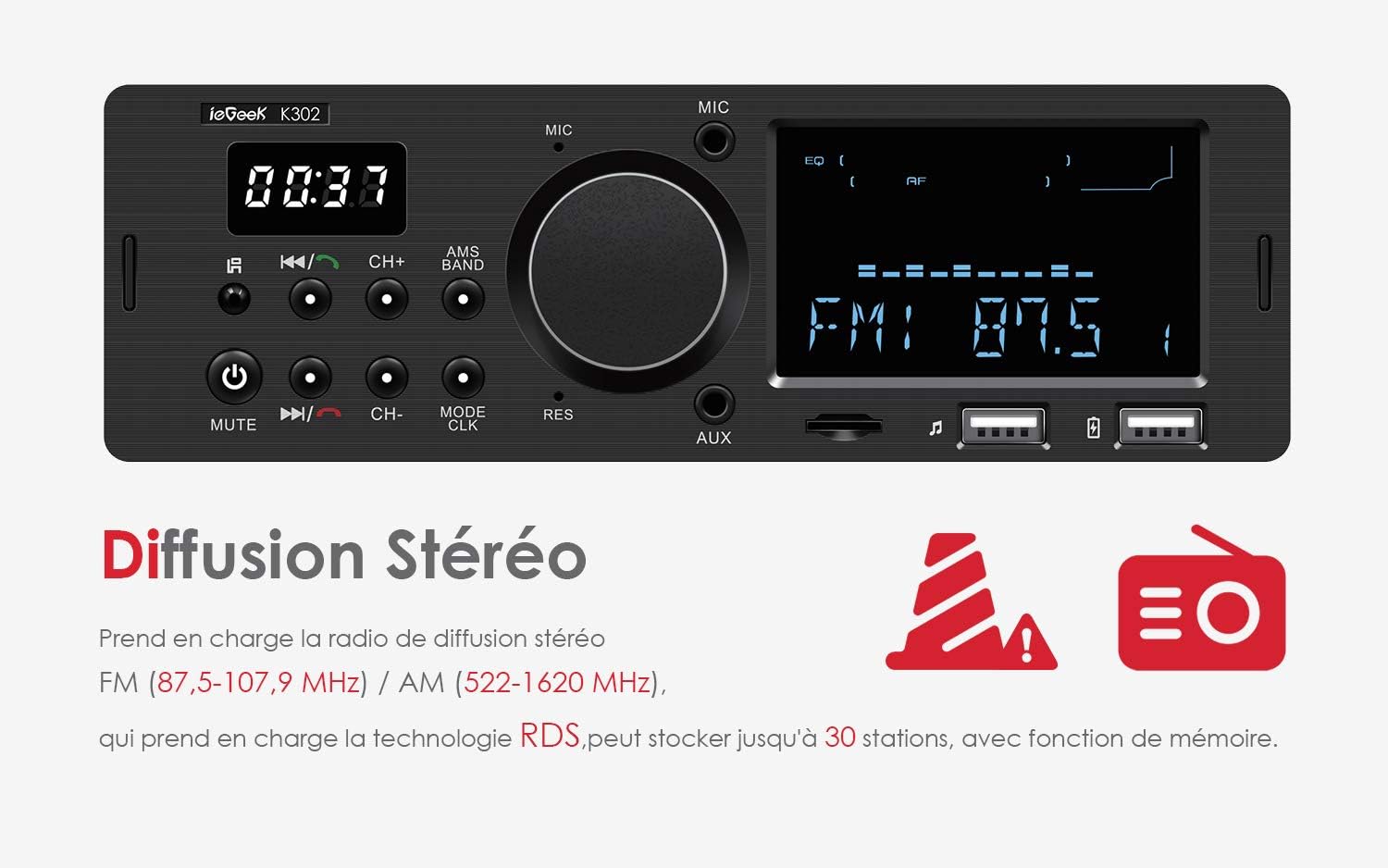
4-сүрөт: The car radio displaying an FM frequency, indicating stereo broadcast capability.
- басыңыз MODE баскычы to select FM or AM radio mode.
- басыңыз CH+/CH- баскычтары to manually tune to a station or to navigate through preset stations.
- басып, кармап туруңуз CH+/CH- баскычтары автоматтык станция издөө үчүн.
- The unit supports FM (87.5-107.9 MHz) and AM (522-1620 KHz) stereo broadcast.
- RDS (Radio Data System): The car radio supports RDS, providing traffic information and allowing the AF (Alternative Frequencies) function to find stronger signals for the current station.
- Эстутум функциясы: The unit can store up to 30 stations. The power-off save system remembers your settings and stations even after power interruption.
Bluetooth байланышы

5-сүрөт: Demonstrates the hands-free Bluetooth calling feature, allowing safe communication while driving.
- Мобилдик түзмөгүңүздө Bluetooth иштетилгенин текшериңиз.
- Тандоо Bluetooth режими on the car radio using the MODE button.
- On your device, search for Bluetooth devices and select "ieGeek K302" (or similar name) to pair.
- Once paired, you can stream audio from your device or make/receive hands-free calls.
- For calls, a short press of the Ойнотуу/тындыруу баскычы (
 ) will answer/end a call.
 - The unit supports an external 3.5mm microphone for clearer voice quality during calls.
USB/SD Card/AUX Playback

6-сүрөт: Illustrates the use of AUX-IN for playing various audio formats, enhancing the in-car entertainment experience.
- Insert a USB flash drive (up to 32GB) into the USB Music Interface (10) or an SD card (up to 32GB) into the SD Card Slot (9).
- Тышкы аудио түзмөгүн (мисалы, смартфон, MP3 ойноткуч) 3.5 мм аудио кабелин колдонуп, AUX киргизүүсүнө туташтырыңыз.
- The unit supports multiple audio formats including MP3, WMA, WAV, and FLAC (lossless quality).
- колдонуу Ойнотуу/Тыныгуу, Кийинки/Мурунку ойнотууну башкаруу үчүн баскычтар.
- The USB Charger Interface (11) can be used to charge compatible devices.
Саатты орнотуу

7-сүрөт: The separate clock display on the car radio, which remains visible when the engine is on, allowing for quick time checks.
- басып, кармап туруңуз MODE/CLK button to enter clock setting mode.
- колдонуу CH+/CH- баскычтары сааттарды жана мүнөттөрдү тууралоо үчүн.
- басыңыз MODE/CLK button again to confirm and exit clock setting mode.
- The LCD clock display (7) shows the exact time and is always visible when the engine is on.
Алыстан башкаруу операциясы

8-сүрөт: The remote control provides convenient access to various functions of the car radio, enhancing user experience.
The included remote control allows for convenient operation of the car radio from a distance. Refer to the remote control's button layout for specific functions such as power, mode, volume, track skip, station tuning, EQ settings, and more.
Техникалык тейлөө
- Агрегаттын алдыңкы панелин жумшак, кургак чүпүрөк менен тазалаңыз. Абразивдүү тазалагычтарды же эриткичтерди колдонбоңуз.
- Keep the USB ports and SD card slot free from dust and debris.
- Ашыкча ысып кетүүнүн алдын алуу үчүн аппараттын айланасында туура желдетүүнү камсыз кылыңыз.
- If the fuse blows, replace it with a fuse of the same rating (15A).
Проблемаларды чечүү
| Көйгөй | Мүмкүн себеп | Чечим |
|---|---|---|
| Күч жок | Бошоң электр байланышы; күйгүзүлгөн сактагыч; Унаанын аккумулятору маселеси. | Check power wiring harness connections. Replace 15A fuse if blown. Check vehicle battery. |
| Үн жок | Volume too low; Mute activated; Incorrect speaker wiring; Incorrect audio source. | Increase volume. Deactivate mute. Check speaker connections. Select correct audio source. |
| Радио кабыл алуу начар | Антенна туташкан эмес; Сигнал алсыз аймак; Антенна бузулган. | Ensure antenna is securely connected. Try AF function for stronger signal. Check antenna for damage. |
| Bluetooth туташпай жатат | Bluetooth not enabled on device; Incorrect pairing mode; Interference. | Ensure Bluetooth is on and discoverable on your device. Select Bluetooth mode on radio. Try re-pairing. Move away from interference sources. |
| USB/SD ойнобой жатат | Колдоого алынбайт file формат; Бузулган files; USB/SD card not inserted correctly; Card capacity exceeded. | камсыз кылуу files are MP3/WMA/WAV/FLAC. Reinsert USB/SD card. Check card for errors. Ensure card is 32GB or less. |
Техникалык шарттар

9-сүрөт: Physical dimensions of the ieGeek K302 car radio unit.
| Өзгөчөлүк | Деталь |
|---|---|
| Модель номери | K302 |
| Бренд | ieGeek |
| Байланыш технологиясы | Bluetooth |
| Шайкеш түзмөктөр | Speaker, iOS, Android devices |
| Туташтыргыч түрү | 3.5 мм Джек |
| Аудио чыгаруу режими | Стерео, айлана |
| Көлөмдүү үн каналынын конфигурациясы | 4.0 |
| Чыгуу күчү | 60 Ватт |
| Каналдардын саны | 4 |
| Колдоого алынган аудио форматтары | MP3, WMA, WAV, FLAC |
| USB/SD картаны колдоо | 32 ГБ чейин |
| Радио жыштыктар | FM (87.5-107.9 МГц), AM (522-1620 кГц) |
| Өлчөмдөрү (W x Y x D) | Болжол менен 188 мм x 58 мм x 100 мм |
Кепилдик жана колдоо
ieGeek products are designed and manufactured to the highest quality standards. For warranty information and technical support, please refer to the warranty card included with your product or visit the official ieGeek website. If you encounter any issues not covered in this manual, please contact ieGeek customer service for assistance.
ieGeek Official Store: Visit ieGeek Store on Amazon


