1. Киришүү
Thank you for choosing the PROXTEND X502 Full HD Webcam. This manual provides detailed instructions to help you set up, operate, and maintain your webcam for optimal performance. The X502 is designed to deliver clear 1080p video at 30 frames per second, featuring an omni-directional microphone and automatic low light correction for various lighting conditions.
2. Пакеттин мазмуну
Пакетиңизде бардык буюмдар бар экенин текшериңиз:
- PROXTEND X502 Full HD Webcam (PX-CAM007)
- Integrated Universal Mounting Clip
- Колдонуучунун Колдонмосу (бул документ)
3. Орнотуу
Follow these steps to set up your PROXTEND X502 Webкамера:
- монтаждоо Webкамера:
The webcam features an integrated universal mounting clip. You can place the webcam on top of your computer monitor, laptop screen, or a flat surface. Adjust the clip to securely hold the webcam in position. The webcam also supports mini tripod mounting (tripod not included).
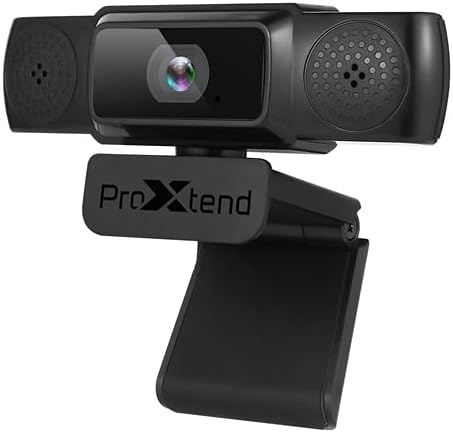
Image: The PROXTEND X502 Full HD Webcam shown with its universal mounting clip, suitable for monitors or flat surfaces.
- Компьютериңизге туташуу:
USB кабелин туташтыргычтан сайыңыз webкамераны компьютериңиздеги жеткиликтүү USB портуна туташтырыңыз. webcam is plug-and-play, meaning your operating system should automatically detect and install the necessary drivers. No additional software installation is typically required.
- Driver Installation Verification:
After connecting, allow a few moments for your computer to recognize the device. You can verify successful installation in your operating system's Device Manager (Windows) or System Information (macOS) under 'Cameras' or 'Imaging Devices'.
4. Иштөө нускамалары
Бир жолу webcam is set up, you can begin using it with various applications:
- тандоо Webкамера:
Open your preferred video conferencing, streaming, or recording application (e.g., Zoom, Microsoft Teams, Skype, OBS Studio). Navigate to the application's video and audio settings. Select "PROXTEND X502" as your camera and microphone input device.

Сүрөт: алдыңкы view of the PROXTEND X502 Full HD Webcam, highlighting the lens and integrated microphones.
- Видеонун сапаты:
The webcam automatically adjusts for optimal image quality, including auto-focus and auto low light correction. Ensure adequate lighting for the best video performance. The 1920x1080p resolution at 30fps provides clear and smooth video.
- Аудионун сапаты:
The integrated omni-directional microphone captures sound from all directions. Position yourself appropriately to ensure your voice is clearly picked up. Most applications allow you to adjust microphone input levels in their audio settings.
5. Өзгөчөлүктөрү
Key features of the PROXTEND X502 Full HD Webcam include:
- 1 / 2.7 ”CMOS сүрөт сенсору
- 2 мегапиксел
- Resolution: 1920x1080 at 30 frames per second
- Ар тараптуу микрофон
- Универсалдуу монтаждоочу клип
- Mini Tripod Support
- Автоматтык аз жарык коррекциясы
6. Техникалык шарттар
Detailed technical specifications for the PROXTEND X502 Full HD Webкамера:

Image: A visual representation of the PROXTEND X502 Full HD Webcam's key features and technical specifications.
| Өзгөчөлүк | Спецификация |
|---|---|
| Сүрөт сенсору | 1/2.7" CMOS Image Sensor |
| Мегапикселдер | 2 депутат |
| Max чечим | 1920x1080 |
| Video Resolution | 1920x1080 |
| Максималдуу FPS | 30 кадр/сек |
| Видеонун декоддоо формасы | H.264/MJPG |
| Экспозиция режими | Авто |
| Ак баланс | Авто |
| Пайда | Авто |
| Төмөн жарык компенсациясы | Авто |
| Viewбурч | 77° |
| Фокустук аралык | Чексиздикке чейин 10 см |
| Фокус түрү | Авто |
| Микрофон | Omni-багыттуу |
| Аудио С.ampling Rate | 1 Канал 16bit 16K 32K 44.1K 48K |
| Аудио формат | PCM, шайкеш UAC 1.0 |
| Интерфейс | USB 2.0 |
| Кабелдин узундугу | 1.5 м |
| Шайкеш OS | Windows XP, Windows 7 (32bit/64bit), Windows 8, Windows 10, Android V5.0 or higher OS, MAC OS 10.6 or higher |
| Продукциянын өлчөмдөрү | 12.7 x 7.62 x 5.08 см |
| Продукт Салмагы | 453.59 г |
7. Кыйынчылыктарды
If you encounter issues with your PROXTEND X502 Webкамера, төмөнкү чечимдерди колдонуп көрүңүз:
- Сүрөт/видео жок:
- USB кабели экөөнө тең бекем туташтырылганын текшериңиз webкамера жана компьютериңиз.
- Компьютериңиздеги башка USB портун колдонуп көрүңүз.
- Компьютериңизди өчүрүп күйгүзүңүз.
- Check your application's settings to ensure the PROXTEND X502 is selected as the video input.
- Verify that no other application is currently using the webкамера
- Аудио жок/микрофон иштебей жатат:
- Ensure the PROXTEND X502 is selected as the microphone input in your application's audio settings.
- Микрофондун күйгүзүлгөнүн жана үнсүз эместигин текшерүү үчүн компьютериңиздин үн жөндөөлөрүн текшериңиз.
- Adjust the microphone input level in your system or application settings.
- Видеонун сапаты начар:
- Айлана-чөйрөңүздө жетиштүү жарыкты камсыз кылыңыз.
- тазалаңыз webcam lens gently with a soft, lint-free cloth.
- Check your internet connection speed if streaming, as bandwidth can affect video quality.
8. Техникалык тейлөө
Сиздин узак жана оптималдуу иштешин камсыз кылуу үчүн webкамера:
- Тазалоо: Акырын сүртүңүз webcam lens with a soft, dry, lint-free cloth. Avoid using harsh chemicals or abrasive materials.
- Сактагыч: Колдонулбаган учурда, дүкөндү сактаңыз webкамераны таза, кургак жерде, өтө жогорку температурадан жана түз күн нурунан алыс сактаңыз.
- Колдонуу: Түшүрүп салуудан алыс болуңуз webcam or subjecting it to strong impacts.
9. Кепилдик жана колдоо
The PROXTEND X502 Full HD Webкамера менен келет 7 жылдык кепилдик, ensuring peace of mind regarding your purchase. For warranty claims, technical support, or any inquiries not covered in this manual, please refer to the contact information provided with your product packaging or visit the official PROXTEND webсайт.
10. Шайкештик жөнүндө маалымат
This device complies with relevant regulatory standards for electronic equipment. For detailed compliance information, please refer to the product packaging or the official PROXTEND webсайт.


