1. Киришүү
This manual provides essential instructions for the setup, operation, and maintenance of your Sophos XGS 126 Next-Gen Firewall. The Sophos XGS 126 is designed to provide robust network security, accelerating SaaS, SD-WAN, and cloud application traffic while protecting against advanced threats.
1.1 Кутуда эмне бар
- Sophos XGS 126 Firewall Appliance
- US Power Cord
- Базалык лицензия
- Network Protection License
- Web Protection License
- Өркүндөтүлгөн колдоо
- Xstream TLS and DPI engine
- Web Security and Control features
- Application Control features
- Кабарлоо мүмкүнчүлүктөрү
- Кирүүнү алдын алуу системасы (IPS)
- Advanced Threat Protection (ATP)
- Security Heartbeat functionality
- SD-RED VPN support
- SD-WAN and Cloud Application Traffic Control

Figure 1: Sophos XGS 126 Next-Gen Firewall appliance with its software packaging.
2. Орнотуу
2.1 Физикалык орнотуу
Place the Sophos XGS 126 on a stable, flat surface in a well-ventilated area. Ensure adequate space around the device for proper airflow.
2.2 Кубатты туташтыруу
- Connect the provided US power cord to the power input on the rear of the XGS 126 appliance.
- Электр шнурунун экинчи учун жерге туташтырылган электр розеткасына сайыңыз.
- The device will power on automatically. Observe the status indicators on the front panel.
2.3 Тармактык байланыштар
The XGS 126 features multiple RJ45 ports for network connectivity. Refer to the diagrams below for port identification.

Figure 2: Front Panel of Sophos XGS 126. Displays status indicators and front-facing ports.

Figure 3: Rear Panel of Sophos XGS 126. Shows network interfaces, power inputs, and the reset button.
- Connect your internet service provider's modem or router to the designated WAN port (typically Port 1 or a labeled WAN port).
- Connect your internal network devices (switches, access points) to the LAN ports.
- For initial configuration, connect a computer directly to a LAN port using an Ethernet cable.
3. Брандмауэрди иштетүү
The Sophos XGS 126 operates as a Next-Gen Firewall, providing comprehensive security and network management.
3.1 Негизги өзгөчөлүктөрү
- Xstream коргоосу: Utilizes Sophos Firewall’s Xstream architecture for advanced threat protection and optimized traffic handling for SaaS, SD-WAN, and cloud applications.
- TLS 1.3 чечмелөө: Provides intelligent and fast TLS inspection, supporting the latest standards with flexible policy tools.
- Терең пакеттик текшерүү: Кийинки муундагы IPSти кошо алганда, жогорку өндүрүмдүүлүктөгү агымдык терең пакеттик текшерүүнү сунуштайт, web protection, application control, deep learning, and sandboxing via SophosLabs Intelix.
- Standard Protection Bundle: Includes Base License, Network Protection, Web Protection, and Enhanced Support for a foundational security posture.
3.2 Баштапкы конфигурация
Access the firewall's webаркылуу негизделген административдик интерфейс web browser on a connected computer. The default IP address and login credentials can be found in the quick start guide or Sophos documentation. Follow the on-screen prompts for initial setup, including setting up network zones, security policies, and user authentication.

Figure 4: ашыкview of Xstream Protection features for the Sophos XGS Series.
4. Техникалык тейлөө
Regular maintenance ensures optimal performance and longevity of your Sophos XGS 126 firewall.
- Физикалык текшерүү: Periodically check the device for dust accumulation, especially around ventilation openings. Clean with a soft, dry cloth. Ensure all cables are securely connected.
- Программалык камсыздоонун жаңыртуулары: Keep the firewall's firmware updated to the latest version. Sophos regularly releases updates that include security patches, new features, and performance improvements. Refer to the Sophos documentation for the update procedure.
- Конфигурациянын камдык көчүрмөсү: Regularly back up your firewall configuration. This allows for quick restoration in case of an unexpected issue or hardware replacement.
- Экологиялык шарттар: Ensure the operating environment remains within specified temperature and humidity ranges to prevent overheating or damage.
5. Кыйынчылыктарды
This section provides solutions to common issues you might encounter with your Sophos XGS 126 firewall.
5.1 Күч жок
- Электр кабелин текшерүү: Ensure the power cord is securely connected to both the firewall and the electrical outlet.
- Outlet текшерүү: Розетканын иштеп жатканын текшерүү үчүн аны башка түзмөк менен текшериңиз.
- Power Cycle: Disconnect the power cord, wait 10 seconds, then reconnect it.
5.2 Тармакка туташуу жок
- Кабелдерди текшерүү: Ensure all Ethernet cables are properly connected to the correct ports on the firewall and connected devices.
- Статус диоддору: Observe the link/activity LEDs on the firewall ports. If they are off, check the cable and the connected device.
- IP конфигурациясы: Verify that your connected devices are receiving IP addresses from the firewall (if configured as a DHCP server) or have correct static IP settings.
- Firewall эрежелери: Incorrect firewall rules can block legitimate traffic. Review your security policies in the administration interface.
5.3 Жай аткаруу
- Ресурстарды колдонуу: Check the firewall's resource monitor in the administration interface to see if CPU, memory, or disk usage is high.
- Коркунучтан коргоо: High levels of threat protection (e.g., deep packet inspection, antivirus scanning) can impact throughput. Ensure your policies are optimized for your network's needs.
- Тармактын тыгыны: Investigate if the slowdown is due to network congestion upstream or downstream from the firewall.
6. Техникалык шарттар
Detailed technical specifications for the Sophos XGS 126 Next-Gen Firewall.
- Модель номери: XGS 126
- Өлчөмдөрү (L x W x Y): 12.6 x 8.35 x 1.73 дюйм
- Элемент Салмагы: 8 фунт
- Иштин материалы: Пластик
- Интерфейс түрү: RJ45
- Порттардын саны: 8
- Маалыматтарды өткөрүү ылдамдыгы: 10500 Megabits Per Second (Firewall throughput)
- IMIX брандмауэри: 4,000 Мбит/сек
- Firewall Latency (64 byte UDP): 8 мкс
- IPS Throughput: 2,600 Мбит/сек
- Threat Protection Throughput: 900 Мбит/сек

Figure 5: Sophos XGS Series Desktop Technical Specifications, including XGS 126 details.
7. Licensing and Protection Modules
The Sophos XGS 126 comes with a Standard Protection Bundle. Additional protection modules and licensing options are available to customize your security posture.
7.1 Стандарттык коргоо топтому
The included Standard Protection Bundle provides:
- Базалык лицензия: Core firewall functionality.
- Тармакты коргоо: Intrusion Prevention System (IPS), Advanced Threat Protection (ATP), SD-RED VPN.
- Web Коргоо: Web security and control, application control, Xstream TLS and DPI engine.
- Өркүндөтүлгөн колдоо: Includes 24/7 technical support, access to feature updates, and an advanced replacement hardware warranty.

Figure 6: Sophos Firewall Licensing Options.
7.2 Protection Modules Overview
Sophos Firewall offers a range of protection modules to tailor security to specific organizational needs. These include advanced features for network, web, and zero-day protection, as well as centralized management and reporting.
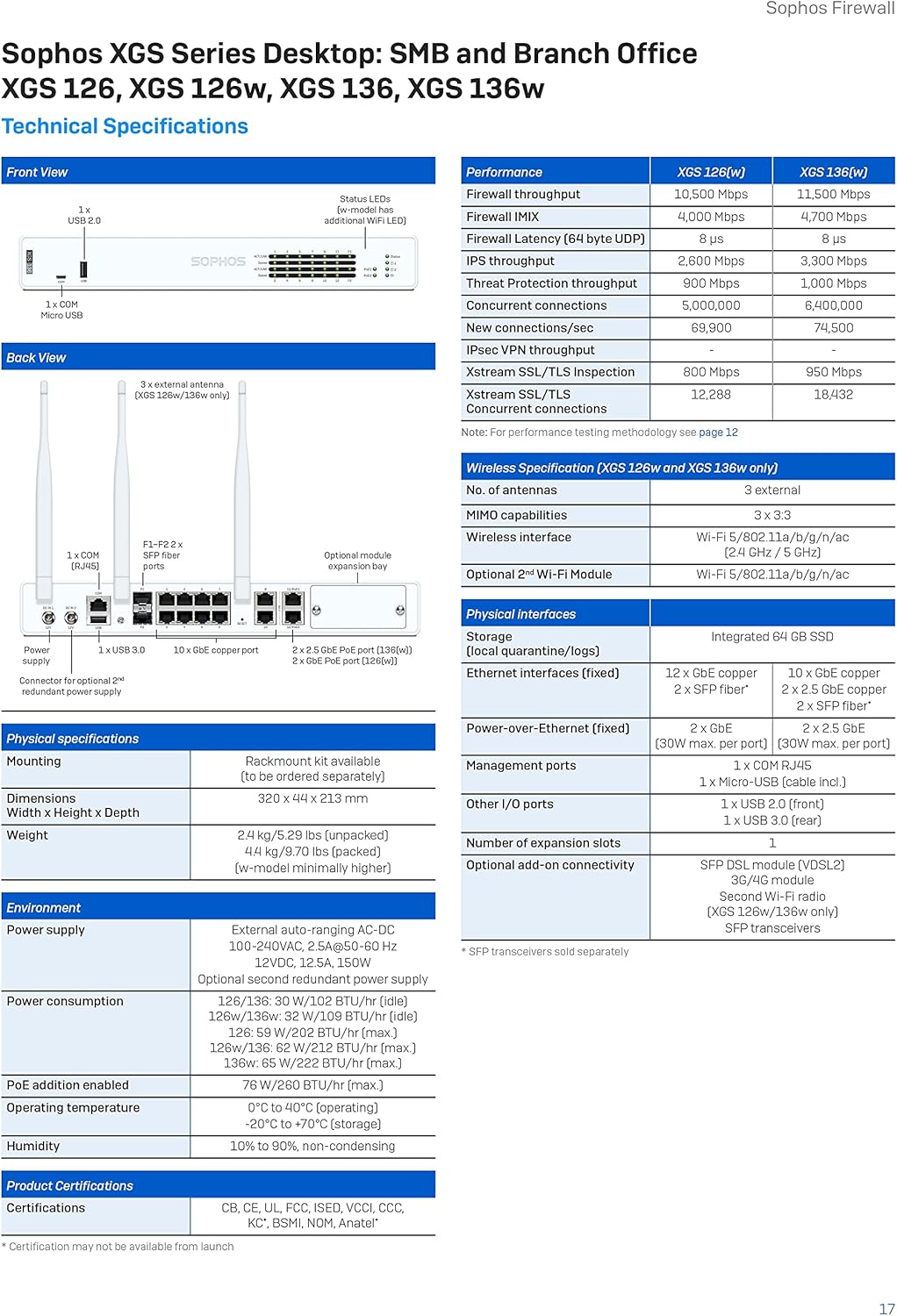
Figure 7: Sophos Firewall Protection Modules.
8. Колдоо жана кепилдик
Your Sophos XGS 126 Next-Gen Firewall includes a 1-year Standard Protection bundle, which provides Enhanced Support.
- Өркүндөтүлгөн колдоо: This includes 24/7 technical support, access to feature updates, and an advanced replacement hardware warranty.
- Кепилдик камтуу: The hardware warranty covers defects in materials and workmanship for the duration of the included protection plan.
- Колдоо кызматы менен байланышуу: For technical assistance or warranty claims, please refer to the official Sophos support website or contact your Sophos partner. Ensure you have your product serial number and license information ready.
Көбүрөөк маалымат алуу үчүн, киргиле Amazon'догу Sophos дүкөнү.


