Introduction
This manual provides essential instructions for the safe and efficient operation of your Miroir M600 1080p Battery-Powered Projector. Please read this manual thoroughly before using the device and retain it for future reference.
Кутуда эмне бар
Төмөндө тизмеленген нерселердин баары пакетиңизге камтылганын текшериңиз:
- Miroir M600 Projector
- HDMI кабели
- AC Adapter and Charger

Image: Contents of the Miroir M600 Projector package.
Продукт бүттүview
The Miroir M600 is a compact, portable 1080p projector designed for various projection needs. Familiarize yourself with its components:
Фронт View

Сүрөт: алдыңкы view of the Miroir M600 Projector, showing the projection lens and ventilation grille.
Арткы View жана порттор

Сүрөт: Арткы view of the Miroir M600 Projector, highlighting the various input/output ports.
- 3.5 мм аудио чыгышы: Тышкы динамиктерди же наушниктерди туташтыруу үчүн.
- USB-C Video Port: For video input from compatible USB-C devices.
- HDMI порту: HDMI иштетилген түзмөктөрдөн видео киргизүү үчүн.
- USB кубаттоочу порт: Тышкы түзмөктөрдү кубаттоо үчүн.
- Туруктуу кубат киргизүү: For connecting the AC adapter to power and charge the projector.
Жайгашуу
1. Күйгүзүү жана заряддоо
- Connect the AC adapter to the DC Power Input port on the projector and then to a power outlet. The projector can operate while charging.
- Press and hold the power button (location not specified in data, assume standard placement) for a few seconds until the projector powers on.
- The internal battery provides portable operation. Ensure it is sufficiently charged for use without the AC adapter.
2. Жайгаштыруу жана проекциялоо
Position the projector on a stable, flat surface or mount it on a compatible stand. Ensure the lens is unobstructed and pointed towards your desired projection surface (wall or screen).

Image: Miroir M600 Projector positioned on a stand for optimal projection.
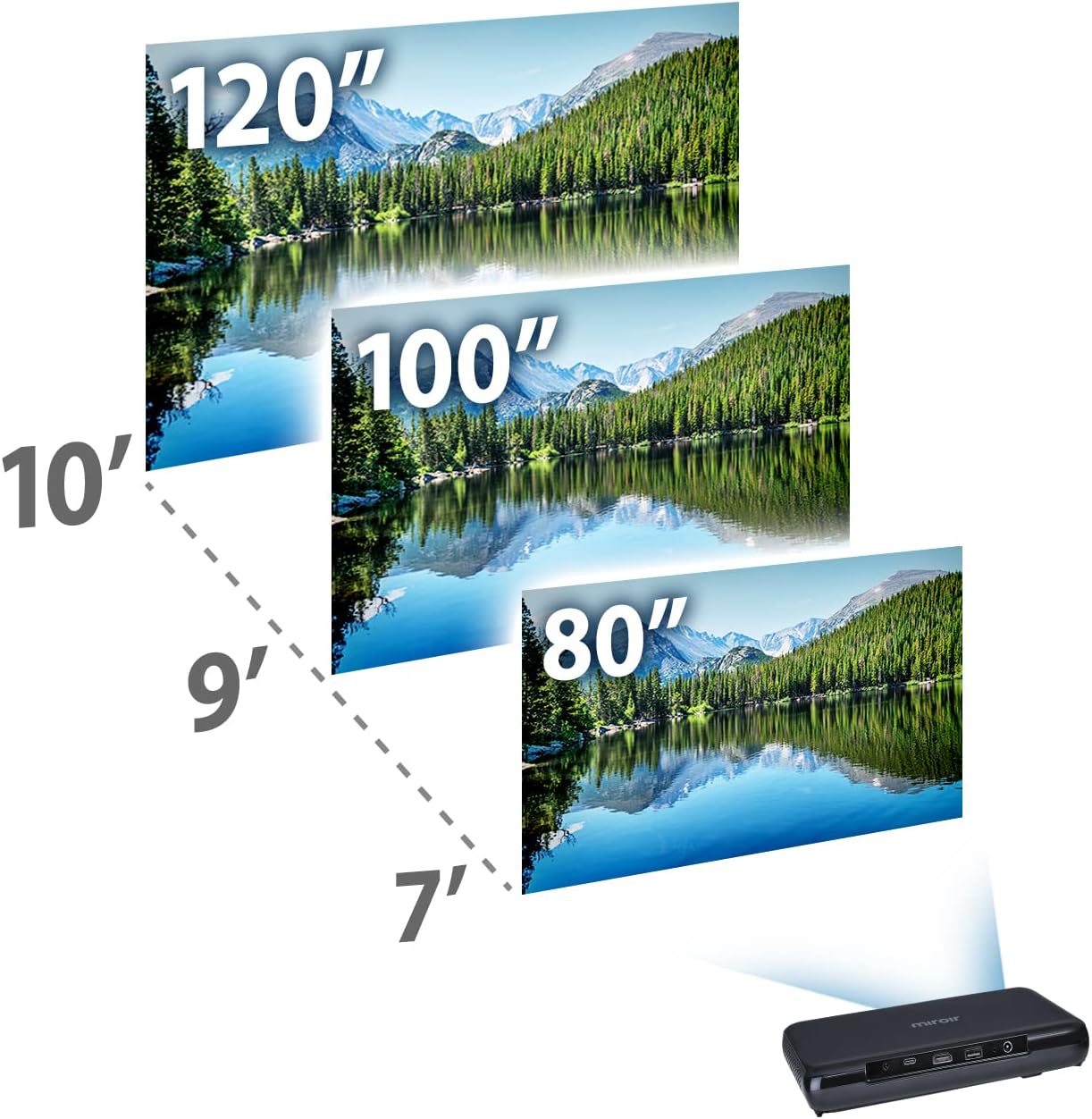
Image: Guide for projection distances to achieve various screen sizes (e.g., 7 feet for 80 inches, 10 feet for 120 inches).
Иштеп жатат
1. Киргизүү түзүлүштөрүн туташтыруу
- HDMI: Connect an HDMI cable from your source device (laptop, streaming stick, game console) to the HDMI port on the projector.
- USB-C Video: For compatible devices, connect a USB-C cable from your source to the USB-C Video port on the projector.
2. Adjusting Image and Focus
The Miroir M600 features automatic keystone correction to adjust the image shape. For focus, manual adjustment may be required via a focus wheel (location not specified in data, assume standard placement near lens).
3. Аудио чыгаруу
The projector includes a built-in 5-watt speaker. For enhanced audio, connect external speakers or headphones to the 3.5mm Audio Out jack.
4. Лamp Режимдер
LED lamp offers two modes:
- Кадимки режим: Up to 20,000 hours of lamp жашоо.
- ЭКО режими: Up to 30,000 hours of lamp life, providing extended usage and reduced power consumption.
Техникалык тейлөө
1. Проекторду тазалоо
- Объектив: Оптикалык линзалар үчүн атайын жасалган жумшак, түксүз кездемени колдонуңуз. Абразивдүү тазалагычтарды же ашыкча күч колдонбоңуз.
- Сырткы: Wipe the projector's exterior with a soft, dry cloth. Avoid using liquid cleaners directly on the device.
- Вентиляция: Ensure the ventilation grilles are clear of dust and debris to prevent overheating.
2. Батареяга кам көрүү
- Батареянын оптималдуу иштөө мөөнөтү үчүн, бат-баттан батарейканы толук зарядсыздандырбаңыз.
- Store the projector in a cool, dry place when not in use for extended periods.
Проблемаларды чечүү
If you encounter issues with your Miroir M600 projector, refer to the following common solutions:
- Сүрөт жок: Ensure the input source is correctly connected and selected. Check all cable connections.
- бүдөмүк сүрөт: Adjust the focus manually. Ensure the projection surface is flat and the projector is stable.
- Үн жок: Verify that the volume is not muted on both the projector and the source device. If using external speakers, ensure they are properly connected and powered.
- Ашыкча ысып кетүү: Ensure adequate ventilation around the projector. Do not block air vents.
For more detailed troubleshooting steps, please consult the full user manual available for download (see Support section).
Техникалык шарттар
| Өзгөчөлүк | Деталь |
|---|---|
| Продукциянын өлчөмдөрү | 9 x 5 x 1 дюйм |
| Элемент Салмагы | 1.6 фунт |
| Элемент моделинин номери | M600 |
| Батареялар | 1 Литий Полимердик батарейка (кошулган) |
| Өндүрүүчү | Miroir |
| Бренд | Miroir |
| Сунушталган Колдонуулар | Бизнес |
| Өзгөчө өзгөчөлүк | Pico, Speakers |
| Байланыш технологиясы | USB, HDMI |
| Display Resolution | 1920 x 1080 (1080p) |
| Lamp Life (Normal Mode) | 20,000 саатка чейин |
| Lamp Жашоо (ЭКО режими) | 30,000 саатка чейин |
| Камтылган динамик | 5 ватт |
| Көрүнүүчү экран диагоналы | 120" / 305 см |
Кепилдик маалымат
Specific warranty details are not provided in this document. Please refer to the official Miroir website or the warranty card included with your product for comprehensive warranty terms and conditions.
Колдоо & Байланыш
For further assistance, detailed instructions, or to contact customer support:
- Толук Колдонуучу Колдонмосу: Толук PDF колдонуучу колдонмосун жүктөп алууга болот бул жерде.
- Өндүрүүчү Webсайт: Visit the official Miroir website for product registration, FAQs, and support resources.


