1. Киришүү
This manual provides comprehensive instructions for the installation, programming, and operation of the Finder 12.A4.8.230.0010 NFC Weekly Time Clock. This electronic astronomical time switch features a weekly program, an analog output, and can be programmed via a joystick or an NFC-enabled smartphone using the Finder Toolbox app.
2. Коопсуздук маалыматы
Please read these safety instructions carefully before installation and operation. Failure to follow these instructions may result in electric shock, fire, or damage to the device.
- Орнотуу жергиликтүү электр зымдарынын эрежелерине ылайык квалификациялуу электрик тарабынан аткарылышы керек.
- Кандайдыр бир орнотуу же тейлөө иштеринин алдында электр кубаты өчүрүлгөнүн текшериңиз.
- Аппаратты нымдуулукка, экстремалдык температурага же коррозиялуу чөйрөгө тийгизбеңиз.
- Аппарат үй ичинде колдонуу үчүн гана иштелип чыккан.
3. Продукт бүтүп калдыview
The Finder 12.A4.8.230.0010 is an electronic time switch designed for DIN rail mounting. It offers precise time control with a weekly program and astronomical function.

Сүрөт 1: Алдыңкы view of the Finder 12.A4.8.230.0010 Time Clock, showing the LCD display, joystick, and NFC symbol.
Негизги өзгөчөлүктөрү:
- Weekly program for flexible scheduling.
- 1 analog output: 0-10 V or PWM.
- 1 changeover contact for 16 A / 250 V AC (AC1).
- Менен камсыз кылууtage: 110-230 V AC/DC.
- LCD display for clear information.
- Programming via joystick or NFC-enabled smartphone with Finder Toolbox app (Android and iOS).
- Astronomical time control: automatic switching at sunrise and sunset based on postcode or coordinates.
- Adjustable time offset for sunrise/sunset.
4. Орнотуу жана орнотуу
This device is designed for DIN rail mounting. Follow these steps for proper installation:
- Электр энергиясын өчүрүү: Улантуудан мурун, орнотуу аймагына негизги электр менен камсыздоо толугу менен өчүрүлгөнүн текшериңиз.
- Монтаждоо: Mount the time switch securely onto a standard DIN rail.
- Зымдар: Connect the power supply (110-230 V AC/DC) to terminals A1 and A2. Connect the load to the changeover contact terminals (NO, NC, COM) and the analog output (W, O, Y) as required. Refer to the wiring diagram below.
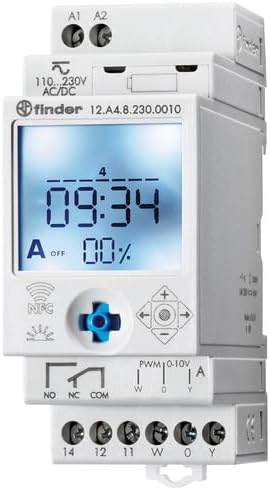
2-сүрөт: Детальдуу view of the wiring terminals for power input (A1, A2), relay output (NO, NC, COM), and analog output (W, O, Y).
Эскертүү: The device features safe separation between the power supply and contacts.
5. Иштөө нускамалары
5.1 Баштапкы кубаттуулук
Once wired, restore power. The LCD display will illuminate. You may need to set the current date and time if it's the first use or after a prolonged power outage.
5.2 Programming via Joystick
The integrated joystick allows for direct programming on the device:
- Навигация: Use the joystick to move through menu options (up, down, left, right).
- Тандоо/Ырастоо: Опцияны тандоо же жөндөөнү ырастоо үчүн джойстикти ичкери басыңыз.
- Follow the on-screen prompts to set the current time, date, weekly program, and astronomical functions.
5.3 Programming via NFC (Finder Toolbox App)
For maximum flexibility, program the time switch using an NFC-enabled smartphone and the Finder Toolbox app:
- Колдонмону жүктөп алуу: Download the "Finder Toolbox" app from the Google Play Store (Android) or Apple App Store (iOS).
- Create/Load Program: Open the app and create a new program or load an existing one. The app allows for detailed configuration of weekly schedules, astronomical settings, and special functions.
- Маалыматтарды өткөрүү: To transfer the program, hold your smartphone close to the NFC symbol on the time switch. The app will guide you through the data transfer process.
- Read Program: You can also read an existing program from the time switch to your smartphone for editing or backup.
5.4 Astronomical Time Control
The device can automatically switch based on sunrise and sunset times:
- Жайгашкан жерди жөндөө: Set your location by entering a postcode or geographical coordinates in the programming menu (via joystick or app).
- Оффсет: You can set a selectable time offset for both sunrise and sunset times to adjust switching points.
- Astro ON/OFF: Configure specific ON/OFF times during the astronomical ON period if needed.
6. Техникалык тейлөө
The Finder 12.A4.8.230.0010 is designed for maintenance-free operation. However, periodic checks are recommended:
- Тазалоо: Clean the device with a dry, soft cloth. Do not use abrasive cleaners or solvents.
- Байланыштары: Мезгил-мезгили менен терминалдык байланыштарды текшерип туруңуз, алардын коопсуздугу.
- Программалык камсыздоонун жаңыртуулары: Издөөчүнү текшериңиз webжакшыртылган функцияларды же каталарды оңдоо үчүн жеткиликтүү болгон микропрограммалык камсыздоонун жаңыртуулары жөнүндө маалымат алуу үчүн сайтка же колдонмого өтүңүз.
7. Кыйынчылыктарды
| Көйгөй | Мүмкүн себеп | Чечим |
|---|---|---|
| Түзмөк күйбөй жатат. | Электр менен камсыздоо жок же зымдар туура эмес туташтырылган. | Check power connections (A1, A2) and ensure power is supplied. Verify wiring against the diagram. |
| Program not executing. | Incorrect program settings or manual override active. | Review program settings via joystick or app. Check for any active manual override functions. Ensure current date/time is correct. |
| NFC transfer fails. | Smartphone not NFC-enabled, app not open, or poor contact. | Ensure your smartphone has NFC enabled. Open the Finder Toolbox app. Hold the phone directly over the NFC symbol on the device. |
| Astronomical function inaccurate. | Incorrect location (postcode/coordinates) or time zone setting. | Verify the entered postcode or coordinates. Check the time zone setting. |
If the problem persists, please contact Finder technical support.
8. Техникалык шарттар
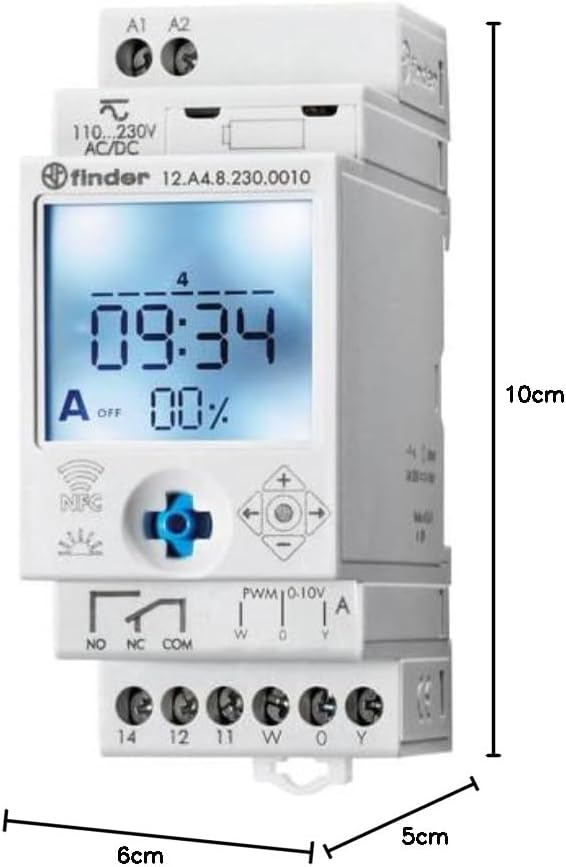
Figure 3: Dimensions of the Finder 12.A4.8.230.0010 Time Clock, showing approximate measurements of 10cm height, 6cm width, and 5cm depth.
| Өзгөчөлүк | Деталь |
|---|---|
| Бренд | Finder |
| Модель номери | 12.A4.8.230.0010 |
| Өлчөмдөрү (H x W x D) | 10 x 6 x 5 см |
| Салмагы | 70 г |
| Supply Voltage | 110-230 В AC/DC |
| Байланышты чыгаруу | 1 changeover contact, 16 A / 250 V AC (AC1) |
| Аналогдук чыгаруу | 0-10 V or PWM |
| Байланыш материалы | AgSnO2 |
| Макс. Катуу агым | 120 мс үчүн 5 А |
| Min. Switching Time | 1 мүнөт |
| Max. Switching Power (230 V AC1) | 4000 VA |
| Адам интерфейсинин киргизүү | Buttons (Joystick) |
| Батареялар талап кылынат | Жок |
| менен шайкеш келет | Power supplies/ballasts with 0-10 V or PWM inputs, or Slave dimmers Type 15.11 |
9. Кепилдик жана колдоо
For warranty information and technical support, please refer to the official Finder webсайтка кайрылыңыз же жергиликтүү дистрибьютериңиз менен байланышыңыз. Сатып алганыңыздын далили катары сатып алуу дүмүрчөгүңүздү сактаңыз.
Өндүрүүчү: Finder
Product on Amazon.es since: 24-май, 2021-жыл


