1. Продукт бүтүп калдыview
The Lexmark MX611DHE is a monochrome laser multifunction device designed for office environments, offering comprehensive capabilities including printing, copying, scanning, and faxing. This robust unit is engineered for high-volume output and efficient document handling.
- Көп функциялуулугу: Integrates print, copy, fax, and scan functions into a single device.
- Жогорку ылдамдыктагы аткаруу: Capable of printing and copying at speeds up to 50 pages per minute (ppm).
- Дуплекстүү басып чыгаруу: Supports automatic two-sided printing to conserve paper.
- Киргизүү сыйымдуулугу: Features a standard input capacity of 650 sheets, expandable for larger tasks.
- Байланыш: Equipped with USB and Ethernet interfaces for versatile network integration.
- Интуитивдик башкаруу: Features a touchscreen display for easy navigation and operation.
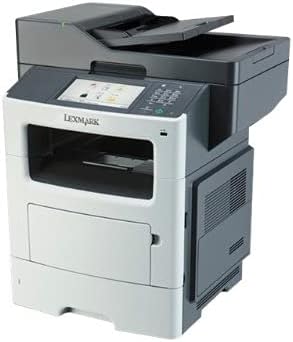
Сүрөт 1: Алдыңкы view of the Lexmark MX611DHE multifunction printer, showcasing its compact design and front-facing paper tray.
2. Орнотуу колдонмосу
Follow these steps to set up your Lexmark MX611DHE printer for initial use.
- Пакеттен чыгаруу: Принтерди таңгагынан кылдаттык менен чыгарыңыз. Аппараттын сыртынан жана ички бөлүгүндөгү бардык коргоочу ленталарды жана таңгактоочу материалдарды алып салыңыз.
- Жайгашкан жери: Place the printer on a stable, level surface with adequate ventilation. Ensure there is enough space around the printer for proper operation and maintenance.
- Кубат туташуу: Connect the power cord to the printer's power input and then to a grounded electrical outlet. Do not connect to a surge protector or extension cord initially.
- Кагаз жүктөө: Open the paper tray and load the appropriate paper size (up to 8.5 x 14 inches). Adjust the paper guides to fit the paper stack snugly.
- Тармак/USB туташуусу:
- For Network (Ethernet): Принтердин Ethernet портунан Ethernet кабелин тармак роутериңизге же коммутаторуңузга туташтырыңыз.
- USB үчүн: Принтердин USB портунан USB кабелин компьютериңизге туташтырыңыз.
- Баштапкы күйгүзүү: Press the power button to turn on the printer. Follow the on-screen prompts on the touchscreen display to select language, region, and perform initial setup configurations.
- Драйверди орнотуу: Install the necessary printer drivers on your computer. Drivers can typically be found on the Lexmark support website or on an included installation CD (if applicable).
3. Иштөө нускамалары
This section provides basic instructions for using the Lexmark MX611DHE's primary functions.
3.1. Басып чыгаруу
- Принтер күйгүзүлүп, компьютериңизге же тармагыңызга туташып турганын текшериңиз.
- Компьютериңизде басып чыгаргыңыз келген документти ачыңыз.
- Тандоо File > Басып чыгаруу (же колдонмоңуздагы эквиваленттүү буйрук).
- Choose "Lexmark MX611DHE" from the list of available printers.
- Adjust print settings such as number of copies, paper size, and duplex options as needed.
- Click Басып чыгаруу.
3.2. Көчүрүү
- Place the document face-down on the scanner glass or face-up in the automatic document feeder (ADF).
- Принтердин сенсордук экранында, тандаңыз Көчүрүү функция.
- Adjust settings such as number of copies, lightness/darkness, and paper size.
- басыңыз Баштоо көчүрүүнү баштоо үчүн баскычты басыңыз.
3.3. Скандоо

Figure 2: The Lexmark MX611DHE with its scanner lid open, revealing the flatbed scanner glass and the automatic document feeder mechanism.
- Документти сканердин айнегине же ADFке салыңыз.
- Принтердин сенсордук экранында, тандаңыз Скандоо функция.
- Choose your desired scan destination (e.g., Scan to Computer, Scan to Email, Scan to Network Folder).
- Чечилиши, түс режими жана башка сканерлөө жөндөөлөрүн конфигурациялаңыз file формат.
- басыңыз Баштоо button to initiate the scan.
3.4. Факс жөнөтүү
- Ensure the printer is connected to a telephone line.
- Документти сканердин айнегине же ADFке салыңыз.
- Принтердин сенсордук экранында, тандаңыз Факс функция.
- Enter the recipient's fax number using the keypad on the control panel.
- Бардык керектүү факс жөндөөлөрүн тууралаңыз.
- басыңыз Баштоо факс жөнөтүү үчүн баскыч.
4. Техникалык тейлөө
Regular maintenance ensures optimal performance and extends the lifespan of your Lexmark MX611DHE.
- Тышкы тазалоо: жумшак колдонуу, damp, lint-free cloth to wipe the exterior surfaces of the printer. Avoid abrasive cleaners.
- Сканер айнегин тазалоо: For clear scans, regularly clean the scanner glass with a soft, lint-free cloth and a mild glass cleaner.
- Тонер картриджин алмаштыруу: When the toner low message appears, order a new Lexmark toner cartridge. Follow the instructions provided with the new cartridge for proper installation.
- Кагаз жолун тазалоо: If paper jams become frequent, consult the printer's internal guides or the Lexmark support website for instructions on cleaning the paper path rollers.
5. Кыйынчылыктарды
This section addresses common issues you might encounter with your Lexmark MX611DHE.
| Көйгөй | Мүмкүн себеп | Чечим |
|---|---|---|
| Принтер жооп бербей жатат | Power cable disconnected, network issue, driver problem. | Check power connections. Verify network cable or USB connection. Reinstall printer drivers. |
| Кагаз тыгылышы | Кагаз туура эмес жүктөлгөн, кагаз жолунда бөтөн нерсе бар. | Open access covers and carefully remove jammed paper. Ensure paper is loaded correctly. |
| Басып чыгаруу сапаты начар | Low toner, dirty print head/rollers, incorrect print settings. | Replace toner cartridge. Clean internal components as per maintenance guide. Adjust print quality settings in driver. |
| Сканер иштебей жатат | Scanner glass dirty, software issue, connectivity problem. | Clean scanner glass. Restart computer and printer. Check USB/network connection. |
6. Техникалык шарттар
Detailed technical specifications for the Lexmark MX611DHE.
| Өзгөчөлүк | Деталь |
|---|---|
| Бренд | Lexmark |
| Модель аты | MX611DHE |
| Дисплей түрү | LCD (Touchscreen) |
| Басма технологиясы | Лазер (монохромдуу) |
| Макс басып чыгаруу ылдамдыгы (монохромдуу) | 50 промилле |
| Макс көчүрүү ылдамдыгы (ак-кара) | 50 промилле |
| Резолюция | 1200 x 1200 dpi |
| Эстутум сактоо сыйымдуулугу | 1024 MB |
| Барактын өлчөмүн колдоо | Up to 8.5 x 14 Inches |
| Аппараттык интерфейс | USB-Ethernet |
| Продукциянын өлчөмдөрү | 22.6 x 23.5 x 26.5 дюйм |
| Түс | Боз/ак |
| UPC | 656942073611 |
7. Кепилдик жана колдоо
Your Lexmark MX611DHE (Renewed) product is covered by a limited warranty and support resources.
- Кепилдик: Бул продукт менен келет 90 күн чектелген кепилдик. Please refer to your purchase documentation for specific terms and conditions of the Amazon Renewed Guarantee.
- Техникалык колдоо: For technical assistance, driver downloads, or further troubleshooting, please visit the official Lexmark support webсайтка же кардарларды тейлөөгө кайрылыңыз.
- Онлайн ресурстар: Additional user guides, FAQs, and firmware updates may be available on the Lexmark support portal.


