1. Киришүү
The eKids Fisher-Price Karaoke Machine (Model FP-550) is a portable Bluetooth speaker designed for children, featuring a wired microphone, built-in Mother Goose Club songs, and a USB audio player. This manual provides detailed instructions for safe and optimal use of the device.
2. Продукт бүтүп калдыview
Пакеттин мазмуну:
- eKids Fisher-Price Karaoke Machine
- Зымдуу микрофон
- Заряддоо кабели (USB)
Түзмөктүн өзгөчөлүктөрү:
- Портативдик Bluetooth динамиги
- Real Working Wired Microphone
- 24 Built-in Mother Goose Club Songs
- USB Audio Player for expanded content
- Наушник уясы
- Камтылган кайра заряддалуучу батарея
Фронт View
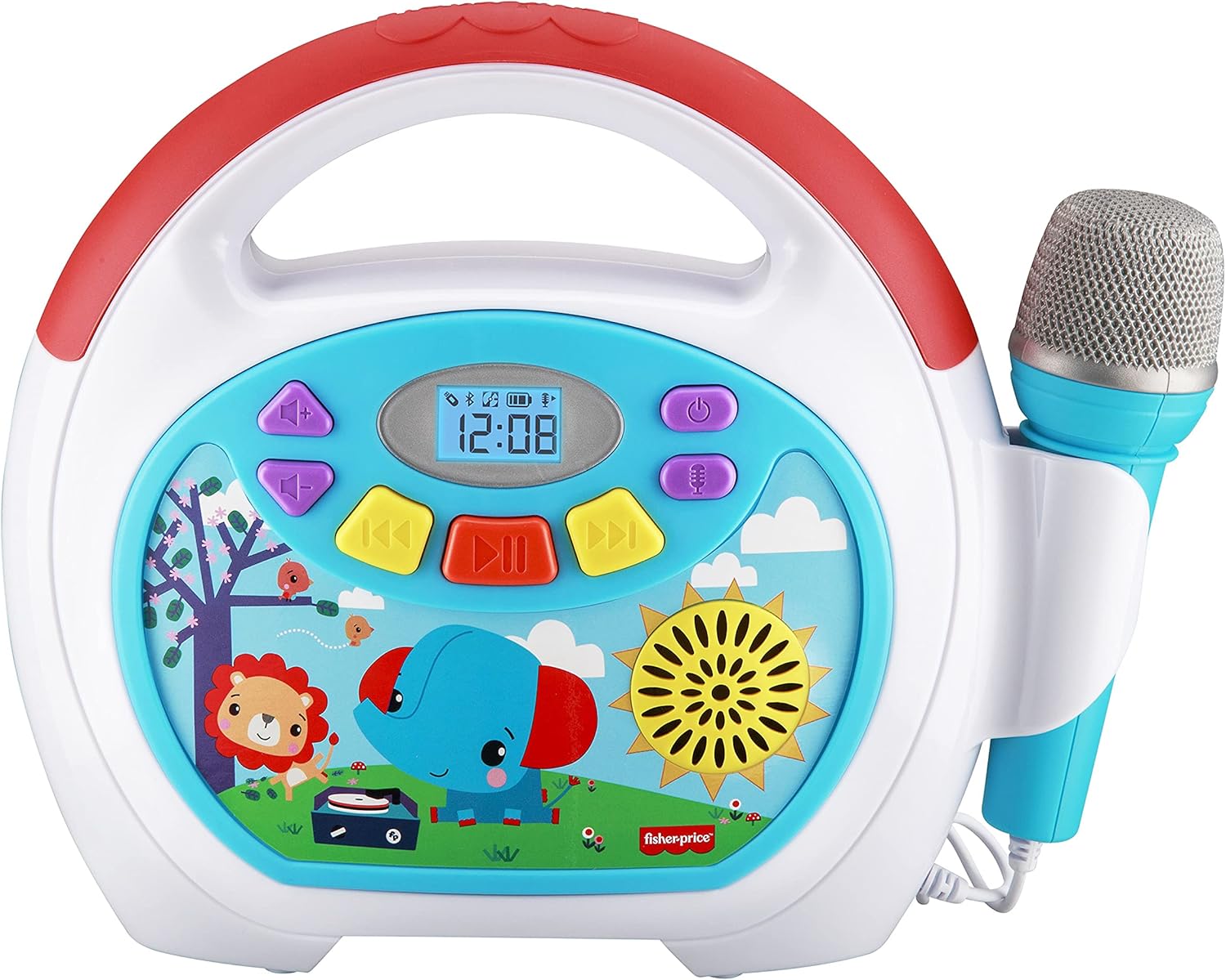
Image 2.1: The front panel displays the power button, volume controls, track navigation, play/pause button, and a digital display. The wired microphone is attached to the side.
Арткы View жана Байланыштар

Image 2.2: The back of the unit features the volume knob, reset button, DC 5V charging port, headphone jack, and a USB-In port for playing audio from a USB drive. A compartment for cord storage is also visible.
3. Орнотуу
3.1 Аппаратты заряддоо
- Locate the DC 5V charging port on the rear of the karaoke machine.
- Connect the provided charging cable to the port and the other end to a standard USB power adapter (not included) or a computer USB port.
- The charging indicator will illuminate. Allow approximately 2-3 hours for a full charge. The indicator will change or turn off once charging is complete.
Эскертүү: The device contains a built-in rechargeable Lithium Ion battery. Ensure the device is fully charged before first use for optimal battery life.
3.2 Микрофонду туташтыруу
- The wired microphone is permanently attached to the unit.
- Ensure the microphone cable is untangled and positioned comfortably for use.
4. Иштөө нускамалары
4.1 Күйгүзүү/өчүрүү
- Аппаратты күйгүзүү үчүн басып, кармап туруңуз Кубат баскычы () located on the front panel.
- Өчүрүү үчүн, басып туруңуз Кубат баскычы кайра.
4.2 Үндү тууралоо
- колдонуу Үн баскычы on the rear of the unit to adjust the overall sound output.
- For microphone volume, use the dedicated microphone volume control if available, or adjust the main volume.
4.3 Камтылган ырларды ойнотуу
- Upon powering on, the device may default to playing built-in songs.
- колдонуу Мурунку трек () жана Кийинки трек () buttons to navigate through the 24 Mother Goose Club songs.
- басыңыз Ойнотуу/тындыруу баскычы () ойнотууну баштоо же тындыруу үчүн басыңыз.
4.4 Bluetooth жупташтыруу

Image 4.1: The karaoke machine supports wireless audio streaming via Bluetooth from compatible devices.
- Караоке машинасы күйгүзүлгөнүн текшериңиз.
- Activate Bluetooth on your external device (e.g., smartphone, tablet).
- Издөө available Bluetooth devices. The karaoke machine will appear as 'eKids FP-550' or similar.
- Select the device name to pair. A confirmation sound may indicate successful pairing.
- Жупташтырылгандан кийин, түзмөгүңүздөн караоке машинасына зымсыз аудио агылта аласыз.
4.5 USB аудио ойнотуу

Image 4.2: The USB expansion slot allows playback of songs from a USB drive.
- MP3 аудио камтылган USB дискти салыңыз files into the USB-In port on the rear of the unit.
- The device should automatically detect the USB drive and begin playing the audio files.
- колдонуу Мурунку трек жана Кийинки трек багыттоо үчүн баскычтар.
- басыңыз Ойнотуу/тындыруу баскычы ойнотууну баштоо же тындыруу үчүн.
4.6 Микрофонду колдонуу

Image 4.3: The wired microphone allows users to sing along to music.
- The microphone is active when the unit is powered on.
- Sing into the microphone while playing built-in songs, Bluetooth audio, or USB audio.
- Adjust the main volume knob to control the microphone's output level.
4.7 Наушниктерди колдонуу
- To listen privately, plug standard 3.5mm headphones (not included) into the headphone jack on the rear of the unit.
- Audio will be redirected to the headphones, muting the main speaker.
5. Техникалык тейлөө
5.1 Тазалоо
- Тазалоодон мурун ар дайым түзмөктү өчүрүңүз.
- Сырткы беттерди сүртүү үчүн жумшак, кургак чүпүрөктү колдонуңуз.
- Do not use liquid cleaners, abrasive pads, or chemical solvents, as these can damage the finish.
5.2 Сактоо
- Аппаратты түз күн нурунан жана экстремалдык температурадан алыс салкын, кургак жерде сактаңыз.
- Ensure the microphone cable is neatly wrapped and stored in the designated compartment on the back to prevent damage.
6. Кыйынчылыктарды
| Көйгөй | Мүмкүн себеп | Чечим |
|---|---|---|
| Түзмөк күйбөйт. | Батарея түгөнүп калды. | Берилген USB кабели аркылуу аппаратты заряддаңыз. |
| Динамиктен үн жок. | Үнү өтө төмөн же үнсүз. Кулакчындар туташтырылган. | Increase the volume using the knob. Disconnect headphones if plugged in. |
| Микрофон иштебей жатат. | Microphone volume is too low. | Ensure the main volume is adequately adjusted. |
| Bluetooth түзмөгү жупташкан жок. | Device is out of range. Bluetooth is not enabled on external device. | Move devices closer. Ensure Bluetooth is active on your external device and search again. |
| USB audio not playing. | USB drive not properly inserted or contains unsupported file түрлөрү. | Ensure USB drive is fully inserted. Verify audio fileлар MP3 форматында. |
7. Техникалык шарттар
- Модель номери: МД-550
- Элемент Салмагы: 2.35 фунт
- Продукциянын өлчөмдөрү: 10.72 x 3.64 x 8.67 дюйм
- Батарея: 1 литий-иондук батарейка (кошулган)
- Байланыш: Bluetooth, USB
- Камтылган компоненттер: Микрофон
- Кубат булагы: Батарея менен иштейт
- Түсү: Көп түстүү
8. Кепилдик жана колдоо
This product is covered by a limited warranty. For specific warranty details, please refer to the documentation included with your purchase or contact eKids customer support. For technical assistance or further inquiries, please visit the official eKids webсайтка же кардарларды тейлөө бөлүмүнө кайрылыңыз.
Көбүрөөк маалымат алуу үчүн, сиз иш сапары менен болот Amazon'догу eKids дүкөнү.


