1. Киришүү
This manual provides detailed instructions for the safe and effective use of your KAIWEETS HT206B Clamp Meter and KAIWEETS KM100 Digital Multimeter. Please read this manual thoroughly before operation and retain it for future reference.
2. Коопсуздук маалыматы
WARNING: Always observe safety precautions when working with electrical circuits to prevent personal injury or damage to the meter.
- The HT206B meets safety standard IEC 61010-1, CAT III 600V. The KM100 has passed CE and RoHS certifications and is IEC rated CAT III 600V.
- Both devices feature anti-burn protection with double fuses and overload protection on all ranges (KM100).
- Ensure the rotary switch is set to the correct test range before making measurements.
- Көлөмдү өлчөөгө аракет кылбаңызtages же токтун белгиленген максималдуу чегинен ашуусу.
- Ар бир колдонуудан мурун сыноо өткөргүчтөрүн текшериңиз. Эгерде изоляция бузулса, колдонбоңуз.
- cl менен токту өлчөгөндөamp meter, only clamp the live wire, not the entire power cord.
3. Продукт бүтүп калдыview
3.1 KAIWEETS HT206B Clamp Метр
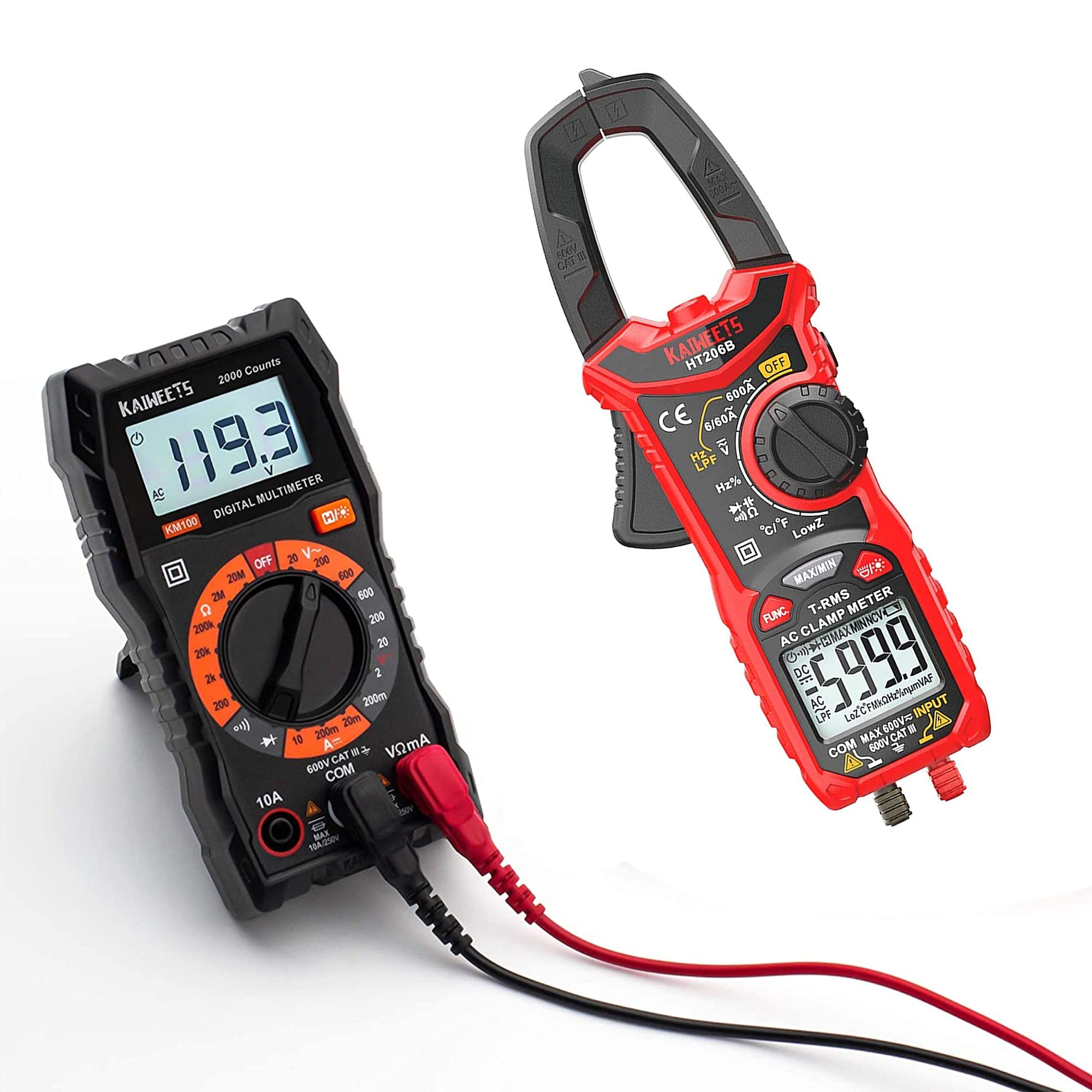
Figure 1: KAIWEETS HT206B Clamp Эсептегич жана кошумча жабдуулар.
The KAIWEETS HT206B is a True-RMS clamp meter designed for accurate measurements on non-linear loads. It is suitable for various applications in labs, factories, and households.
Негизги өзгөчөлүктөрү:
- Өлчөө мүмкүнчүлүктөрү: AC Current, AC/DC Voltage, Frequency, Duty Cycle, Resistance, Capacitance, Diode, Continuity, and Temperature.
- Two-color Backlit LCD Display: The screen turns red to warn of high voltage (>80V) or high current (>3A).
- LED фонарик: For illumination in dimly lit areas.
- Байланышсыз томtage (NCV) аныктоо: For detecting live wires without direct contact.
- Автоматтык өчүрүү: Батареяны үнөмдөө үчүн 15 мүнөт аракетсиз болгондон кийин өчөт.
- Батареянын төмөн көрсөткүчү: Батареяларды алмаштыруу керек болгондо эскертет.

Figure 2: HT206B Clamp Meter feature highlights.

Figure 3: NCV and Hold functions on the HT206B.
3.2 KAIWEETS KM100 Digital Multimeter

Figure 4: KAIWEETS KM100 Digital Multimeter and included accessories.
The KAIWEETS KM100 is a multi-function digital multimeter designed for safety and accuracy in various electrical tests, including household, automotive, and industrial applications.
Негизги өзгөчөлүктөрү:
- Өлчөө мүмкүнчүлүктөрү: AC/DC Voltage, DC Current, Resistance, Continuity, and Diode Measurement. Note: This model cannot test AC current.
- Арткы жарык функциясы: Improves visibility in dark conditions.
- кармап туруу функциясы: Locks the displayed measurement value for easy recording.
- Support Stand: Flexible and stable, adjustable up to 90°.
- Коопсуздук: CAT III 600V, CE and RoHS certified, with anti-burn double fuses and overload protection.
4. Орнотуу
4.1 Батареяны орнотуу
Both the HT206B and KM100 require AAA batteries for operation.
- Аппараттын артындагы батарея бөлүкчөсүнүн капкагын табыңыз.
- Use a screwdriver (if necessary) to open the cover.
- Insert 2 AAA batteries, observing the correct polarity (+/-) as indicated inside the compartment. (For KM100, batteries are typically pre-installed).
- Батарея уясынын капкагын ордуна коюп, аны бекитиңиз.
4.2 Connecting Test Leads and Thermocouple
For most measurements, test leads are required. For temperature measurements with the HT206B, the K-Type thermocouple is used.
- Insert the red test lead into the "VΩmA" or "+" input jack.
- Insert the black test lead into the "COM" or "-" input jack.
- For HT206B temperature measurement, connect the K-Type thermocouple to the designated temperature input ports, observing polarity.
5. Иштөө нускамалары
5.1 Жалпы операция
- Айланма которгучту керектүү өлчөө функциясына буруңуз.
- Connect the test leads or clamp the conductor as appropriate for the measurement.
- LCD дисплейдеги өлчөө маанисин окуңуз.
- To turn off the device, rotate the switch to the "OFF" position. The HT206B also features automatic shutdown after 15 minutes of inactivity.
5.2 KAIWEETS HT206B Specific Operations
- AC учурдагы өлчөө: Rotate the switch to the AC Current range (e.g., 6/60A or 600A). Open the clamp jaw and enclose only the live wire of the circuit. Ensure the jaw is fully closed.
- FUNC. Button: Press the "FUNC." button to switch between secondary functions within a range, such as AC and DC voltage, or different frequency/duty cycle modes.
- NCV (контактсыз томtagд) аныктоо: Rotate the switch to the NCV position. Bring the top of the clamp meter near the conductor. The meter will beep and the NCV indicator will light up if AC voltagе аныкталат.
- HOLD Функциясы: Press the "MAX/MIN" button briefly to activate the data hold function, freezing the current reading on the display. Press again to release.
- Температураны өлчөө: Connect the K-Type thermocouple. Rotate the switch to the temperature function (°C/°F). Insert the thermocouple probe into the substance or area to be measured.

Figure 5: HT206B temperature measurement applications.
5.3 KAIWEETS KM100 Specific Operations
- Тtage Өлчөө (AC/DC): Rotate the switch to the desired AC V or DC V range. Connect test leads in parallel to the circuit.
- Туруктуу токтун өлчөөсү: Rotate the switch to the DC A range. Connect test leads in series with the circuit. Caution: Do not attempt to measure AC current with the KM100.
- Каршылык өлчөө: Rotate the switch to the Ω range. Connect test leads across the component to be measured. Ensure the circuit is de-energized.
- Үзгүлтүксүздүк тести: Rotate the switch to the continuity/diode position. Connect test leads across the circuit or component. A continuous beep indicates continuity.
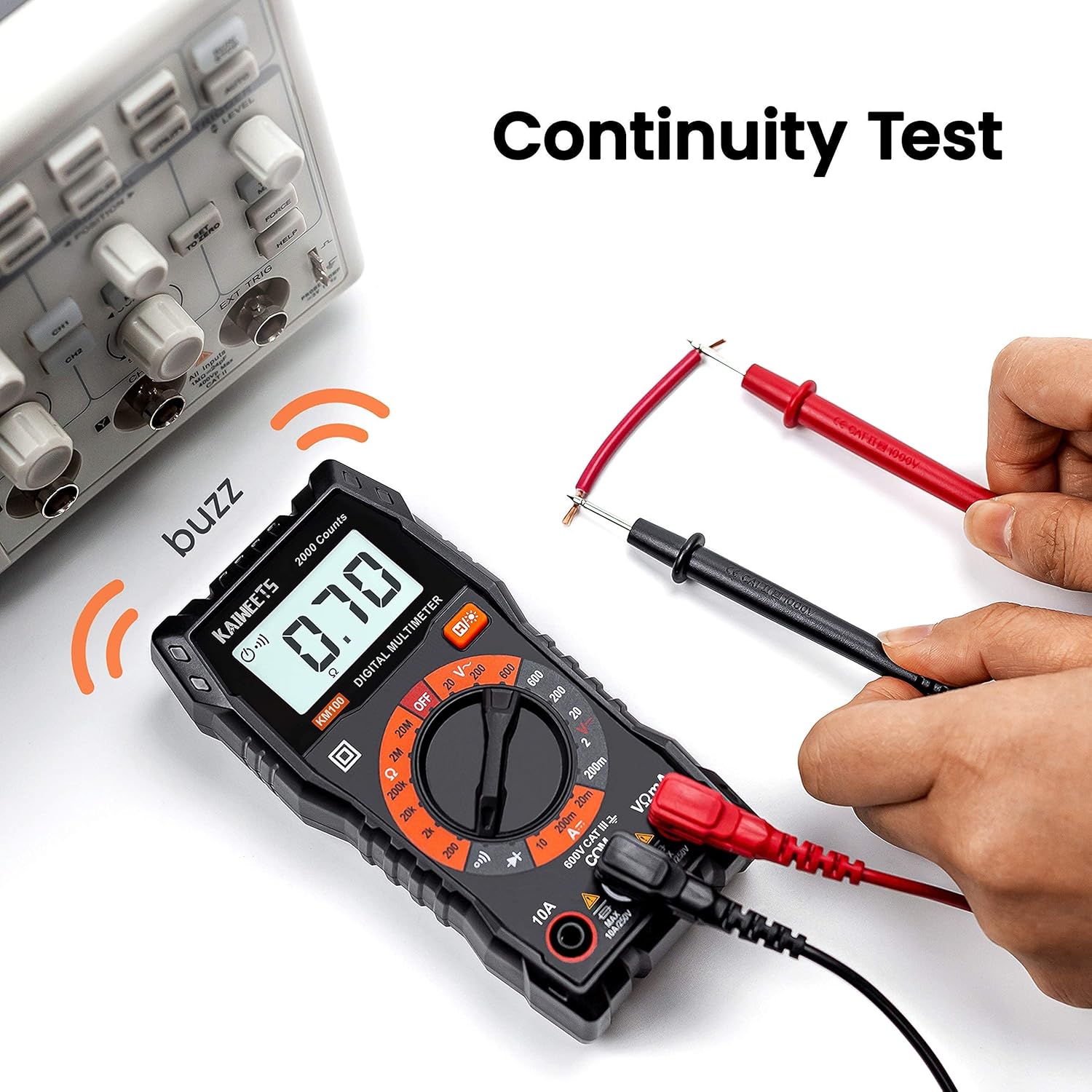
Figure 6: KM100 Continuity Test.

Figure 7: KM100 DC Voltage Өлчөө.
6. Техникалык тейлөө
6.1 Тазалоо
Эсептегичти сүртүңүзasing жарнама мененamp кездеме жана жумшак жуугуч каражат. Абразивдүү заттарды же эриткичтерди колдонбоңуз. Колдонуудан мурун эсептегичтин кургак экенин текшериңиз.
6.2 Батареяны алмаштыруу
When the low battery indicator appears on the display, replace the batteries promptly to ensure accurate readings. Refer to Section 4.1 for battery installation instructions.
6.3 Сактоо
When not in use for extended periods, remove the batteries to prevent leakage. Store the meters and accessories in their carrying cases in a cool, dry place, away from direct sunlight and extreme temperatures.

Figure 8: KM100 stored in its carrying case.
7. Кыйынчылыктарды
- Дисплей жок/Алсыз дисплей: Батареянын деңгээлин текшерип, зарыл болсо, алмаштырыңыз. Батареялардын туура полярдуулукта салынганын текшериңиз.
- Туура эмес окуулар:
- Ensure the rotary switch is set to the correct measurement function and range.
- Verify test leads are properly connected and not damaged.
- cl үчүнamp meter, ensure the jaw is fully closed around a single conductor for current measurement.
- For resistance or continuity, ensure the circuit is de-energized.
- Эсептегич жооп бербейт: Turn the meter off and then on again. If the issue persists, replace batteries.
8. Техникалык шарттар
8.1 KAIWEETS HT206B Clamp Метр
| Өлчөө | Диапазон | Тактык |
|---|---|---|
| AC тогу | 6A/60A/600A | ±(2.5%+5) |
| AC Voltage | 6V/60V/600V | ±(1.0%+5) |
| DC Voltage | 600mV/6V/60V/600V | ±(0.5%+5) |
| Каршылык | 600Ω/6kΩ/60kΩ/600kΩ/6MΩ/60MΩ | ±(1.0%+5) |
| Сыйымдуулук | 10nF/100nF/1μF/10μF/100μF/1mF/10mF/100mF | ±(4.0%+5) |
| Frequency / Duty Cycle | 10Гцден 10МГцке чейин | ±(1.0%+3) |
| Температура | -4°F – 1832°F (-20°C – 1000°C) | ±(2.5%+5) |
| Эсептерди көрсөтүү | 6000 саны | |
| Коопсуздук рейтинги | CAT III 600V, CE, RoHS, IEC 61010-1 | |
| Power Source | 2 x AAA батареялары | |
8.2 KAIWEETS KM100 Digital Multimeter
| Өлчөө | Диапазон | Тактык |
|---|---|---|
| AC Voltage | 20V/200V/600V | ±(1.0%+5) |
| DC Voltage | 200mV/2V/20V/200V/600V | ±(1.0%+5) |
| Туруктуу ток | 20мА/200мА/10А | ±(1.5%+5) |
| Каршылык | 200Ω/2kΩ/20kΩ/200kΩ/2MΩ/20MΩ | ±(1.2%+5) |
| Коопсуздук рейтинги | CAT III 600V, CE, RoHS | |
| Power Source | 2 x AAA батареялары (алдын ала орнотулган) | |
9. Кепилдик жана колдоо
KAIWEETS products are designed and manufactured to high-quality standards. Both the HT206B and KM100 are CE and RoHS certified, indicating compliance with European safety, health, and environmental protection requirements.
For specific warranty information or technical support, please refer to the warranty card included with your product or contact KAIWEETS customer service directly through their official channels.


