Продукт бүттүview
The Razer Wolverine V2 is a wired gaming controller engineered for competitive play on Xbox Series X|S, Xbox One, and PC. It features advanced customization options designed to provide greater precision and control, enabling users to enhance their gaming performance.
This controller is built with an ergonomic design for a natural and comfortable grip, ensuring agile and precise interaction during extended gaming sessions. Its contoured shape and non-slip rubber grips contribute to maximum performance and comfort.

Сүрөт 1: Алдыңкы view Razer Wolverine V2 зымдуу оюн контроллеринин, showcasing анын эргономикалык дизайны жана баскычтардын жайгашуусу.
Орнотуу колдонмосу
1. Контроллерди туташтыруу
The Razer Wolverine V2 is a wired controller. To connect it to your gaming system:
- Ensure your Xbox console (Xbox Series X|S or Xbox One) or PC is powered on.
- Locate an available USB port on your console or PC.
- Plug the USB connector of the Razer Wolverine V2 controller into the USB port. The controller will automatically be recognized by your system.
2. Installing Razer Controller Setup for Xbox App
For advanced customization and button remapping, it is recommended to install the Razer Controller Setup for Xbox application.
- On Xbox, search for "Razer Controller Setup for Xbox" in the Microsoft Store and install the application.
- On PC, download the application from the official Razer webсайты же Microsoft дүкөнү.
- Launch the application and follow the on-screen instructions to configure your controller settings, including button remapping and profile сактоо.

Figure 2: The Razer Controller Setup for Xbox application interface, used for button remapping and profile башкаруу.
Иштөө нускамалары
Эргономикалык дизайн жана кармагыч
The Wolverine V2 is designed for enhanced control and precision. Its ergonomic shape provides a natural hand fit, while the non-slip rubber grips ensure comfort and stability during long gaming sessions, preventing fatigue and improving responsiveness.

Figure 3: The Razer Wolverine V2 controller, highlighting its design for greater control and precision.
Reprogrammable Front-Facing Buttons
The controller features two additional multi-function buttons located at the front. These buttons can be remapped using the Razer Controller Setup for Xbox application, allowing for personalized control schemes and advanced gameplay strategies.

Figure 4: A user's hands holding the Razer Wolverine V2, demonstrating the position of the additional remappable front-facing buttons.
Razer Mecha-Tactile Action Buttons and D-Pad
Experience hyper-responsive actuation with the Razer Mecha-Tactile Action Buttons and D-Pad. These buttons provide a cushioned touch with crisp, tactile feedback, ensuring every command is registered quickly and accurately for competitive gaming.
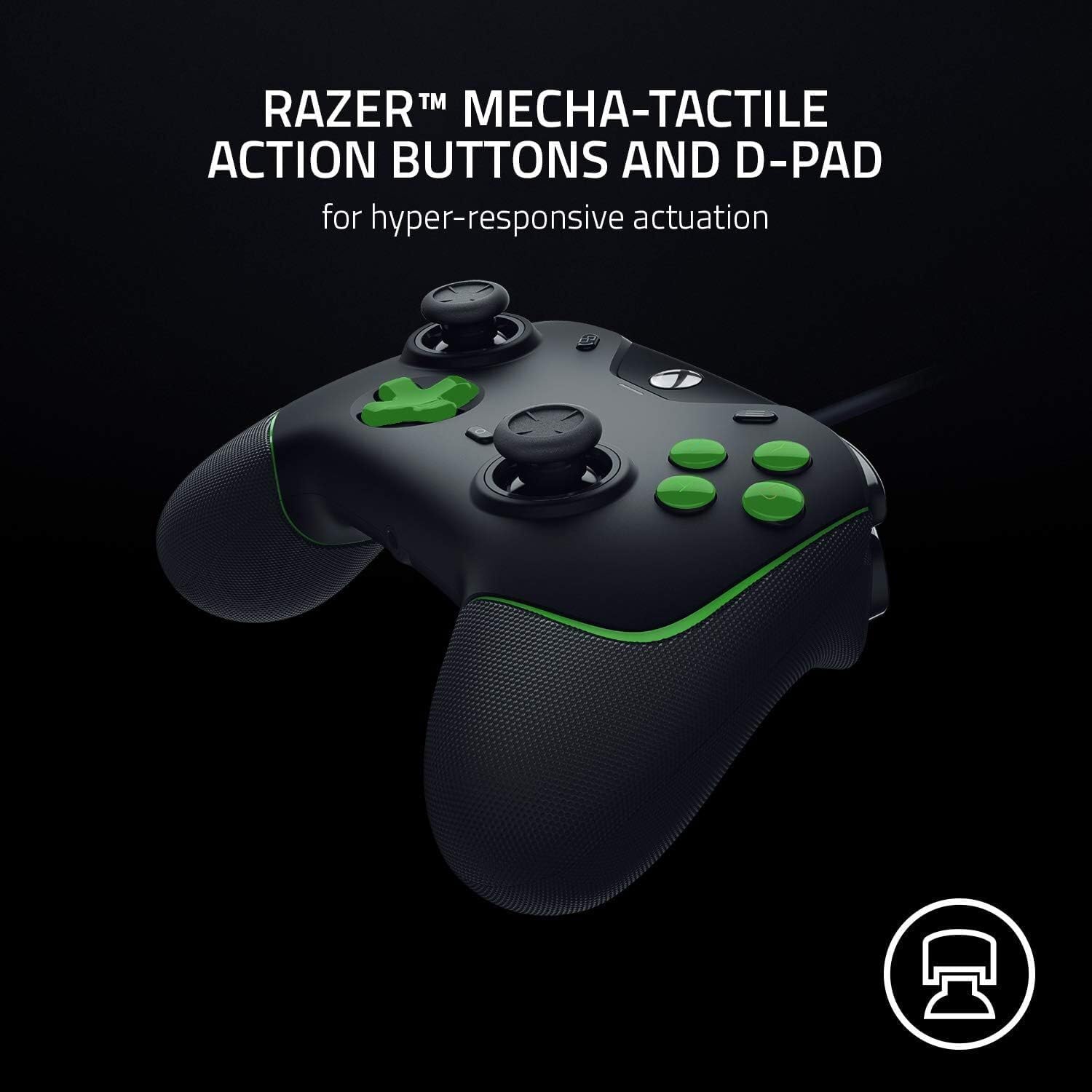
Сүрөт 5: Жакын пландан view of the Razer Wolverine V2's Mecha-Tactile action buttons and D-Pad, emphasizing their design.
Триггерди токтотуучу өчүргүчтөрү бар чачты иштетүү режими
For a competitive edge, activate the Hair Trigger Mode using the two sliding lock switches located on the underside of the controller. This mode significantly reduces the travel distance of the main triggers, allowing for ultra-fast firing action in games.

6-сүрөт: Каптал view of the Razer Wolverine V2, showing the Hair Trigger Mode switches on the underside of the controller.
3.5 мм аналогдук аудио порту
The controller includes a convenient 3.5mm analog audio port, allowing you to directly plug in your preferred headphones or headset. This feature provides easy access to audio without needing to connect to the console, enhancing your gaming experience with clear communication and immersive sound.

Figure 7: A user wearing a headset connected to the 3.5mm audio port on the Razer Wolverine V2 controller.
Техникалык тейлөө
Proper maintenance ensures the longevity and optimal performance of your Razer Wolverine V2 controller.
- Тазалоо: Башкаргычты үзгүлтүксүз сүртүү үчүн жумшак, кургак чүпүрөктү колдонуңуз. Өтө кир болсо, бир азampкездемени суу менен жууп салыңыз. Катуу химиялык заттарды, абразивдүү тазалоочу каражаттарды же эриткичтерди колдонуудан алыс болуңуз, анткени алар контроллердин сырткы көрүнүшүнө жана ички компоненттерине зыян келтириши мүмкүн.
- Сактагыч: When not in use, store the controller in a clean, dry place away from direct sunlight, extreme temperatures, and excessive dust. Avoid coiling the cable too tightly to prevent damage.
- Колдонуу: Handle the controller with care. Avoid dropping it or subjecting it to strong impacts, which can cause internal damage.
Проблемаларды чечүү
If you encounter issues with your Razer Wolverine V2 controller, refer to the following common troubleshooting steps:
| Көйгөй | Мүмкүн болгон себеп / Чечим |
|---|---|
| Консоль/компьютер контроллерди тааныган жок |
|
| Buttons or D-Pad unresponsive/incorrect input |
|
| Audio issues (no sound/mic not working) |
|
| Hair Trigger Mode not working |
|
If the problem persists after attempting these solutions, please refer to the official Razer support webкошумча жардам үчүн сайт.
Техникалык шарттар
| Бренд | Razer |
| Модель аты | Wolverine V2 |
| Модель номери | RZ06-03560100-R3M |
| Түс | Black / Green |
| Байланыш технологиясы | Зымдуу туташуу |
| Шайкеш түзмөктөр | Xbox Series X|S, Xbox One, PC |
| Өзгөчөлүктөр | Ergonomic, Multi-function, Multi-usage, Headphone Jack, Remappable Buttons, Hair Trigger Mode |
| баскычтардын саны | 16 |
| Элемент Салмагы | 350 грамм |
| Пакеттин саны | 1 |
Кепилдик жана колдоо
For detailed warranty information, product registration, and technical support, please visit the official Razer support webсайт. Ал жерден кардарларды тейлөө боюнча көп берилүүчү суроолорду, драйверлерди жүктөп алууну жана байланыш маалыматын таба аласыз.
Razer continuously provides software updates to enhance controller performance and compatibility. It is recommended to keep your Razer Controller Setup for Xbox application and controller firmware updated to ensure optimal functionality.
For spare parts availability, please contact Razer customer support directly as this information is not publicly available.
Расмий Razer колдоо Webсайт: www.razer.com/support


