1. Киришүү
The ANVIZ VF30 PRO is a new generation standalone access control reader designed for robust and efficient security management. It features a Linux-based 1Ghz processor, a 2.4" TFT LCD screen, and flexible communication options including Power over Ethernet (PoE) and Wi-Fi. The VF30 PRO also supports web server functionality for easy self-management and professional standalone access control interfaces. An standard EM card reader is integrated into the device.
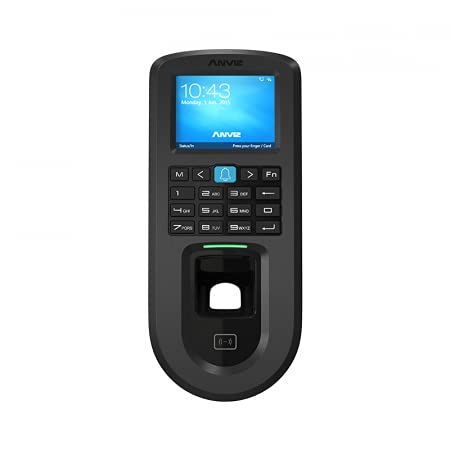
Сүрөт 1: Алдыңкы view of the ANVIZ VF30 PRO Access Control Terminal.
2. Техникалык шарттар
| Параметр | Нарк |
|---|---|
| Манжа изинин сыйымдуулугу | 3,000 |
| Карта сыйымдуулугу | 3,000 |
| Log Capacity | 100,000 |
| Коммуникация интерфейстери | TCP/IP, RS485, POE (Standard IEEE802.3af), Optional WiFi |
| Relay Output | COM, NO, NC |
| I/O порттору | Door Sensor, Exit Button, Door Bell, Wiegand in/out, Anti-pass Back |
| Идентификация режими | Finger, Password, Card |
| Идентификация ылдамдыгы | <0.5s |
| Картаны окуу аралык | 1~5cm (125KHz), 13.56MHz >2CM for Standard CR80 Card |
| Сүрөттү көрсөтүү | Колдоо |
| Time Attendance Mode | 8-топ |
| Убакыт алкагы | 16 Group, 32 Time Zone |
| Иш кодекси | 6 Сан |
| Кыска билдирүү | 50 |
| WebServer | Колдоо |
| Жайкы жарык | Колдоо |
| Үн чакыруу | Колдоо |
| Clock Bell | 30 Топтор |
| Программалык камсыздоо | Anviz CrossChex |
| CPU | 1GHz Quick CPU |
| Сенсор | Touch Active Sensor |
| Скандоо аймагы | 22*18мм |
| RFID картасы | Standard EM, Optional Mifare |
| Дисплей | 2.4 дюймдук TFT LCD экран |
| Өлчөмдөрү (W * H * D) | 80 * 180 * 40 мм |
| Иштөө температурасы | -30℃~ 60℃ |
| Нымдуулук | 20% - 90% |
| Poe | Standard IEEE802.3af |
| Күч | DC12V 1A |
| IP даражасы | IP55 |
3. Орнотуу жана орнотуу
Proper installation is crucial for the optimal performance of your ANVIZ VF30 PRO. This section provides general guidelines. For detailed wiring diagrams and specific installation scenarios, please refer to the included video tutorial.
3.1 Физикалык орнотуу
The VF30 PRO is designed for wall mounting. Ensure the mounting surface is stable and provides adequate space for wiring. Consider the optimal height for user access to the fingerprint sensor and keypad.
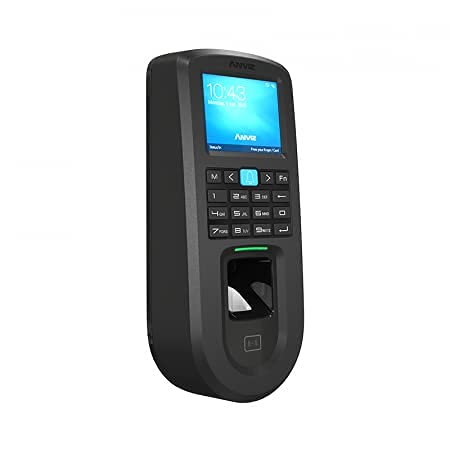
2-сүрөт: Каптал view of the ANVIZ VF30 PRO, showing its slim profile.
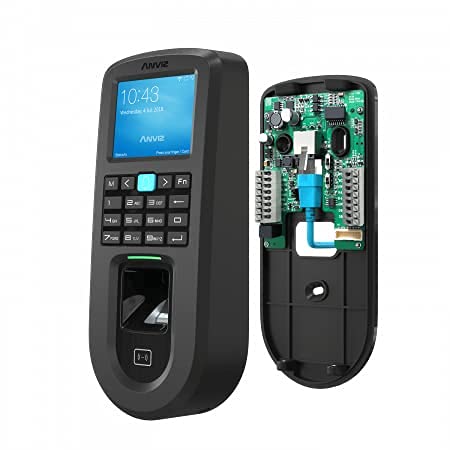
3-сүрөт: Ички view of the ANVIZ VF30 PRO, showing the circuit board and components.
3.2 Зымдар жана байланыштар
The VF30 PRO supports various connection types including TCP/IP, RS485, PoE, and optional Wi-Fi. It also provides relay outputs for door locks and inputs for door sensors and exit buttons.

Figure 4: Connection diagram illustrating how the ANVIZ VF30 PRO integrates with door locks, sensors, and network infrastructure.
5-сүрөт: Арткы view of the ANVIZ VF30 PRO, showing the wiring terminals for power and external devices.
3.3 Electrical Lock Connection Tutorial
For a visual guide on connecting the ANVIZ VF30 PRO to an electrical lock, please watch the following tutorial video. This video demonstrates the wiring process for seamless integration with your access control system.
Video 1: Detailed tutorial on connecting the ANVIZ VF30 PRO to an electrical lock, demonstrating the wiring steps and testing the functionality.
4. Иштөө нускамалары
The ANVIZ VF30 PRO offers multiple identification modes for access control: fingerprint, password, and card. The device features a user-friendly interface on its 2.4" TFT LCD screen.
4.1 Колдонуучуну каттоо
To enroll new users, navigate to the 'User Management' menu on the device. You can add fingerprints, assign unique passwords, and register RFID cards. Ensure each user's data is securely stored.
4.2 Access Control Modes
- Манжа изи: Place your registered finger on the optical sensor for quick and secure access. The identification speed is less than 0.5 seconds.
- Купуя сөз: Enter your assigned password using the keypad on the device.
- Карта: Present your registered EM or Mifare card to the integrated card reader. The reading distance is 1-5cm for 125KHz cards and >2cm for 13.56MHz cards.
4.3 Time Attendance Features
The VF30 PRO includes comprehensive time attendance functionalities. It supports 8 groups for time attendance mode and 16 groups with 32 time zones for flexible scheduling. Users can also input 6-digit work codes.
5. Техникалык тейлөө
Regular maintenance ensures the longevity and reliable operation of your ANVIZ VF30 PRO. Follow these guidelines:
- Тазалоо: Use a soft, dry cloth to clean the device's exterior and the fingerprint sensor. Avoid abrasive cleaners or solvents.
- Программалык камсыздоонун жаңыртуулары: Periodically check the ANVIZ official webоптималдуу аткарууну жана коопсуздукту камсыз кылуу үчүн микропрограммаларды жаңыртуу үчүн сайт.
- Маалыматтын камдык көчүрмөсү: Regularly back up user data and access logs to prevent data loss.
- Экологиялык шарттар: Ensure the device operates within the specified working temperature (-30℃ to 60℃) and humidity (20% to 90%) ranges.
6. Кыйынчылыктарды
This section addresses common issues you might encounter with the ANVIZ VF30 PRO.
- Түзмөк күйбөй жатат:
- Check the power supply connection (DC12V 1A or PoE).
- Электр розеткасынын иштешин текшериңиз.
- Манжа изин таануудагы ката:
- Манжаңыздын таза жана кургак экенине ынаныңыз.
- Place your finger flat on the sensor, covering the entire scanning area (22x18mm).
- Re-enroll your fingerprint if the issue persists.
- Card Not Reading:
- Ensure you are using a registered EM or Mifare card.
- Hold the card within the specified reading distance.
- Check for any obstructions between the card and the reader.
- Эшик ачылбай жатат:
- Verify the wiring connections between the VF30 PRO and the electric lock.
- Check the lock's power supply.
- Ensure the user has appropriate access permissions.
- Тармакка туташуу маселелери:
- For TCP/IP, check the network cable and IP settings.
- For Wi-Fi, ensure the device is within range of the Wi-Fi network and the credentials are correct.
If you encounter issues not listed here or if troubleshooting steps do not resolve the problem, please contact ANVIZ customer support.
7. Кепилдик жана колдоо
ANVIZ products are covered by a limited warranty. For detailed warranty terms and conditions, please refer to the warranty card included with your product or visit the official ANVIZ webсайт.
For technical support, product inquiries, or service requests, please contact ANVIZ customer support through the following channels:
- Webсайт: www.anviz.com
- Электрондук почта: support@anviz.com
Please have your product model (VF30 PRO) and serial number ready when contacting support.


