Introduction
The EGLOO S4 is a versatile 1080P Wi-Fi smart camera designed for comprehensive home monitoring. It functions as a security camera, baby monitor, and pet camera, offering advanced features such as integrated temperature and humidity monitoring, remote appliance control, motion and sound detection with real-time alerts, clear IR night vision, and two-way audio communication. Its wide field of view and digital zoom capabilities provide comprehensive coverage for various indoor environments.
Коопсуздук маалыматы
- Ensure the camera is placed on a stable, flat surface to prevent falling.
- Аппаратты суудан, нымдан жана экстремалдык температурадан алыс кармаңыз.
- Аппаратты өз алдынча бөлүүгө же оңдоого аракет кылбаңыз. Квалификациялуу тейлөө кызматкерлерине кайрылыңыз.
- Зыяндын алдын алуу үчүн берилген кубат адаптерин гана колдонуңуз.
- Keep out of reach of children and pets to avoid accidental damage or injury.
- Камераны күн тийе турган жерге же жылуулук булактарынын жанына коюудан алыс болуңуз.
Пакеттин мазмуну
Пакетиңизде бардык буюмдар бар экенин текшериңиз:
- EGLOO S4 Smart Home Security Camera
- Кубаттуу адаптер
- Колдонуучунун Колдонмосу (бул документ)
- Mounting Accessories (if applicable, not specified but common)
Продукт бүттүview

Фронт view of the EGLOO S4 camera, showcasing its compact dome design with a black camera head and a light-colored base.

The EGLOO S4 camera held in a hand, illustrating its small and portable size.
Негизги өзгөчөлүктөрү:
- 1080P Full HD Video: Provides clear and detailed video monitoring.
- Температура жана нымдуулук сенсору: Real-time environmental monitoring.
- Кыймыл жана үндү аныктоо: Receive instant alerts on your mobile device.
- Motion Tracking (AI Supported): Табылган кыймылды автоматтык түрдө ээрчийт.
- Remote Appliance Control: Control compatible appliances from anywhere.
- Clear IR Night Vision: Жарык аз шарттарда көрүнүүнү камсыз кылат.
- 140° кең бурчтуу объектив: Кеңири чөйрөнү сунуштайт view.
- 8x Digital Zoom: Zoom in for closer details.
- Эки тараптуу аудио: Communicate with individuals or pets through the camera.
- 4-Channel Simultaneous Screen: Monitor multiple cameras or viewбир эле учурда.
- Оңой орнотуу: Тез жана оңой орнотуу үчүн иштелип чыккан.

Diagram illustrating the key features of the EGLOO S4 camera, including temperature/humidity, motion/sound alerts, motion tracking, 1080P video, and easy setup.

A smartphone screen displaying a 4-channel simultaneous view from the EGLOO S4 camera, highlighting features like night vision, wide angle, digital zoom, and two-way audio.
Орнотуу колдонмосу
1. Download the EGLOO App:
Издөө "EGLOO" in your mobile device's app store (App Store for iOS or Google Play Store for Android) and download the official application. Alternatively, scan the QR code below:

Scan this QR code to quickly download the EGLOO application.
Көбүрөөк маалымат алуу үчүн төмөнкүгө кириңиз: http://m.site.naver.com/0ZStX
2. Power On the Camera:
Connect the provided power adapter to the camera's power port and plug it into a wall outlet. The camera will power on automatically.
3. Add Device in App:
- Open the EGLOO app and create an account or log in.
- Follow the in-app instructions to add a new device. This typically involves selecting your camera model and connecting it to your Wi-Fi network (2.4GHz Wi-Fi is supported).
- Ensure your mobile device is connected to the same Wi-Fi network during the setup process.

A hand holding a smartphone displaying the EGLOO application logo, indicating readiness for setup.
Иштөө нускамалары
Live View жана башкаруу:
Once connected, you can access the live video feed from your camera through the EGLOO app. Use the on-screen controls to pan, tilt, and zoom the camera, activate two-way audio, or take snapshots/record video.
Температура жана нымдуулук мониторинги:
The EGLOO S4 continuously monitors the ambient temperature and humidity. View real-time data directly within the app to ensure optimal environmental conditions, especially for baby or pet monitoring.
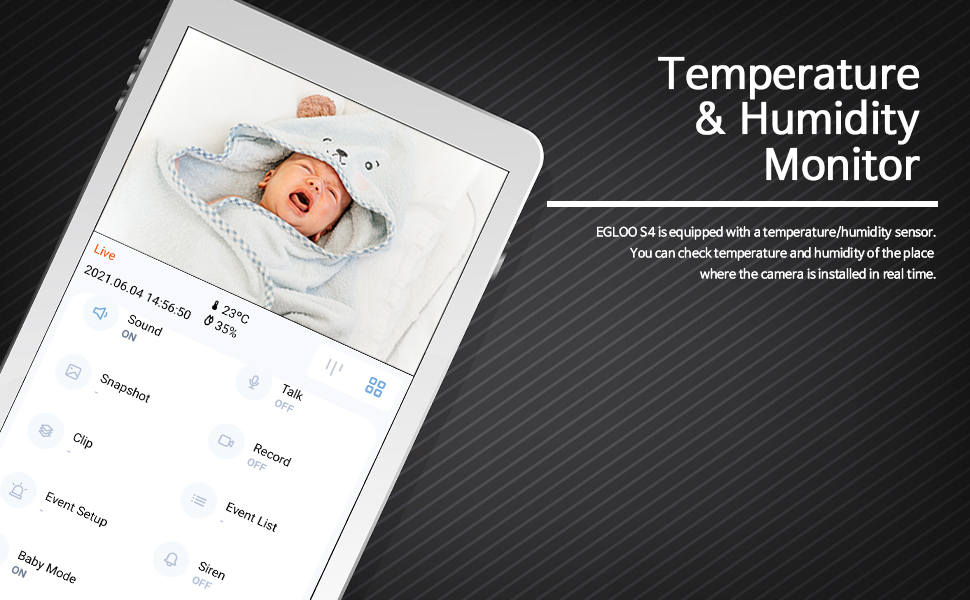
The EGLOO app interface displaying real-time temperature and humidity readings alongside the live camera feed, useful for monitoring a baby's room.
Кыймылды жана үндү аныктоо:
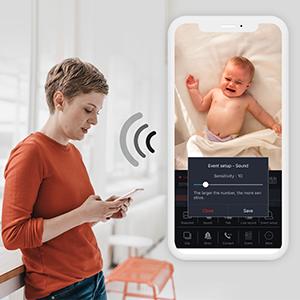
Configure motion and sound detection settings in the app to receive instant push notifications when activity is detected. Adjust sensitivity levels to minimize false alerts.

A woman checking her smartphone, which displays notification alerts from the EGLOO S4 camera for motion and sound detection.
Remote Appliance Control:
The EGLOO S4 can act as a smart remote control for various home appliances. Follow the in-app guide to pair your appliances with the camera for remote operation.

An illustration showing the EGLOO S4 camera positioned in a living room, with lines indicating its ability to connect and control various home appliances remotely.

A smartphone screen displaying controls for an air conditioner, demonstrating the remote appliance control feature of the EGLOO S4 camera.
Түнкү көрүнүш:
The camera automatically switches to infrared (IR) night vision in low-light conditions, providing clear black-and-white video. The "Night Color" technology enhances visibility.
A split image demonstrating the difference between normal lighting and the clear infrared night vision capability of the camera in a room setting.
Эки тараптуу аудио:
Utilize the two-way audio feature to speak through the camera and hear responses. This is ideal for comforting a baby, communicating with a pet, or interacting with family members.

An image of a puppy with a speech bubble saying "Hi, puppy!", illustrating the two-way audio communication feature of the camera for interacting with pets.
Техникалык тейлөө
- Тазалоо: Камера линзасын жана корпусун жумшак, кургак чүпүрөк менен акырын сүртүңүз. Катуу химиялык заттарды же абразивдүү тазалоочу каражаттарды колдонбоңуз.
- Сактагыч: If storing the camera for an extended period, disconnect it from power and keep it in a cool, dry place.
- Программалык камсыздоо жаңыртуулары: Regularly check the EGLOO app for firmware updates to ensure optimal performance and security.
Проблемаларды чечүү
| Көйгөй | Мүмкүн себеп | Чечим |
|---|---|---|
| Камера Wi-Fi'га туташпай жатат. | Туура эмес Wi-Fi сырсөзү; камера роутерден өтө алыс; 5 ГГц Wi-Fi тармагы. | Verify Wi-Fi password. Move camera closer to router. Ensure you are connecting to a 2.4GHz Wi-Fi network. Restart camera and router. |
| Эч кандай эскертмелер алынган жок. | App notification settings disabled; phone notification settings disabled; incorrect detection sensitivity. | Check notification settings within the EGLOO app. Verify phone's system notification settings for the EGLOO app. Adjust motion/sound detection sensitivity. |
| Видеонун сапаты начар. | Weak Wi-Fi signal; insufficient bandwidth. | Ensure strong Wi-Fi signal. Reduce other network activity. Consider moving camera closer to router or upgrading internet plan. |
| Камера жооп бербей жатат. | Электр энергиясында көйгөй; программалык камсыздоонун иштебей калышы. | Unplug the power adapter, wait 10 seconds, then plug it back in to restart the camera. If the issue persists, contact customer support. |
Техникалык шарттар
| Өзгөчөлүк | Деталь |
|---|---|
| Модель аты | S4 |
| Элемент моделинин номери | TSC-221P |
| Байланыш технологиясы | Зымсыз (Wi-Fi) |
| Видео тартуунун резолюциясы | 1080p |
| Максималдуу Webcam Image Resolution | 200 депутат |
| Field Of View | 360 градус |
| Чоңойтуу түрү | Digital Zoom |
| Төмөн жарык технологиясы | Түнкү түс |
| Эскертүү түрү | Аудио жана кыймыл |
| Элементтин өлчөмдөрү (L x W x Y) | 4.34 x 3.1 x 4.34 дюйм |
| Элемент Салмагы | 0.44 фунт (7 унция) |
| Power Source | AC Adapter (Batteries Not Required) |
| Эл аралык коргоо рейтинги | IP65 |
| Өндүрүүчү | TRUEN |
Кепилдик жана колдоо
For warranty information and technical support, please refer to the official EGLOO website or contact the manufacturer directly. The installation manual is available as a PDF document for further reference.
Өндүрүүчү: TRUEN
Орнотуу боюнча колдонмо (PDF): PDF жүктөп алуу


