Продукт бүттүview
The Poly Sync 60 USB/Bluetooth smart speakerphone is designed to provide clear audio for small to medium conference rooms. It features powerful twin speakers and a six-microphone array that focuses on voices while reducing background noise. This allows for natural conversations, even when multiple participants speak simultaneously. The device offers versatile connectivity options, including USB-A, USB-C, and Bluetooth, enabling connection to PCs, Macs, and smartphones. It is powered by an AC adapter, eliminating the need for battery charging during use. For larger spaces, two units can be wirelessly paired to expand voice pickup coverage.
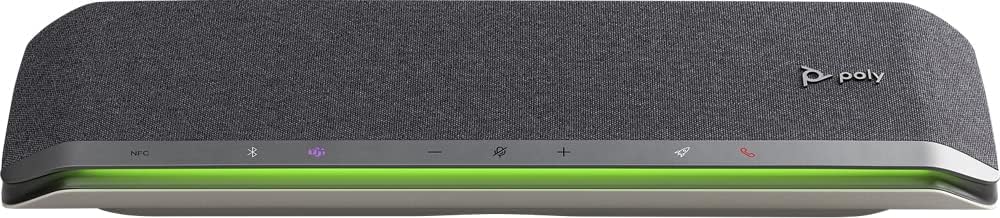
Сүрөт: алдыңкы view of the Poly Sync 60 Smart Speakerphone, showing the speaker grille, control buttons, and an illuminated LED light bar.
Пакеттин мазмуну
- Poly Sync 60 Speakerphone
- Main power supply with global pin adapters
- USB cable with USB-A and USB-C connectors
Негизги өзгөчөлүктөрү
- Өркүндөтүлгөн аудио: Six-microphone steerable array for echo and noise reduction, ensuring clear voice pickup.
- Кош сүйлөөчүлөр: High-performance speakers deliver rich, clear audio for all participants.
- AC кубаттуулугу: Operates continuously via AC power, eliminating battery concerns.
- Daisy Chain мүмкүнчүлүгү: Wirelessly pair two units for extended coverage in larger meeting spaces.
- Ийкемдүү туташуу: Connects to computers via combined USB-A/USB-C cable and to smartphones via Bluetooth.
- USB Video Camera Support: Connect a USB video camera to the speakerphone for combined audio and video with a single cable to the computer.
- Мобилдик түзмөктү кубаттоо: Two USB ports allow charging of up to two mobile phones simultaneously.
- Microsoft командалары тастыкталган: Includes a dedicated Teams button for instant access to the Teams application.
Орнотуу колдонмосу
1. Power Connection
Connect the provided main power supply to the Poly Sync 60 and plug it into a wall outlet. The device requires AC power for operation.
2. Connecting to a Computer (PC/Mac)
Use the integrated USB cable to connect the Poly Sync 60 to your computer. The cable supports both USB-A and USB-C ports. Once connected, the device should be recognized automatically by your operating system.
3. Connecting to a Smartphone (Bluetooth)
- басып, кармап туруңуз Bluetooth баскычы on the Poly Sync 60 until the LED indicator flashes blue.
- On your smartphone, navigate to the Bluetooth settings and select "Poly Sync 60" from the list of available devices.
- Жупташкандан кийин LED индикатору көк түскө айланат.
4. Daisy Chain Two Units (Optional)
For expanded audio coverage, two Poly Sync 60 units can be wirelessly paired. Refer to the official Poly support documentation for detailed instructions on how to enable this feature.
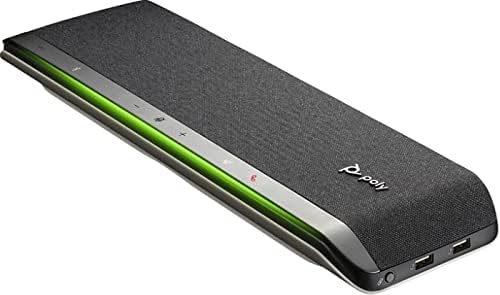
Сүрөт: каптал view of the Poly Sync 60 Smart Speakerphone, highlighting the USB ports for charging mobile devices and connecting a video camera.
Иштөө нускамалары
Негизги башкаруу элементтери
- Үнүн жогорулатуу/төмөндөтүү: колдонуу + жана - buttons to adjust the speaker volume.
- Үнсүз/Ачуу: басыңыз microphone icon button to mute or unmute the microphone. The LED indicator will change color to show mute status.
- Чалууга жооп берүү/аяктоо: басыңыз телефон сүрөтчөсүнүн баскычы чалууга жооп берүү же бүтүрүү.
- Microsoft командалары баскычы: басыңыз Teams icon button to launch or interact with the Microsoft Teams application (if certified version).
Мобилдик түзмөктөрдү заряддоо
Connect your mobile phone or other USB-powered device to one of the two USB ports on the Poly Sync 60 to charge it during a meeting.
Техникалык тейлөө жана кам көрүү
- Clean the Poly Sync 60 with a soft, dry, lint-free cloth.
- Абразивдүү тазалагычтарды, эриткичтерди же күчтүү химиялык заттарды колдонбоңуз, алар аппаратка зыян келтириши мүмкүн.
- Аппаратты экстремалдык температурага, нымдуулукка же тике күн нуруна тийгизүүдөн сактаңыз.
- Колдонбогондо динамикти салкын, кургак жерде сактаңыз.
Проблемаларды чечүү
- Аудио жок/микрофон иштебей жатат:
- Ensure the device is powered on and the AC adapter is securely connected.
- Verify that the speakerphone is not muted (check the mute button LED).
- Check the volume levels on both the Poly Sync 60 and your connected computer/smartphone.
- Confirm that the Poly Sync 60 is selected as the audio input/output device in your computer's sound settings or conferencing application.
- Connection Issues (USB):
- USB кабелин компьютериңиздин башка портуна туташтырып көрүңүз.
- Компьютериңизди өчүрүп күйгүзүңүз.
- Байланыш көйгөйлөрү (Bluetooth):
- Ensure Bluetooth is enabled on your smartphone and the Poly Sync 60 is in pairing mode.
- Unpair and then re-pair the device from your smartphone's Bluetooth settings.
- Башка Bluetooth түзмөктөрү тоскоолдук жаратпай турганын текшериңиз.
- Echo or Background Noise:
- Place the speakerphone centrally in the room, away from walls or highly reflective surfaces.
- Бөлмө тынч жана ашыкча фондук ызы-чуу жок экенине ынаныңыз.
Техникалык мүнөздөмөлөр
| Өзгөчөлүк | Спецификация |
|---|---|
| Модель аты | Синхрондоштуруу 60 |
| Элемент моделинин номери | 216873-01 |
| Динамик түрү | Мультимедиа |
| Байланыш технологиясы | Bluetooth, USB |
| Зымсыз байланыш технологиясы | Bluetooth |
| Bluetooth диапазону | 3 метр |
| Power Source | Электр зымдары |
| Динамиктин максималдуу чыгаруу күчү | 60 Ватт |
| Аудио чыгаруу режими | Стерео |
| Көлөмдүү үн каналынын конфигурациясы | 2.0 |
| Башкаруу ыкмасы | Push Button |
| Продукциянын өлчөмдөрү | 1.5"D x 15.5"W x 4.8"H |
| Элемент Салмагы | 2.2 фунт (1000 грамм) |
| Сунушталган Колдонуулар | Office work, remote work, conference calls, personal entertainment, charging mobile devices |
| Монтаж түрү | Столдун үстү |
| Өндүрүүчү | Поли |
| UPC | 017229172517, 197029590572 |
Кепилдик маалымат
The Poly Sync 60 Smart Speakerphone comes with a full manufacturer's warranty. For detailed information regarding warranty terms, duration, and claim procedures, please refer to the official Poly webсайтты же сатып алууда камтылган кепилдик документтерин.
Колдоо
For further assistance, product updates, software downloads, or detailed guides, please visit the official Poly support website. You can also contact Poly customer service for technical support or service inquiries.
Расмий Поли Webсайт: www.poly.com