1. Киришүү
This manual provides detailed instructions for the safe operation, setup, maintenance, and troubleshooting of your 4DRC H2 High Speed RC Car. Please read this manual thoroughly before operating the vehicle to ensure proper function and to prevent damage or injury. Keep this manual for future reference.

Image: The 4DRC H2 High Speed RC Car, highlighting its 4WD, 2.4Ghz control, dual batteries, 30KM/H speed, strong power, and drift tires.
2. Коопсуздук чаралары
Always observe the following safety guidelines to prevent injury or damage to the product:
- Operate the RC car in open areas away from people, pets, and obstacles.
- Do not operate near public roads, water, or high-voltage линиялары.
- Колдорду, чачтарды жана бош кийимдерди кыймылдуу бөлүктөрдөн алыс кармаңыз.
- Моторду колдонгондон кийин дароо кармабаңыз, анткени ал ысык болушу мүмкүн.
- Батареялардын туура заряддалганын жана этияттык менен колдонулганын текшериңиз.
- Жаш колдонуучулар үчүн чоңдордун көзөмөлү сунушталат.
- Do not modify the product, as this may void the warranty and cause unsafe operation.
3. Package Contents & Components Overview
3.1 Пакеттин мазмуну
Пакетте бардык буюмдар бар экенин текшериңиз:
- 4DRC H2 RC унаасы
- Remote Controller
- Lithium Ion Batteries (x2)
- USB заряддоо кабели
- Racing Tires (pre-installed or separate set)
- Drift Tires (separate set)
- Instruction Manual

Image: An illustration showing the 4DRC H2 RC Car, remote controller, two batteries, USB charger, and two sets of tires (racing and drift), alongside the product box and manual.
3.2 Car Components
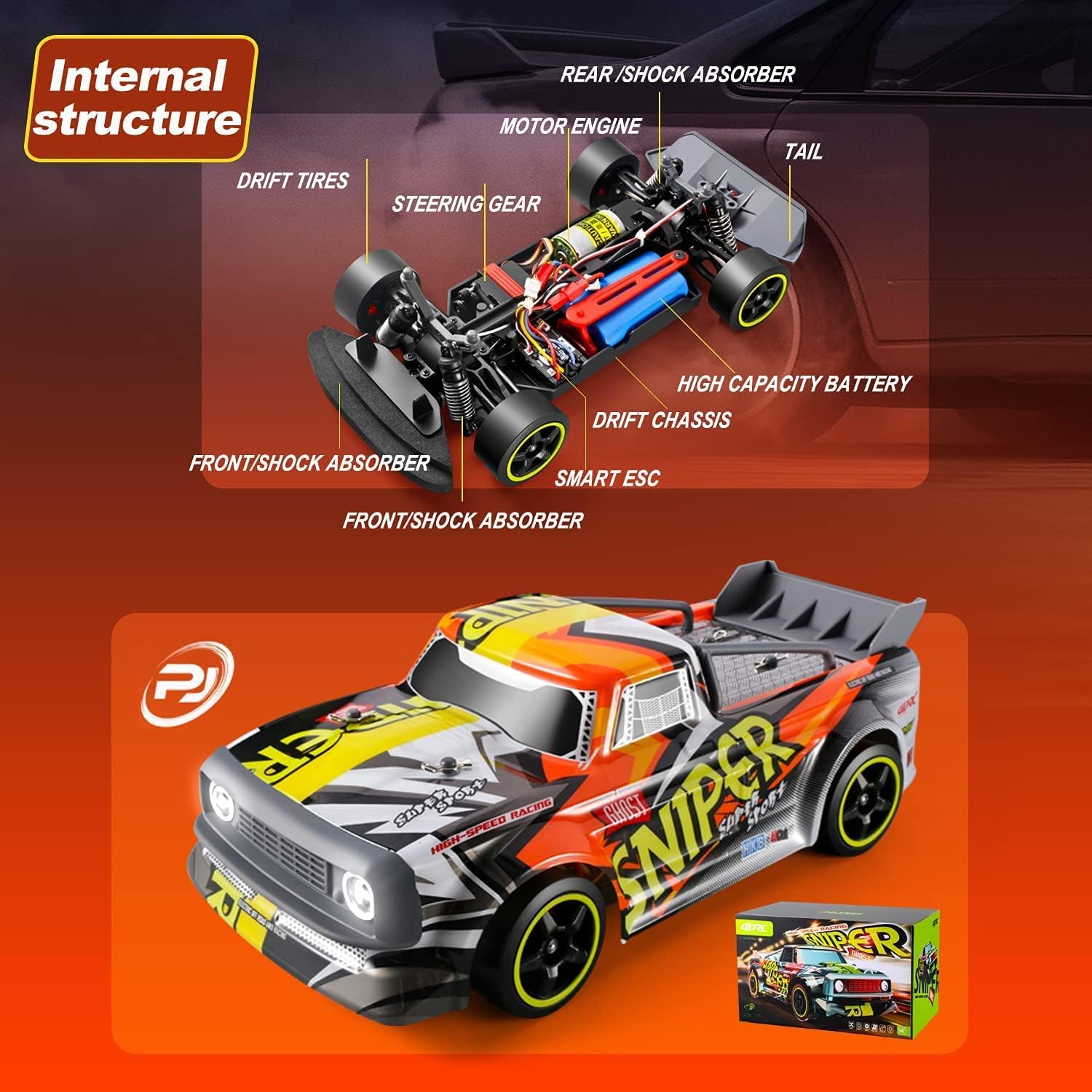
Image: A diagram illustrating the internal components of the RC car, including the motor engine, steering gear, smart ESC, high capacity battery, drift chassis, and front/rear shock absorbers.
3.3 Алыстан башкаруучу ашыкview

Сүрөт: деталдуу view of the remote control, labeling the Body Stability System (ESP+), Turn-to-Fine-Tuning, Reverse Throttle, Wheel Status Indicator Light (Green), TX (Transmitter), ST.TRIM, ST.D/R (Steering Range), ST.REV (Reverse Steering Amplitude), and Remote Control Status Indicator Light (Red).
4. Орнотуу
4.1 Charging the Car Battery
- USB заряддоо кабелин батареяга туташтырыңыз.
- Plug the USB end into a suitable USB power adapter (e.g., computer USB port, phone charger).
- Кубаттоочу түзүлүштөгү индикатор кубаттоо абалын көрсөтөт (белгилүү бир жарык үлгүлөрү үчүн кубаттоочу түзүлүштүн көрсөтмөлөрүн караңыз).
- Толук заряддалгандан кийин, батареяны заряддагычтан ажыратыңыз.
Эскертүү:
- Батареяны ашыкча заряддабаңыз.
- Always supervise charging.
- Allow the battery to cool down before recharging after use.

Image: Two blue Lithium Ion batteries, indicating the power source for the RC car.
4.2 Installing Car Battery
- RC унаасынын астыңкы бетиндеги батарея бөлүмүн табыңыз.
- Бөлүмдүн капкагын ачыңыз.
- Insert the charged battery, ensuring correct polarity.
- Батарея бөлүгүнүн капкагын бекем жабыңыз.
4.3 Алыстан башкаруу пультунун батареяларын орнотуу
- Пульттун артындагы батарея бөлүкчөсүн ачыңыз.
- Insert the required batteries (usually AA, refer to packaging for exact type and quantity), observing correct polarity.
- Батарея уясынын капкагын жабыңыз.
4.4 Алыстан башкаруу пультун жупташтыруу
- Turn on the RC car. The car's indicator light will flash.
- Алыстан башкаруучуну күйгүзүңүз.
- The remote controller and car will automatically pair. Once paired, the indicator lights on both the car and remote will become solid.
4.5 Changing Tires
The 4DRC H2 comes with two sets of tires: racing tires for grip and drift tires for sliding maneuvers.
- To change tires, carefully remove the wheel nuts using the provided tool.
- Remove the current tires and replace them with the desired set.
- Securely fasten the wheel nuts.

Image: The 4DRC H2 RC Car displayed with two distinct sets of tires: one labeled 'Racing Tires' suitable for all terrain, and another labeled 'Drift Tires' suitable for drifting.
5. Операция
5.1 Негизги башкаруу каражаттары
- дроссель триггери: Алдыга жылуу үчүн тартыңыз, тормоздоо/артка айландыруу үчүн басыңыз.
- Руль: Солго бурулуш үчүн солго, оңго бурулуш үчүн оңго бурулуңуз.

Image: A close-up of the remote control, indicating the steering wheel and accelerator trigger for controlling the RC car.
5.2 Advanced Controls & Adjustments
- ST.TRIM: Adjusts the steering trim to ensure the car drives straight when the steering wheel is centered.
- ST.D/R (Рулду эки эселенген ылдамдыкта башкаруу): Adjusts the maximum steering angle. Lowering this value reduces the steering sensitivity.
- TH.REV (Throttle Reverse): Reverses the throttle direction.
- ST.REV (Steering Reverse): Reverses the steering direction.
- ESP+ (Body Stability System): Activates or deactivates the electronic stability program for improved control, especially during high-speed maneuvers or on slippery surfaces.

Image: The remote control with a speed indicator, suggesting variable speed control.
5.3 Айдоо боюнча кеңештер
- Башкаруу элементтерине көнүү үчүн акырындык менен баштаңыз.
- Experiment with different tire types for various terrains and driving styles (racing vs. drifting).
- Utilize the ESP system for enhanced stability, especially when learning or on challenging surfaces.

Image: The RC car depicted on four different terrains: rocky ground (rock climbing), asphalt (racing), grassy field (grassland), and sand (sandy land), illustrating its versatility.
Video: An official product video demonstrating the 4DRC H2 high-speed RC car in action, showcasing its speed, drift capabilities, and performance on various surfaces.
6. Техникалык тейлөө
6.1 Тазалоо
- After each use, especially in dusty or dirty conditions, clean the car with a soft brush or cloth.
- Do not use water or harsh chemicals, as this can damage electronic components.
- Remove any debris from the wheels, suspension, and motor area.
6.2 Батареяга кам көрүү
- Батареяларды күн тийбеген, салкын, кургак жерде сактаңыз.
- Do not store fully charged or completely depleted batteries for extended periods. Charge them to about 50% for long-term storage.
- If the car will not be used for a long time, remove the batteries from both the car and the remote controller.
6.3 Жалпы текшерүү
- Бошогон бурамалар же бузулган бөлүктөрүн дайыма текшерип туруңуз.
- Ensure the shock absorbers are functioning correctly.
- Дөңгөлөктөрдүн эскиргендигин жана бузулгандыгын текшериңиз.

Сүрөт: деталдуу view of the RC car's shock absorber, indicating its role in suspension and handling.

Image: The underside of the RC car chassis, highlighting the anti-collision cotton for impact protection.
7. Кыйынчылыктарды
| Көйгөй | Мүмкүн себеп | Чечим |
|---|---|---|
| Унаа алыстан башкаруу пультуна жооп бербейт. | Low batteries in car or remote; Not paired; Out of range. | Charge/replace batteries; Re-pair car and remote; Operate within range. |
| Car drives crooked. | Руль дөңгөлөгүн тууралоо керек. | Adjust the ST.TRIM knob on the remote controller. |
| Reduced speed or power. | Low car battery; Motor/drivetrain obstruction. | Recharge car battery; Check for debris in gears or wheels. |
| Унаа күтүүсүздөн токтоп калат. | Ашыкча ысып кетүү; Батарея аз. | Allow car to cool down; Recharge battery. |
8. Техникалык шарттар
- Бренд: 4DRC
- Модел: H2
- Масштаб: 1:16
- Drive системасы: 4WD (төрт дөңгөлөктүү)
- Максималдуу ылдамдык: 30 км/саатка чейин
- Башкаруу жыштыгы: 2.4 ГГц
- Батареялар: 2 литий-иондук батарейкалар (кошумча)
- Элемент Салмагы: Болжол менен 3.48 фунт
- Пакеттин өлчөмдөрү: 13.7 x 8.11 x 7.56 дюйм
- Өзгөчөлүктөрү: High-speed motor, independent shock absorption, drift tires, racing tires, LED lights, body stability system.
9. Кепилдик жана колдоо
For warranty information and customer support, please refer to the contact details provided on the product packaging or visit the official 4DRC webсайт. Сатып алуу квитанциясын кепилдик дооматтары үчүн сатып алуунун далили катары сактаңыз.


