Introduction
This manual provides detailed instructions for the Google Pixel Buds A-Series wireless earbuds. These earbuds are designed to deliver high-quality audio and feature a comfortable, secure fit with multiple eartip sizes and a stabilizer arc. They are compatible with Android, iOS, and other Bluetooth 4.0+ devices.
Кутуда эмне бар
- Google Pixel Buds A-Series Earbuds
- Заряддоо кутусу
- USB-C заряддоо кабели
- Eartips (Small, Medium, Large)
- Ыкчам баштоо колдонмосу (бул санариптик колдонмодо камтылган эмес)

Image: Google Pixel Buds A-Series earbuds securely placed within their white charging case, which is open to reveal the earbuds.
Жайгашуу
1. Баштапкы жупташтыруу
For Android Devices (One-Tap Pairing):
- Ensure your Android device is unlocked and has Bluetooth enabled.
- Open the charging case of your Pixel Buds A-Series next to your Android device.
- A pairing notification will appear on your device's screen. Tap to connect.
- Follow any on-screen prompts to complete the setup, including installing the Pixel Buds app for additional features.
For iOS and Other Bluetooth 4.0+ Devices:
- Кулакчындарды кубаттоочу кутуга салып, капкагын ачыңыз.
- Press and hold the pairing button on the back of the charging case until the status light begins to pulse white.
- On your device, navigate to Bluetooth settings and select "Pixel Buds A-Series" from the list of available devices.
- Confirm the pairing on your device.
2. Коопсуз дене түзүлүшкө жетүү
The Pixel Buds A-Series come with three sizes of eartips (small, medium, large) and a flexible stabilizer arc to ensure a comfortable and secure fit.
- Experiment with different eartip sizes to find the best seal for your ears. A good seal is crucial for optimal sound quality and bass response.
- Gently insert each earbud into your ear, rotating slightly until the stabilizer arc tucks comfortably into your ear's concha.

Сүрөт: жакын план view of a single Google Pixel Bud A-Series earbud, highlighting its ergonomic design, eartip, and stabilizer arc.
Иштөө нускамалары
1. Башкаруу элементтерине тийүү
The Pixel Buds A-Series feature touch controls on the outer surface of each earbud.
- Бир жолу таптоо: Аудиону ойнотуу/тындыруу, Чалууга жооп берүү/аяктоо.
- Эки жолу таптоо: Skip forward a track, Decline call.
- Үч жолу таптоо: Skip backward a track.
- Басып кармап туруңуз: Activate Google Assistant (Android only), or hear notifications.
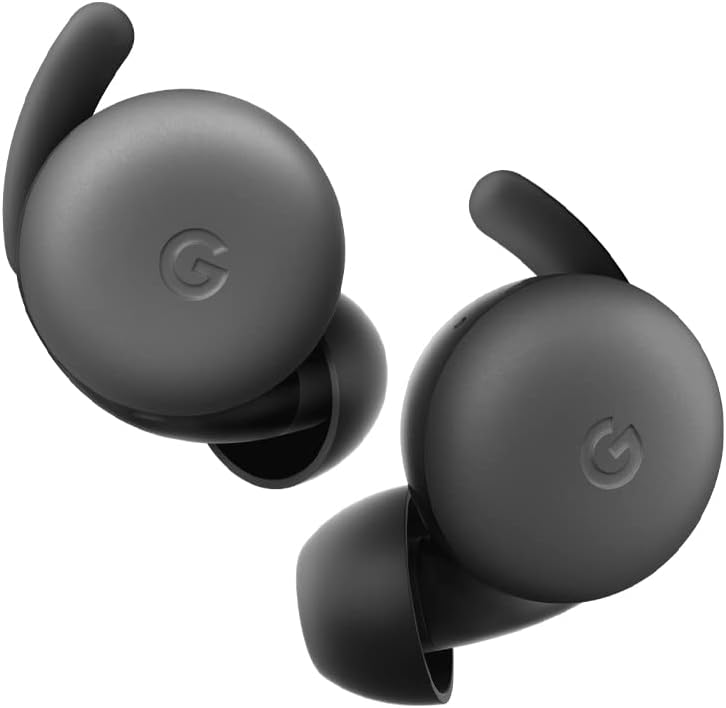
Image: A pair of Google Pixel Buds A-Series earbuds, showcasing their compact design and the 'G' logo on the touch-sensitive surface.
2. Google Assistant Integration
With a compatible Android device, you can access Google Assistant directly from your Pixel Buds A-Series.
- Say "Hey Google" or "Ok Google" to activate the Assistant hands-free.
- Alternatively, press and hold either earbud to speak to Google Assistant.
- You can ask for directions, check weather, control music, or have notifications read aloud.
3. Заряддоо
The Pixel Buds A-Series provide up to 5 hours of listening time or 2.5 hours of talk time on a single charge. The charging case extends this to up to 24 hours of total listening time.
- To charge the earbuds, place them inside the charging case. The indicator light on the case will show their charging status.
- To charge the case, connect it to a USB-C power source using the provided cable. The case's indicator light will show its charging status.
Техникалык тейлөө
1. Тазалоо
- Наушниктерди жана кубаттоочу кутучаңызды үзгүлтүксүз тазалап туруңуз.
- Use a soft, dry, lint-free cloth to wipe the exterior of the earbuds and case.
- For eartips, gently remove them and clean with a mild soap solution and water, then rinse and dry thoroughly before reattaching.
- Абразивдүү материалдарды же катуу химиялык заттарды колдонуудан алыс болуңуз.
2. Сактоо
- Always store the Pixel Buds A-Series in their charging case when not in use to protect them and keep them charged.
- Салкын, кургак жерде, экстремалдык температурадан жана түз күндүн нурунан алыс сактаңыз.
Проблемаларды чечүү
If you encounter issues with your Pixel Buds A-Series, try the following steps:
- Үн жок же үзгүлтүктүү туташуу:
- Эки кулакчындын тең кубатталганын текшериңиз.
- Check that Bluetooth is enabled on your device and the earbuds are connected.
- Try placing the earbuds back in the case, closing the lid for a few seconds, then reopening to reset the connection.
- Телефонуңуздун Bluetooth жөндөөлөрүнөн түзмөктү унутуп, кайра жупташтырыңыз.
- Түзмөгүңүз Bluetooth диапазонунда (10 метрге чейин) экенин текшериңиз.
- Кулакчындар кубатталбай жатат:
- Заряддоо кутусунун өзү заряддалганын текшериңиз.
- Verify that the earbuds are correctly seated in the charging case.
- Кулакчындардагы жана корпустун ичиндеги заряддоо контакттарын кургак кебез менен тазалаңыз.
- Башка USB-C кабелин жана кубат адаптерин колдонуп көрүңүз.
- Үн сапаты начар:
- Ensure you have a secure fit with the correct eartip size.
- Clean the earbud mesh and eartips.
- Check your device's audio settings and equalizer.
Техникалык шарттар
| Модель аты | Pixel Buds A-Series |
| Байланыш технологиясы | Зымсыз (Bluetooth 5.0) |
| Шайкеш түзмөктөр | Android, iOS, and Bluetooth 4.0+ devices |
| Батареянын иштөө мөөнөтү (наушник) | 5 саатка чейин угуу, 2.5 саат сүйлөшүү убактысы |
| Батареянын иштөө мөөнөтү (заряддоо кутусу менен) | Up to 24 hours listening |
| Сууга туруктуулук деңгээли | Water Resistant (IPx4 rating for earbuds) |
| Башкаруу түрү | Touch (Media Control, Google Assistant) |
| Элемент Салмагы | 1.9 унция (жалпы) |
| Өлчөмдөрү (кулакчын) | 0.81 x 1.15 x 0.69 дюйм |
| Жыштык диапазону | 20 Гц - 20 000 Гц |
| Bluetooth диапазону | 10 метр |
Кепилдик жана колдоо
For detailed warranty information and customer support, please refer to the official Google Pixel Buds support webсайты. Адатта, колдоо ресурстарын, көп берилүүчү суроолорду жана байланыш параметрлерин бул жерден таба аласыз g.co/pixelbuds/help.
The Pixel Buds A-Series are designed to be repairable, but any repair, disassembly, or damage may affect the water resistance rating.


