1. Киришүү
This manual provides essential information for the safe and efficient operation of your DALY Smart Battery Management System (BMS) for LiFePo4 8S 24V 40A batteries. The BMS is designed to protect your battery pack from various electrical anomalies and allows for monitoring and parameter adjustment via Bluetooth-enabled mobile applications or PC software.
2. Продукциянын өзгөчөлүктөрү
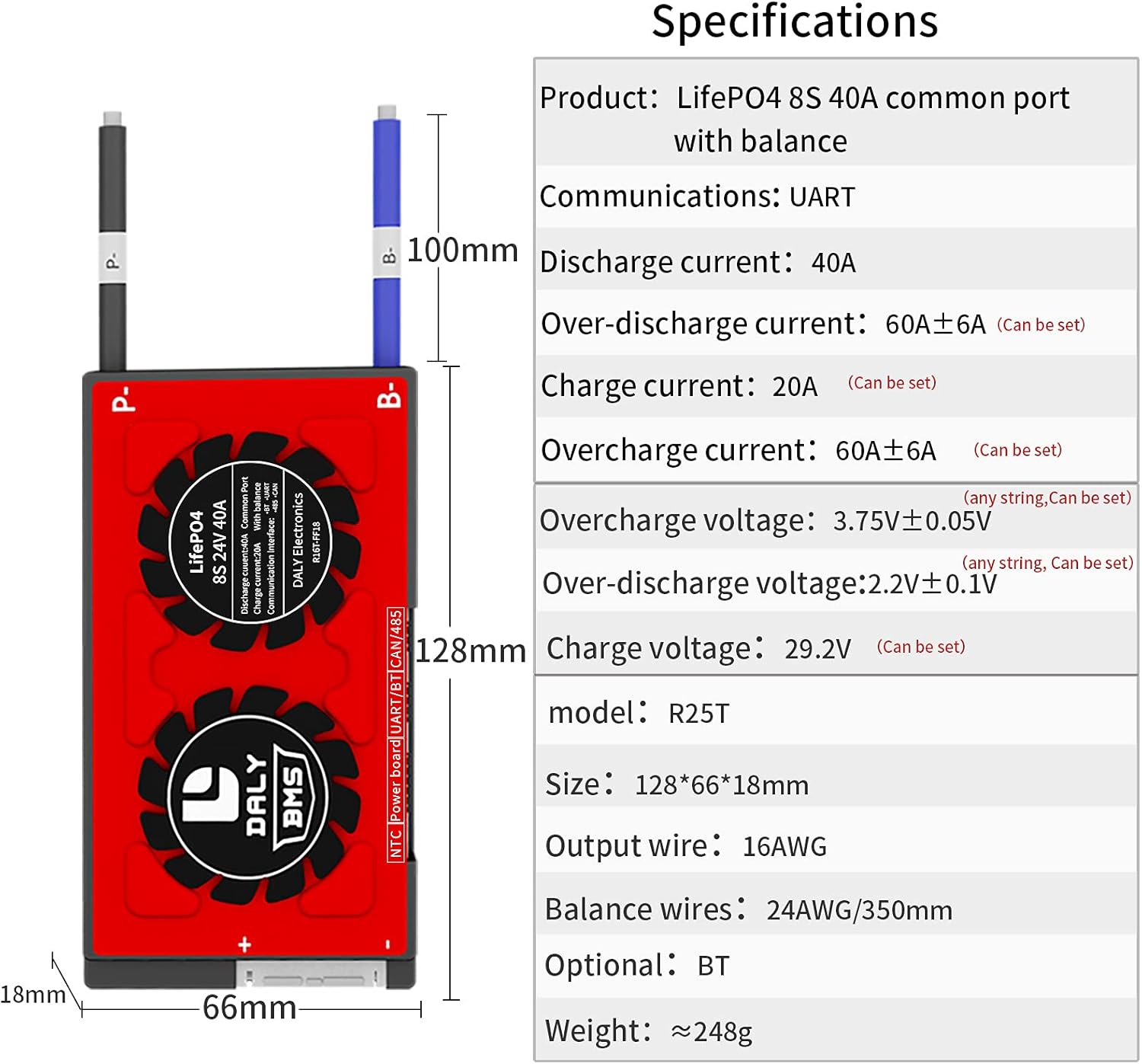
- Common Port Design: Supports both charging and discharging through the same port.
- High Current Capability: Supports up to 40A continuous discharge and 20A charge current.
- Programmable Protections:
- Ашыкча заряддан коргоо
- Ашыкча разряддан коргоо
- Over-current protection (charge and discharge)
- Көлөмүtagд коргоо
- Low temperature charging protection (down to -1°C)
- NTC temperature protection
- Кыска туташуулардан коргоо
- Акылдуу функциялар: Precise State of Charge (SOC) calculation with automatic learning, automatic charge battery function, and static balance function.
- Bluetooth байланышы: Monitor battery status and adjust parameters wirelessly via Android or iOS mobile applications.
- Компьютердик программалык камсыздоону колдоо: Manage and monitor the BMS via a PC interface using a UART cable.

3. Техникалык шарттар
| Өзгөчөлүк | Нарк |
|---|---|
| Продукциянын өлчөмдөрү | 5.04 x 2.6 x 0.71 дюйм |
| Элемент Салмагы | 12.8 унция |
| Бренд | DALY |
| Байланыш технологиясы | Bluetooth |
| Power Source | Батарея менен иштейт |
| Зымсыз байланыш стандарты | Bluetooth |
| Шайкеш түзмөктөр | Мобилдик телефондор |
| Разряд агымы | 40A (Үзгүлтүксүз) |
| Заряддоо агымы | 20A (Үзгүлтүксүз) |
| Ашыкча разряддан коргоо | 60A ± 6A (Configurable) |
| Overcharge Current Protection | 60A ± 6A (Configurable) |
| Overcharge Voltage | 3.75V ± 0.05V (per string, Configurable) |
| Ашыкча разряд Voltage | 2.2V ± 0.1V (per string, Configurable) |
| Заряддоо Voltage | 29.2V (Configurable) |

4. Пакеттин мазмуну
Upon receiving your DALY Smart BMS, please verify that all components are included:
- SMART BMS Unit (1)
- Balance Wires (1 set)
- Bluetooth Module (1)
- UART Cable (for PC connection) (1)
- English Version Wiring Manual (1)

5. Коопсуздук маалыматы
WARNING: Improper installation or use of a BMS can lead to serious injury, fire, or damage to property. Always exercise caution when working with high-voltagэлектрондук батарея системалары.
- Электр кубатын колдонуудан мурун, бардык туташуулардын туура жана коопсуз экенин текшериңиз.
- Always disconnect the power source before performing any maintenance or wiring changes.
- Тиешелүү жеке коргонуу шаймандарын (ЖКК), анын ичинде изоляцияланган кол каптарды жана көздү коргоону кийиңиз.
- Do not short-circuit the battery terminals or BMS connections.
- Operate the BMS within its specified voltage жана учурдагы чектөөлөр.
- Keep the BMS away from water, moisture, and extreme temperatures.
- Эгер кандайдыр бир кадамга ишенбесеңиз, квалификациялуу адиске кайрылыңыз.
6. Орнотуу
6.1. Электр схемасы
Carefully follow the wiring diagram provided. Ensure that the balance wires are connected to the correct cell terminals in sequence, starting from the negative terminal of the first cell (B-) to the positive terminal of the last cell (B+).

6.2. Initial Activation and Connection
- Зымдарды текшерүү: Before connecting the BMS, measure the voltage between adjacent balance cables to ensure the wiring is correct and matches the nominal voltage of a single string.
- Connect BMS: Plug in the NTC temperature sensor and the Bluetooth module to the BMS.
- Activate BMS: Press the button on the Bluetooth module to activate the smart BMS.
- Колдонмону жүктөп алуу: Download the "Smart BMS" application from your mobile device's app store (Huawei or Apple App Store).
- Bluetooth аркылуу туташуу: Open the Smart BMS APP and connect to the corresponding Bluetooth device ID.
- Initial Parameter Setup: For the first power-on, the battery capacity must be set to the actual capacity of your battery pack. The initial password for parameter settings is 123456. Adjust other parameters as needed under the guidance of your battery manufacturer.
7. Операция
Once the BMS is properly installed and configured, you can monitor its status and the battery pack's health using the Smart BMS mobile application or PC software.
- реалдуу убакыт мониторинг: The app displays critical information such as total voltagд, жеке клетка томtages, current, temperature, and State of Charge (SOC).
- Параметрди тууралоо: Access the "Parameter Settings" section (password: 123456) to fine-tune protection thresholds for voltage, current, and temperature according to your battery specifications.
- Автоматтык калибрлөө: The battery is automatically calibrated when charged until the voltage reaches a high level 2 alarm.

8. Техникалык тейлөө
Proper maintenance ensures the longevity and optimal performance of your battery pack and BMS.
- Үзгүлтүксүз текшерүү: Мезгил-мезгили менен бардык зымдарды туташтыруунун бекемдигин жана коррозия же бузулуу белгилерин текшерип туруңуз.
- Программалык камсыздоо жаңыртуулары: Keep the Smart BMS mobile application and PC software updated to the latest version for improved features and bug fixes.
- Экологиялык шарттар: Ensure the BMS and battery pack are operated within recommended temperature and humidity ranges. Avoid direct sunlight or extreme cold.
- Тазалоо: Keep the BMS unit clean and free from dust and debris. Use a dry, soft cloth for cleaning.
9. Кыйынчылыктарды
This section addresses common issues you might encounter with your DALY Smart BMS.
- BMS Not Activating: Ensure all balance wires are correctly connected and the main battery terminals (B- and P-) are properly wired. Press the activation button on the Bluetooth module.
- Bluetooth туташуу маселелери: Verify the Bluetooth module is securely plugged into the BMS. Ensure Bluetooth is enabled on your mobile device and the "Smart BMS" app has necessary permissions. Try restarting the app or your device.
- Туура эмес томtage Окуулар: Double-check all balance wire connections. Loose or incorrect connections can lead to inaccurate cell voltagэ окуулар.
- BMS Shuts Down Unexpectedly: This often indicates a protection trigger (e.g., over-current, over-voltage, томдун астындаtage, or temperature). Check the alarm messages in the app for details. Address the underlying cause (e.g., reduce load, check charger, inspect battery cells).
- Баланс маселелери: Эгерде клетка томtages are consistently out of balance, ensure the balance wires are correctly installed. The BMS has a passive balancing function; for severely mismatched cells, external balancing might be required or cells may need replacement.
- App/PC Software Not Displaying Data: Confirm the Bluetooth module or UART cable is properly connected and the BMS is active. Ensure the app/software is the correct version and compatible with your BMS model.
For persistent issues not covered here, please refer to the detailed wiring manual included in your package or contact DALY customer support.
10. Кепилдик жана колдоо
For warranty information, please refer to the documentation provided at the time of purchase or contact your vendor. DALY provides technical support for their products. For assistance, please visit the official DALY website or contact their customer service department with your product model and purchase details.


