1. Киришүү
This manual provides comprehensive instructions for the assembly, operation, and maintenance of your FLEXISPOT EN2 Electric Height Adjustable Standing Desk. Please read this manual thoroughly before assembly and use to ensure safe and efficient operation.
The FLEXISPOT EN2 desk features a spacious one-piece desktop, an electric height adjustment system with memory presets, and a removable clamp power strip for convenient device charging and cable management. It is designed to support a dynamic work environment, allowing seamless transitions between sitting and standing positions.
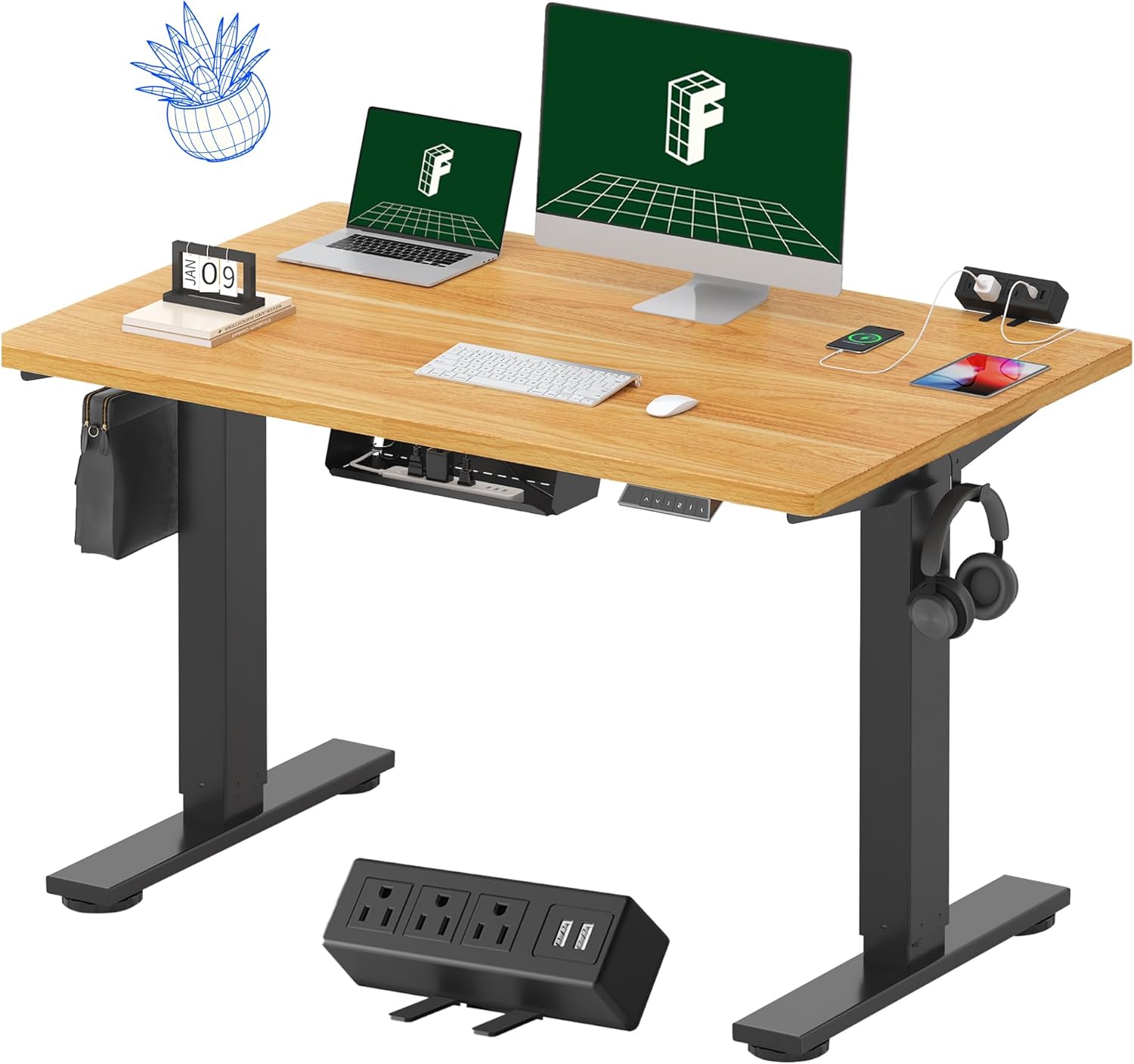
Image 1.1: FLEXISPOT EN2 Standing Desk with Maple Top and Black Frame, showcasing a typical setup with monitors, a laptop, and a clamp электр тилкеси.
2. Коопсуздук маалыматы
ЭСКЕРТҮҮ: Бул коопсуздук нускамаларын аткарбоо жаракатка же буюмдун бузулушуна алып келиши мүмкүн.
- Ар дайым монтаждоо көрсөтмөлөрүн кылдаттык менен аткарыңыз.
- An electric drill (not included) may be required for assembly.
- Үстөлдүн оодарылып кетишинин алдын алуу үчүн туура орнотулганын текшериңиз.
- Сунушталган максималдуу салмактан 80 кг (176 фунт) ашпаңыз.
- Keep the work surface clear of items that could fall and cause injury during height adjustments.
- Always unplug the desk before performing any maintenance or making adjustments to the frame or electrical components.
- Иш учурунда балдарды жана үй жаныбарларын столдон алыс кармаңыз.
3. Пакеттин мазмуну
Your FLEXISPOT EN2 Standing Desk will arrive in two separate packages, which may be shipped separately. Please ensure you have received both packages and all components before beginning assembly.

Image 3.1: Illustration showing the desk components arriving in two separate packages: one for the desktop and one for the desk frame.
Камтылган компоненттер:
- One-piece desktop (48" x 30" Maple Top)
- Electric height-adjustable frame (Black)
- 6-button digital controller with 4 memory presets
- Removable clamp power strip (3 AC outlets, 2 USB charging ports)
- Cable management device
- Assembly hardware and tools (excluding electric drill)
4. Орнотуу жана чогултуу
Assembly typically requires two people and an electric drill (not included). Follow the detailed instructions provided in the separate assembly guide included with your product. The process involves attaching the legs to the desktop and connecting the control panel and motor.
Чогултуу боюнча кеңештер:
- Чийип кетпеш үчүн бардык компоненттерди жумшак, таза бетке жайыңыз.
- Бардык бурамалар бекем бекемделгенин текшериңиз, бирок ашыкча тартпаңыз.
- Properly route all cables using the provided cable management solutions to avoid interference with desk movement.
Video 4.1: Official FLEXISPOT Standing Desk Frame Installation Guide. This video demonstrates the step-by-step process of assembling the desk frame and attaching it to the desktop.
5. Иштөө нускамалары
5.1 Санарип башкаруу панели
The desk is operated using a 6-button digital controller, typically mounted on the underside of the desktop. It features up/down arrows, an LED display for height, and four programmable memory presets.

Image 5.1: Digital control panel with LED display showing current height, up/down arrows, and four numbered memory preset buttons.
5.2 Бийиктигин тууралоо
- басып, кармап туруңуз Өйдө жебе (^) үстөлдү көтөрүү үчүн баскыч.
- басып, кармап туруңуз Төмөн жебе (v) үстөлдү түшүрүү үчүн баскыч.
- The desk adjusts smoothly from 28.1 inches (71.4 cm) to 45.7 inches (116.1 cm).
- The motor operates quietly at less than 50 dB.
5.3 Эстутум алдын ала орнотууларды орнотуу
The controller allows you to save up to four preferred height settings for quick adjustments.
- Өйдө/төмөн жебелер менен үстөлдү каалаган бийиктикке тууралаңыз.
- басыңыз Эстутум (M) баскычы. LED дисплей күйөт.
- 3 секунданын ичинде алдын ала коюлган номерленген баскычтардын бирин басыңыз (1, 2, 3 же 4) учурдагы бийиктикти ошол алдын ала коюлганга сактоо үчүн.
- Сакталган бийиктикти кайра чакырып алуу үчүн жөн гана тиешелүү номерленген алдын ала коюлган баскычты басыңыз. Үстел автоматтык түрдө сакталган абалга жылат.
Video 5.2: FlexiSpot Brand Store video demonstrating the desk's height adjustment and memory preset functions.
6. Өзгөчөлүктөрү
6.1 One-Piece Desktop
The desk features a spacious, single-piece desktop made of FSC-Certified wood. This design provides a smooth, seamless work surface, enhancing stability and aesthetics compared to multi-piece desktops.

Image 6.1: Visual comparison highlighting the smooth surface of a single-piece desktop against the visible seams of a two-piece desktop.
6.2 Removable Clamp Power Strip
A desktop-mounted power strip is included, featuring 3 AC outlets (125V/12A) and 2 USB charging ports (5V/2A). This allows for convenient charging of electronic devices directly from your desk. The power strip can be clipped to the back or side of your desk.

Image 6.2: Close-up of the removable clamp power strip, detailing its 3 AC outlets and 2 USB-A ports, and how it attaches to the desk edge.
6.3 Кабелди башкаруу
The desk includes a cable management device to help organize and tidy up your workspace, preventing cables from dangling and interfering with desk movement.

Image 6.3: Illustration demonstrating effective cable management with an under-desk tray, showing a tidy setup compared to unmanaged cables.
7. Техникалык тейлөө
- Бардык бурамаларды жана туташууларды бекем кармап туруу үчүн үзгүлтүксүз текшерип туруңуз.
- Жумушчу столдун бетин жумшак, d менен тазалаңызamp кездеме. Финишке зыян келтирүүчү абразивдүү тазалагычтардан алыс болуңуз.
- Моторду жана электрдик тетиктерди чаңдан жана нымдуулуктан алыс кармаңыз.
- Do not place hot items directly on the desktop without protective coasters.
8. Кыйынчылыктарды
8.1 Desk Not Moving or Displaying Error Code (e.g., "r5t")
If your desk is not responding or the LED display shows an error code like "r5t", a system reset may be required.
- Үстөлдү электр розеткасынан ажыратыңыз.
- Жок дегенде 10-15 секунд күтө туруңуз.
- Үстөлдү кайра электр розеткасына сайыңыз.
- Press and hold the "Down Arrow (v)" button until the desk reaches its lowest position and then slightly rises. This indicates a successful reset.
- Эгер көйгөй чечилбесе, кардарларды колдоо менен байланышыңыз.
8.2 Desk Wobbling at Higher Heights
While the desk is designed for stability, minor wobbling can occur at maximum heights. Ensure the adjustable feet on the leg bases are properly leveled to compensate for uneven flooring.
9. Техникалык шарттар
| Өзгөчөлүк | Спецификация |
|---|---|
| Бренд | FLEXISPOT |
| Модел | EN2 |
| Иш столунун материалы | FSC тарабынан сертификацияланган клен жыгачы |
| Иш тактанын өлчөмдөрү | 48" (туурасы) x 30" (туурасы) |
| Иш тактасынын калыңдыгы | 1 дюйм |
| Frame Material | Industrial-grade Alloy Steel (Black) |
| Бийиктигин тууралоо диапазону | 28.1 дюймдан 45.7 дюймга чейин (71.4 смден 116.1 смге чейин) |
| Мотор ызы-чуунун деңгээли | < 50 дБ |
| Салмак сыйымдуулугу | 176 фунт (80 кг) |
| Башкаруу панели | 6-button digital controller with 4 memory presets |
| Электр розеткасы | 3 AC outlets (125V/12A), 2 USB charging ports (5V/2A) |
| Ассамблея талап кылынат | Yes (electric drill recommended) |
10. Кепилдик жана колдоо
10.1 Кепилдик маалыматы
- 5 жылдык кепилдик: рамкаларды, моторлорду жана башка механикалык түзүлүштөрдү камтыйт.
- 2 жылдык кепилдик: Контроллерлерди, өчүргүчтөрдү жана электрониканы камтыйт.
Please retain your proof of purchase for warranty claims. The warranty covers defects in materials and workmanship under normal use.
10.2 Кардарларды колдоо
For any questions, troubleshooting assistance, or warranty claims, please contact FLEXISPOT customer support through their official webсайтка же продуктуну сатып алган сатуучуга.


