Introduction
This manual provides comprehensive instructions for the setup, operation, and maintenance of your MOFII Sweet 2.4G Wireless Keyboard and Mouse Set. Please read this manual thoroughly before using the product to ensure proper functionality and longevity.
Пакеттин мазмуну
- MOFII Sweet Wireless Keyboard
- MOFII Sweet Wireless Mouse
- USB 2.4G кабыл алуучу
- 2 x AA батарейкалар (алдын ала орнотулган же өзүнчө камтылган)
- Колдонуучунун Колдонмосу (бул документ)
Жайгашуу
1. Батареяны орнотуу
The MOFII Sweet set requires AA batteries for both the keyboard and the mouse. Ensure correct polarity when inserting batteries.
- Баскычтоп үчүн: Locate the battery compartment on the underside of the keyboard. Open the cover, insert the AA batteries according to the polarity markings, and close the cover.
- Чычкан үчүн: Locate the battery compartment on the underside of the mouse. Open the cover, insert the AA battery according to the polarity markings, and close the cover.

Image: The MOFII Sweet wireless keyboard and mouse, showcasing their design and color. This image represents the complete set.
2. USB Receiver Connection
- Locate the USB 2.4G receiver, typically stored in the mouse's battery compartment or included separately.
- Plug the USB receiver into an available USB port on your computer, laptop, or tablet.
- Сиздин иштөө тутумуңуз керектүү драйверлерди автоматтык түрдө таап, орнотууга тийиш. Бул процесс бир нече мүнөткө созулушу мүмкүн.
3. Күйгүзүү
Ensure the power switch on both the keyboard and mouse is in the "ON" position. The power switch for the mouse is usually on its underside. The keyboard may not have a dedicated power switch and will activate upon key press after battery installation.
Иштөө нускамалары
Баскычтопту колдонуу
The MOFII Sweet keyboard features a standard QWERTY layout with additional function keys. It is designed for comfortable typing.
- Стандарттык ачкычтар: All alphanumeric and symbol keys function as expected.
- Функция баскычтары (F1-F12): These keys may have secondary functions (e.g., media control, volume adjustment) when pressed in combination with the Fn баскыч. Белгилүү бир функциялар үчүн баскычтоптун капкакчасынын уламыштарын караңыз.
- Сандык баскычтоп: The dedicated numeric keypad on the right provides efficient data entry. Ensure Num Lock is active if numbers are not registering.
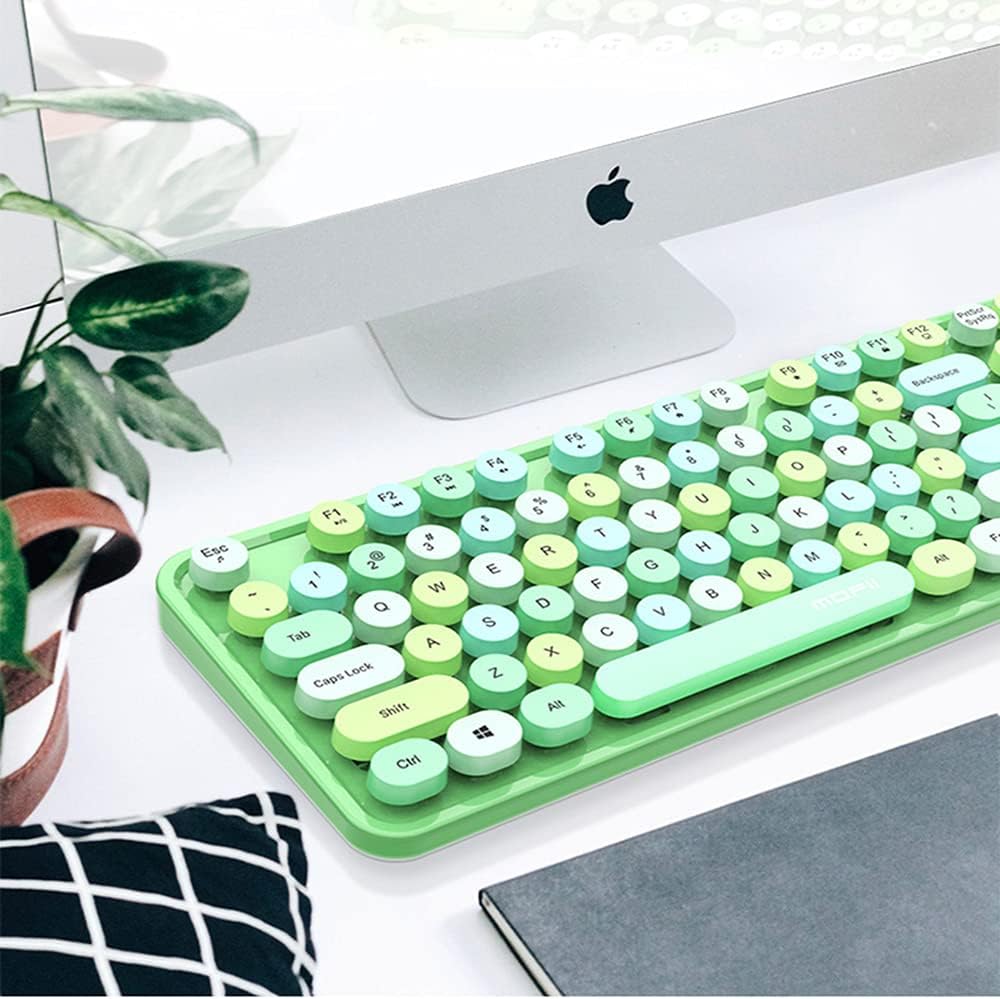
Image: The MOFII Sweet wireless keyboard positioned on a desk next to a computer monitor, demonstrating a typical usage scenario.
Чычканды колдонуу
The MOFII Sweet mouse provides precise cursor control and comfortable navigation.
- Сол баскыч: Негизги чыкылдатуу функциясы.
- Оң баскыч: Экинчи чыкылдатуу функциясы (контексттик меню).
- Жылдыруу дөңгөлөгү: Документтерди өйдө же ылдый сыдырыңыз жана web барактар. Ошондой эле ортоңку чыкылдатуу баскычы катары иштей алат.
Техникалык тейлөө
Тазалоо
To maintain the appearance and functionality of your MOFII Sweet set:
- Use a soft, dry, lint-free cloth to wipe down the surfaces.
- өжөр кир үчүн, бир аз гampчүпүрөктү суу же жумшак, абразивдүү тазалагыч менен жууп салыңыз. Ашыкча нымдуулуктан сактаныңыз.
- Do not use harsh chemicals, solvents, or abrasive materials, as these can damage the finish.
- Баскычтоп үчүн, баскычтардын ортосундагы таштандыларды кетирүү үчүн кысылган абаны колдонуңуз.
Батареяны алмаштыруу
When the keyboard or mouse performance degrades (e.g., delayed response, intermittent connection), it may be time to replace the batteries. Follow the battery installation steps outlined in the "Setup" section.
Сактагыч
If storing the device for an extended period, remove the batteries to prevent leakage and potential damage.
Проблемаларды чечүү
| Көйгөй | Мүмкүн себеп | Чечим |
|---|---|---|
| Баскычтоп/чычкан жооп бербей жатат |
|
|
| Delayed response or intermittent connection |
|
|
| Атайын баскычтар иштебейт |
|
|
Техникалык шарттар
- Бренд: MOFII
- Модел: таттуу
- Байланыш технологиясы: 2.4G зымсыз (радио жыштык)
- Шайкеш түзмөктөр: Personal Computer, Laptop, Tablet
- Операциялык системанын шайкештиги: Windows (and generally compatible with other OS that support standard USB HID devices)
- Кубат булагы: Батарея менен иштейт
- Батарея түрү: AA (2 included)
- Баскычтоптун жайгашуусу: QWERTY
Коопсуздук маалыматы
- Аппаратты экстремалдык температурага, нымдуулукка же түз күн нуруна калтырбаңыз.
- Аппаратты түшүрүүдөн же катуу таасирлерден сактаныңыз.
- Балдар жетпеген жерде сактаңыз.
- Батареяларды жергиликтүү эрежелерге ылайык жок кылыңыз. Батареяларды отко таштабаңыз.
- Do not attempt to disassemble or repair the device yourself. This will void any potential warranty.
Кепилдик жана колдоо
MOFII products are designed for reliability and performance. For warranty information or technical support, please refer to the documentation provided at the point of purchase or contact your retailer. Keep your proof of purchase for warranty claims.


