1. Продукт бүтүп калдыview
The CHESONA Wireless Keyboard and Mouse Combo offers a versatile and efficient solution for your computing needs. Featuring multi-device connectivity via Bluetooth (5.0 + 3.0) and 2.4G wireless, this full-size combo is designed for seamless switching between up to three devices, including Mac OS, iOS, Windows, and Android systems. Its ultra-thin design, low-profile scissor-switch keys, and rechargeable battery ensure a comfortable and productive user experience.

Image: The CHESONA wireless keyboard and mouse combo, showcasing the integrated slot for holding a smartphone or tablet.
2. Кутуда эмне бар
- 1 x Зымсыз баскычтоп
- 1 x зымсыз чычкан
- 1 x Type-C заряддоо кабели
- 1 х клавиатура капкагы
- 1 x 2.4G USB Receiver (stored on the bottom of the keyboard)
- 1 x User Manual

Image: A visual representation of all items included in the product package: keyboard, mouse, 2.4G receiver, charging cable, keyboard cover, and user manual.
3. Орнотуу колдонмосу
3.1 Аппараттарды заряддоо
The keyboard and mouse are equipped with built-in rechargeable 280mAh lithium batteries. Before first use, or when the battery indicator is low, connect the included Type-C charging cable to the respective charging ports on the keyboard and mouse, and then to a USB power source. A full charge provides approximately 50 hours of continuous work and 200 hours of standby time.

Image: The keyboard and mouse connected to a Type-C charging cable, illustrating the recharging process.
3.2 2.4G зымсыз байланыш аркылуу туташуу
For 2.4G wireless connection, locate the USB receiver stored on the bottom of the keyboard. Plug this receiver into an available USB port on your computer or device. The keyboard and mouse will automatically connect. No additional software or drivers are required.

Image: The keyboard and mouse with a visual representation of the 2.4G wireless connection, highlighting the USB receiver.
3.3 Connecting via Bluetooth (BT 5.0 + 3.0)
The combo supports connection to up to two Bluetooth devices simultaneously. To connect:
- Баскычтопту жана чычканды күйгүзүңүз.
- басыңыз BT 1 or BT 2 button on the keyboard to select a Bluetooth channel. The indicator light will flash.
- On your device (Mac, iPad, iPhone, Android, Windows PC), go to Bluetooth settings and search for "CHESONA Keyboard" or "CHESONA Mouse".
- Select the device to pair. Once paired, the indicator light will stop flashing.
- Башка BT каналын колдонуп, экинчи Bluetooth түзмөгү үчүн кайталаңыз.

Image: Close-up of the keyboard and mouse, illustrating the 2.4G, BT1, and BT2 connection buttons for multi-device pairing.
Шайкештик: Compatible with Mac OS/iOS 10.12 or above, Windows 8/10 or above, Android 4.3 or above.
4. Иштөө нускамалары
4.1 Түзмөктөрдүн ортосунда которулуу
To switch between connected devices, simply press the corresponding button on the keyboard:
- Басыңыз 2.4G button for the device connected via USB receiver.
- Басыңыз BT 1 button for the first Bluetooth device.
- Басыңыз BT 2 button for the second Bluetooth device.

Image: The keyboard displaying its multi-device compatibility with icons for Windows, Mac, Android, and iOS operating systems.
4.2 Кубатты үнөмдөө режими
To conserve battery life, the keyboard and mouse will automatically enter sleep mode if not used for more than 30 minutes. To wake them up, simply press any key on the keyboard or move the mouse.
4.3 Баскычтоптун өзгөчөлүктөрү
The keyboard features low-profile keys with a scissor mechanism, providing increased stability, silent operation, and quick rebound for comfortable and precise typing. It includes a full-size layout with a numeric keypad for enhanced productivity.

Сүрөт: жакын план view of the keyboard's low-profile keys, highlighting their design for quiet and responsive typing.
4.4 Integrated Device Slot
The keyboard includes an integrated slot designed to hold your smartphone or tablet, providing a convenient viewing angle while you work or type.

Image: A smartphone securely placed in the integrated slot of the keyboard, demonstrating its utility.
5. Техникалык тейлөө
To ensure the longevity and optimal performance of your CHESONA Wireless Keyboard and Mouse Combo, follow these maintenance guidelines:
- Тазалоо: Тергичтин жана чычкандын беттерин сүртүү үчүн жумшак, кургак чүпүрөктү колдонуңуз. өжөр кир үчүн, бир аз гamp ным аппаратка кирбеши үчүн кездемени колдонсо болот.
- Keyboard Cover: The included keyboard cover is waterproof and stain-resistant, providing protection against spills and dust. Regularly clean the cover with mild soap and water, and ensure it is completely dry before placing it back on the keyboard.
- Сактагыч: Узак мөөнөткө колдонулбаганда, аппараттарды күн тийбеген жана өтө температурадан алыс салкын, кургак жерде сактаңыз.

Image: The CHESONA keyboard with its transparent, waterproof, and stain-resistant cover being applied, demonstrating protection against spills.
6. Кыйынчылыктарды
If you encounter any issues with your CHESONA Wireless Keyboard and Mouse Combo, please refer to the following common solutions:
- Туташуу маселелери:
- Ensure both the keyboard and mouse are fully charged.
- For 2.4G connection, verify the USB receiver is securely plugged into a working USB port. Try a different USB port.
- For Bluetooth connection, ensure Bluetooth is enabled on your device and the keyboard/mouse are in pairing mode (indicator light flashing). Try unpairing and re-pairing the devices.
- Ensure the devices are within the 33-foot operating range.
- Input Delay or Unresponsiveness:
- Батареянын деңгээлин текшерип, керек болсо кайра заряддаңыз.
- Move closer to your device to reduce potential interference.
- If using 2.4G, try plugging the USB receiver into a different USB port.
- If using Bluetooth, try disconnecting and reconnecting the Bluetooth pairing.
- Keyboard/Mouse Not Turning On:
- Ensure the power switch on both devices is in the "ON" position.
- Connect the charging cable to confirm if the battery is completely depleted.
If problems persist, please contact CHESONA customer support for further assistance.
7. Техникалык шарттар
| Өзгөчөлүк | Деталь |
|---|---|
| Продукциянын өлчөмдөрү | 16.93 x 5.31 x 0.31 дюйм |
| Элемент Салмагы | 1.31 фунт |
| Батареялар | 1 литий-иондук батарейкалар талап кылынат (кошулган) |
| Бренд | ЧЕСОНА |
| Түс | Кара |
| Байланыш технологиясы | Wireless (BT 5.0+3.0+2.4G) |
| Өзгөчө өзгөчөлүк | Зарядкалуу |
| Шайкеш түзмөктөр | Laptop, Personal Computer, Smartphone, iPad |
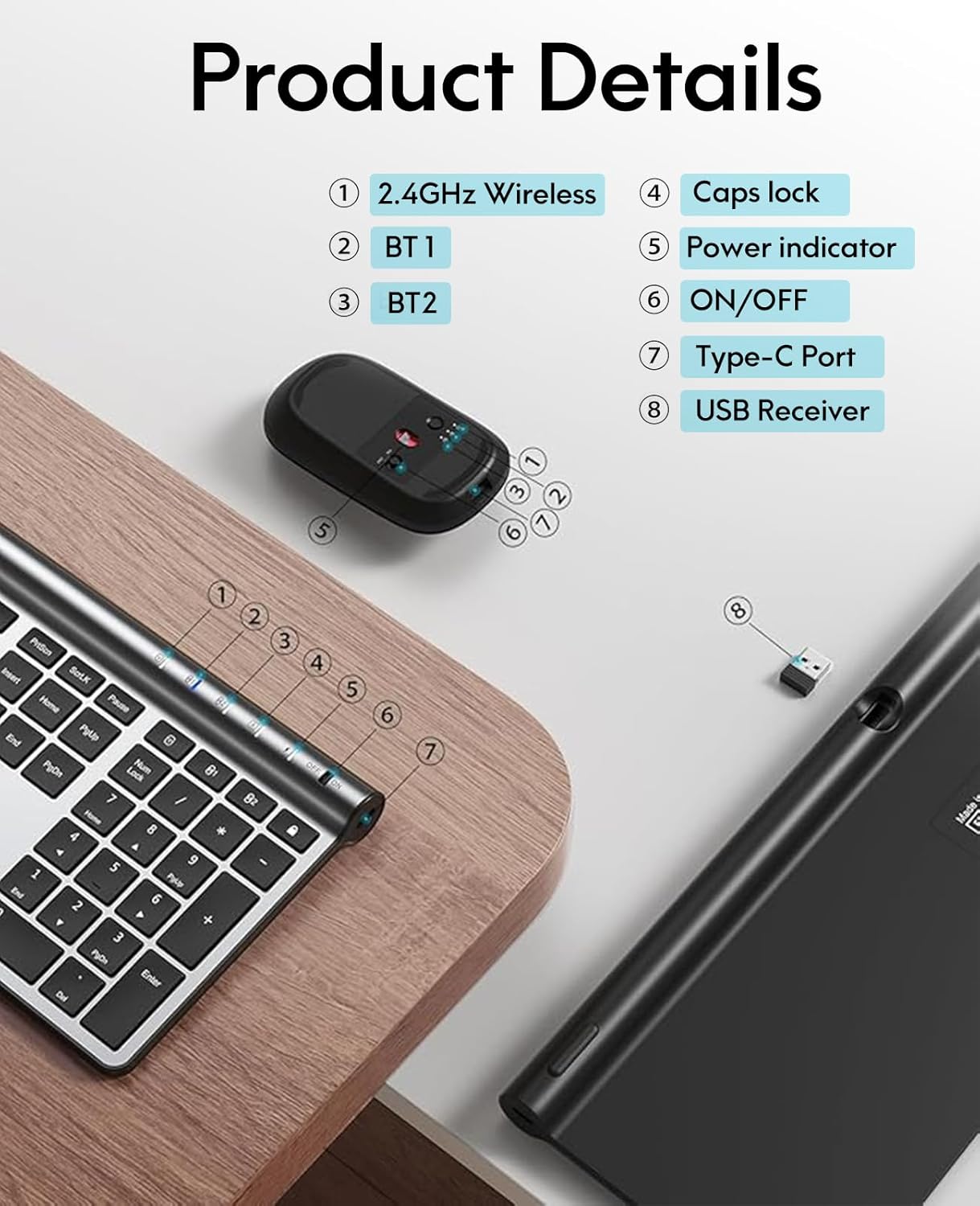
Image: Detailed diagram illustrating the various components and features of the CHESONA keyboard and mouse.
8. Кепилдик жана колдоо
CHESONA products are designed for reliability and performance. For any warranty claims, technical support, or product inquiries, please contact CHESONA customer service through the retailer where you purchased the product or visit the official CHESONA store online.


