1. Киришүү
The MINISFORUM UM340 is a compact and powerful mini PC designed for various computing tasks, from everyday productivity to multimedia consumption. This manual provides essential information to help you get started, operate, and maintain your device effectively.

Image 1.1: The MINISFORUM UM340 Mini PC, a compact computing device.
2. Пакеттин мазмуну
Verify that all items listed below are included in your product package. If any items are missing or damaged, please contact customer support.
- MINISFORUM UM340 Mini PC
- Кубаттуу адаптер
- HDMI кабели
- VESA Mount with Screws
- Колдонуучунун Колдонмосу (бул документ)

Image 2.1: Contents of the MINISFORUM UM340 Mini PC package, including the PC, power adapter, HDMI cable, and VESA mount.
3. Продукт бүтүп калдыview
Familiarize yourself with the ports and components of your MINISFORUM UM340 Mini PC.
Front Panel

Image 3.1: Front panel of the MINISFORUM UM340 Mini PC, showing the power button, audio jack, and USB ports.
- Кубат баскычы: Press to turn the PC on or off.
- CMOS тазалоо: Small button for resetting BIOS settings.
- 3.5 мм аудио уячасы: Наушниктерди же динамиктерди туташтыруу үчүн.
- USB 3.2 Gen2 Type-A (x2): Перифериялык түзүлүштөр үчүн жогорку ылдамдыктагы USB порттору.
- USB 3.2 Type-C (x1): Supports DisplayPort Alternate Mode, data transfer, and Power Delivery.
Арткы панель
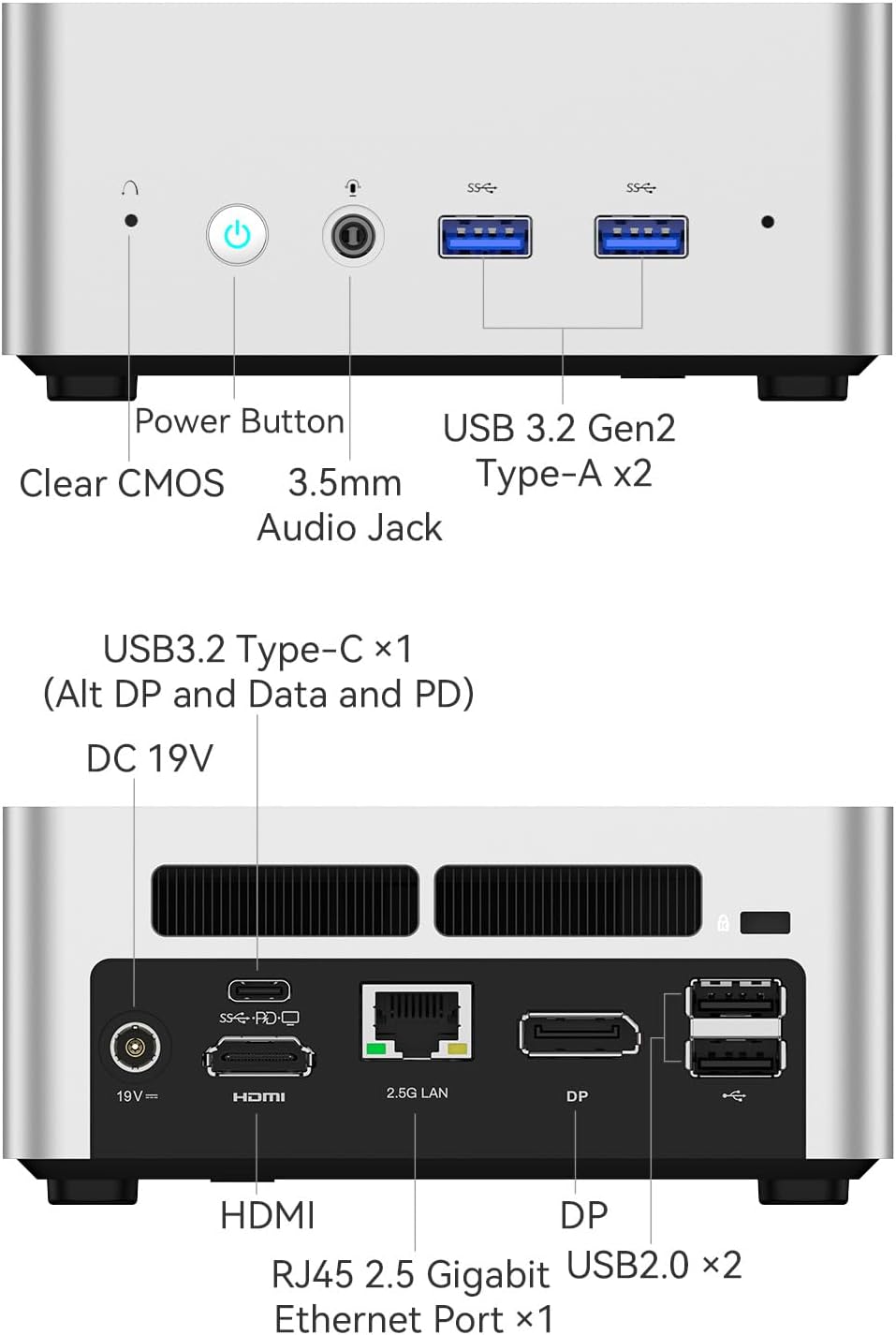
Image 3.2: Rear panel of the MINISFORUM UM340 Mini PC, displaying video outputs, Ethernet, and additional USB ports.
- DC 19V кубат киргизүү: Бул жерде камтылган электр адаптерин туташтырыңыз.
- HDMI порту: Дисплейге туташуу үчүн.
- DisplayPort (DP): Дисплейге туташуу үчүн.
- RJ45 2.5 Gigabit Ethernet Port: Зымдуу тармак туташуусу үчүн.
- USB 2.0 (x2): Перифериялык түзүлүштөрдү туташтыруу үчүн.
4. Орнотуу
Follow these steps to set up your MINISFORUM UM340 Mini PC.
- Дисплейди туташтыруу: Connect your monitor or TV to the Mini PC using an HDMI, DisplayPort, or USB-C cable. The UM340 supports up to three 4K@60Hz displays simultaneously.
- Перифериялык түзүлүштөрдү туташтыруу: Клавиатураңызды, чычканыңызды жана башка USB түзмөктөрүңүздү жеткиликтүү USB портторуна сайыңыз.
- Тармакка туташуу (милдеттүү эмес): For a wired internet connection, connect an Ethernet cable from your router or modem to the RJ45 port on the Mini PC. For wireless, ensure Wi-Fi is enabled in the operating system.
- Туташуу кубаты: Plug the power adapter into the DC 19V input port on the Mini PC, then plug the adapter into a power outlet.
- Күйгүзүү: Press the power button on the front panel of the Mini PC. The system will boot up.
VESA монтаждоо
The MINISFORUM UM340 can be mounted to the back of a VESA-compatible monitor or to a wall using the included VESA mount.
- Attach the VESA bracket to the back of your monitor or desired wall location using the provided screws.
- Slide the Mini PC onto the mounted bracket until it securely locks into place.

Image 4.1: Illustration of the MINISFORUM UM340 Mini PC being installed using the VESA mount.
5. Иштөө нускамалары
Күйгүзүү/өчүрүү
- Күйгүзүү үчүн: Кубат баскычын бир жолу басыңыз.
- Өчүрүү үчүн: From the operating system, select 'Shut Down'. Alternatively, press and hold the power button for 5-7 seconds to force a shutdown (use only when necessary).
Connecting Multiple Displays
The MINISFORUM UM340 supports connecting up to three independent displays simultaneously via its HDMI, DisplayPort, and USB-C ports. Ensure your displays are connected and configured within your operating system's display settings.

Image 5.1: The MINISFORUM UM340 Mini PC connected to three external displays, demonstrating its multi-monitor capability.
6. Техникалык тейлөө
Тийиштүү техникалык тейлөө сиздин мини-компьютериңиздин узак мөөнөттүү иштешин жана оптималдуу иштешин камсыз кылат.
- Тазалоо: Regularly clean the exterior of the Mini PC with a soft, dry cloth. Use compressed air to gently clear dust from ventilation openings. Do not use liquid cleaners directly on the device.
- Вентиляция: Ensure the ventilation holes are not obstructed to prevent overheating. Operate the PC in a well-ventilated area.
- Программалык камсыздоо жаңыртуулары: Keep your operating system, drivers, and applications updated to ensure security and performance.
- Сактагыч: Avoid placing heavy objects on the Mini PC. Store it in a cool, dry environment away from direct sunlight and extreme temperatures.
7. Кыйынчылыктарды
This section addresses common issues you might encounter with your MINISFORUM UM340 Mini PC.
| Көйгөй | Мүмкүн чечим |
|---|---|
| Күч жок | Кубат адаптери Мини компьютерге жана иштеген электр розеткасына бекем туташып турганын текшериңиз. Розетканы башка аспап менен текшериңиз. |
| Дисплей чыгаруу жок | Verify display cables (HDMI, DP, USB-C) are securely connected to both the Mini PC and the monitor. Ensure the monitor is powered on and set to the correct input source. Try a different cable or monitor if possible. |
| Интернет байланышы жок | For wired connections, check the Ethernet cable and router. For Wi-Fi, ensure Wi-Fi is enabled in the operating system and you are connected to the correct network with the correct password. Restart your router/modem. |
| Система жай же жооп бербей жатат | Close unnecessary applications. Check for background processes consuming resources. Ensure sufficient free storage space. Consider updating drivers or reinstalling the operating system if issues persist. |
Эгерде сизде көйгөйлөр улана берсе, кошумча жардам алуу үчүн колдоо бөлүмүнө кайрылыңыз.
8. Техникалык шарттар
Detailed technical specifications for the MINISFORUM UM340 Mini PC.
| Өзгөчөлүк | Деталь |
|---|---|
| Процессор | AMD Ryzen 5 3450U (4C/8T, up to 4.4 GHz) |
| Графика | Radeon Vega 8 графикасы |
| RAM | 16 GB DDR4 (expandable) |
| Сактагыч | 512 GB SSD (PCIE x 4) |
| Video Output | HDMI, DisplayPort, USB-C (supports triple 4K@60Hz output) |
| USB порттору | 2x USB 3.2 Gen2 Type-A, 1x USB 3.2 Type-C, 2x USB 2.0 |
| Network | 2.5 Gigabit RJ45 Ethernet, Dual Band WiFi |
| Аудио | 3.5 мм аудио джек |
| Операция системасы | OS (Pre-installed or compatible) |
| Өлчөмдөр | Болжол менен 6.26 x 6.22 x 4.45 дюйм |
| Салмагы | Болжол менен 2.92 фунт |
9. Кепилдик маалыматы
MINISFORUM products typically come with a standard limited warranty. Please refer to the warranty card included in your package or visit the official MINISFORUM webАймагыңызга жана сатып алуу датасына тиешелүү деталдуу кепилдик шарттарын жана шарттары үчүн сайт. Кепилдик дооматтар үчүн сатып алганыңыздын далилин сактаңыз.
10. Колдоо
For technical assistance, product inquiries, or warranty support, please contact MINISFORUM customer service through the following channels:
- Официалдуу Webсайт: зыярат кылыңыз MINISFORUM Store for FAQs, driver downloads, and contact information.
- Электрондук почта колдоо: Продуктуңуздун таңгагына же расмий өкүлгө кайрылыңыз webэң акыркы колдоо электрондук почта дареги үчүн сайт.
When contacting support, please have your product model (UM340) and serial number ready.


