Introduction
Thank you for choosing the Continu.us R230D2 Master TV Remote. This remote control is specifically designed to provide comprehensive control over RCA and Continu.us brand televisions, including access to commercial menus. Its intuitive layout ensures ease of use for all essential TV functions.

Сүрөт 1: Алдыңкы view of the R230D2 Master TV Remote, showing all buttons.
Жайгашуу
Before using your new remote, you will need to install batteries.
Батарея орнотуу
- Пульттун артындагы батарея отсегин табыңыз.
- Батарея бөлүмүнүн капкагын ылдый жылдырып, көтөрүп алыңыз.
- Эки (2) AA батарейкасын салып, оң (+) жана терс (-) терминалдары бөлүмдүн ичиндеги белгилер менен дал келгенин текшериңиз.
- Батарея бөлүкчөсүнүн капкагын бекем чыккыча ордуна жылдырыңыз.

2-сүрөт: Артка view of the R230D2 Master TV Remote, illustrating the battery compartment.
Баштапкы колдонуу
The R230D2 Master TV Remote is pre-programmed for RCA and Continu.us televisions and typically requires no code entry or complex synchronization. Simply point the remote at your television and press the КҮЧ button. If the TV responds, the remote is ready for use.
Иштөө нускамалары
This section details the functions of the buttons on your R230D2 remote control.
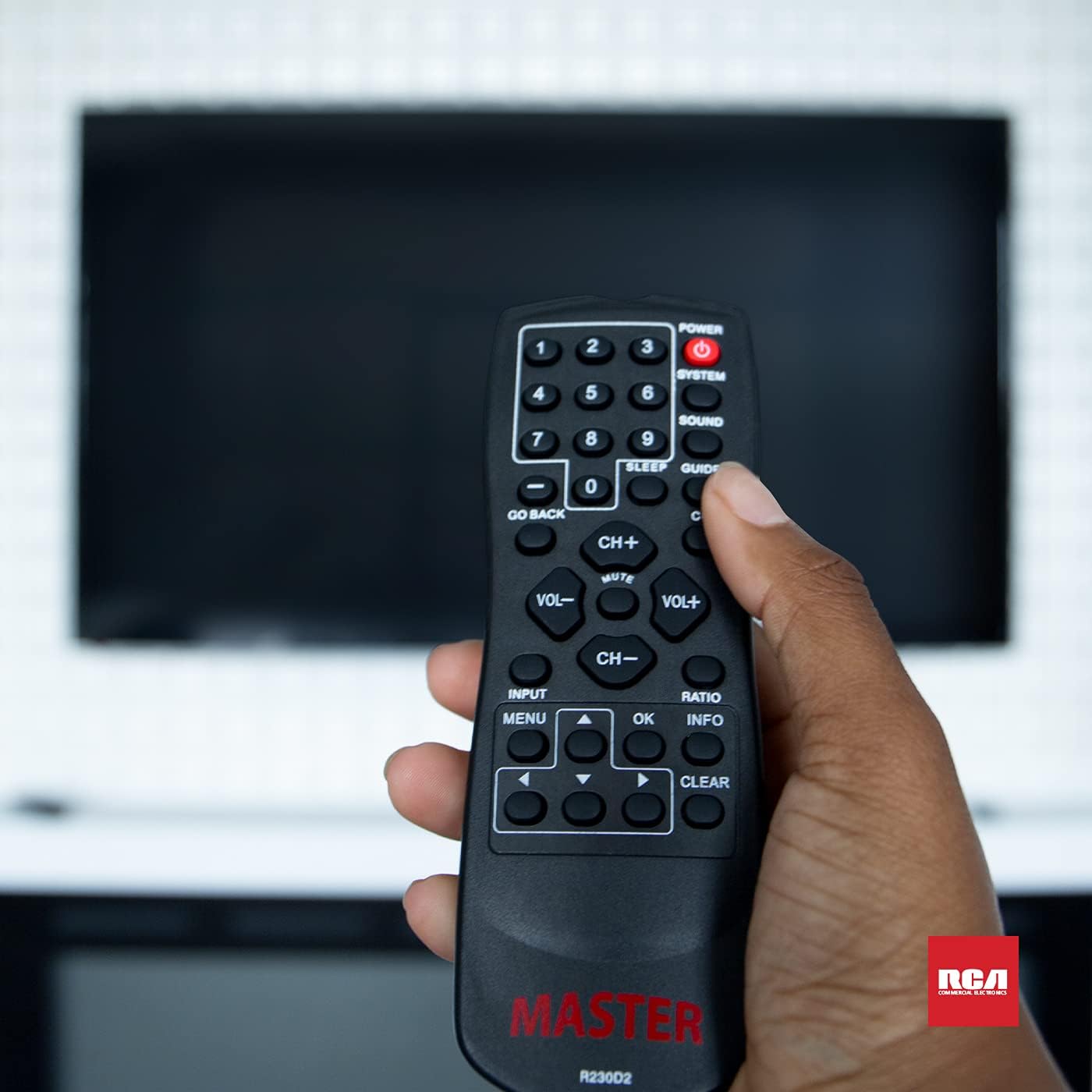
Figure 3: Using the R230D2 Master TV Remote with a television.
- КҮЧ: Телевизорду күйгүзөт же өчүрөт.
- СИСТЕМА: Accesses system-specific functions or menus.
- ҮН: Adjusts sound modes or settings.
- GUIDE: Электрондук программалык көрсөтмөнү (EPG) көрсөтөт.
- УЙКУ: Sets a timer for the TV to automatically turn off.
- CC (жабык коштомо жазуу): Жабык субтитрлерди күйгүзөт же өчүрөт.
- АРТКА КАЙРЫЛ: Returns to the previous channel or menu screen.
- Сан баскычтары (0-9): Directly input channel numbers.
- CH+ / CH-: Каналдарды өйдө же төмөн которот.
- VOL + / VOL-: Increases or decreases volume.
- БАСУУ: Mutes or unmutes the television sound.
- INPUT: Selects the input source (e.g., HDMI 1, AV).
- МЕНЮ: Opens the television's main menu.
- OK: Confirms a selection or enters a submenu.
- INFO: Учурдагы программа же киргизүү жөнүндө маалыматты көрсөтөт.
- РАТИО: Adjusts the screen aspect ratio.
- CLEAR: Clears input or exits certain functions.
- Чабыттоо жебелери (өйдө, ылдый, солго, оңго): Менюлар жана параметрлер боюнча чабыттайт.
Accessing Commercial Menus
The R230D2 remote is designed to access commercial menus on compatible RCA and Continu.us televisions. The specific button or sequence to access these menus may vary by TV model. Typically, this function is integrated within the СИСТЕМА or МЕНЮ buttons, or a combination thereof. Refer to your television's specific user manual for detailed instructions on accessing its commercial menu features.
Техникалык тейлөө
Алыстан башкаруу пультуңуздун узак мөөнөттүү жана оптималдуу иштешин камсыз кылуу үчүн, төмөнкү жөнөкөй техникалык тейлөө көрсөтмөлөрүн аткарыңыз:
- Тазалоо: Пультту жумшак, кургак чүпүрөк менен сүртүңүз. өжөр кир үчүн, бир аз гampen the cloth with water or a mild, non-abrasive cleaner. Do not use harsh chemicals or immerse the remote in liquid.
- Батареяны алмаштыруу: Replace batteries when the remote's response becomes sluggish or stops working. Always replace both batteries at the same time with new AA batteries. Do not mix old and new batteries, or different types of batteries.
- Сактагыч: Пультту салкын, кургак жерде, күндүн түз тийген нурунан, өтө жогорку температурадан жана жогорку нымдуулуктан алыс сактаңыз.
- Тамчылардан качуу: Пультти физикалык таасирден коргоңуз, анткени тамчылар ички компоненттерге зыян келтириши мүмкүн.
Проблемаларды чечүү
If you encounter issues with your R230D2 remote, try the following solutions:
- Алыстан жооп бербейт:
- Батареялар туура полярдуулук менен туура салынганын текшериңиз.
- Батареяларды жаңыларына алмаштырыңыз.
- Пульт менен телевизордун инфракызыл сенсорунун ортосунда эч кандай тоскоолдуктар жок экенин текшериңиз.
- Телевизордун IR ресиверинин эффективдүү диапазонунда экениңизди текшериңиз.
- TV Not Turning On/Off:
- Confirm the TV is plugged into a working power outlet.
- Try turning the TV on/off using its physical power button.
- Айрым функциялар иштебей жатат:
- Some functions may require the TV's menu to be open or a specific input selected.
- Пульттун түз телевизорго багытталганын текшериңиз.
- Remote Still Not Working:
- If the remote was recently dropped or exposed to moisture, internal damage may have occurred.
- Кошумча жардам алуу үчүн кардарларды колдоо бөлүмүнө кайрылыңыз.
Техникалык шарттар
| Өзгөчөлүк | Деталь |
|---|---|
| Бренд | Continu.us |
| Модель номери | R230D2 |
| Шайкеш түзмөктөр | RCA and Continu.us Televisions |
| Байланыш технологиясы | Инфракызыл |
| Power Source | 2 АА батарейкалар (киргизилген эмес) |
| Элемент Салмагы | 1.76 унция |
| Продукциянын өлчөмдөрү | 6 x 2 x 1 дюйм |
| Колдоого алынган түзмөктөрдүн максималдуу саны | 1 |
Кепилдик жана колдоо
Continu.us products are designed and tested to high standards. We pride ourselves on offering excellent customer support.
Кардарларды колдоо
If you require assistance with your R230D2 Master TV Remote, our support and technical team are available to help. Please reach out via phone or email for any pressing issues or questions.
For the most up-to-date contact information, please visit the official Continu.us webсайтка же продуктунун таңгагына кайрылыңыз.
Кепилдик маалымат
Specific warranty details for the R230D2 remote are typically provided with the product packaging or can be found on the Continu.us official webсайт. Кепилдик дооматтары үчүн сатып алганыңыздын далилин сактап коюңуз.