1. Киришүү
The KZ AZ09 Bluetooth 5.2 Ear Hooks are designed to transform your compatible wired in-ear monitors (IEMs) into a wireless listening experience. Featuring advanced Bluetooth 5.2 technology, AAC audio encoding, and a robust IPV5 waterproof rating, these ear hooks provide stable connectivity, high-fidelity sound, and enhanced durability. The ergonomic design ensures comfortable wear for extended periods, making them ideal for daily use, exercise, and gaming.

Image: KZ AZ09 Bluetooth Ear Hooks with their charging case, showcasing the compact and portable design.
2. Продукт бүтүп калдыview
2.1 Компоненттер
- KZ AZ09 Bluetooth Ear Hooks (Left and Right)
- Заряддоо кутусу
- USB Charging Cable (not explicitly listed but implied)
2.2 Негизги өзгөчөлүктөрү
- TWS High-Definition Bluetooth: Supports AAC audio encoding for natural and clear sound.
- Узартылган батареянын иштөө мөөнөтү: Ear hooks provide approximately 6 hours of use on a full charge. The 800mA charging case can recharge the ear hooks up to 7 times, offering a total battery life of up to 42 hours.
- Өркүндөтүлгөн Bluetooth 5.2 чип: Utilizes the RTL8753 chip for stable transmission, lower power consumption, and longer battery life.
- 2PIN Pluggable Design: Features 0.75mm gold-plated pins, allowing easy conversion of compatible wired earphones into wireless ones.
- Эргономикалык комфорт: Optimized structure for a comfortable and secure fit around the outer ear.
- Dual-Channel Transmission: Eliminates conventional single-host limitations, offering lower latency and the ability to use ear hooks individually.
- High-Performance Game Mode: Triple-press the button on the ear hook to activate a low-latency mode for gaming.
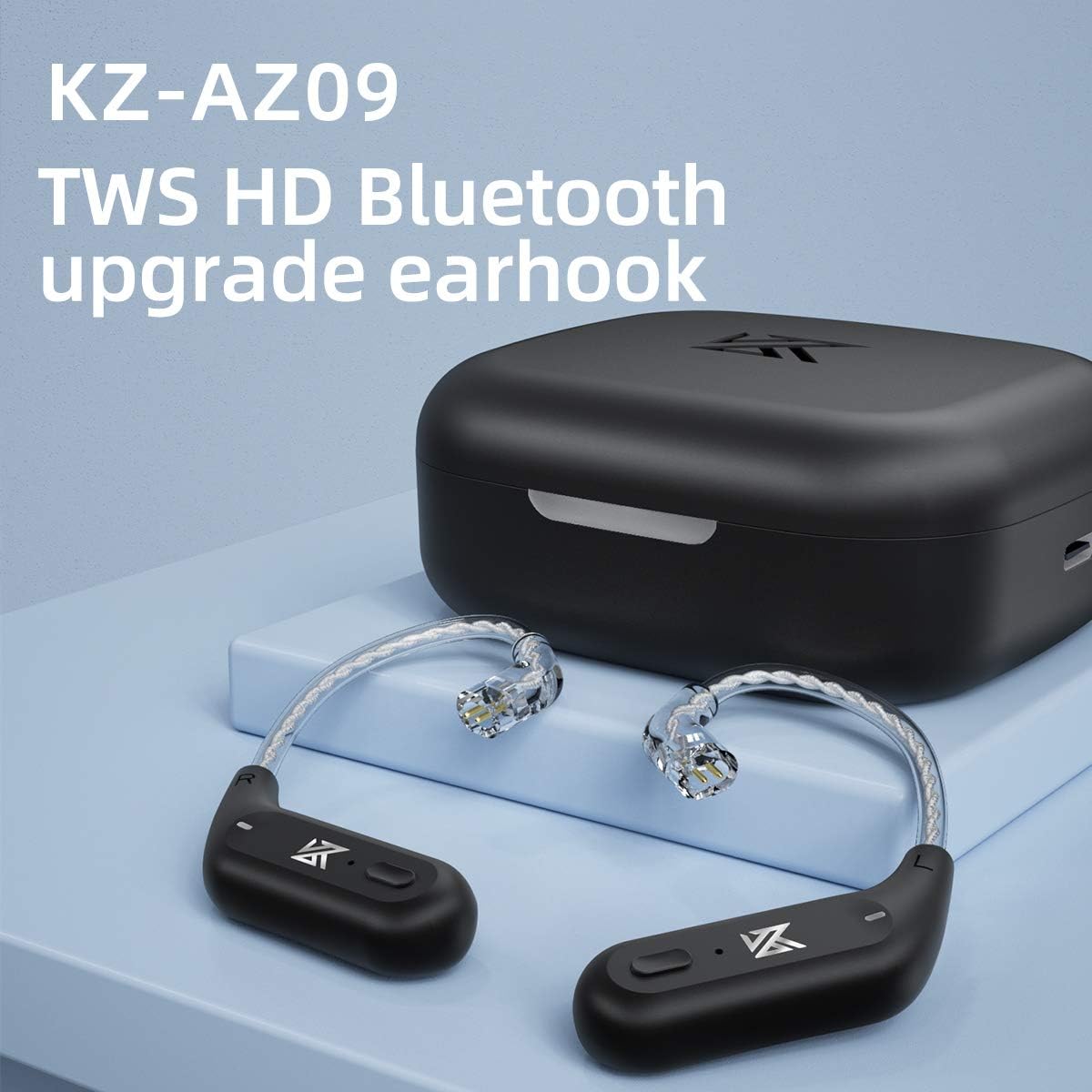
Image: The KZ AZ09 ear hooks, highlighting their TWS HD Bluetooth upgrade capability.

Image: The 2PIN pluggable design of the KZ AZ09 ear hooks, demonstrating how they connect to compatible IEMs.

Image: A close-up of the ear hook's internal wiring, showing the high-purity oxygen-free copper silver-plated wire for optimal signal transmission.
Video: An official product video demonstrating the KZ AZ09 Bluetooth Upgrade Earhooks and their wireless replacement cable functionality.
3. Орнотуу
3.1 Алгачкы заряддоо
Before first use, place both ear hooks into the charging case and connect the case to a power source using the provided USB cable. The indicator light on the case will show charging status. Ensure the ear hooks are fully charged for optimal performance.

Image: The KZ AZ09 charging case with ear hooks inside, connected to a power source, illustrating the charging process.
3.2 Attaching IEMs
Carefully align the 2PIN connectors of your compatible IEMs with the pins on the KZ AZ09 ear hooks. Gently push the IEMs onto the ear hooks until they are securely connected. Ensure a firm connection to prevent accidental detachment during use.
3.3 Bluetooth жупташтыруу
- Ensure the ear hooks are charged and placed in the charging case.
- Open the charging case. The ear hooks will automatically power on and enter pairing mode.
- Түзмөгүңүздө (смартфон, планшет ж.б.) Bluetooth жөндөөлөрүнө өтүп, Bluetooth күйгүзүңүз.
- Look for "AZ09" in the list of available devices and select it to pair.
- Туташкандан кийин үн билдирүүсү ийгиликтүү жупташтырууну ырастайт.
- Маанилүү эскертүү: The left ear hook acts as the master. Ensure it pairs first for proper dual-channel operation. If only one side connects, try disconnecting and re-pairing, ensuring the left ear hook is the primary connection.

Image: A visual representation of the KZ AZ09 ear hooks pairing with a mobile device, showing the Bluetooth connection process.
4. Иштөө нускамалары
4.1 Күйгүзүү/өчүрүү
- Күйгүзүү: Open the charging case, and the ear hooks will automatically power on.
- Өчүрүү: Place the ear hooks back into the charging case and close the lid. They will automatically power off and begin charging.
4.2 Музыканы ойнотууну башкаруу

Image: Diagram illustrating the button functions on the KZ AZ09 ear hooks for music and call control.
- Ойнотуу/тындыруу: Press the button on either ear hook once.
- Кийинки ыр: Double-click the button on the туура ear hook.
- Мурунку ыр: Double-click the button on the сол ear hook.
4.3 Чалууларды башкаруу
- Чалууга жооп берүү/түп коюу: Press the button on either ear hook once.
- Чакырууну четке кагуу: Long press the button on either ear hook.
4.4 Үн жардамчысы (Siri)
- Үн Жардамчысын жандыруу: Long press the button on either ear hook for 2 seconds.
4.5 High-Performance Game Mode
- Оюн режимин иштетүү: Triple-press the button on either ear hook. This mode reduces audio latency for a more synchronized gaming experience.

Image: The KZ AZ09 ear hooks in a gaming context, illustrating the benefit of the high-performance game mode for reduced latency.
5. Техникалык тейлөө
5.1 Тазалоо
Regularly clean the ear hooks and charging case with a soft, dry, lint-free cloth. Avoid using harsh chemicals, cleaning solvents, or strong detergents. For the 2PIN connectors, use a dry cotton swab to gently remove any debris.
5.2 Заряддоо боюнча эң мыкты тажрыйбалар
- Ар дайым берилген кубаттоочу кабелди же сертификатталган эквивалентин колдонуңуз.
- Avoid exposing the charging case or ear hooks to extreme temperatures.
- Do not leave the device uncharged for extended periods to preserve battery health.
5.3 Сактоо
When not in use, store the ear hooks in their charging case to protect them from dust and damage. Store the device in a cool, dry place away from direct sunlight and moisture.
6. Кыйынчылыктарды
6.1 Жупташтыруу маселелери / Үн жок
- Ensure Left Ear Hook is Master: If only one ear hook connects, try forgetting the device on your phone and re-pairing, ensuring the left ear hook is the first to establish a connection.
- Кайрадан: Turn off and on your Bluetooth device (phone, tablet).
- Reset Ear Hooks: Place ear hooks in the case, close the lid, wait a few seconds, then open and try pairing again.
- Батареяны текшерүү: Ensure both ear hooks and the charging case have sufficient charge.
6.2 Connection Drops / Unstable Connection
- Аралыкты кыскартуу: Keep your device within the 10-meter Bluetooth range.
- Интерференцияны азайтуу: Башка зымсыз түзмөктөрдөн келген күчтүү электромагниттик тоскоолдуктардан алыс болуңуз.
- Тоскоолдуктар: Walls or large objects between the ear hooks and your device can affect signal strength.
6.3 Аудио сапаты начар
- Check Source Audio: Ensure the audio source quality is high.
- Коопсуз туташуу: Verify that the IEMs are securely attached to the ear hooks.
- Bluetooth кийлигишүүсү: Тоскоолдукка алып келиши мүмкүн болгон башка зымсыз түзмөктөрдөн алыс болуңуз.
- Жогорку өндүрүмдүүлүк режими: For critical listening or gaming, activate the high-performance mode.
7. Техникалык шарттар
| Өзгөчөлүк | Спецификация |
|---|---|
| Модель аты | AZ09 |
| Элемент моделинин номери | AZ09-B |
| Байланыш технологиясы | Bluetooth 5.2 |
| Bluetooth диапазону | 10 метр |
| Кулак илгичтин батареясынын сыйымдуулугу | 50mA (approx. 6 hours use) |
| Заряддоо корпусунун батареясынын сыйымдуулугу | 800mA (approx. 7 charges for ear hooks) |
| Батареянын жалпы иштөө мөөнөтү (корпус менен) | 42 саатка чейин |
| Сууга туруктуулук деңгээли | Water Resistant (IPV5) |
| Жыштык диапазону | 20 Гц - 20 000 Гц |
| Башкаруу ыкмасы | баскыч |
| Элемент Салмагы | 55 грамм (жалпысынан) / 1.94 унция |
| Продукциянын өлчөмдөрү | 4.6 x 4.2 x 1.6 дюйм |

Сүрөт: деталдуу view of the Bluetooth 5.2 chip, highlighting the core technology within the KZ AZ09 ear hooks.
8. Кепилдик жана колдоо
This product is covered by a standard manufacturer's warranty. For specific warranty terms and conditions, please refer to the documentation provided with your purchase or contact the seller directly. If you encounter any issues or require technical assistance, please reach out to the KZ customer support team or your authorized retailer.
Көбүрөөк жардам алуу үчүн, KZ расмий сайтына кириңиз webсайтка же сатып алган жериңизге кайрылыңыз.