1. Киришүү
This manual provides detailed instructions for the setup, operation, maintenance, and troubleshooting of your A4Tech FSTYLER FG30S Wireless Mouse. Please read this guide thoroughly before using the device to ensure optimal performance and longevity.

Image 1.1: The A4Tech FSTYLER FG30S Wireless Mouse with its accompanying USB receiver.
2. Пакеттин мазмуну
- A4Tech FSTYLER FG30S Wireless Mouse
- USB 2.4 ГГц кабыл алгыч
- Колдонуучунун Колдонмосу (бул документ)
Note: Batteries are not included and must be purchased separately. The mouse requires one AA battery.
3. Орнотуу
3.1 Батареяны орнотуу
- Чычкандын астыңкы жагындагы батарея бөлүкчөсүн табыңыз.
- Батарея уясынын капкагын ачыңыз.
- Туура полярдуулукту (+/-) камсыз кылуу менен бир AA батареясын салыңыз.
- Батарея уясынын капкагын бекем жабыңыз.
3.2 2.4 ГГц зымсыз байланыш аркылуу туташуу
- Remove the USB 2.4GHz receiver from its storage slot, usually located within the battery compartment.
- USB ресиверди компьютериңиздеги жеткиликтүү USB портуна сайыңыз.
- Төмөнкү жагында жайгашкан күйгүзүү/өчүрүү баскычын колдонуп, чычканды күйгүзүңүз.
- Компьютериңиз керектүү драйверлерди автоматтык түрдө таап, орнотуп алышы керек. Чычкан колдонууга даяр болот.
3.3 Bluetooth аркылуу туташуу
- Turn on the mouse using the On/Off switch on the underside.
- Press and hold the Bluetooth pairing button (refer to the mouse diagram for location, typically near the On/Off switch) until the indicator light begins to flash, signifying pairing mode.
- Компьютериңизден Bluetooth жөндөөлөрүнө өтүңүз.
- Издөө new devices and select "A4Tech FG30S" or a similar identifier from the list.
- Follow any on-screen prompts to complete the pairing process. The indicator light on the mouse will become solid when successfully connected.
4. Иштөө нускамалары

Сүрөт 4.1: Жогорку view of the mouse, highlighting primary buttons and scroll wheel.
4.1 Негизги колдонуу
- Сол чыкылдатуу: Негизги тандоо жана активдештирүү.
- Оң чыкылдатуу: Контексттик менюларга жетет.
- Жылдыруу дөңгөлөгү: Мазмунду тигинен жылдырат. Ортоңку чыкылдатуу функциясы үчүн чыкылдатса болот.
- Каптал баскычтары: Адатта, ал "Алдыга" жана "Артка" функцияларын аткарат web браузерлер жана file изилдөөчүлөр.
4.2 DPI жөндөө
The A4Tech FG30S mouse features 3 adjustable DPI (Dots Per Inch) levels: 1000, 1600, and 2000 DPI. DPI controls the sensitivity of the mouse cursor. To change the DPI setting:
- Locate the DPI switch button, usually positioned behind the scroll wheel.
- Press the DPI button to cycle through the available sensitivity levels. The mouse may have an indicator light that changes color or flashes to show the current DPI setting.
4.3 Электр энергиясын башкаруу
- Күйгүзүү/өчүрүү: A physical switch on the underside of the mouse allows you to conserve battery power when the mouse is not in use.
- Auto-Sleep Power Saving: The mouse is designed with an adjustable 4-level power-saving mode. It will automatically enter a sleep state after 0.2 seconds of inactivity to extend battery life. Move the mouse or click a button to wake it up.
5. Өркүндөтүлгөн функциялар
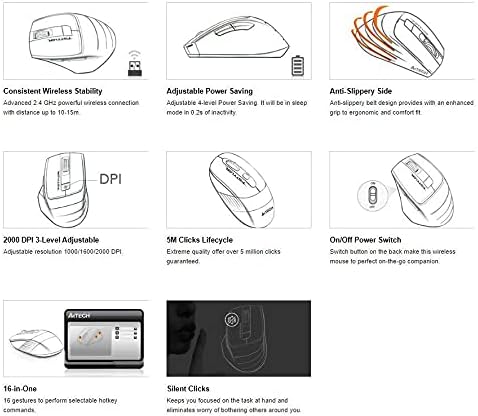
5.1-сүрөт: Функция бүттүview of the A4Tech FSTYLER FG30S mouse.
5.1 Consistent Wireless Stability
The mouse utilizes advanced 2.4 GHz wireless technology, providing a stable and reliable connection with a range of up to 10-15 meters, minimizing interference and lag.
5.2 Үнсүз чыкылдатуулар
The A4Tech FG30S features silent click technology, reducing click noise by up to 90%. This allows for a quieter working environment, minimizing distractions for both the user and those nearby.
5.3 Anti-Slippery Side Design
The mouse incorporates an anti-slippery side design, enhancing grip and providing a more ergonomic and comfortable experience during extended use.
5.4 16-in-One Gestures
The mouse supports 16 customizable gestures, allowing users to perform various hotkey commands for increased productivity. Specific software may be required for full customization, typically available from the manufacturer's webсайт.
5.5 5 Million Clicks Lifecycle
The mouse buttons are engineered for durability, guaranteeing over 5 million clicks throughout the product's lifespan.
6. Техникалык тейлөө
6.1 Тазалоо
- Тазалоодон мурун чычканды өчүрүп коюңуз.
- Чычкандын бетин сүртүү үчүн жумшак, кургак, түксүз чүпүрөктү колдонуңуз.
- өжөр кир үчүн, жеңил гampчүпүрөктү суу же жумшак тазалоо эритмеси менен жууп салыңыз. Ашыкча нымдуулуктан сактаныңыз.
- Катуу химиялык заттарды, абразивдүү тазалагычтарды же эриткичтерди колдонбоңуз.
- Use a cotton swab or compressed air to clean around the scroll wheel and optical sensor.
6.2 Батареяны алмаштыруу
When the mouse performance degrades or the indicator light signals low battery, replace the AA battery by following the steps outlined in Section 3.1.
7. Кыйынчылыктарды
- Чычкан жооп бербей жатат:
- Чычкан күйгүзүлгөнүн текшериңиз.
- Батареянын деңгээлин текшериңиз жана керек болсо алмаштырыңыз.
- For 2.4GHz connection, ensure the USB receiver is securely plugged into a working USB port. Try a different port.
- For Bluetooth connection, ensure Bluetooth is enabled on your computer and the mouse is properly paired. Try re-pairing the device.
- Move the mouse closer to the receiver/computer to rule out range issues.
- Курсордун кыймылы туруксуз же секирип турат:
- Чычкандын астындагы оптикалык сенсорду тазалаңыз.
- Чычканды ылайыктуу бетте колдонуп жатканыңызды текшериңиз. Өтө жарык чагылдыруучу же тунук беттерден алыс болуңуз.
- DPI жөндөөсү өзгөрбөйт:
- Туура DPI баскычын басып жатканыңызды текшериңиз.
- Батареянын деңгээлин текшериңиз.
8. Техникалык шарттар
| Өзгөчөлүк | Спецификация |
|---|---|
| Модель номери | FG30S |
| Бренд | A4tech |
| Байланыш | Bluetooth & 2.4GHz Wireless |
| DPI деңгээли | 1000 / 1600 / 2000 (3-level adjustable) |
| Кыймылды аныктоо | Оптикалык |
| Колдун багыты | Эки тараптуу |
| Операциялык системанын шайкештиги | Linux, Windows XP (and newer OS versions) |
| Батарея түрү | 1x AA (киргизилген эмес) |
| Элемент Салмагы | 150 г |
| Пакеттин өлчөмдөрү | 17.5 x 12 x 7.3 см |
| Жашоо циклин чыкылдатыңыз | 5 миллиондон ашык чыкылдатуу |
9. Кепилдик жана колдоо
For warranty information and technical support, please refer to the official A4Tech webсайтына кириңиз же жергиликтүү сатуучуңузга кайрылыңыз. Кепилдик талаптары үчүн сатып алуунун далили катары сатып алуу дүмүрчөгүңүздү сактап коюңуз.
Онлайн ресурстар:
- A4Tech Official Webсайт: www.a4tech.com


