Introduction
The Altec Lansing HydraBlast is a robust and versatile wireless portable Bluetooth speaker designed for various environments, from outdoor parties to everyday use. It features IP67 Everything Proof protection, ensuring it is waterproof, shockproof, snowproof, and dustproof. With a long-lasting battery, built-in phone charging capabilities, and dynamic LED lights, the HydraBlast delivers powerful audio and convenience wherever you go.

Сүрөт 1: Алдыңкы view of the Altec Lansing HydraBlast speaker in Royal Blue.
Кутуда эмне бар
- Altec Lansing HydraBlast Bluetooth Speaker
- USB-C заряддоо кабели
- Карабин клип
- Колдонуучунун Колдонмосу (бул документ)
Продукт өзгөчөлүктөрү
- Bold Bass and Clear Audio: Experience HD audio with immersive bass for a rich listening experience.
- IP67 Everything Proof: Designed to be waterproof, shockproof, snowproof, and dustproof, making it suitable for any environment.

Figure 2: The HydraBlast speaker demonstrating its water resistance.
- 20 сааттык ойноо убактысы: Бир кубаттоо менен узак убакыт бою музыка ойнотуңуз.
- Built-in Phone Charger: Features both wireless (Qi) charging and wired USB-C output to charge your devices.

Figure 3: Wireless charging a smartphone on the speaker's top surface.
- LED жарык режимдери: Multiple LED light modes to enhance your listening experience and create a party atmosphere.

Figure 4: The speaker features 11 distinct LED light modes, including strobe effects.
- Портативдик дизайн: Lightweight and includes a built-in carabiner hook for easy transport and attachment.

Figure 5: The included carabiner clip allows for easy portability, attaching to bags or gear.
- Bluetooth 5.0: Provides a stable wireless connection up to 100 feet.
- Чыныгы зымсыз жупташтыруу: Connect two HydraBlast speakers for a stereo sound experience.
Controls Overview

Figure 6: Top panel controls of the HydraBlast speaker.
- Күйгүзүү / Өчүрүү баскычы: Press and hold to power the speaker on or off.
- Шилтеме баскычы: Used for True Wireless Pairing with another HydraBlast speaker.
- Color Change Button: Cycles through different LED light modes.
- Wireless Qi Charger: Integrated charging pad for compatible devices.
- Үндү азайтуу / Мурунку трек баскычы (-): Үндү азайтуу үчүн кыска басыңыз, мурунку трек үчүн көпкө басыңыз.
- Voice Assistant / Answer Calls Button: Activates voice assistant or answers/ends calls.
- Үндү катуулатуу / Кийинки трек баскычы (+): Үнүн жогорулатуу үчүн кыска басыңыз, кийинки трекке узакка басыңыз.
Жайгашуу
1. Баштапкы заряддоо
Before first use, fully charge your HydraBlast speaker. Locate the USB-C charging port on the side of the speaker (protected by a waterproof flap). Connect the provided USB-C cable to the speaker and the other end to a USB power adapter (not included) or a computer's USB port. The charging indicator light will show charging status.
2. Bluetooth Жупташтыруу
- Динамик өчүрүлгөнүн текшериңиз.
- басып, кармап туруңуз Күйгүзүү/өчүрүү button until you hear an audible prompt and the Bluetooth indicator light begins to flash, indicating pairing mode.
- Смартфонуңузда же Bluetooth иштетилген түзмөгүңүздө Bluetooth жөндөөлөрүнө өтүңүз.
- Select "Altec Lansing HydraBlast" from the list of available devices.
- Once connected, you will hear a confirmation tone, and the Bluetooth indicator light will become solid.
3. True Wireless Pairing (Pairing Two Speakers)
To achieve a stereo sound experience, you can pair two HydraBlast speakers together:
- Ensure both HydraBlast speakers are powered on and not connected to any other Bluetooth devices.
- On one speaker (this will be your primary speaker), press the Шилтеме button. The speaker will enter True Wireless Pairing mode.
- On the second speaker, also press the Шилтеме баскычы.
- Эки динамик автоматтык түрдө бири-бирине туташат. Туташтырылгандан кийин ырастоо сигналын угасыз.
- Now, connect your Bluetooth device to the primary speaker as described in the "Bluetooth Pairing" section above. Audio will play through both speakers in stereo.
Иштөө нускамалары
Аудио ойнотулууда
- After successful Bluetooth pairing, open your preferred music application on your device and begin playback.
- колдонуу Үнүн жогорулатуу (+) жана Үнүн азайтуу (-) buttons on the speaker to adjust the volume.
- көпкө басыңыз Үнүн жогорулатуу (+) button for the next track, and long press the Үнүн азайтуу (-) мурунку трек үчүн баскыч.
Чалууларды башкаруу
- Чалуу келгенде, басыңыз Voice Assistant / Answer Calls жооп берүү үчүн баскыч.
- Чалууну бүтүрүү үчүн, ошол эле баскычты кайра басыңыз.
- Кирүүчү чалууну четке кагуу үчүн, басып туруңуз Voice Assistant / Answer Calls баскычы.
Using LED Light Modes
басыңыз Түсү өзгөртүү button to cycle through the available LED light modes. Continue pressing until you find your desired light pattern or turn the lights off.
Тышкы түзмөктөрдү заряддоо
- Зымсыз кубаттоо: Place your Qi-compatible smartphone or device on the designated wireless charging area on top of the speaker. Ensure proper alignment for charging to begin.
- Зымдуу кубаттоо: Open the waterproof flap on the side of the speaker to access the USB-A output port. Connect your device's charging cable to this port to charge it.
Техникалык тейлөө
- Тазалоо: жумшак колдонуу, damp cloth to clean the speaker's exterior. Avoid using harsh chemicals or abrasive cleaners.
- Суу каршылык: While the speaker is IP67 rated, ensure the charging port flap is securely closed before exposing it to water or dust. Do not submerge the speaker for extended periods or at depths greater than 1 meter.
- Сактагыч: Колдонулбаган учурда динамикти салкын, кургак жерде сактаңыз. Ашыкча температурадан алыс болуңуз.
- Батареяга кам көрүү: For optimal battery life, avoid fully discharging the speaker frequently. Charge it regularly, even if not in constant use.
Проблемаларды чечүү
| Көйгөй | Мүмкүн болгон себеп / Чечим |
|---|---|
| Динамик күйбөйт. | Battery may be depleted. Connect to a power source using the USB-C cable and charge for at least 30 minutes before attempting to power on again. |
| Bluetooth аркылуу жупташтыруу мүмкүн эмес. |
|
| Үн жок же үнү төмөн. |
|
| Зымсыз кубаттоо иштебейт. |
|
| Үндүн бузулушу. |
|
Техникалык шарттар
| Өзгөчөлүк | Деталь |
|---|---|
| Бренд | Altec Lansing |
| Модель аты | HydraBlast (IMW1300-RYB-STK-2) |
| Байланыш технологиясы | Bluetooth, USB |
| Зымсыз байланыш технологиясы | Bluetooth 5.0 |
| Bluetooth диапазону | 100 Фут |
| Динамик түрү | Сыртта |
| Өзгөчө өзгөчөлүк | Portable, Waterproof, Built-in Phone Charger, LED Lights |
| Сууга туруктуулук деңгээли | IP67 (Суу өткөрбөйт, соккуга чыдамдуу, кар өткөрбөйт, чаң өткөрбөйт) |
| Батареянын иштөө мөөнөтү | 20 саатка чейин |
| Power Source | Батарея менен иштейт |
| Заряддоо порту | USB-C |
| Аудио чыгаруу режими | Стерео |
| Динамиктин максималдуу чыгаруу күчү | 6 Ватт |
| Продукциянын өлчөмдөрү | 8.7"D x 4.4"W x 5.5"H |
| Элемент Салмагы | 1.9 фунт |
| Материал | Durable Plastic / Rubberized Plastic |
| Камтылган компоненттер | Bluetooth Speaker |
| UPC | 021331023704 |
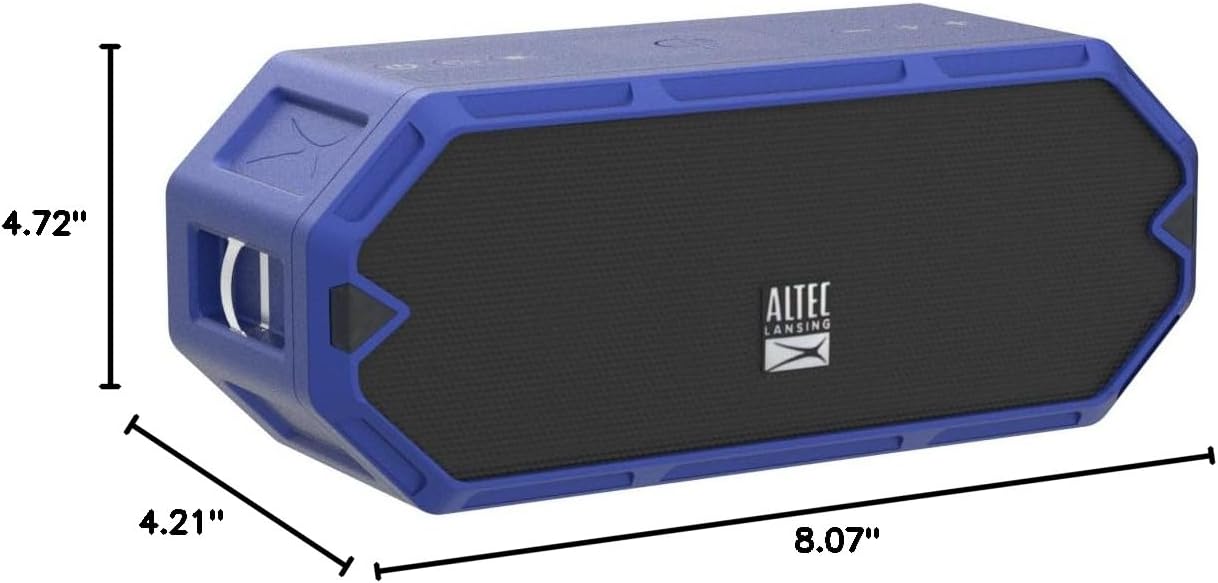
Figure 7: Dimensions of the HydraBlast speaker.
Кепилдик жана колдоо
The Altec Lansing HydraBlast speaker comes with a Limited Warranty. For specific warranty terms, conditions, and duration, please refer to the warranty card included with your product or visit the official Altec Lansing webсайт.
For technical support, troubleshooting assistance, or warranty claims, please contact Altec Lansing Customer Service:
- Webсайт: alteclansing.com/support
- Телефон: Продукциянын таңгагын караңыз же webаймактык байланыш номерлери үчүн сайт.
Please have your product model number (IMW1300-RYB-STK-2) and proof of purchase ready when contacting support.


