1. Киришүү
Thank you for choosing the iPega PG-9076 Wireless Bluetooth Gamepad. This versatile controller is designed to provide an immersive gaming experience across multiple platforms. It supports both Bluetooth and 2.4GHz wireless connections, making it compatible with Android smartphones, tablets, Smart TVs, TV boxes, and Windows PCs (XP/7/8/10).
Please read this manual carefully before using the product to ensure proper operation and to maximize your gaming enjoyment.
2. Пакеттин мазмуну
- 1 x iPega PG-9076 Wireless Bluetooth Gamepad
- 1 x USB заряддоо кабели
- 1 x 2.4G Wireless Receiver (USB Dongle)
- 1 x User Manual
3. Продукт бүтүп калдыview
Familiarize yourself with the layout and functions of your gamepad.

3.1-сүрөт: Жогорудан төмөн view of the iPega PG-9076 Gamepad. This image displays the directional pad (D-pad) on the left, two analog joysticks, action buttons (A, B, X, Y) on the right, and central function buttons including TURBO, START, SELECT, NEW, iCADE, and ANDROID mode buttons.
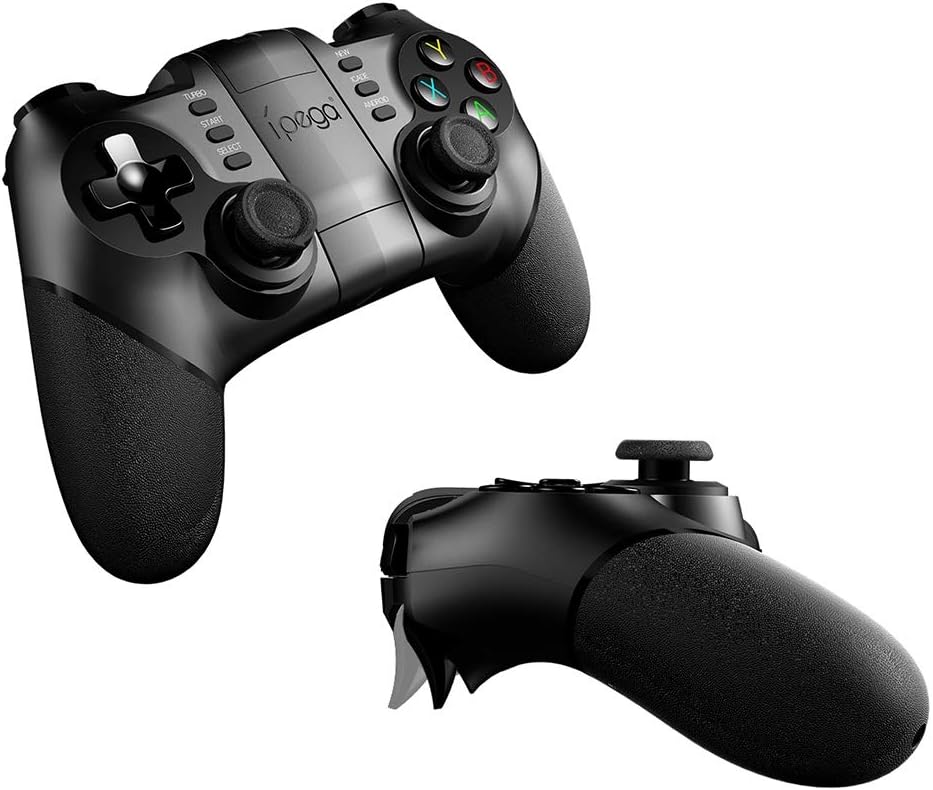
3.2-сүрөт: Бурчтуу view of the iPega PG-9076 Gamepad. This perspective emphasizes the ergonomic grips and the overall shape of the controller, designed for comfortable handling during extended gaming sessions.
- D-Pad: Directional Pad for precise movement.
- Сол/оң аналогдук таякчалар: 360 градустук кыймыл жана камераны башкаруу үчүн.
- Аракет баскычтары (A, B, X, Y): Оюндагы аракеттер үчүн.
- L1/L2/R1/R2 Triggers/Shoulder Buttons: Located on the top of the gamepad.
- START/SELECT Buttons: Оюнду башкаруунун стандарттуу баскычтары.
- TURBO баскычы: Activates continuous firing for assigned buttons.
- Mode Buttons (NEW, iCADE, ANDROID): Used to switch between different operating modes.
- Үй баскычы: Системанын функциялары үчүн борбордук баскыч.
- Телефон ээси: Integrated adjustable holder for smartphones.
4. Орнотуу
4.1. Геймпадды заряддоо
Before first use, fully charge the gamepad. Connect the supplied USB charging cable to the gamepad's charging port and the other end to a USB power source (e.g., computer USB port, USB wall adapter).
- The LED indicator will typically show charging status (e.g., red light on while charging, off when fully charged).
- Толук заряддоо, адатта, болжол менен 2-3 саатты талап кылат.
4.2. Туташуу режимдери
The PG-9076 supports multiple connection modes for various devices.
4.2.1. Bluetooth Connection (for Android/iOS/Smart TV/TV Box)
- Геймпад өчүрүлгөнүн текшериңиз.
- басып, кармап туруңуз ANDROID button (or relevant mode button for your device, e.g., iCADE for iOS if supported) and the ҮЙ button simultaneously until the LED indicator flashes rapidly. This puts the gamepad into pairing mode.
- On your device (smartphone, tablet, Smart TV, TV Box), go to Bluetooth settings and turn Bluetooth on.
- Издөө available devices. You should see "PG-9076" or a similar name appear in the list.
- Select "PG-9076" to pair. The LED indicator on the gamepad will become solid once successfully connected.
- For iOS devices, some games may require specific iCADE mode. Refer to game instructions.

4.1-сүрөт: The iPega PG-9076 Gamepad with a smartphone securely mounted in its integrated holder, ready for mobile gaming. This image demonstrates the convenience of playing on a phone with a physical controller.
4.2.2. 2.4G Wireless Connection (for PC/Smart TV/TV Box)
- Plug the 2.4G wireless receiver (USB dongle) into an available USB port on your PC, Smart TV, or TV Box.
- Геймпад өчүрүлгөнүн текшериңиз.
- басып, кармап туруңуз ЖАНЫ button (or a specific PC mode button if available) and the ҮЙ button simultaneously until the LED indicator flashes rapidly.
- The gamepad should automatically connect to the receiver. The LED indicator will become solid when connected.
- Your system may automatically install necessary drivers.

4.2-сүрөт: The iPega PG-9076 Gamepad with a smartphone attached, and the 2.4G USB wireless receiver prominently displayed in the foreground. This illustrates the wireless connectivity option for devices like PCs and TV boxes.
5. Иштөө нускамалары
5.1. Күйгүзүү/өчүрүү
- Күйгүзүү: басыңыз ҮЙ button. The gamepad will attempt to connect to the last paired device.
- Өчүрүү: басып, кармап туруңуз ҮЙ button for approximately 3 seconds until the LED indicator turns off. The gamepad will also automatically power off after a period of inactivity.
5.2. Gamepad Modes
The PG-9076 supports different modes to ensure compatibility with various games and platforms. Switch modes by holding the corresponding button (e.g., ANDROID, NEW, iCADE) and then pressing the HOME button to power on.
- Android стандарттык режими: For most Android games.
- PC X-киргизүү режими: For Windows PC games that support X-Input (common for modern PC games).
- iCADE Mode: For some older iOS games that specifically support iCADE protocol.
5.3. ТУРБО функциясы
The TURBO function allows a button to continuously fire when held down, useful for certain games.
- Press the button you wish to set to TURBO (e.g., A button).
- Ошол баскычты кармап турганда, басыңыз TURBO button once. The LED indicator may flash to confirm.
- To cancel TURBO for that button, repeat the process.
6. Техникалык тейлөө
- Тазалоо: Геймпадды тазалоо үчүн жумшак, кургак чүпүрөктү колдонуңуз. Катуу химиялык заттарды же абразивдүү тазалоочу каражаттарды колдонбоңуз.
- Сактагыч: Геймпадды күн тийбеген жана экстремалдуу температурадан алыс, салкын, кургак жерде сактаңыз.
- Батареяга кам көрүү: To prolong battery life, avoid fully discharging the battery frequently. Charge the gamepad regularly, even if not in use for extended periods (e.g., once every three months).
- Тамчылардан качуу: Геймпадды түшүрбөңүз же катуу соккуларга дуушар кылбаңыз, анткени бул ички компоненттерге зыян келтириши мүмкүн.
7. Кыйынчылыктарды
7.1. Геймпад туташпай жатат
- Күчтү текшерүү: Ensure the gamepad is charged and powered on.
- Туура режим: Verify you are in the correct connection mode (Bluetooth for mobile/TV, 2.4G for PC with dongle).
- Кайра жупташтыруу: Delete the gamepad from your device's Bluetooth list and attempt to re-pair.
- Интерференция: Түзмөгүңүзгө жакыныраак жана тоскоолдук жаратышы мүмкүн болгон башка зымсыз түзмөктөрдөн алысыраак жылыңыз.
- Dongle Check: If using 2.4G, ensure the USB dongle is securely plugged in and recognized by your device.
7.2. Баскычтар жооп бербейт
- Батарея деңгээли: Low battery can cause erratic behavior. Charge the gamepad.
- Кайра баштоо: Power off the gamepad and your device, then restart both and try connecting again.
- Оюндун шайкештиги: Some games may not fully support external controllers or may require specific mapping. Check game settings.
7.3. Заряддоо маселелери
- Cable/Port: Башка USB кабелин же кубаттоо портун колдонуп көрүңүз.
- Кубат булагы: Ensure the USB power source is functioning correctly.
8. Техникалык шарттар
| Өзгөчөлүк | Деталь |
|---|---|
| Модел | PG-9076 |
| Байланыш | Bluetooth, 2.4G зымсыз |
| Шайкештик | Android (Phones, Tablets, Smart TV, TV Box), Windows (XP/7/8/10) |
| Өлчөмдөрү (жеткирүү) | 17.8 x 13.4 x 6.8 см |
| Салмагы (жеткирүү) | 302 грамм |
| Өндүрүүчүнүн маалымдамасы | 2724709426067 |
9. Кепилдик жана колдоо
This product comes with a standard manufacturer's warranty. Please refer to the warranty card included in your package or contact your retailer for specific warranty terms and conditions.
For technical support or further assistance, please contact the customer service department of your place of purchase or visit the official iPega webколдоо булактары үчүн сайт.


