1. Коопсуздук боюнча маанилүү маалымат
Before operating the Matrix Fitness TF50 Treadmill, please read and understand all safety instructions. Failure to follow these instructions may result in injury or damage to the equipment.
- Врач менен кеңешиңиз: Кандайдыр бир жаңы көнүгүү программасын баштоодон мурун ар дайым саламаттыкты сактоо адиси менен кеңешиңиз.
- Көзөмөл: Бул шайман физикалык, сезүү же акыл-эс мүмкүнчүлүктөрү чектелүү же тажрыйбасы жана билими жок адамдар тарабынан колдонулушу үчүн арналган эмес, эгерде алардын коопсуздугуна жооптуу адам тарабынан шайманды колдонуу боюнча көрсөтмөлөр болбосо. Балдар шайман менен ойнобошу үчүн аларды көзөмөлгө алуу керек.
- Шашылыш токтотуу: Familiarize yourself with the safety key and its function. Always attach the safety key clip to your clothing during operation. In case of an emergency, pulling the safety key will immediately stop the treadmill.
- Туура жайгаштыруу: Place the treadmill on a level, stable surface with adequate clearance around it (at least 6 feet behind and 2 feet on each side). Do not place on thick carpet as it may interfere with ventilation.
- Электр кабели: Ensure the power cord is not pinched or damaged. Do not use extension cords. Plug directly into a grounded outlet.
- Тейлөө: Коопсуз иштөөнү камсыз кылуу үчүн бул колдонмодо сүрөттөлгөндөй үзгүлтүксүз тейлөөнү аткарыңыз.
WARNING: To reduce the risk of electric shock, fire, and serious injury, read all instructions before using this equipment.
2. Продукт бүтүп калдыview
The Matrix Fitness TF50 Treadmill with XUR 22" Touchscreen Console is designed to provide a club-quality workout experience in a home environment. It features a robust frame, a spacious running deck, and an interactive console for diverse training options.
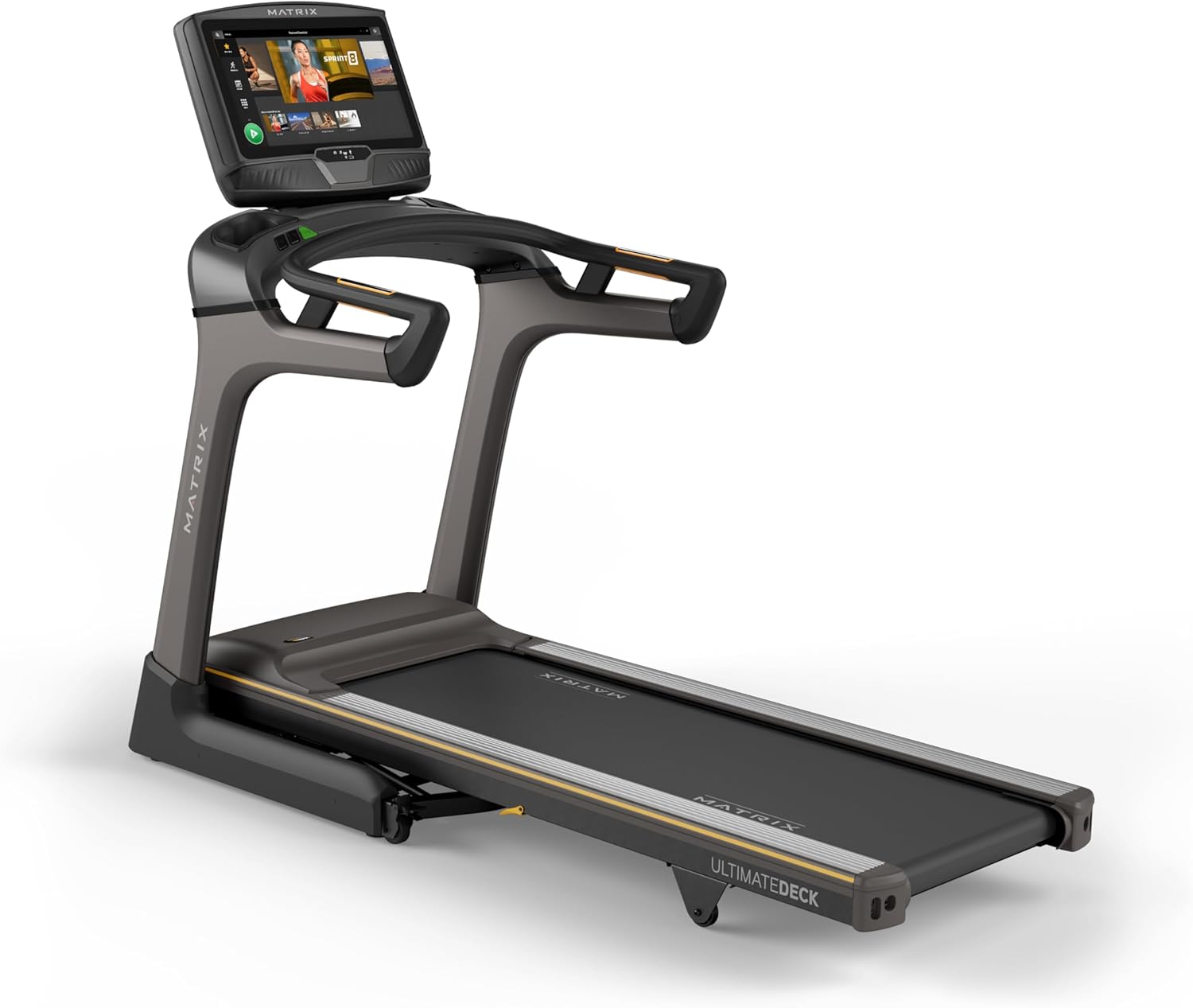
Сүрөт: алдыңкы view of the Matrix Fitness TF50 Treadmill, showcasing the 22-inch touchscreen console and the running deck.
Негизги өзгөчөлүктөрү
- XUR 22" Touchscreen Console: Offers streaming apps, iFIT integration, virtual active programs, and performance tracking.
- Johnson Drive System: A quiet, durable, and responsive motor for consistent performance.
- Ultimate Deck System: Provides industrial-grade cushioning for a comfortable running experience.
- Бүктөлүүчү дизайн: Near 90-degree folding for space-saving storage.
- Expanded Running Surface: 20" x 60" deck accommodates various stride lengths.
- Speed and Incline: 0.5-12.5 mph speed range and 0-15% incline for versatile workouts.

Image: Diagram highlighting key features of the TF50 Treadmill, including its folding design, 20"x60" Ultimate Deck System, quiet DC motor, 0-15% incline range, 0.5-12.5 mph speed range, and industrial-grade cushioning.
3. Орнотуу жана чогултуу
The Matrix Fitness TF50 Treadmill requires assembly. It is recommended to have two people for assembly due to the size and weight of the components. Ensure all parts listed in the hardware kit are present before beginning.
3.1 Пакеттен чыгаруу жана жайгаштыруу
- Carefully remove all components from the packaging. Keep packaging materials until assembly is complete.
- Place the treadmill in a location that meets the recommended clearance requirements: at least 6 feet (1.8 meters) behind the treadmill and 2 feet (0.6 meters) on each side.
- Ensure the surface is level and stable. Avoid placing on thick carpet that could obstruct ventilation.
3.2 Чогултуу кадамдары
Refer to the included assembly guide for detailed, step-by-step instructions and diagrams. General steps include:
- Attach the upright masts to the treadmill frame.
- Secure the console base and handlebars to the masts.
- Connect all necessary cables between the console and the frame.
- Install any remaining covers or accessories.
3.3 Кубат туташтыруу
- Ensure the treadmill is turned off before plugging it in.
- Plug the power cord directly into a dedicated, grounded electrical outlet. Do not use extension cords or adapters.
- Turn on the main power switch, usually located near the front of the treadmill base.
4. Иштөө нускамалары
This section details how to operate your Matrix Fitness TF50 Treadmill and utilize its features.
4.1 Console Overview (XUR 22" Touchscreen)
The XUR console provides access to various workout programs, entertainment apps, and performance data.

Image: Close-up of the XUR 22-inch touchscreen console, highlighting its extra-large HD display, streaming app capabilities (Netflix, YouTube, Spotify), Virtual Active Sprint 8 and iFIT integration, Bluetooth FTMS, integrated HDMI, 13 metric-driven programs, and Bluetooth HR strap connectivity.
- Күйгүзүү: Once plugged in and the main power switch is on, the console will power up.
- Баштапкы орнотуу: Follow the on-screen prompts to connect to Wi-Fi, set up user profiles, and activate any included subscriptions like iFIT.
- Навигация: Use the touchscreen to navigate through menus, select workouts, and access applications.

Image: The main workout screen of the XUR console, displaying various workout options and a 'Sprint 8' program tile.

Image: The entertainment apps screen on the XUR console, showing icons for Netflix, YouTube, Spotify, Facebook, Twitter, Instagram, and other applications.
4.2 Машыгууну баштоо
- Коопсуздук ачкычын тиркеңиз: Clip the safety key to your clothing. The treadmill will not operate without the safety key in place.
- Select Program/Mode: From the console, choose a quick start, a pre-programmed workout, an iFIT workout, or a virtual active route.
- Баштоо: Консольдогу START баскычын басыңыз. Кур жай ылдамдыкта кыймылдай баштайт.
- Adjust Speed and Incline: Use the speed and incline buttons on the console or handlebars to adjust your workout intensity.

Image: Close-up of the treadmill handlebars, showing integrated speed and incline control buttons for easy adjustments during a workout.
4.3 Машыгууну токтотуу
- Кадимки токтотуу: Press the STOP button on the console. The belt will gradually slow down and stop.
- Шашылыш токтотуу: Pull the safety key from the console. The treadmill will stop immediately.
4.4 Бүктөө жана сактоо
The TF50 Treadmill features an easy-folding design for convenient storage.
- Чуркоо жолу токтоп, өчүк экенин текшериңиз.
- Чуркоочу палубаны тик абалга бекитилгенче этияттык менен көтөрүңүз.
- To unfold, gently push the deck release lever and slowly lower the deck to the floor.

Image: The Matrix TF50 Treadmill shown in its folded, upright position, demonstrating its space-saving design.

Image: A woman demonstrating the folding mechanism of the treadmill, lifting the running deck into its upright storage position.
5. Техникалык тейлөө
Үзгүлтүксүз тейлөө сиздин чуркоо жолуңуздун узак мөөнөттүү жана оптималдуу иштешин камсыз кылат.
5.1 Тазалоо
- Күнүмдүк: Wipe down the console and handlebars with a soft, damp cloth after each use. Avoid abrasive cleaners or excessive moisture.
- Апта сайын: Vacuum around and under the treadmill to prevent dust and debris buildup.
5.2 Running Belt Maintenance
- Майлоо: The Ultimate Deck System is designed for low maintenance. Refer to the full product manual for specific lubrication schedules, if any. Over-lubrication can cause damage.
- Tension and Alignment: Periodically check the running belt for proper tension and alignment. If the belt slips or drifts to one side, consult the full manual for adjustment procedures or contact customer support.

Image: A cutaway diagram illustrating the multi-layered cushioning of the Ultimate Deck System, designed for impact absorption.
5.3 Motor Compartment
- Жылдык текшерүү: Annually, or as needed, unplug the treadmill and carefully remove the motor cover. Vacuum any dust or debris from the motor area. Do not touch any electrical components. Replace the cover securely.

Сүрөт: кесилген view of the Johnson Drive System motor, showing its internal components and design for quiet and responsive operation.
6. Кыйынчылыктарды
This section provides solutions to common issues you might encounter with your TF50 Treadmill. For more complex problems, contact Matrix Fitness customer support.
| Көйгөй | Мүмкүн себеп | Чечим |
|---|---|---|
| Чуркоо тилкеси күйбөйт. | Кубат шнуру сайылган эмес; Негизги кубат өчүргүч өчүрүлгөн; Автоматтык өчүргүч өчүп калган. | Ensure power cord is securely plugged in. Turn on the main power switch. Check household circuit breaker. |
| Чуркоо куру кыймылдабайт. | Safety key not in place; Emergency stop activated; Motor issue. | Ensure safety key is fully inserted. Check if emergency stop button is pressed. If problem persists, contact support. |
| Console is unresponsive or frozen. | Software glitch; Temporary electrical issue. | Turn off the main power switch, wait 30 seconds, then turn it back on. If issue continues, contact support. |
| Чуркап бара жаткан кур тайып кетет же олку-солку болот. | Belt tension too loose; Belt lubrication needed. | Refer to the full manual for belt tension adjustment. Check lubrication schedule. |
If you encounter an issue not listed here or if the suggested solutions do not resolve the problem, please contact Matrix Fitness customer support.
7. Техникалык шарттар
Detailed technical specifications for the Matrix Fitness TF50 Treadmill with XUR Console.

Image: Diagram showing the dimensions of the Matrix TF50 Treadmill: 81 inches (D) x 35 inches (W) x 62 inches (H).
| Өзгөчөлүк | Спецификация |
|---|---|
| Бренд | Матрица |
| Модель аты | Matrix Fitness TF50 Treadmill |
| Консол | XUR 22" Touchscreen |
| Продукциянын өлчөмдөрү (LxWxH) | 81" x 35" x 62" |
| Катталган өлчөмү | 42" x 35" x 76" |
| Элемент Салмагы | 310 фунт |
| Максималдуу Колдонуучу Салмагы | 400 фунт |
| Агып өтүүчү бет (палубанын узундугу x туурасы) | 60" x 20" |
| Максималдуу ылдамдык | Саатына 12.5 миль |
| Минималдуу ылдамдык | Саатына 0.5 миль |
| Максималдуу эңкейиш пайызыtage | 15% |
| Мотор кубаты | 3.25 Ат күчү |
| Материал | Эритме болот |
| Power Source | Электр зымдары |
| Байланыш технологиясы | HDMI, USB, WiFi, Bluetooth |
| Metrics Measured | Distance, Speed, Incline, Calories, Time |
| Ассамблея талап кылынат | Ооба |
| UPC | 763165008938 |
8. Кепилдик жана колдоо
Matrix Fitness provides comprehensive warranty coverage for the TF50 Treadmill.
8.1 Кепилдик маалыматы
- кадр: Өмүр бою кепилдик
- Motor and Cushioning: Өмүр бою кепилдик
- Parts (Console): 5 жыл
- Labor (Console): 1 жыл
- Parts (Frame): 7 жыл
- Labor (Frame): 2 жыл
Please retain your proof of purchase for warranty claims. Warranty terms may vary by region. For full details, refer to the warranty card included with your product or visit the official Matrix Fitness webсайт.
8.2 Кардарларды колдоо
For technical assistance, parts, or service inquiries, please contact Matrix Fitness customer support. Have your model number (TF50 Treadmill with XUR) and serial number ready when contacting support.
зыярат кылыңыз Matrix Fitness Store on Amazon Көбүрөөк маалымат алуу же байланыш маалыматын табуу үчүн.


