Introduction
The XPLORA XMOVE is an advanced activity and fitness tracker designed to help you monitor your health and activity levels. It features a heart rate monitor, sleep tracking, various sports modes, and smart notifications, all integrated with the unique Goplay Platform to encourage an active lifestyle.
This manual provides essential information on setting up, operating, maintaining, and troubleshooting your XMOVE device.
Продукт бүттүview

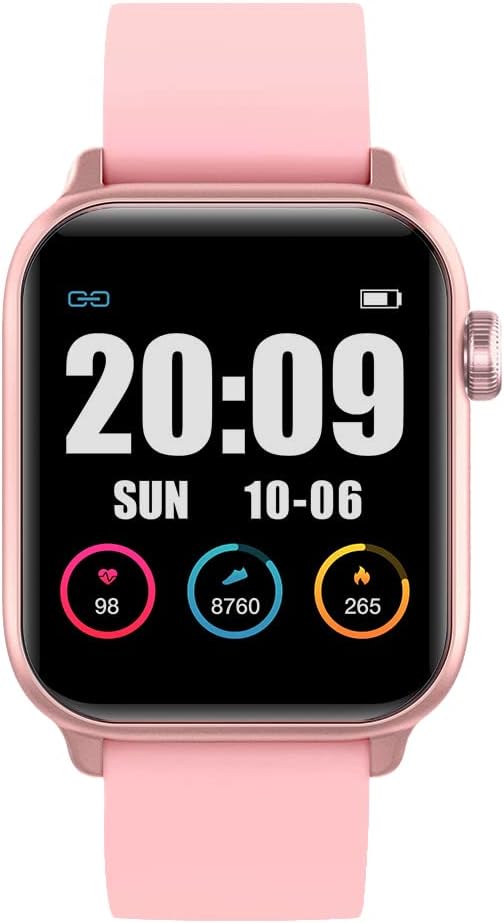
The XPLORA XMOVE Activity Tracker, shown from an angled front view, displaying the current time, weekly step count, and various daily metrics such as heart rate, calories burned, and total steps.

А тарап проfile view of the XPLORA XMOVE Activity Tracker, illustrating its sleek and slim design, along with the single physical button located on the side of the device.
Негизги өзгөчөлүктөрү:
- Жүрөктүн кагышын көзөмөлдөөчү: Real-time heart rate detection to help optimize exercise intensity.
- Уйкунун мониторинги: Measures duration and quality of sleep, viewable in the Xplora app.
- Sports Monitoring Modes: Dedicated modes for running, walking, cycling, and climbing.
- Movement Reminders: Built-in sensor prompts you to move after periods of inactivity.
- GOPLAY Platform: Earn Xplora coins for physical activity, balancing screen time with active play.
- Notification Sync: Displays call alerts, messages, and reminders from your connected smartphone via Bluetooth.
- Батареянын узак иштөө мөөнөтү: Up to 3 days of working time and up to 8 days of standby time.
Жайгашуу
1. Аппаратты заряддоо
Before first use, fully charge your XPLORA XMOVE. Connect the included charging cable to the charging port on the back of the device and plug the USB end into a compatible power source (e.g., computer USB port or wall adapter). A full charge typically takes approximately 2 hours.
The XPLORA XMOVE display showing the time and a full battery indicator, typical when the device is fully charged or actively charging.
2. Installing the XPLORA App
The XPLORA XMOVE requires the XPLORA app for full functionality and data synchronization. The app is compatible with Android smartphones.
- Издөө "XPLORA" in your smartphone's app store (Google Play Store for Android).
- Download and install the official XPLORA app.
- Каттоо эсебин түзүү же кирүү үчүн экрандагы нускамаларды аткарыңыз.
3. Смартфонуңуз менен жупташуу
Once the app is installed and you have an account, pair your XMOVE with your smartphone via Bluetooth:
- Смартфонуңузда Bluetooth иштетилгенин текшериңиз.
- Open the XPLORA app and navigate to the device pairing section.
- Turn on your XMOVE by pressing and holding the side button.
- The app will search for nearby XMOVE devices. Select your device from the list.
- Confirm the pairing request on both your smartphone and the XMOVE if prompted.
Иштеп жатат
Дисплейде багыттоо
The XMOVE features a 1.3-inch digital display. You can navigate through different screens and functions by swiping horizontally and vertically on the touchscreen, or by using the side button for specific actions like waking the screen or returning to the home screen.

The XPLORA XMOVE display showing current heart rate, daily steps, and calories burned, each represented with a circular progress indicator.
Активдүүлүккө мониторинг
- Кадамдар: The pedometer automatically tracks your daily step count. View your progress on the device or in the app.
- Жүрөктүн кагышы: Access the heart rate monitor function on the device to take a real-time reading. For continuous monitoring, refer to app settings.
- Уйку: Wear the XMOVE to bed for automatic sleep tracking. Data on sleep duration and quality will be available in the XPLORA app.
- Спорт режимдери: Select a specific sports mode (e.g., running, cycling) before starting an activity to track relevant metrics like distance, duration, and calories more accurately.

Two users interacting with their XPLORA XMOVE trackers, demonstrating the ease of use and touch screen responsiveness during active wear.
Smart Functions
- Эскертмелер: Once paired, the XMOVE can display incoming call alerts, messages, and reminders from your smartphone. Manage notification settings within the XPLORA app.
- Movement Reminders: The device will vibrate to remind you to move if it detects prolonged inactivity. This feature can be configured in the app.
- GOPLAY Platform: Synchronize your activity data with the XPLORA app to earn Xplora coins through the Goplay platform, which can be redeemed for various rewards.
Техникалык тейлөө
Аппаратыңызды тазалоо
Regular cleaning helps maintain the device's appearance and functionality:
- Экранды жана боону жумшак, d менен сүртүңүзamp, түксүз кездеме.
- Абразивдүү тазалагычтарды, эриткичтерди же катуу химиялык заттарды колдонбоңуз.
- Заряддоодон мурун заряддоо контакттары таза жана кургак экенин текшериңиз.
Суу каршылык
The XPLORA XMOVE is IP68 waterproof, meaning it is resistant to dust and can withstand immersion in water up to 1.5 meters for up to 30 minutes. It is suitable for daily use, including hand washing and light rain. However, it is not recommended for swimming, showering with hot water, or diving, as steam and high-pressure water jets can compromise the seal.
Батареяга кам көрүү
- Батареянын иштөө мөөнөтүн узартуу үчүн, тынымсыз колдонулбаса дагы, түзмөктү үзгүлтүксүз кубаттап туруңуз.
- Батареянын иштешин начарлатышы мүмкүн болгон өтө жогорку температуралардан алыс болуңуз.
- Берилген заряддоо кабелин гана колдонуңуз.
Сактагыч
When not in use for extended periods, store the XMOVE in a cool, dry place away from direct sunlight and extreme temperatures.
Проблемаларды чечүү
Жалпы маселелер жана чечимдер:
- Түзмөк күйбөй жатат: Аппараттын толук заряддалганын текшериңиз. Аны заряддагычка кеминде 30 мүнөт туташтырыңыз.
- Смартфон менен жупташуу мүмкүн эмес:
- Ensure Bluetooth is enabled on your phone and the XMOVE is discoverable.
- Restart both the XMOVE and your smartphone.
- Make sure the XMOVE app is updated to the latest version.
- If previously paired, try unpairing and re-pairing the device from your phone's Bluetooth settings.
- Так эмес көрсөткүчтөр (кадамдар, жүрөктүн кагышы):
- Ensure the device is worn snugly on your wrist, about one finger's width above the wrist bone.
- Түзмөктүн арткы бетиндеги сенсорду тазалаңыз.
- For heart rate, remain still during measurement.
- Эскертмелер көрүнбөй жатат:
- Check notification settings in the XPLORA app and your phone's system settings to ensure permissions are granted.
- Ensure the device is connected via Bluetooth.
- Батарейканын кыска мөөнөтү:
- Экран жарыктыгын азайтыңыз.
- Limit the number of apps sending notifications to the device.
- Ensure background app refresh is not excessively draining battery.
If you encounter persistent issues, refer to the XPLORA app's help section or contact customer support.
Техникалык шарттар
| Өзгөчөлүк | Деталь |
|---|---|
| Модель номери | XMove Activity Band |
| Продукциянын өлчөмдөрү | 13.34 x 0.79 x 4.22 см |
| Элемент Салмагы | 110 г |
| Дисплей өлчөмү | 1.3 дюйм |
| Дисплей түрү | Санарип |
| Батарея түрү | 1 литий-иондук батарейка (кошулган) |
| Байланыш технологиясы | Bluetooth |
| Суу каршылык | IP68 (Dust and water resistant up to 1.5m for 30 mins) |
| Шайкеш Операция системасы | Android |
| Өзгөчөлүктөр | Sleep Monitor, Pedometer, Notifications, Heart Rate Monitor |
Кепилдик жана колдоо
Кепилдик маалымат
The XPLORA XMOVE Activity and Fitness Tracker includes a 2-year warranty from the date of purchase, covering manufacturing defects. Please retain your proof of purchase for warranty claims.
Кардарларды колдоо
For technical assistance, warranty claims, or further inquiries, please contact XPLORA customer support:
- Электрондук почта: support@xplora.com
- Дарек: Xplora Technologies AS - HQ Nedre Slottsgate 8 0157 Oslo, Norway
Please visit the official XPLORA website for the most up-to-date support information and FAQs.


