Маанилүү коопсуздук маалыматы
Сураныч, чогултуу жана колдонуу алдында бардык нускамаларды кунт коюп окуп чыгыңыз. Бул колдонмону келечектеги маалымат үчүн сактаңыз.
- Стулду ар дайым берилген көрсөтмөлөргө ылайык чогултуңуз.
- Ensure the chair is placed on a flat and stable surface before use.
- максималдуу салмак сыйымдуулугунан ашпаңыз 150 кг (330 фунт).
- Keep the chair away from direct heat sources and sharp objects to prevent damage and potential injury.
- Regularly check all bolts and screws to ensure they are tightened.
Продукт бүттүview
The MELOKEA Ergonomic Office Chair is designed to provide comfort and support for extended periods of sitting. Key features include an adjustable headrest, unique lumbar support, breathable mesh back, and a comfortable seat cushion.

Сүрөт 1: Алдыңкы view of the MELOKEA Ergonomic Office Chair in red with white frame.

Figure 2: The office chair positioned in a modern office environment, demonstrating its aesthetic integration.

Figure 3: Detailed dimensions of the chair, including height (112.5-119.5cm), width (68cm), seat height (40.5-47.5cm), and seat cushion size (51cm wide, 49cm deep, 10cm thick). Maximum weight capacity is 150 kg.
Орнотуу жана чогултуу
Assembly is required. Please follow the steps below carefully. It is recommended to assemble the chair on a soft, clean surface to prevent scratches.
- Компоненттерди таңгактан чыгаруу: Carefully remove all parts from the packaging and lay them out. Verify all components are present against the parts list (not provided in this manual, refer to included assembly guide).
- Дөңгөлөктөрдү базага тиркөө: Беш дөңгөлөктү отургучтун негизинин ар бир бутунун учундагы тешиктерге салыңыз. Алар ордуна чыкылдаган үн чыкканча бекем басыңыз.
- Газ лифтин киргизүү: Газ көтөргүч баллонду отургучтун негизинин борбордук тешигине салыңыз.
- Отургуч механизмин чогултуу: Берилген бурамалар менен отургучтун механизмин отургуч жаздыкчасынын астыңкы бетине бекитиңиз. Механизмдин алдыңкы бети отургучтун алдыңкы бети менен бир сызыкта экенин текшериңиз.
- Колтуктарды бекитүү: Secure the armrests to the seat cushion using the designated screws.
- Аркасын отургучка туташтыруу: Attach the backrest to the seat assembly. Some users find it easier to attach the lower part of the backrest first, then align the upper part. Ensure all screws are securely tightened.
- Чогултулган отургучту газ лифтине коюңуз: Чогултулган отургучту жана аркалыкты газ көтөргүч цилиндрге этияттык менен орнотуңуз, анын борборлоштурулганын жана туруктуу экенин текшериңиз.
Note: For detailed visual instructions, refer to the assembly diagram included with your product packaging.
Иштөө нускамалары
This chair offers several adjustment features to customize your seating experience.
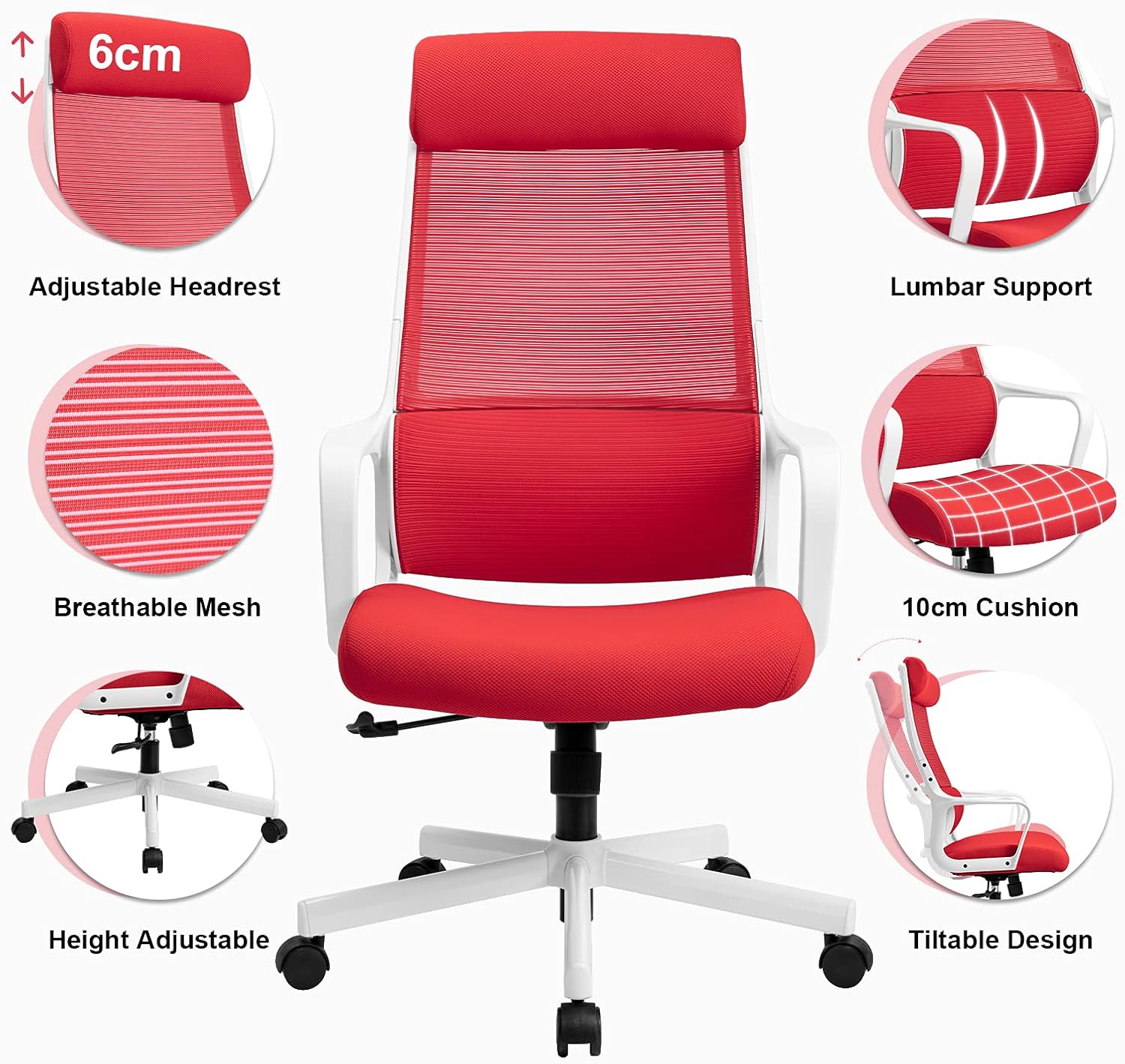
Figure 4: ашыкview of key adjustable features including adjustable headrest, lumbar support, breathable mesh, 10cm cushion, height adjustment, and tiltable design.

Figure 5: Demonstrates the tilt function (90° to 115° recline) and how to adjust the height and lock/unlock the tilt mechanism. Pulling the lever inwards locks the tilt, pulling it outwards unlocks it for height adjustment.
1. Бийиктигин тууралоо
Отургучтун бийиктигин тууралоо үчүн:
- Орунду көтөрүү үчүн: While standing, pull the lever located under the right side of the seat upwards. The seat will rise. Release the lever at the desired height.
- Орундукту түшүрүү үчүн: Отурган абалыңызда, отургучтун оң жагынын астында жайгашкан рычагды өйдө тартыңыз. Орундук ылдый түшөт. Керектүү бийиктикте рычагды коё бериңиз.
2. Tilt Function and Lock
The chair features a tilt mechanism allowing you to recline the backrest.
- Жаталуу үчүн: Pull the lever located under the right side of the seat outwards to unlock the tilt. Lean back to recline.
- Эңкейүүнү бекитүү үчүн: Push the lever inwards to lock the backrest in an upright position (90 degrees).
- Эңкейиш чыңалуусун жөнгө салуу: Rotate the round knob located under the front of the seat to adjust the tension of the tilt mechanism. Turn clockwise to increase tension (harder to recline) and counter-clockwise to decrease tension (easier to recline).
3. Жөнгө салынуучу баштык
The headrest can be adjusted vertically to provide optimal neck support.
- Grasp the headrest and gently pull it upwards or push it downwards to adjust its height. It will click into place at various positions.
4. Белди колдоо
The chair features a unique S-shaped lumbar support designed to conform to the natural curve of your spine, promoting healthy posture.

Figure 6: Illustration of the ergonomic design, highlighting the support provided to the cervical, thoracic, and lumbar regions of the spine.
This support is integrated and adapts to your back as you sit.
Техникалык тейлөө жана кам көрүү
Proper maintenance will extend the life of your MELOKEA office chair.
- Тазалоо:
- For fabric and mesh surfaces, use a soft cloth dampened with mild soap and water. Avoid harsh chemicals or abrasive cleaners.
- Wipe metal and plastic parts with a dry or slightly damp кездеме.
- Текшерүү: Мезгил-мезгили менен бардык бурамалар менен болттордун бекемдигин текшерип туруңуз. Керек болсо кайра тартыңыз.
- Роликтер: Keep casters clean from hair and debris to ensure smooth rolling.
- Ашыкча жүктөөдөн качыңыз: 150 кг максималдуу салмак жөндөмдүүлүгүн ашпаңыз.
- Сактагыч: Отургучту кургак, салкын жерде, күндүн түз тийген нурларынан жана өтө жогорку температурадан алыс сактаңыз.
Проблемаларды чечүү
Эгерде сиз отургучуңуз менен көйгөйлөргө туш болсоңуз, төмөнкү кеңири таралган көйгөйлөрдү жана чечимдерди караңыз:
| Көйгөй | Мүмкүн себеп | Чечим |
|---|---|---|
| Отургуч бийиктигин өзгөртпөйт. | Gas lift issue or lever not engaged. | Бийиктикти жөндөө рычагы толугу менен тартылганын текшериңиз. Эгерде көйгөй чечилбесе, газ көтөргүчтү алмаштыруу керек болушу мүмкүн. |
| Отургуч чайпалып же туруксуз болуп жатат. | Бошогон бурамалар же тегиз эмес бет. | Check and tighten all assembly screws. Ensure the chair is on a flat, level surface. |
| Дөңгөлөктөр тегиз жылбайт. | Дөңгөлөктөргө илинген сыныктар. | Отургучту оодарып, дөңгөлөктөрдөгү чачты, чаңды же таштандыларды алып салыңыз. |
| Арка таянычы чалкалап же бекитилбейт. | Эңкейтүү механизми кулпуланган же чыңалуу өтө жогору. | Ensure the tilt lock lever is disengaged (pulled outwards). Adjust the tilt tension knob counter-clockwise to loosen. |
If the problem persists after attempting these solutions, please contact MELOKEA customer support.
Техникалык шарттар
| Өзгөчөлүк | Деталь |
|---|---|
| Бренд | MELOKEA |
| Модель номери | DECHAF007R (F007) |
| Түс | Кызыл |
| Жалпы өлчөмдөрү (L x W x Y) | 49 x 51 x 120 см (болжол менен 19.3 x 20.1 x 47.2 дюйм) |
| Seat Cushion Dimensions | 50 x 49 x 10 см (болжол менен 19.7 x 19.3 x 3.9 дюйм) |
| Жөнгө салынуучу бийиктик диапазону | 40.5 - 47.5 см (болжол менен 15.9 - 18.7 дюйм) |
| Салмак сыйымдуулугу | 150 кг (330 фунт) |
| Продукт Салмагы | 14.1 кг (31.1 фунт) |
| Материалдар | Metal, Fabric, Nylon Mesh, Polyurethane Foam |
| Өзгөчөлүктөр | Adjustable Headrest, Integrated Lumbar Support, Height Adjustment, Tilt Function, Breathable Mesh Back |
Кепилдик жана колдоо
MELOKEA is committed to providing high-quality products and excellent customer service.
For warranty information, product support, or if you have any questions or concerns regarding your MELOKEA office chair, please contact our customer service team. While specific warranty details are not provided in this manual, MELOKEA values customer experience and strives to provide the best products and services.
Please refer to the contact information provided with your purchase or visit the official MELOKEA webакыркы колдоо маалымат үчүн сайт.


