Introduction
This manual provides detailed instructions for the safe and efficient use of your iHome XT-45 True Wireless Earbuds. Please read this manual thoroughly before operating the device and retain it for future reference.
The iHome XT-45 True Wireless Earbuds offer a seamless audio experience with Bluetooth 5.0 connectivity, intuitive touch controls, and a portable charging case. Designed for comfort and convenience, these earbuds are suitable for various activities, including travel.

Figure 1: iHome XT-45 True Wireless Earbuds and Charging Case
The image displays the iHome XT-45 True Wireless Earbuds, black in color, resting within their open charging case. The case features a digital display indicating battery levels. The earbuds themselves are compact with a rounded tip design, ready for use.
Кутуда эмне бар
Кутудан чыгарылганда бардык буюмдар бар экенин текшериңиз:
- XT-45 чыныгы зымсыз кулакчындар
- Charging Travel Case with Display
- 8 Ear Cushions in 3 Sizes (2 small, 2 large, 4 medium)
- USB заряддоо кабели (USB-C)
- Көрсөтмө (бул документ)
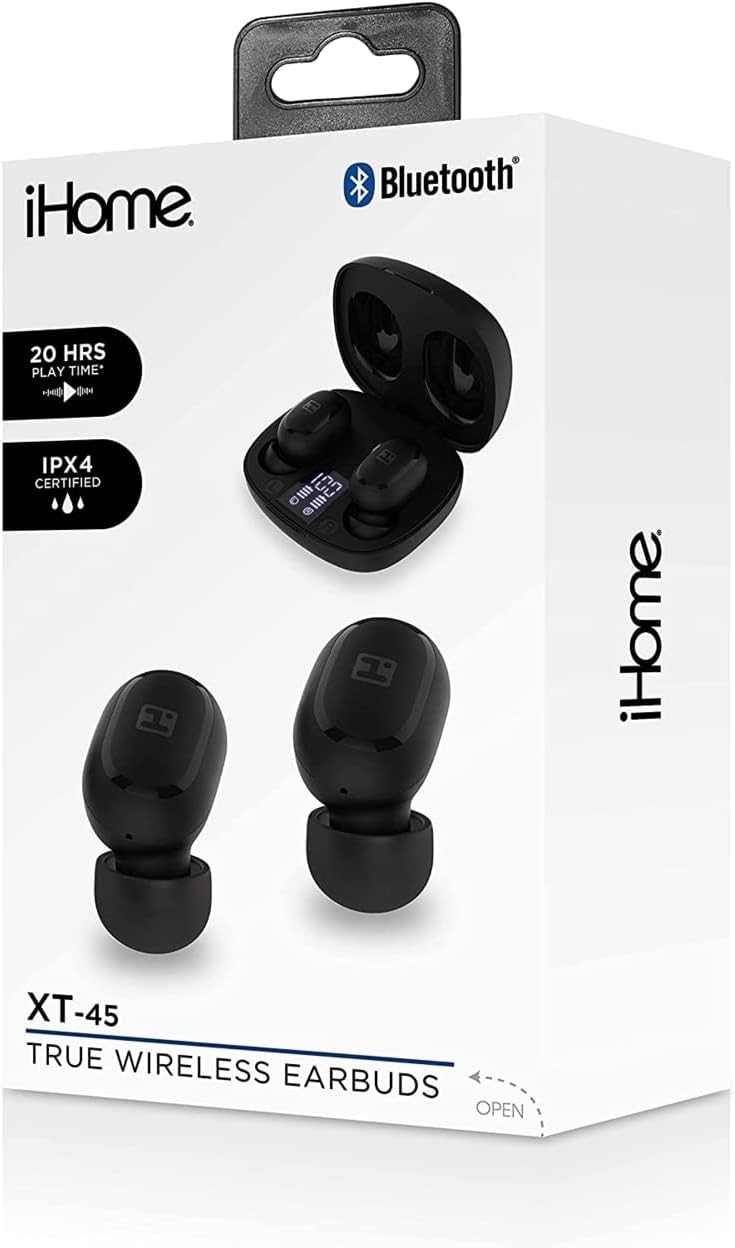
Figure 2: iHome XT-45 Product Packaging
This image shows the retail box for the iHome XT-45 True Wireless Earbuds. The box highlights features such as "20 HRS PLAY TIME" and "IPX4 CERTIFIED", along with a visual of the earbuds and charging case.
Жайгашуу
1. Кулакчындарды жана кутуну кубаттоо
Биринчи колдонуудан мурун, кулакчындарды жана заряддоо кутучасын толук заряддаңыз.
- Кулакчындарды кубаттоочу кутуга салыңыз. Алардын туура орнотулганын текшериңиз; магниттик контакттар аларды ордунда кармап турат.
- Connect the provided USB-C charging cable to the charging port on the case and plug the other end into a USB power source (e.g., computer, wall adapter).
- The case display will show the charging status. A full charge for both the case and earbuds takes approximately 1.5 hours.
- The case battery capacity is 300mAh, and each earbud has a 40mAh battery.
2. Bluetooth түзмөгү менен жупташуу
The iHome XT-45 earbuds use Bluetooth 5.0 for stable connectivity up to 33 feet.
- Заряддоо кутучасын ачыңыз. Кулакчындар жупташтыруу режимине автоматтык түрдө кирет.
- Түзмөгүңүздө (смартфон, планшет, ноутбук) Bluetooth жөндөөлөрүнө өтүңүз.
- Издөө жеткиликтүү түзмөктөрдү жана тизмеден "iHome XT-45" тандоо.
- Once connected, your device will indicate successful pairing.
- Түзмөктө Bluetooth иштетилген болсо, кулакчындар кутудан чыгарылганда акыркы жупташтырылган түзмөккө автоматтык түрдө кайра туташат.
3. Кулакчындарды орнотуу
Proper fit is crucial for sound quality and comfort. The package includes 8 ear cushions in 3 sizes (small, medium, large).
- Select the ear cushion size that provides a snug and comfortable seal in your ear canal.
- Ар бир кулакчынды кулагыңызга акырын киргизип, бекем бекитилгендей болгонго чейин бир аз бурап коюңуз.
- Adjust as needed to ensure the best audio experience and to prevent them from falling out during movement.

Figure 3: Earbud Placement
This close-up image illustrates an iHome XT-45 earbud, black in color, properly seated within the ear canal. The earbud's design is shown to fit snugly, ensuring optimal sound delivery and comfort.
Иштөө нускамалары
The iHome XT-45 earbuds feature intuitive touch controls for various functions.
Touch Controls
- Ойнотуу/тындыруу: Кулакчындарды бир жолу таптаңыз.
- Кийинки трек: Оң кулакчынды эки жолу таптаңыз.
- Мурунку трек: Сол кулакчынды эки жолу таптаңыз.
- Көлөмү: Оң кулакчынды үч жолу таптаңыз.
- Үнүн азайтуу: Сол кулакчынды үч жолу таптаңыз.
- Чалууга жооп берүү/аяктоо: Кирүүчү чалуу же активдүү чалуу учурунда гарнитураны бир жолу таптаңыз.
- Чакырууну четке кагуу: Кирүүчү чалуу учурунда кулакчындын бирин 2 секунд басып туруңуз.
- Үн Жардамчысын жандыруу: Кулакчындардын бирин 3 секунд басып туруңуз.
Күйгүзүү/өчүрүү
- Күйгүзүү: Кулакчындар заряддоо кутусунан чыгарылганда автоматтык түрдө күйөт.
- Өчүрүү: Кулакчындар кубаттоочу кутуга кайра салынганда жана капкагы жабылганда автоматтык түрдө өчөт.

4-сүрөт: Негизги өзгөчөлүктөр бүттүview
This graphic provides a summary of the iHome XT-45 True Wireless Earbuds' main features. It highlights "EXTENDED PLAY TIME" (20 hours), "DEEP RICH SOUND", "BLUETOOTH MIC+CONTROLS", a "RECHARGEABLE CASE" with LED display, and a "STREAMLINED DESIGN" for portability. Package contents and contact information are also listed.
Техникалык тейлөө
To ensure the longevity and optimal performance of your iHome XT-45 earbuds, follow these maintenance guidelines:
- Тазалоо: Кулакчындарды жана заряддоо кутусун жумшак, кургак, түксүз чүпүрөк менен дайыма тазалап туруңуз. Абразивдүү тазалагычтарды, спиртти же химиялык эриткичтерди колдонбоңуз.
- Кулак жаздыктары: Remove and clean the ear cushions periodically. They can be gently washed with mild soap and water, then thoroughly dried before reattaching.
- Заряддоо байланыштары: Туура кубаттоону камсыз кылуу үчүн кулакчындардын жана кутучанын ичиндеги заряддоочу контакттардын таза жана таштандылардан таза экенин текшериңиз.
- Сактагыч: Колдонулбаганда, кулакчындарды чаңдан жана бузулуудан коргоо үчүн кубаттоочу кутуга салып сактаңыз. Салкын, кургак жерде, экстремалдык температурадан алыс сактаңыз.
- Суу каршылык: The product is not water resistant. Avoid exposure to water or excessive moisture.
Проблемаларды чечүү
If you encounter issues with your iHome XT-45 earbuds, refer to the following common solutions:
- Кулакчындар жупташкан жок:
- Эки кулакчындын тең кубатталганын текшериңиз.
- Түзмөгүңүздөгү Bluetooth'ду өчүрүп, кайра күйгүзүңүз.
- Forget "iHome XT-45" from your device's Bluetooth list and attempt to pair again.
- Кулакчындарды кайра кутуга салып, капкагын жаап, бир нече секунд күтө туруңуз, анан жупташтыруу режимин кайра баштоо үчүн ачыңыз.
- Бир гана кулакчын иштейт:
- Эки кулакчындын тең кубатталганын текшериңиз.
- Place both earbuds back in the charging case, close the lid, and then remove them simultaneously. This often re-syncs them.
- Try resetting the earbuds (refer to the full manual if a specific reset procedure is available, otherwise, the above steps usually suffice).
- Кулакчындар кубатталбай жатат:
- USB-C кабелин жана кубат адаптерин зыянга учуратпаганын текшериңиз.
- Ensure the charging contacts on the earbuds and case are clean and free of obstructions.
- Verify the charging case itself has power (check its display).
- Poor sound quality or low volume:
- Түзмөгүңүздөгү жана кулакчындын сенсордук башкаруу элементтерин колдонуп, үндү тууралаңыз.
- Ensure the ear cushions provide a good seal in your ear. Try different sizes.
- Clean the earbud speaker grilles.
- Move closer to your paired device to avoid interference or exceeding the 33-foot range.
Техникалык шарттар
| Модель аты | HM-AU-BE-206-BK |
| Bluetooth версиясы | 5.0 |
| Иштөө Дистанциясы | 33 фут (10 метр) чейин |
| Динамик өлчөмү | 6мм |
| Frequency Response | 20Гц - 20кГц |
| Сезимталдуулук | -90дБ |
| Кулакчын батареясы | 2 х 40 мАч |
| Case Батарея | 300mAh |
| Earbuds Charge Time | 1.5 саат |
| Case Charge Time | 1.5 саат |
| Earbud Playtime | 4 саатка чейин (орточо көлөмдө) |
| Заряддоо туташтыргычы | USB-C |
| Башкаруу түрү | Сенсордук башкаруу, Үндү башкаруу |
| Микрофон | Built-in Microphone Included |
| Сууга туруктуулук деңгээли | Сууга чыдамдуу эмес |
| Өлчөмдөрү (пакет) | 7.17 x 3.74 x 2.05 дюйм |
| Элемент Салмагы | 7 унция (0.2 килограмм) |
Продукт бүттүview Video
Video 1: iHome XT-45 True Wireless Earbuds Overview
Бул видео визуалдык көрүнүштү камсыз кылатview of the iHome XT-45 True Wireless Earbuds. It showcases the earbuds and their charging case, highlighting key features such as Bluetooth 5.0, touch controls, USB-C charging, and the included ear cushions. The video demonstrates the product's design, functionality, and portability, emphasizing its suitability for daily use and travel. It also mentions the working distance, frequency response, speaker size, and sensitivity for clear audio reproduction.
Кепилдик жана колдоо
For warranty information and customer support, please refer to the official iHome webсайтка же кардарларды тейлөө бөлүмүнө кайрылыңыз. Ар кандай кепилдик дооматтары үчүн сатып алганыңыздын далилин сактаңыз.
Manufacturer: iHome
Кошумча жардам алуу үчүн, баш багыңыз Amazonдагы iHome дүкөнү.


